Overview

15 Hiding your complexities

This chapter closes the book by arguing that the real power of Web Components is their ability to hide internal complexity behind simple, stable interfaces. After a bumpy standards journey (for example, HTML Imports fading out), the fundamentals are now broadly supported and unlikely to change soon. The author highlights upcoming HTML and CSS modules, shadow parts/themes, and design-system-friendly styling as the next big enablers, alongside a growing ecosystem of framework-agnostic tools. The message: encapsulation keeps components usable for years, regardless of the implementation details inside.

To illustrate, the chapter explores demanding domains where encapsulation shines. In 3D, VR, and AR, low-level WebGL and sensor fusion are daunting, yet higher-level approaches like A-Frame (with nonvisual, scene-defining tags) and Google’s model-viewer offer simple markup for complex scenes, interaction, and even AR handoffs. The author then builds a custom 3D scene component with Babylon.js, wiring cameras, lights, materials, and UI (like a color picker) into a single, easy-to-use element. Across these examples, components act as boundaries that separate intricate rendering and math from everyday page code.

The chapter then moves to live video effects and machine learning. A video component abstracts camera setup and frame access, first demonstrating CPU-based pixel filters and then upgrading to GPU-accelerated WebGL shaders for performance and custom effects. Finally, a hand-tracking component wraps a Tensorflow.js-based model, emitting high-level events that are effortlessly integrated into the earlier Web Harp app. The takeaway is consistent: by encapsulating complexity—graphics, performance, computer vision, or ML—Web Components make advanced functionality approachable, reusable, and future-proof, while keeping the core standards (and developer experience) simple.

Example A-Frame scene
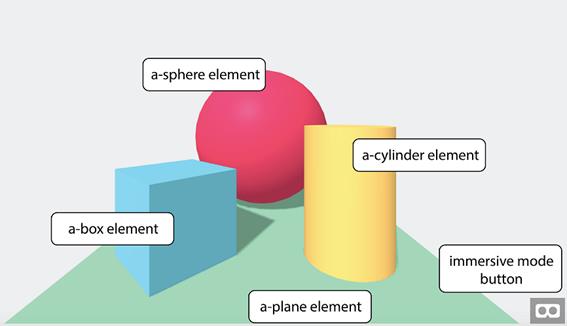
Inspecting the A-Frame scene
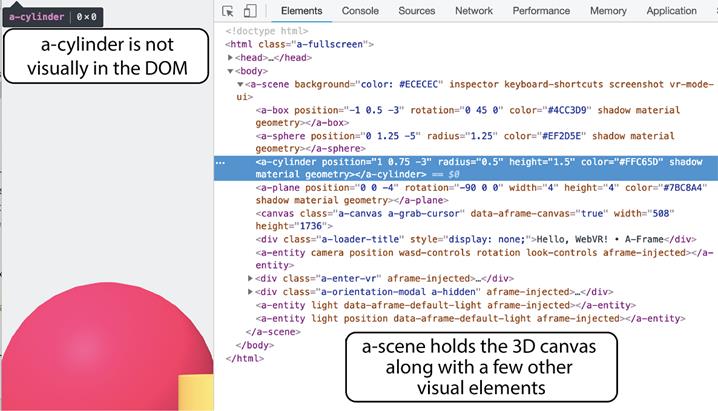
Changing A-Frame objects live in the browser’s dev tools
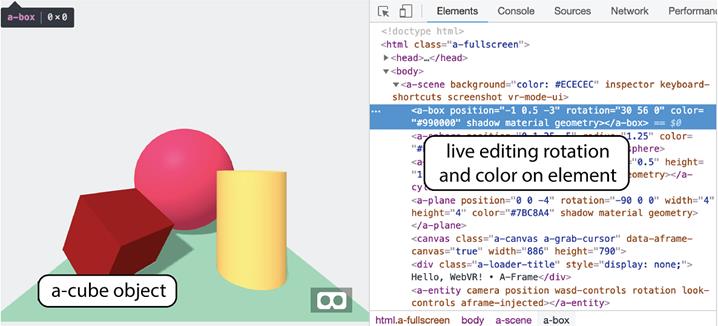
Astronaut model over a colored background

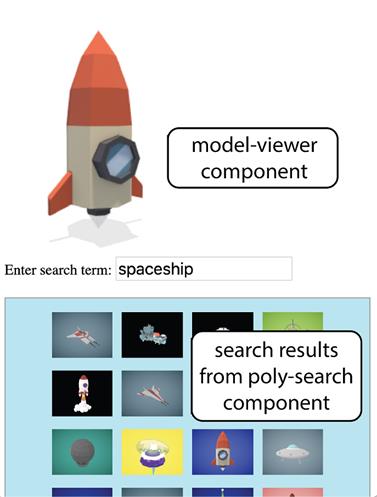
Poly search component with model-viewer preview
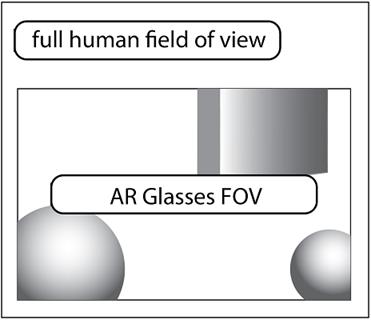
Example AR glasses field of view
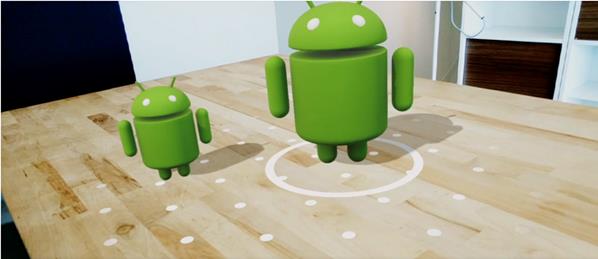
Placing a virtual object in the real world using ARCore
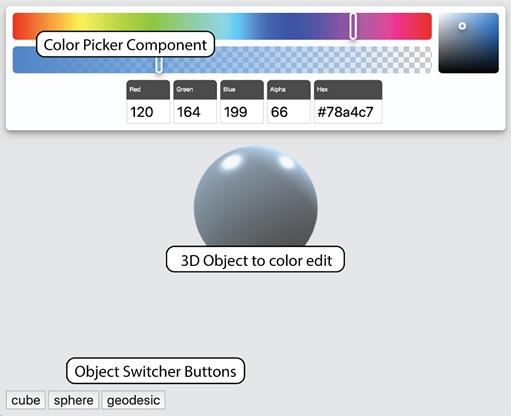
A 3D color picker application
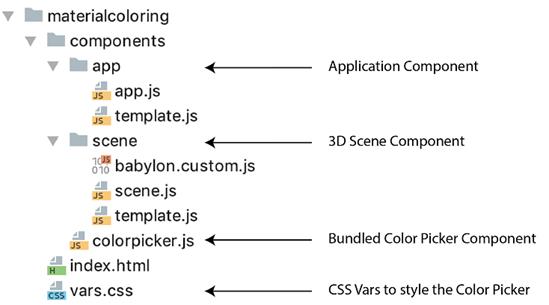
3D color picker project structure
A live video stream with a black and white filter

Live camera feed with “snow” effect

Edge detection effect with a WebGL-based video Web Component

Radial fade around edges of a live camera feed

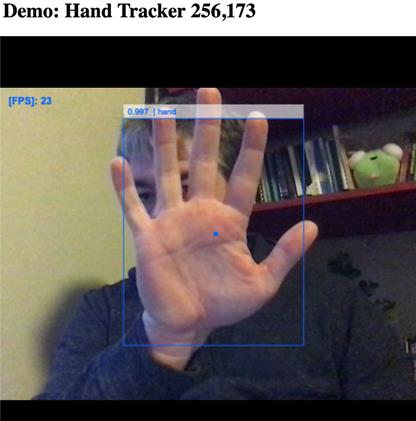
Handtracker Web Component demo
Web Harp with hand tracking

   Summary

In this chapter, you learned

  • What may happen in the Web Component future
  • How Web Components can make intimidating technologies like mixed reality and machine learning approachable
  • Hiding your own complex systems, like a full 3D scene in a Web Component
  • Leveraging components created throughout this book for emerging technologies

FAQ

What does “hiding your complexities” mean in the context of Web Components?It means encapsulating heavy internal logic (3D, shaders, ML, etc.) behind a simple, documented element API so users only set attributes or listen to events, while implementation details remain private and stable over time.
Why are upcoming HTML and CSS modules significant for Web Components?They let you import HTML and small, modular styles directly, separating structure/style from logic. This lowers the JS barrier, improves team workflows, and helps design systems supply styles without piercing Shadow DOM.
How can design systems style Shadow DOM components?By using CSS modules for granular styles, exposing styling hooks via shadow parts, and leveraging upcoming shadow themes. Together they enable theming and system-wide styling without leaking encapsulation.
What is A-Frame and how does it relate to Web Components?A-Frame is an HTML-like framework for 3D/VR scenes (, , etc.). It isn’t built on today’s Custom Elements API (uses an older polyfilled API and no Shadow DOM), but it demonstrates the Web Component idea: declarative tags that hide complex 3D/VR plumbing.
What does Google’s model-viewer component provide?It previews 3D models (glTF/.glb) with attributes like src, controls, auto-rotate, and background-color, and can enable AR. On iOS, AR works via Quick Look by supplying an ios-src (USDZ) asset; broader WebXR support is evolving.
How do you combine Poly search results with model-viewer?Fetch GLTF results from Poly (e.g., a component), store each result’s GLTF URL on the thumbnail, then on click set that URL as the model-viewer’s src to preview the selected model interactively.
Why use 3D libraries like Three.js or Babylon.js instead of raw WebGL?Raw WebGL is low-level and shader-centric. Libraries provide scene graphs, cameras, lights, loaders, and utilities, letting you focus on objects and interactions. The chapter’s custom scene uses Babylon.js for this reason.
What are the core pieces of a custom 3D scene component?- A filling the host element - A render loop (engine.runRenderLoop) that re-renders the scene - Camera and lights setup - Observed attributes (e.g., object, color, alpha) that switch meshes and update materials - Resize handling to keep the canvas in sync
How can Web Components simplify live video effects?A video component can handle getUserMedia, canvas rendering, and frame events. You can apply CPU filters via JS or offload to GPU via WebGL shaders for performance. Custom shaders can be injected and the component emits frameupdate events for processing.
How is hand tracking integrated with Web Components?Extend a video component, load the Handtrack.js (Tensorflow.js) model, detect hands each frame, render overlays, and dispatch a custom event (e.g., onHandLocation) with hand center points. Other components (like the Web Harp) can listen and react without knowing ML details.

pro $24.99 per month

  • access to all Manning books, MEAPs, liveVideos, liveProjects, and audiobooks!
  • choose one free eBook per month to keep
  • exclusive 50% discount on all purchases
  • renews monthly, pause or cancel renewal anytime

lite $19.99 per month

  • access to all Manning books, including MEAPs!

team

5, 10 or 20 seats+ for your team - learn more


choose your plan

team

monthly
annual
$49.99
$499.99
only $41.67 per month
  • five seats for your team
  • access to all Manning books, MEAPs, liveVideos, liveProjects, and audiobooks!
  • choose another free product every time you renew
  • choose twelve free products per year
  • exclusive 50% discount on all purchases
  • renews monthly, pause or cancel renewal anytime
  • renews annually, pause or cancel renewal anytime
  • Web Components in Action ebook for free

choose your plan

team

monthly
annual
$49.99
$499.99
only $41.67 per month
  • five seats for your team
  • access to all Manning books, MEAPs, liveVideos, liveProjects, and audiobooks!
  • choose another free product every time you renew
  • choose twelve free products per year
  • exclusive 50% discount on all purchases
  • renews monthly, pause or cancel renewal anytime
  • renews annually, pause or cancel renewal anytime
  • Web Components in Action ebook for free
choose your plan

team

monthly
annual
$49.99
$499.99
only $41.67 per month
  • five seats for your team
  • access to all Manning books, MEAPs, liveVideos, liveProjects, and audiobooks!
  • choose another free product every time you renew
  • choose twelve free products per year
  • exclusive 50% discount on all purchases
  • renews monthly, pause or cancel renewal anytime
  • renews annually, pause or cancel renewal anytime
  • Web Components in Action ebook for free