This chapter explains how event handling underpins application architecture with Web Components and shows pragmatic patterns for managing data flow without a full framework. It contrasts native DOM events with Custom Events, clarifies timing concerns, and highlights that WebComponentsReady is a polyfill-driven convenience while customElements.whenDefined is the reliable, standards-based way to await specific element readiness. It then details event propagation: Custom Events don’t bubble by default, and when working with Shadow DOM they must set both bubbles: true and composed: true to cross the shadow boundary; developers can inspect event.target, event.currentTarget, and event.composedPath() to understand origin and travel, with closed and open shadow modes affecting visibility of the path.
On application data flow, the chapter advocates separating concerns with a lightweight, MVC-inspired approach. It moves inline data out of components into centralized, importable models: an exercise library and a workout plan model. The workout plan model offers methods to add/edit/remove items, generate stable IDs, compute totals, and persist/load plans using localStorage, keeping the UI in sync through a single source of truth. This separation enables features like a playback overlay that lives outside the app’s DOM hierarchy yet shares the same data model; playback is supported by model utilities such as play/pause/stop timers, getExerciseForTime, duration helpers, and formatting functions, while components wire simple UI events to these model APIs.
To coordinate changes across unrelated parts of the UI, the chapter introduces an event bus: a tiny, global pub/sub that mirrors DOM semantics (addEventListener and dispatchEvent) and relays Custom Events like periodic “playlist time update” ticks from the model to interested components. It recommends defining event type strings as static getters to avoid typos and ensure discoverability, and emphasizes design patterns as tools, not rules—overusing a global bus can reduce component autonomy. The broader takeaway is that Web Components aren’t limited: you can compose small, standard-based pieces, adopt shared libraries (for state, if needed), or implement minimalist patterns like a central model plus an event bus to achieve clear, maintainable application data flow.
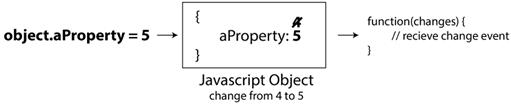
Deprecated data binding feature: Object.observe
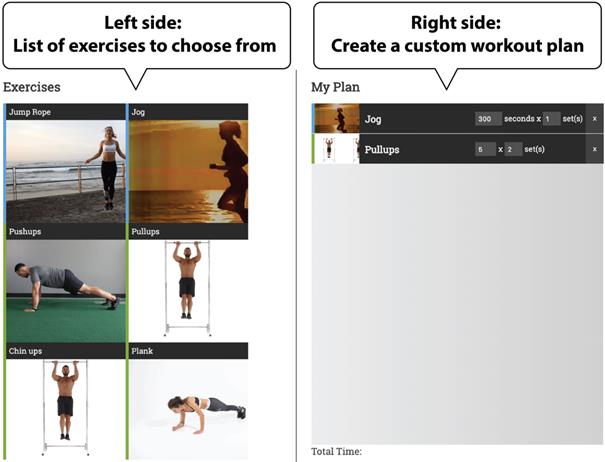
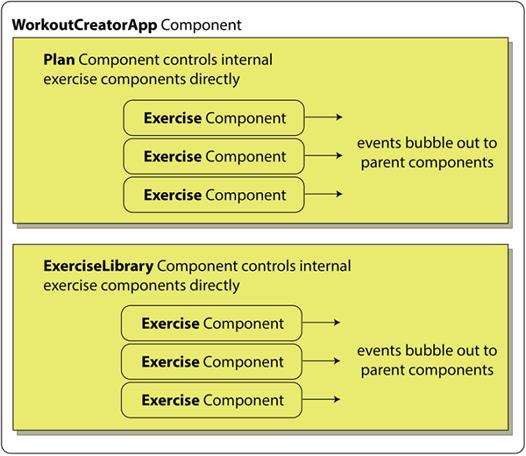
Workout Creator application recap
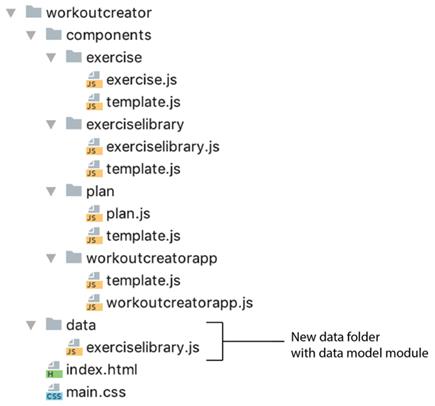
Project structure with the new data folder
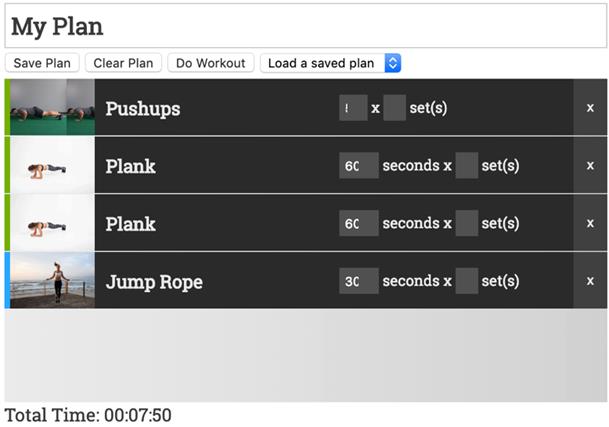
Additional UI to manage plan list
Easy data flow with existing component hierarchy
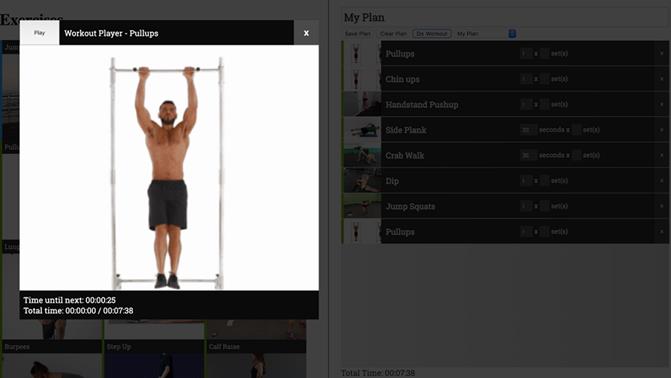
Workout playback modal
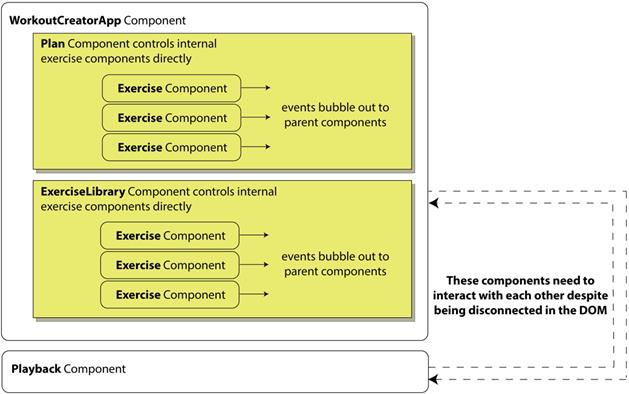
Component interaction after adding the player and with no global data model
Summary
In this chapter, you learned
How to create Custom Events and how they differentiate from native events as they bubble through the DOM, especially the Shadow DOM
To work with Web Component timing by listening to when they are ready or defined
How to use static getters to avoid typos when working with Custom Events
Some example design patterns, with an emphasis on working with an MVC paradigm
FAQ
What’s the difference between native DOM events and Custom Events?Native events are created by the browser (for example, click, input) and come with predefined properties. Custom Events are developer-defined messages you create and dispatch yourself with a name and a detail payload. They can carry arbitrary data via event.detail and require opts like bubbles and composed to control propagation.Should I use the WebComponentsReady event?Usually no. WebComponentsReady is emitted by the polyfill, not the browser, and is rarely needed in modern environments. In native-supporting browsers, elements are ready immediately. Prefer customElements.whenDefined('my-tag') to wait for a specific element.How do I wait until a specific custom element is defined?Use the Custom Elements API promise: customElements.whenDefined('my-element').then(() => { /* safe to use */ }). It resolves when the given tag has been registered with customElements.define.Why don’t Custom Events bubble by default, and how do I enable bubbling?Custom Events default to no bubbling to give you explicit control. Enable it by passing { bubbles: true } when constructing the event: new CustomEvent('name', { bubbles: true, detail: {...} }).How do I let a Custom Event cross the Shadow DOM boundary?Add composed: true in addition to bubbles: true. Example: new CustomEvent('name', { bubbles: true, composed: true, detail: {...} }). Without composed, the event won’t escape the shadow root.What’s the difference between event.target, event.currentTarget, and event.composedPath()?- event.target: where the event originated (may be retargeted to the host when crossing Shadow DOM)
- event.currentTarget: the element whose listener is currently running
- event.composedPath(): the full propagation path (useful to inspect the route, including shadow boundaries in open mode)How should I organize application data with Web Components?Separate concerns. Keep a centralized data model (for example, a module exporting getters/methods) for your app’s state and logic, while components focus on the view. This MVC-inspired split makes editing, saving/loading, and reuse easier.How can I persist and manage a workout plan (or similar app state)?Use a central data model with methods like add, remove, edit, clear, save, load. Persist with localStorage by serializing to JSON: localStorage.setItem(name, JSON.stringify(state)); and read via JSON.parse(localStorage.getItem(name)). Provide helpers (IDs, totals, formatting) in the model.What is an event bus and when should I use it?An event bus is a single global object that lets any part of your app subscribe and dispatch Custom Events without relying on DOM ancestry. It’s useful when components aren’t in the same tree or Shadow DOM blocks straightforward bubbling. Keep usage focused to avoid coupling everything globally.How do static getters help with Custom Event type names?Expose event type strings via static (or module-level) getters, for example PLAYLIST_UPDATE_EVENT. This prevents typos, improves editor autocomplete, and centralizes naming: EventBus.addEventListener(WorkoutPlanData.PLAYLIST_UPDATE_EVENT, cb) and new CustomEvent(WorkoutPlanData.PLAYLIST_UPDATE_EVENT, {...}).
pro $24.99 per month
access to all Manning books, MEAPs, liveVideos, liveProjects, and audiobooks!

 Web Components in Action ebook for free
