13 Component testing
This chapter emphasizes why testing is essential to trustworthy, maintainable Web Components and frames the discussion around unit versus functional testing and the role of Test-Driven Development. Because many component behaviors require a real DOM and JSDOM doesn’t yet fully support Web Components, the chapter focuses on running tests in actual browsers while still thinking in terms of discrete, testable units. The goal is to help developers design for edge cases, gain confidence through repeatable test runs, and use coverage to reveal untested paths.
It introduces the Web Component Tester (WCT) as a streamlined, browser-based solution that combines Selenium automation with Mocha for organizing suites and tests and Chai for assertions. With minimal setup, tests live in HTML fixtures that load components and WCT’s client script, making it easy to practice TDD. Through concrete examples (like a slider and color utilities), the chapter shows asserting API reflection between attributes and properties, verifying visual state via computed positions, and even reaching into an open shadow root for DOM checks. It also demonstrates writing failing tests first (such as enforcing slider min/max) to guide implementation.
For teams needing broader ecosystem flexibility, the chapter presents an alternative setup using Karma as the runner with Mocha and Chai, noting the added configuration: preprocessors (Rollup) for modules, explicit file patterns, and headless browser launchers. To regain the convenience of HTML-based fixtures, the karma-web-components plugin is introduced, which also waits for WebComponentsReady before executing tests. The chapter closes by showing how multiple test configurations can coexist in one project and by noting platform nuances (such as Safari launchers), encouraging readers to choose the toolchain that best fits their project’s needs while keeping tests fast, reliable, and maintainable.
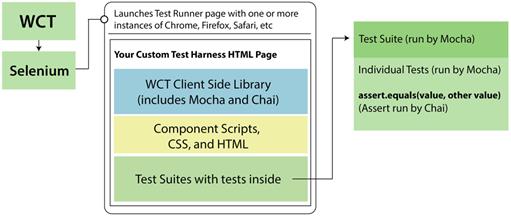
The WCT running flow
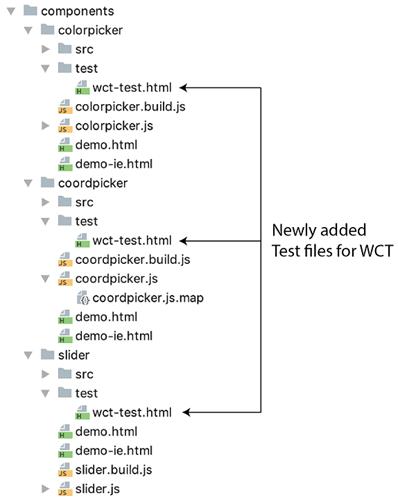
Project structure with test files
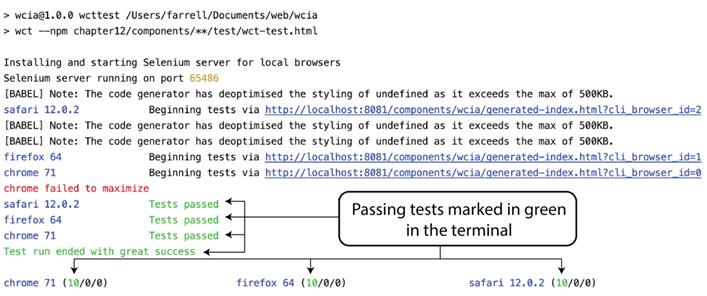
Passing slider component tests
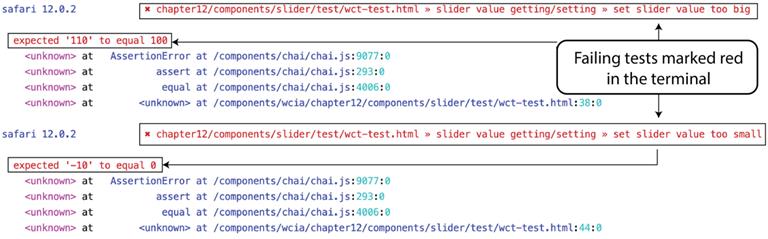
Failing slider tests
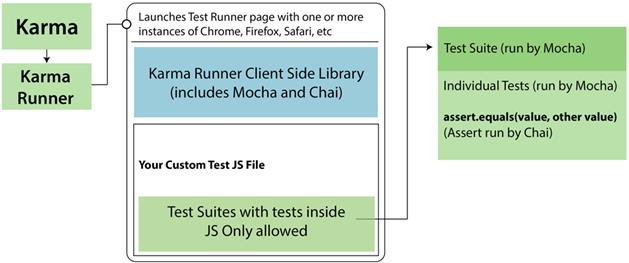
A new test runner flow with Karma
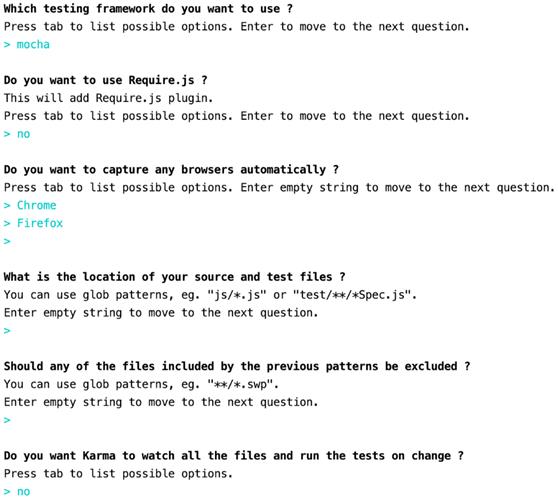
Karma init questions
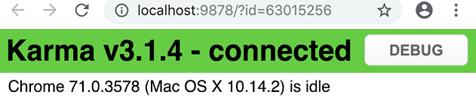
Karma test runner page
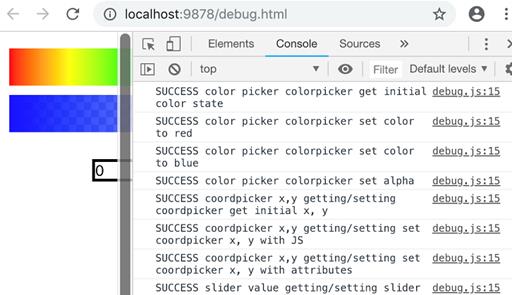
Karma debug page
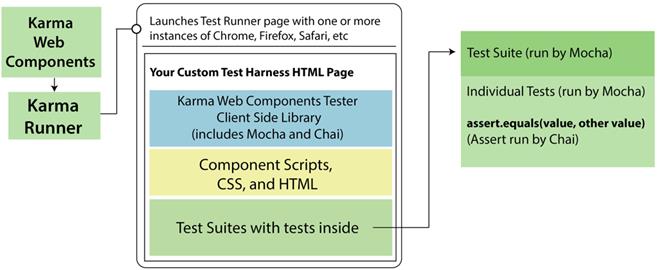
Karma Web Components test runner flow
Summary
In this chapter, you learned
- What the different styles of testing are and the benefits of TDD when writing components
- Three different ways of test running to show the diversity of options available
- Ways to think of your code in units and developing tests for each unit
FAQ
Why should I test my Web Components, and what does this chapter focus on?
Testing increases trust and maintainability. The chapter focuses on unit testing and TDD for Web Components, with practical setups using WCT (Web Component Tester) and an alternative stack with Karma, Mocha, and Chai.What’s the difference between unit and functional testing in this context?
Unit tests target small, isolated pieces of logic (e.g., a color conversion function) and edge cases. Functional tests validate user-observable behavior (e.g., clicking a button changes the UI). In Web Components, boundaries blur because many “units” require a real DOM.Can I use JSDOM to test Web Components?
Not fully. JSDOM currently lacks Web Components support, so you generally need real browsers to run component tests. You can still unit-test isolated JS utilities with JSDOM if they don’t require custom elements or Shadow DOM.What is Web Component Tester (WCT) and what does it include?
WCT is Polymer’s test runner for Web Components. It bundles Selenium for browser automation, Mocha for test structure, and Chai for assertions. It also auto-loads Web Component polyfills, waits for theWebComponentsReady event, and provides helpers for HTML <template> fixtures.How do I install and run WCT, and are there any caveats?
Install withnpm install --save-dev web-component-tester, then run its CLI (often via an npm script) pointing to one or more HTML test files and include the --npm flag. Caveat: Selenium depends on Java; some setups (e.g., Windows) may require specific Java versions (Java 8 was noted as working in the examples).How do I write a basic WCT HTML test page with Mocha and Chai?
Includeweb-component-tester/browser.js, load your component module, render the component in the body, and write Mocha tests (TDD style by default) using Chai’s assert. You can assert reflected API/attribute values and, with an open shadow root, query internal elements to verify visual state. A closed shadow root cannot be inspected.How do I handle edge cases like min/max values and track coverage?
Write failing tests first (e.g., setting a slider to 110 should clamp to 100, -10 to 0), then implement constraints until tests pass. Many runners can report code coverage to flag untested branches (e.g., both sides of an if/else).How does a Karma-based setup compare to WCT, and what extra config is needed?
Karma offers flexibility and a rich plugin ecosystem but requires more setup. Keep Mocha/Chai viakarma-mocha and karma-chai, add browser launchers (Chrome/Firefox), and preprocess ES modules with Rollup (e.g., @metahub/karma-rollup-preprocessor) configured to output iife. Configure files, preprocessors, frameworks, and set client.mocha.ui = 'tdd'.Can I keep using HTML-based test fixtures with Karma?
Yes, withkarma-web-components. Add 'web-components' to frameworks, serve its framework.js, and include your HTML test files in files with included: false. The plugin waits for WebComponentsReady before running tests, similar to WCT.How do I run tests headlessly and what about Safari?
UseChromeHeadless/FirefoxHeadless in Karma’s browsers and set singleRun: true for CI-friendly runs. Safari support may require a workaround: use karma-safarinative-launcher with a customLaunchers entry (e.g., Safari base SafariNative) until the standard Safari launcher issues are resolved.
 Web Components in Action ebook for free
