12 Building and supporting older browsers
This chapter explains how to ship Web Components that work across older and partially supported browsers by starting with a fully featured implementation and then adapting for gaps in support. It identifies pre‑Chromium Edge and IE11 as the primary pain points and advocates targeting the “least common denominator” when necessary, using selective polyfills and pragmatic code adjustments rather than heavy emulation of the platform. The overall goal is to preserve native performance and ergonomics for modern browsers while providing reliable fallbacks where required.
On the component side, the chapter favors avoiding a Shadow DOM polyfill and instead introduces a switch that lets a component run with or without shadow roots. A single root reference abstracts access to either shadowRoot or the host element, with initialization moved from the constructor to connectedCallback to avoid timing issues. Attribute reactions are guarded until DOM is ready, and mutation observers ignore events originating from the host to prevent double handling. CSS and DOM selectors are made shadow‑safe by replacing IDs with classes, translating :host and related selectors to tag‑scoped selectors when Shadow DOM is off, and handling special cases such as host classes. Minor browser fixes are addressed too, such as converting hex alpha gradients to RGBA for Edge.
On the build side, the workflow relies on npm scripts and dev dependencies to keep tooling local and reproducible. Rollup bundles ES modules into UMD with source maps, and scripts are composed to build multiple components in sequence. For IE11, Babel with preset‑env transpiles the Rollup output to older JavaScript, producing a parallel set of “IE” bundles, while modern browsers continue to load native modules. Runtime shims are kept minimal: a Custom Elements polyfill enables registration on older engines, and a CSS variables ponyfill post‑processes styles so design tokens still work in IE. The chapter notes that libraries like LitElement or Stencil can abstract much of this, but the presented approach keeps dependencies light and the build pipeline straightforward.
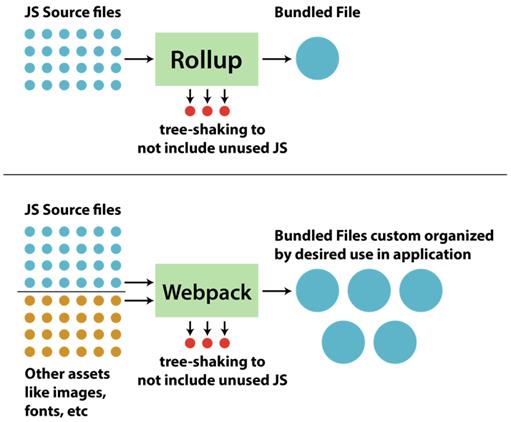
Rollup vs. Webpack
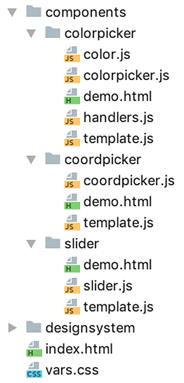
Slider component files
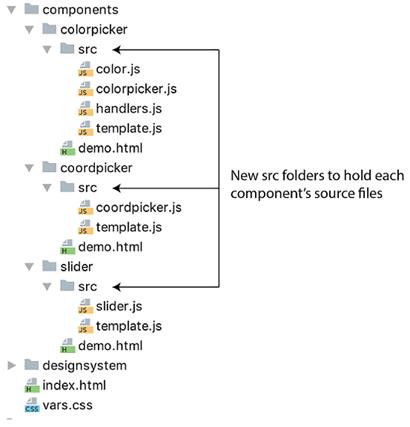
Slider and other component files with source folder
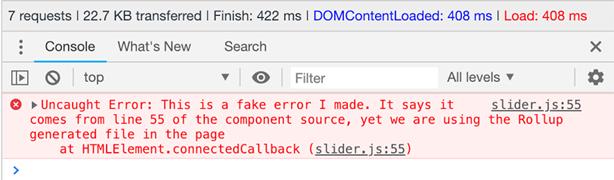
Source maps show where an error occurred in your source files, even when bundling output
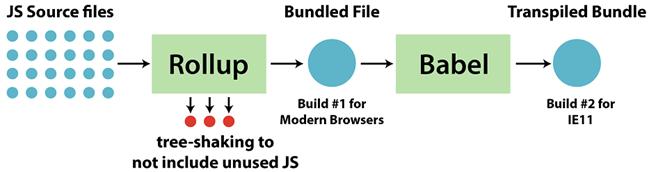
The color picker build pipeline includes two builds, one for modern browsers and the other for IE11.
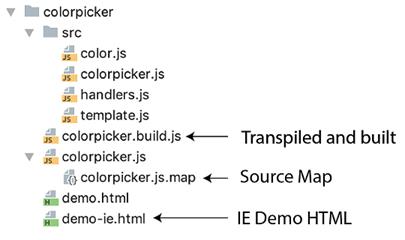
Project file structure with bundled and transpiled output. Tools like Webstorm, pictured here, make the JS file look like a directory to hide the complexity of generated files like source maps, even though it's actually a flat file structure.
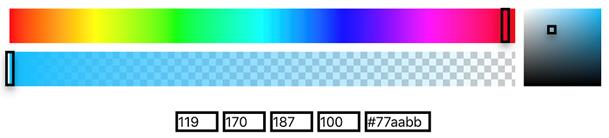
Looking a little broken in IE11
Summary
In this chapter, you learned
- A simple way to run scripts using npm and your package.json without having to rely on more complex build systems that require lots of setup
- Reasons for a build step, whether bundling your code for production or transpiling to let newer JS features work in older browsers
- How bundling is good for combining your code into one or more files, while intelligently leaving out unused imports
FAQ
Which browsers lacked native Web Components at the time, and what strategy does the chapter propose?
Pre‑Chromium Microsoft Edge and IE11. The strategy: ship modern components as-is, add the Custom Elements polyfill for non-supporting browsers, optionally toggle off Shadow DOM to avoid Shadow DOM polyfill caveats, and, for IE11, add a build/transpile step and a CSS vars ponyfill.How can I toggle Shadow DOM usage without breaking my component code?
Add a class-level switch and a unified root reference. Example: use a static flag (e.g., USE_SHADOWDOM_WHEN_AVAILABLE), then set this.root to either this.attachShadow({mode: 'open'}) or this. Use this.root everywhere for DOM access, so your logic works with or without Shadow DOM.Why move initialization from the constructor to connectedCallback when Shadow DOM is off?
Without Shadow DOM, the element’s light DOM isn’t available in the constructor. Move DOM reads/writes (rendering, querying, setting attributes) to connectedCallback, and guard with an this.initialized flag so it only runs once even if the element is reattached.How do I handle attributeChangedCallback timing when not using Shadow DOM?
attributeChangedCallback can fire before connectedCallback has rendered the DOM. Guard early (e.g., if (!this.dom) return;), then apply initial attribute-driven state in connectedCallback after rendering (e.g., re-apply backgroundcolor/value).How do I avoid ID clashes and CSS leakage when there’s no Shadow DOM?
Replace ID selectors with classes and query with querySelector. Scope all selectors with the component tag (e.g., wcia-slider .thumb) instead of bare class names (e.g., .thumb). Avoid :host in non‑native environments; it won’t work and may break CSS.What’s the recommended way to write CSS that works both with and without Shadow DOM?
Generate selectors at render time. Pass a useShadowDOM flag into your template, and use helpers like createHostSelector to output :host when Shadow DOM is on, or the component tag (e.g., wcia-slider) when it’s off. Similarly, convert :host(.modal) to wcia-color-picker.modal via a helper like createHostContextSelector.Which polyfills or ponyfills should I use, and which should I avoid?
Use the Custom Elements polyfill—it’s effectively drop‑in. Shadow DOM/ShadyCSS polyfills come with caveats and rewritten selectors; the chapter avoids them. For IE11’s lack of CSS variables, use css-vars-ponyfill and invoke cssVars() after injecting your component’s styles so variables are processed.What Edge-specific issue affects gradients, and how do I fix it?
Legacy Edge didn’t support 8‑digit hex colors (#RRGGBBAA) in gradients. Convert hex to RGB and use rgba(), e.g., linear-gradient(to right, rgba(r,g,b,1) 0%, rgba(r,g,b,0) 100%).How do I bundle components with Rollup and npm scripts?
Install Rollup as a dev dependency, move source files into a src folder, and output UMD bundles per component (with --file, --format umd, --name, and -m for source maps). Add npm scripts like build-slider, build-coordpicker, build-colorpicker, and chain them (e.g., build-rollup) to build all at once.How do I transpile for IE11 and wire up the demo?
Install @babel/core, @babel/cli, and @babel/preset-env; add a .babelrc with ["@babel/preset-env"]. Transpile the Rollup outputs to *.build.js and chain npm scripts (build-*-ie, build-ie). Create an IE demo that usespro $24.99 per month
- access to all Manning books, MEAPs, liveVideos, liveProjects, and audiobooks!
- choose one free eBook per month to keep
- exclusive 50% discount on all purchases
- renews monthly, pause or cancel renewal anytime
lite $19.99 per month
- access to all Manning books, including MEAPs!
team
5, 10 or 20 seats+ for your team - learn more
pro $24.99 per month
- access to all Manning books, MEAPs, liveVideos, liveProjects, and audiobooks!
- choose one free eBook per month to keep
- exclusive 50% discount on all purchases
- renews monthly, pause or cancel renewal anytime
lite $19.99 per month
- access to all Manning books, including MEAPs!
team
5, 10 or 20 seats+ for your team - learn more

 Web Components in Action ebook for free
