This chapter turns earlier concepts into a practical, shareable UI by building a full color picker out of small, reusable Web Components. It recaps core techniques—Shadow DOM for encapsulation, ES module-based templates, the Custom Elements API with attribute reflection, and event bubbling—then applies them in a realistic workflow. Along the way it emphasizes decomposition, reusability, and maintainability, showing how a well-scoped component can serve multiple contexts and evolve without unnecessary complexity.
The solution is composed of three parts: a generic slider reused for hue and transparency, a two-axis coordinate picker for saturation and brightness, and ordinary text/number inputs for RGB, alpha, and hex. The coordinate picker mirrors the slider’s patterns but exposes x/y attributes and updates a draggable thumb across both axes. The top-level color picker aggregates these pieces, caches key DOM references, and wires interaction through a MutationObserver that watches attribute changes across the shadow subtree. A separate handler module centralizes state and color conversions, keeping the component class lean while synchronizing UI from any source (sliders, picker, or inputs). Input fields are captured with a single change listener that leverages event bubbling in the Shadow DOM, and the component reflects hex and alpha via observed attributes with sensible defaults initialized in connectedCallback.
After functionality, the chapter adds a lightweight, consistent design layer using CSS variables and importable CSS modules. Shared tokens (colors, radii, spacing, typography) replace hard-coded styles, and focused modules style input fields and an optional “modal” treatment applied inside the shadow boundary. This approach preserves encapsulation while enabling global theming—tweaking variables instantly restyles the component and any broader app. The chapter closes by reflecting on extensibility (for example, alternate backgrounds via slots or multi-thumb sliders) and on best practices for deciding when to use Shadow DOM, setting the stage for ensuring broad browser support next.
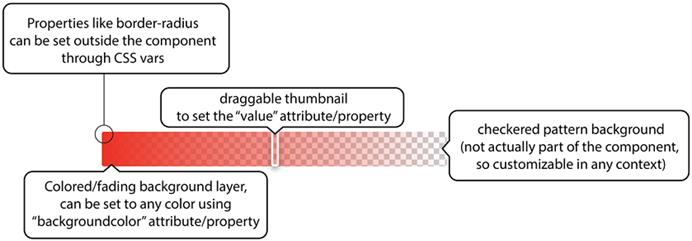
Slider UI component we’ve been building throughout the book
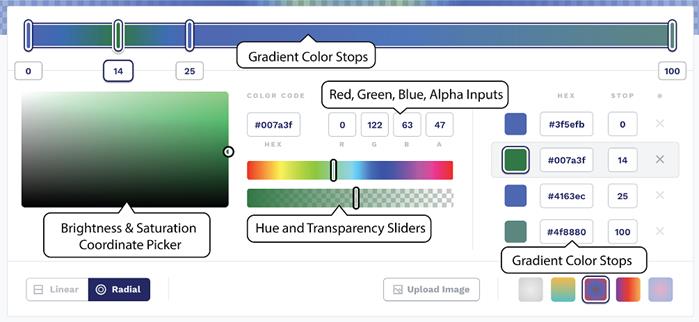
Gradient creator at cssgradient.io
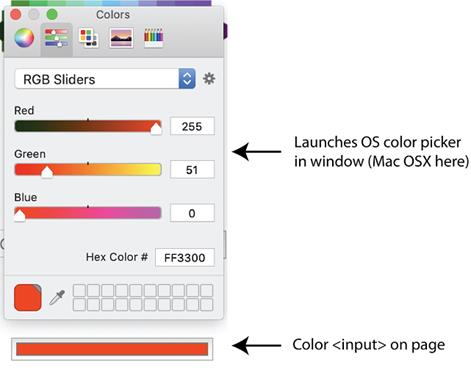
Using the input element’s color picker
Two very similar sliders that we can create one Web Component for
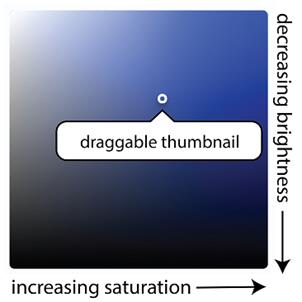
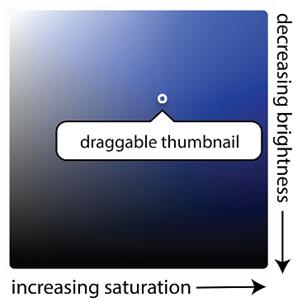
Saturation and brightness picker as a candidate for a web component
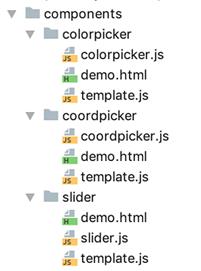
Starting structure for our color picker component project
The coordinate picker component, which allows saturation and brightness selection simultaneously
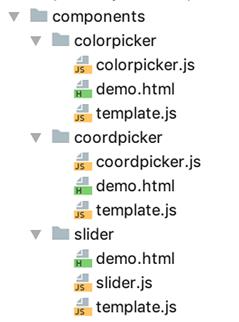
A reminder on files and folders for our component while adding a new demo
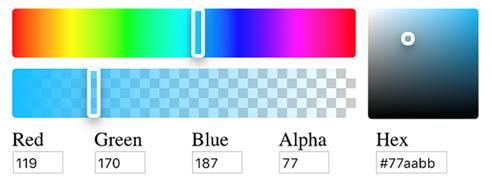
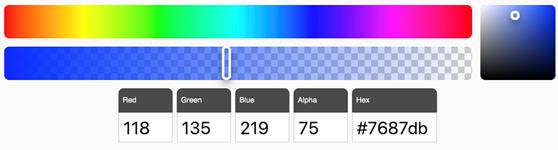
Color picker component
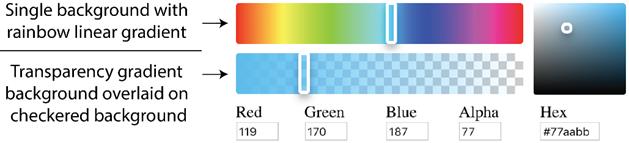
Figure.11.10 Hue and transparency slider backgrounds
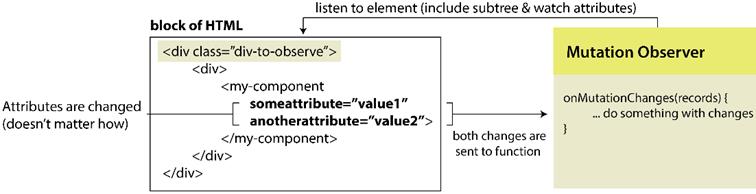
A Mutation Observer in action
Project structure with new modules
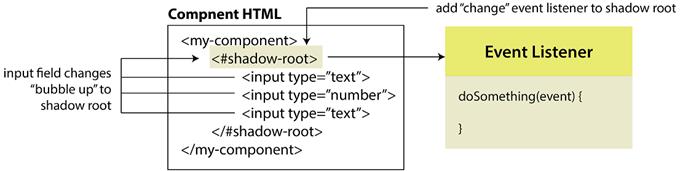
Events bubbling to the shadow root
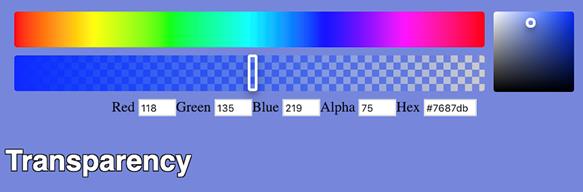
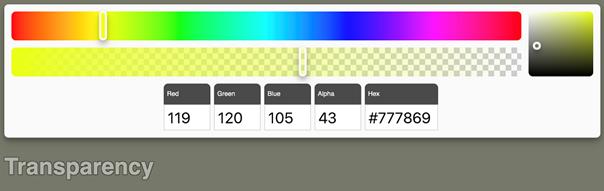
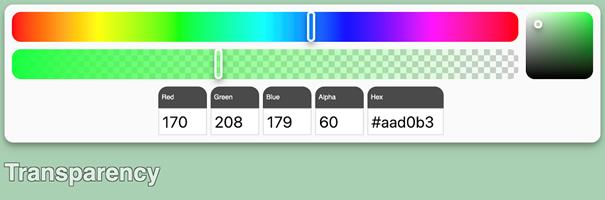
The new color picker demo, wired up to change page color and text transparency
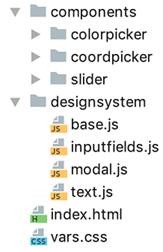
Our project file structure including the CSS vars and the design system imports
Style input fields after applying a rudimentary design system
The color picker component style with a quick and dirty module-based design system
The color picker design is easily tweaked by changing the CSS modules or the CSS vars
Summary
In this chapter, you learned
How to plan a semi-complex UI component by breaking an inspiration reference design down into multiple pieces, some of which become their own smaller components
To break down a component into its inputs and outputs and plan an API around them, including using the concept of reflection to enforce a common API when using tag attributes or JS
To create separate and universal styling rules, whether through CSS vars or importable modules that can be used in your components and in the larger system to enforce design consistency throughout
FAQ
What UI components are built in this chapter and how do they fit together?The chapter builds three components: a reusable slider, a 2D coordinate picker, and a master color picker. The color picker composes the other two: the slider is reused for both hue and transparency, and the coordinate picker controls saturation (x) and brightness (y). Standard inputs (RGB, Alpha, Hex) live alongside these inside the color picker.How does the coordinate picker differ from the slider?The slider is 1D and exposes a single value attribute. The coordinate picker is 2D with x and y attributes representing horizontal and vertical percentages. Its thumbnail can be dragged in both axes, and its background is built by layering two gradients over a solid base color to form a saturation/brightness map.How are interactions wired without custom events?The color picker uses a MutationObserver to watch attribute changes within its Shadow DOM subtree (attributes: true, subtree: true). It also adds a single change listener on the shadowRoot to catch input changes that bubble up. Both pathways funnel into a Handlers.update function that syncs state and UI.What role does attribute reflection play in these components?Properties are reflected to attributes to keep state observable and interoperable. Examples: slider value, coordinate picker x/y/backgroundcolor, and color picker hex/alpha. observedAttributes plus attributeChangedCallback react to changes; getters/setters provide a consistent JS API that sets attributes under the hood.How are default hex and alpha values set correctly?Defaults are provided via static getters (e.g., DEFAULT_HEX, DEFAULT_ALPHA) and applied in connectedCallback if the attributes are missing. This ensures initial state after the element is connected, avoiding the constructor where attributes may not yet be present.How are the hue and transparency slider backgrounds implemented?The hue slider uses a rainbow linear-gradient for its track. The transparency slider uses a checkered background created with multiple linear-gradients to indicate alpha. The slider’s internal fading overlay can be combined with a style-able component background to support different visuals.How is a consistent design language applied across components?By using global CSS variables (vars.css) for sizes, colors, borders, and by importing small CSS “modules” as JS (designsystem/text.js, base.js, inputfields.js, modal.js). These are injected inside each component’s template CSS. Because of Shadow DOM scoping, external selectors don’t pierce the boundary; instead, :host and :host(.modal) apply internal styling.How are plain input fields integrated and listened to?Standard inputs for R, G, B, A, and Hex are included in the color picker. Since the value attribute doesn’t auto-update, a single change listener on the shadowRoot captures updates (via event bubbling) and passes e.target to Handlers.update. References to inputs are cached via Template.mapDOM.How does the color picker expose and respond to external API changes?It exposes hex and alpha as attributes/properties and lists them in observedAttributes. When changed externally, attributeChangedCallback routes updates to Handlers.update, which syncs sliders, the coordinate picker, and text inputs. A demo shows using a page-level MutationObserver to react to hex/alpha changes and update the page background and text opacity.What reusability and architecture practices are highlighted?- Break complex UIs into smaller components composed by a parent component. - Keep visual customization flexible (e.g., consider slots for backgrounds, multiple thumbs). - Separate interaction/state logic (handlers and color math) from component classes. - Consider utilities/libraries to reduce boilerplate reflection. - Provide demos per component and plan for evolving use cases.
pro $24.99 per month
access to all Manning books, MEAPs, liveVideos, liveProjects, and audiobooks!



 Web Components in Action ebook for free
