Overview

10 Shadow CSS rough edges

The chapter explains that while the Shadow DOM delivers strong encapsulation for Web Components, it comes with several rough edges that affect styling and theming. Developers must navigate deprecated features, uneven browser support, and the realities of polyfilling, all while trying to build reusable components and integrate them into broader design systems. The discussion focuses on what works reliably today, what to avoid, and practical patterns that preserve encapsulation without sacrificing flexibility.

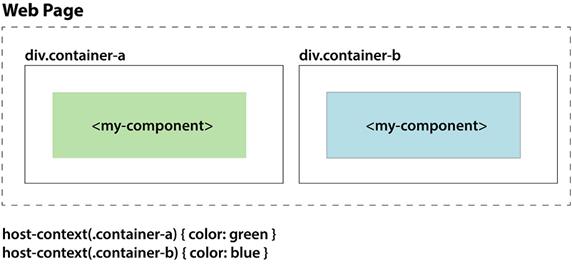
A key pain point is contextual styling. The :host-context() selector exists but is only supported in Chrome and is unlikely to gain cross-browser adoption. The recommended workaround is to avoid it and instead use :host() with explicit context classes (for example, adding “library” or “plan” to the host) or expose a component API to switch modes when the relevant context lives higher up the tree. Older v0 “piercing” selectors (::shadow and /deep/) are deprecated and gone, so they are not viable. For controlled, cross-boundary customization, the most dependable tool today is CSS Variables: they inherit, cross the shadow boundary, and let authors theme components (fonts, colors, spacing, sizes) from the outside, with the possibility of future refinements via emerging features like Shadow Parts.

In practice, browser support for Web Components is strong, but the CSS side of Shadow DOM is the hardest to polyfill. ShadyDOM and ShadyCSS can help emulate encapsulation in non-supporting environments, though ShadyCSS requires extra setup and has known limitations. Modern libraries such as LitElement streamline this workflow by templating HTML/CSS and integrating with these polyfills. Design systems also need rethinking: global, monolithic CSS can’t penetrate the shadow boundary, so styles should be packaged per component, rely on CSS Variables for theming, and plan for explicit, component-owned extension points. With these patterns, teams can confidently use the Shadow DOM today while maintaining flexibility for theming and future standards.

Where we left off in chapter 9
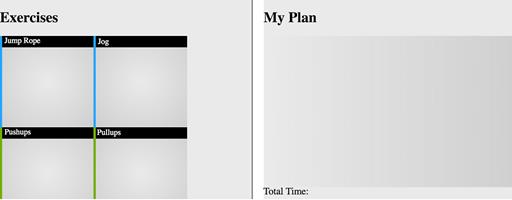
Application state after allowing exercises to be added to a workout plan
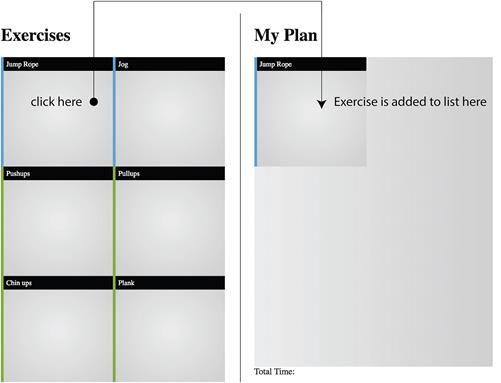
Style differently depending on the context of the component with :host-context()
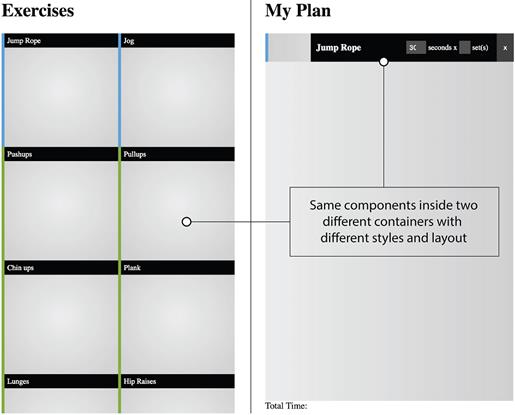
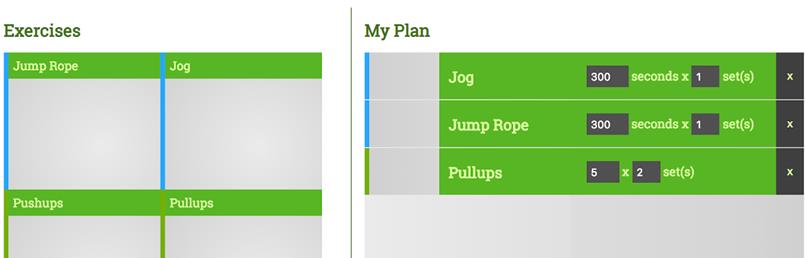
The exercise component has a different style, layout, and controls in different contexts.
A reminder from chapter 9 on the dangers of style creeping into our component
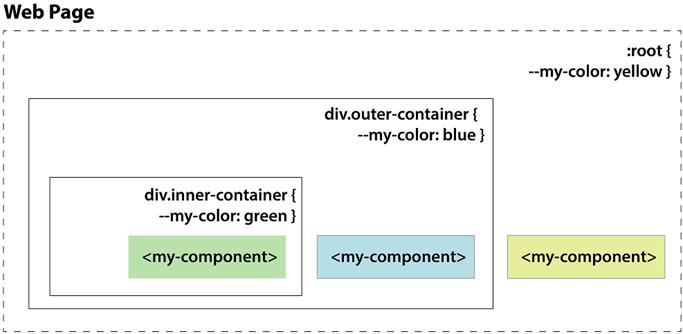
Using the same CSS Variable at multiple levels in your DOM
Simple change of root-level CSS Variables to adjust theme from black to green
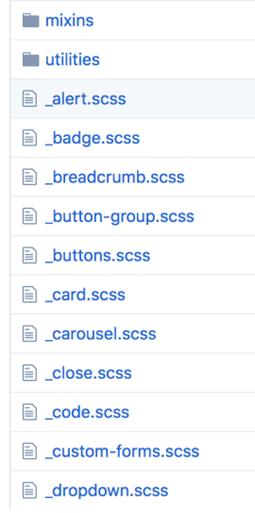
Bootstrap comprises these components and many more.
   Summary

In this chapter, we’ve seen a lot of benefits to the Shadow DOM in terms of wrangling your CSS. But, with the downside being that it isn’t quite fully supported everywhere yet, and never will be for IE, we know to proceed with caution. Going forward as browsers are updated, we’re armed with some good foundational takeaways.

In this chapter, you also learned

  • To watch out for common selectors that have since been deprecated as the Shadow DOM spec standardizes.
  • The Shadow DOM, when using CSS, can’t easily be polyfilled. So, if using the Shadow DOM for CSS, be wary of which browsers support it, how to polyfill, and any unimplemented features.
  • Design systems have a path forward for supporting the Shadow DOM, but support will take some time. While there are a few projects that are designed for the Shadow DOM right now, you may have to roll up your sleeves and do some adaptation work yourself

FAQ

What is :host-context() and why is it discouraged?:host-context() lets a component style itself based on ancestor selectors outside its shadow root. However, only Chrome implemented it; Safari and Firefox rejected it due to performance and design concerns. It may be removed, so relying on it risks portability and future breakage.
How can I get “contextual” styles without :host-context()?Pass context explicitly and target it with :host(). Common patterns: add a class or attribute to the host (for example, class="plan" or class="library") and write rules like :host(.plan) … and :host(.library) …. If the context lives higher up the tree, propagate a signal (class, attribute, or property) down to the component or expose a public API to set its mode.
Does Angular’s :host-context() solve the problem?Angular can emulate :host-context() within its own styling pipeline, so it works inside Angular apps. But it’s not browser support. If you need framework-agnostic Web Components, prefer explicit host classes/attributes and :host() so your components remain portable.
What happened to the ::shadow and /deep/ selectors?They were part of the Shadow DOM v0 era to pierce encapsulation and were removed (e.g., from Chrome in v63). They’re deprecated and should not be used. The modern direction is to keep encapsulation and provide opt-in styling hooks instead.
How do I style across the shadow boundary today?Use CSS Custom Properties (variables). They inherit from the outside into a component’s shadow tree. Define on an ancestor or the host (for example, my-el { --accent: rebeccapurple; }) and consume inside the shadow CSS (color: var(--accent);). This is the supported, encapsulation-friendly way to theme.
How do I theme components with CSS Variables?- Define a small set of variables (colors, fonts, sizes) at :root or a container. - Consume them inside each component’s shadow CSS (e.g., font-family: var(--font); background: var(--panel-bg);). - Override per page/section/instance to switch themes without touching component internals.
What are the trade-offs of contextual styling with Shadow DOM?Global design-system CSS can’t penetrate shadow roots, so “contextual” overrides from the page won’t apply. Without :host-context(), far-ancestor conditions aren’t directly selectable; you must pass context explicitly. The upside is predictable, encapsulated CSS; the cost is wiring intentional styling hooks.
How do I support browsers without native Shadow DOM?Use polyfills: ShadyDOM (DOM scoping) and ShadyCSS (CSS scoping). ShadyCSS often needs template processing and has caveats, but modern libraries like lit-html/LitElement integrate with it. Test carefully; not every Shadow feature can be perfectly emulated.
What’s the browser support story in this chapter’s context?Shadow DOM rolled out from Chrome to Safari, then Firefox (2018), with Edge moving to Chromium. Always verify current compatibility for your target audience; if legacy browsers are in scope, plan for polyfills or provide non-shadow fallbacks.
How does event handling interact with Shadow DOM (and what is composedPath())?Shadow DOM retargets events for encapsulation. Listening higher up (e.g., on an app shell) and using event.composedPath() lets you inspect the flattened path across shadow boundaries to decide which internal element or component triggered an action.

pro $24.99 per month

  • access to all Manning books, MEAPs, liveVideos, liveProjects, and audiobooks!
  • choose one free eBook per month to keep
  • exclusive 50% discount on all purchases
  • renews monthly, pause or cancel renewal anytime

lite $19.99 per month

  • access to all Manning books, including MEAPs!

team

5, 10 or 20 seats+ for your team - learn more


choose your plan

team

monthly
annual
$49.99
$499.99
only $41.67 per month
  • five seats for your team
  • access to all Manning books, MEAPs, liveVideos, liveProjects, and audiobooks!
  • choose another free product every time you renew
  • choose twelve free products per year
  • exclusive 50% discount on all purchases
  • renews monthly, pause or cancel renewal anytime
  • renews annually, pause or cancel renewal anytime
  • Web Components in Action ebook for free

choose your plan

team

monthly
annual
$49.99
$499.99
only $41.67 per month
  • five seats for your team
  • access to all Manning books, MEAPs, liveVideos, liveProjects, and audiobooks!
  • choose another free product every time you renew
  • choose twelve free products per year
  • exclusive 50% discount on all purchases
  • renews monthly, pause or cancel renewal anytime
  • renews annually, pause or cancel renewal anytime
  • Web Components in Action ebook for free
choose your plan

team

monthly
annual
$49.99
$499.99
only $41.67 per month
  • five seats for your team
  • access to all Manning books, MEAPs, liveVideos, liveProjects, and audiobooks!
  • choose another free product every time you renew
  • choose twelve free products per year
  • exclusive 50% discount on all purchases
  • renews monthly, pause or cancel renewal anytime
  • renews annually, pause or cancel renewal anytime
  • Web Components in Action ebook for free