5 Making a conversational Alexa skill
This chapter moves Alexa skills from one-shot replies to genuine back-and-forth conversations. It recommends sketching the flow first and introduces state machines as a simple way to manage conversational context. By storing a state in session attributes (for example, a confirmation state after hearing an unusually large sleep duration), the same user utterances—like built-in Yes/No intents—can be routed to different handlers depending on context. The chapter stresses natural, human-sounding prompts, echoing recognized slot values to help users correct mishears, clearing state when it’s no longer relevant, ordering handlers from most specific to most general, and providing a catch‑all “unhandled” response, optionally complemented by a fallback intent.
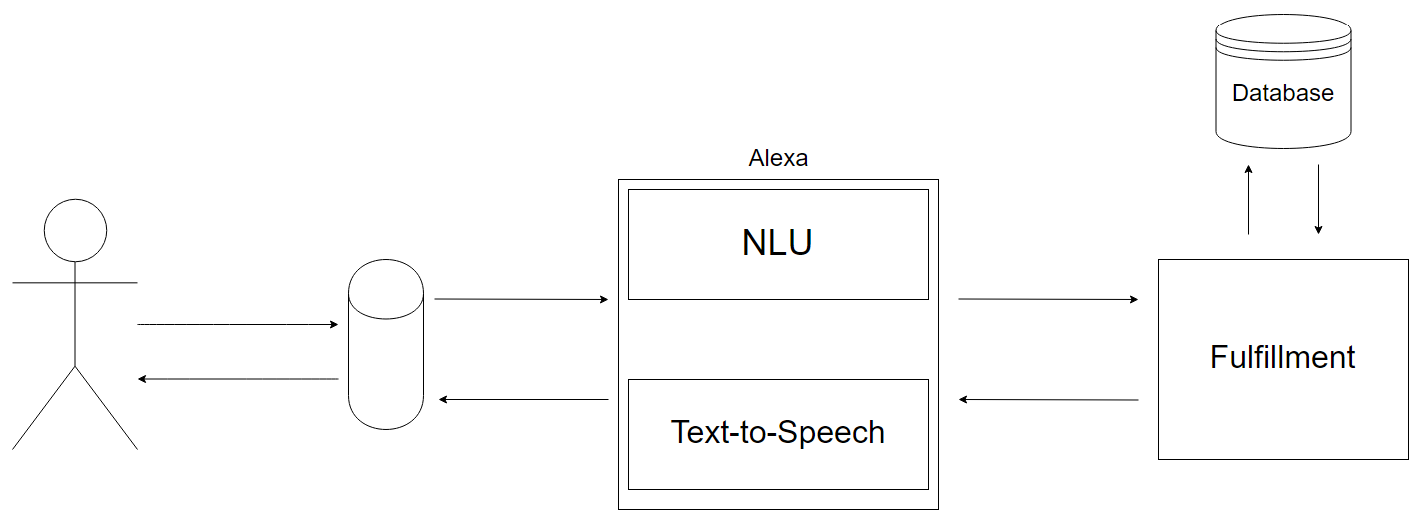
Because session data disappears when a conversation ends, the chapter shows how to add long-term memory with persistent attributes, using an AWS-hosted data store integrated by the SDK. After granting permissions and setting a table name, you can read and write user data through the attributes manager. The example tracks WellRested usage counts, whether the user has provided sleep quality, and whether a feature hint has been shown. This enables timely, once-only guidance that educates without cluttering the main interaction, while keeping the core flow fast and focused.
Finally, the chapter “puts it all together” by adding intents to start and stop sleep tracking and a WAKING state that asks, “Are you up for good?” It maps Yes/Stop to finalize sleep, No/Cancel to continue sleeping, stores sleepStart and timesRisen as persistent attributes, and computes a friendly summary of hours and minutes slept. A per-state unhandled handler keeps users on track, and a small pluralization helper makes speech sound natural. With careful handler ordering, judicious state clearing, and efficient data access, the result is a conversational, stateful skill that remembers users across sessions and guides them gracefully through the experience.
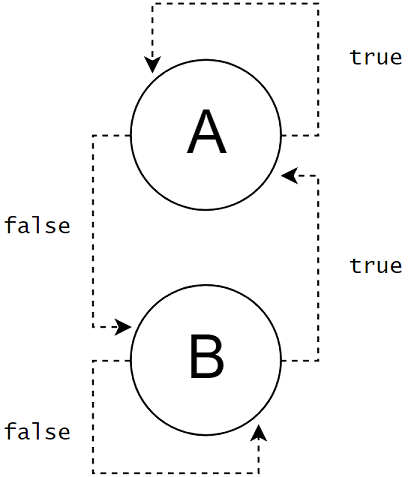
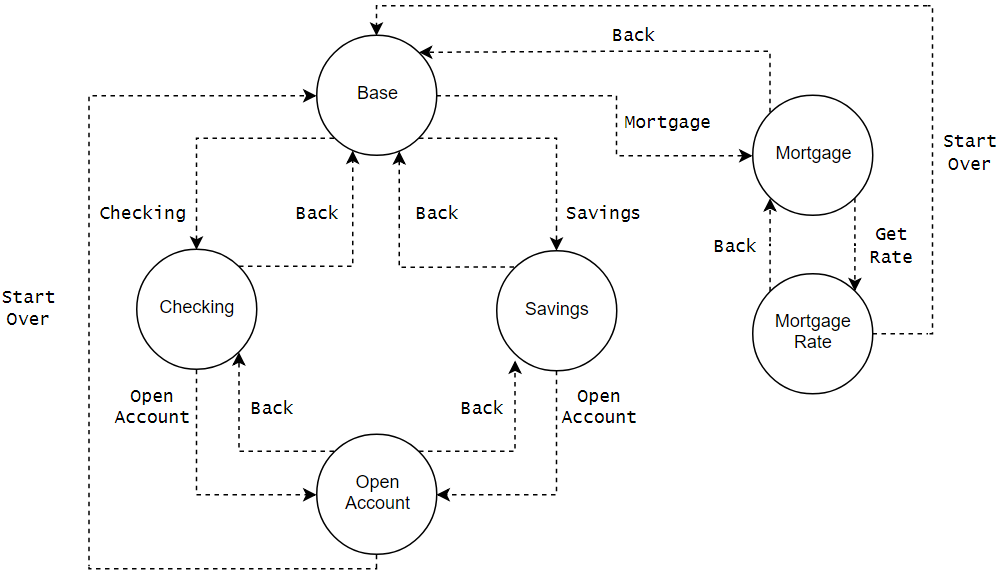
Figure 5.1. The handlers are mapped to request types, intents, and state.
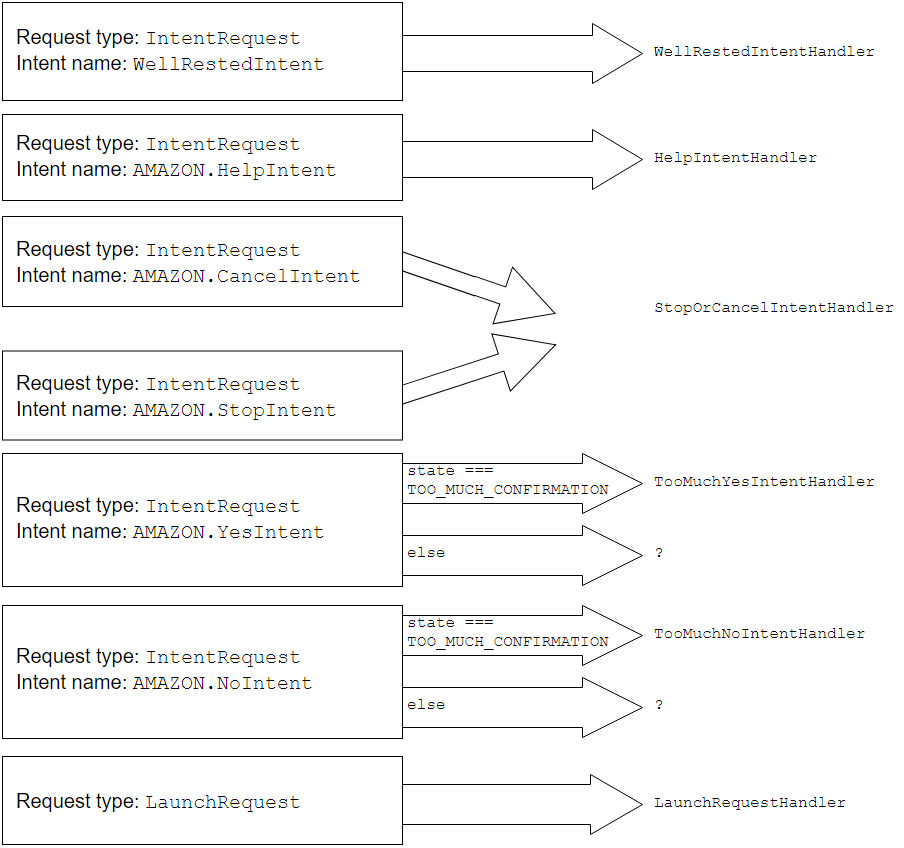
Figure 5.2. Introducing a database adds another branch where data flows.
Summary
- Use the notion of "state" via session attributes to enter into a temporary branch of a conversation between computer and user.
- Track how a user interacts with the skill to be able to guide users who haven’t discovered all of the skill’s functionality.
- Sketching the user’s possible flow between intents can uncover missing steps that the skill needs to handle.
FAQ
How do I make a simple “call-and-response” Alexa skill feel conversational?
Sketch the dialog flow on paper, then add back-and-forth turns driven by state. Use session attributes to remember where the user is in the flow, write prompts that sound natural (avoid wooden phrasing), and confirm or clarify when recognition may be wrong. Route the same intent to different handlers based on state so “yes” or “no” can mean different things in different moments.What is a state machine, and how does it apply to Alexa skills?
A state machine routes events based on current context (state). In skills, users can say the same thing in different contexts, so you store a state flag and use it to decide which handler should run. For example, after asking “Do you really plan to sleep that long?”, set a confirmation state and route “yes”/“no” to specialized handlers until the state is cleared.Where should I store data: request, session, or persistent attributes?
- Request attributes: live only for a single request/response turn.- Session attributes: live for the current session and are ideal for state (e.g., confirmation or “waking” flow). They are lost when the session ends.
- Persistent attributes: saved in a database (e.g., DynamoDB) and survive across sessions (e.g., sleep start time, usage counters, hints already shown).
How do I handle confirmations when a user gives an unusually large sleep duration?
When the user says a large number (e.g., over 12 hours), set a state like TOO_MUCH_CONFIRMATION, echo back what Alexa heard, and reprompt. Add per-state handlers for AMAZON.YesIntent and AMAZON.NoIntent that both check the state. In each handler, respond appropriately and clear the state. Important: add AMAZON.YesIntent and AMAZON.NoIntent to the interaction model or Alexa won’t route those utterances.Why does handler order and canHandle logic matter in the ASK SDK?
Request handlers are checked in order; the first whose canHandle returns true handles the request. Register more specific, state-aware handlers first (e.g., “Yes” while in TOO_MUCH_CONFIRMATION) and generic catch-alls later. This ensures the same intent goes to the correct handler for the current state, not a less specific one.How should I deal with unexpected or unmapped user input?
Add an Unhandled handler whose canHandle always returns true as a last resort. Keep its response generic and helpful (“I’m not sure how to help with that—try telling me how many hours you plan to sleep.”). Also consider AMAZON.FallbackIntent in the model to catch inputs Alexa can’t match at all, and use it to learn about unmet user expectations.How do I persist data across sessions with DynamoDB using the ASK SDK?
- Grant DynamoDB permissions to your Lambda (and your local ASK CLI profile for local testing).- Configure the skill with a table name and withAutoCreateTable(true); first run may be slower as the table is created.
- Use attributesManager.getPersistentAttributes(), setPersistentAttributes(), and savePersistentAttributes() to read/write.
Note: the “user ID” is per-installation; disabling/re-enabling the skill changes it.
How can I use persistent data to provide gentle, timely guidance to users?
Track usage (e.g., invocations of an intent), whether the user has provided optional info (like sleep quality), and whether you’ve already shown a tip. After a couple of uses, append a short hint once (and only when it won’t clash with a confirmation flow). Avoid repeating tips every time to prevent annoyance.How do I implement basic sleep tracking with intents and state?
- Add GoingToBedIntent: on handle, set persistent sleepStart to current time and timesRisen to 0.- Add WakingUpIntent: increment timesRisen, set state WAKING, and ask “Are you up for good?”
- Handle “yes”/“stop” in a WakingForGood handler: compute elapsed time from sleepStart, report hours/minutes (and how many times the user woke), clear state.
- Handle “no”/“cancel” by keeping the timer running and exiting the WAKING state appropriately.
- Add a WakingUnhandled handler to redirect any other intent back to the confirmation question while in the WAKING state.

 Voice Applications for Alexa and Google Assistant ebook for free
