4 Using entity resolution and built-in intents to extend an Alexa skill
This chapter shows how to extend the Sleep Tracker skill into a more robust “Super Sleeper” by shifting development from the browser to the Alexa Skills Kit CLI, and by improving understanding and handling of user input with entity resolution and built‑in intents. It reframes a skill as two coordinated parts—an interaction model that trains Alexa’s NLU and fulfillment code that responds to requests—and emphasizes faster, more disciplined workflows through local files, version control, and one‑command deployment. It also covers the user’s entry points into a skill, including launching without an intent and gracefully exiting with consistent, platform‑wide behaviors.
The ASK CLI streamlines creation, configuration, and deployment: developers define the skill manifest and interaction models locally, organize code under lambda/custom, and deploy both model and Lambda with a single command. The generated project structure makes locales and intents explicit, while the “standard” skill builder (via ask-sdk) prepares the skill for integrations like DynamoDB. The CLI’s simulate command lets you test utterances end‑to‑end through Alexa’s NLU, capture the resulting JSON, and even invoke the Lambda handler locally for rapid, repeatable testing without constant redeployments.
Entity resolution upgrades custom slot types into entities with IDs, canonical values, and synonyms, letting fulfillment rely on stable IDs instead of fragile synonym lists and improving resilience to phrasing variation and recognition errors. The chapter demonstrates how to read resolution results safely, account for multiple matches, and understand where entity resolution does and doesn’t apply (for example, built‑in number slots). It also integrates built‑in intents like Stop and Cancel and introduces LaunchRequest handling, showing how flexible canHandle logic and careful handler ordering enable shared handlers, clear entry experiences, and consistent, user‑friendly exits.
Figure 4.1. The ASK CLI works locally for some functions, and in conjunction with the SMAPI for others
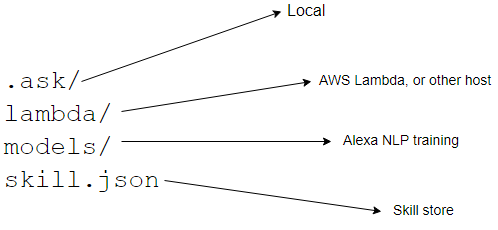
Figure 4.2. Each part of the file structure corresponds to a different part of the finished skill
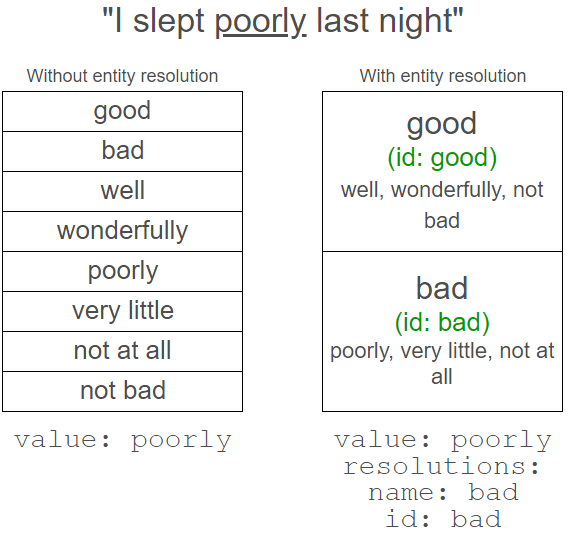
Figure 4.3. Entity resolution groups similar values together under a single canonical value and ID
Figure 4.4. The deployment sends the different files in different directions to configure the skill
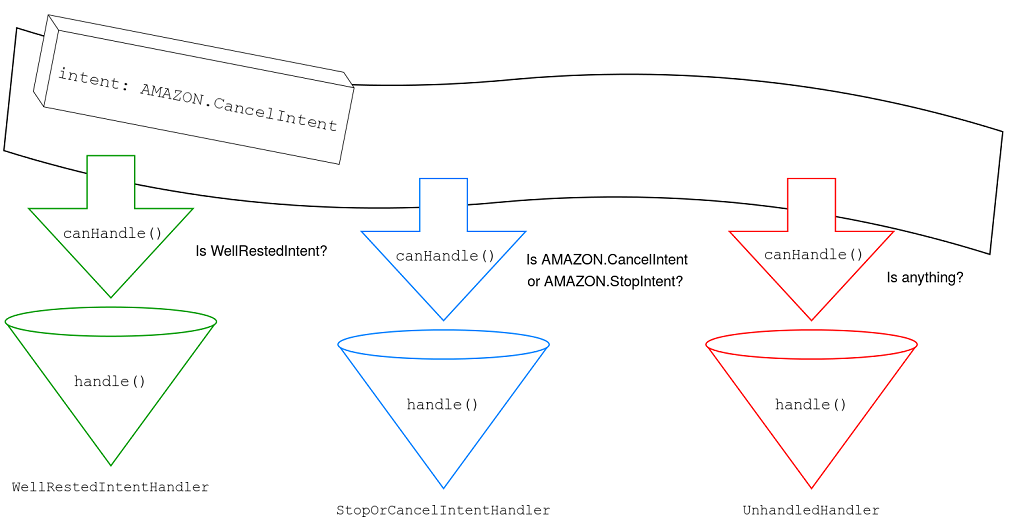
Figure 4.5. The flow to determine which handler will respond to a request is like a conveyor belt, with the request coming off the belt once a condition is met
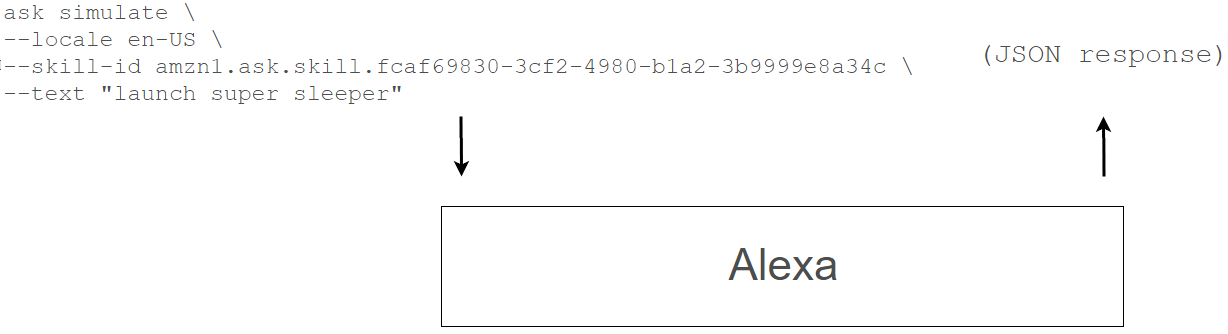
Figure 4.6. The simulate command communicates with Alexa and returns the request and response
Summary
Using the ASK CLI creates a central, local place for skill creation and configuration and demonstrates the relation between the fulfillment and interaction configuration.
People will ask for the same thing in different ways, and entity resolution provides a tidy way to organizing these synonyms, with a canonical value and an ID.
Some intents are common enough for Alexa to provide established interaction models; developers can add these built-in intent to any skill.
The flow of information that starts with the user’s utterance doesn’t stop inside the fulfillment, but instead shuffles through each handler object’s canHandle method until one returns true.
LaunchRequest is triggered when a user asks for a skill without an explicit intent. A handler must be created by the developer to catch and respond to this request.
The ASK CLI’s simulate command will simulate an Alexa invocation without using a device or the developer console.
Capturing the request created by the Alexa service and sending it to the fulfillment handler directly allows for quick, local invocation of the skill fulfillment without deploying.
FAQ
What is the ASK CLI and why use it instead of the Developer Console?The ASK CLI is a command-line tool that wraps the Alexa Skills Management API (SMAPI) to let you create, configure, deploy, and test skills locally. It consolidates configuration into local files (skill manifest and interaction models), enables version control, offline work, and single-command deployments, reducing browser-based steps and context switching.Which files and folders does an ASK CLI project create, and what do they do?An ASK CLI project typically includes: .ask (local project config), lambda (fulfillment code to be deployed to AWS Lambda), models (interaction model files per locale, such as en-US.json), and skill.json (the skill manifest with overall configuration).How do I set up a new skill project with the ASK CLI?Install ask-cli globally, create or select an AWS profile with ask init, scaffold a project with ask new --skill-name your-skill, then install dependencies (e.g., ask-sdk under lambda/custom). After editing the interaction model and code, deploy with ask deploy.Why use ask-sdk (standard builder) instead of ask-sdk-core?The standard builder (ask-sdk) provides conveniences like built-in DynamoDB persistence adapters and simplifies common integrations. Switching to Alexa.SkillBuilders.standard() early prepares the skill for features like state persistence without extra plumbing.What is entity resolution, and how does it improve slot handling?Entity resolution lets you define custom slot types with canonical values, IDs, and synonyms. Alexa maps user input (including synonyms and common mishearings) to a canonical entity ID. In code you check the stable ID (e.g., “good” or “bad”) instead of maintaining long synonym lists, making logic simpler and more maintainable.How do I read a resolved entity ID safely in my handler?Navigate the slot resolution carefully and guard against missing data, for example: slots.SleepQuality.resolutions.resolutionsPerAuthority[0].values[0].value.id. Check each nested object exists before accessing it to avoid errors when the user omits the slot or no match is found.What if a synonym could match multiple entities?Alexa may return multiple resolution values when input overlaps groups (e.g., “Chicago” for Cubs and White Sox). Handle this by detecting multiple matches and either asking the user to clarify (“Did you mean the Cubs or the White Sox?”) or responding with information for both, depending on the use case.When can I use entity resolution, and when can’t I?Entity resolution applies to custom slot types and built-in types you extend with custom values. It does not work for pure built-in types like AMAZON.NUMBER, so numeric slots (e.g., hours of sleep) won’t provide resolution IDs.How do built-in intents and LaunchRequest fit into my skill?Add built-in intents like AMAZON.StopIntent and AMAZON.CancelIntent to your interaction model and handle them in fulfillment (often with a shared handler). Implement a LaunchRequest handler to greet users and guide them when they open the skill without an intent (e.g., “Alexa, open Super Sleeper”).How can I deploy and test my skill locally without the browser?Use ask deploy to push the manifest, model, and Lambda code (or ask deploy --target lambda for code-only). For quick end-to-end checks, use ask simulate with a locale, skill ID, and text utterance; you can save the simulator’s JSON to a file and invoke your Lambda handler locally with that request body to test fulfillment logic rapidly.
pro $24.99 per month
access to all Manning books, MEAPs, liveVideos, liveProjects, and audiobooks!


 Voice Applications for Alexa and Google Assistant ebook for free
