12 Building for actions on Google with the Actions SDK
This chapter reframes how conversation flow works when building for Google Assistant without Dialogflow by using the Actions SDK. It explains that Dialogflow supplies NLU, while the Actions SDK does not, shifting responsibility for intent understanding to the developer’s fulfillment. To demonstrate the trade-offs, the author builds “Exhibit Engine,” a mini-assistant that routes requests to internal “apps” and relies on parsing the raw text Assistant provides. The chapter highlights triggers, invocation, and bridge words in user utterances, and underscores that most follow-up turns arrive as a generic text intent that the fulfillment must interpret. The result is a deeper appreciation for what Dialogflow automates and what developers must own when prioritizing flexibility over speed.
Practically, the chapter walks through creating and configuring an Actions SDK project with the Developer Console and the gactions CLI, defining actions in an action package, and wiring fulfillment. The action package (action.json) declares built-in and custom intents—such as MAIN and HELP—along with query patterns and optional arguments, and maps them to a fulfillment via named conversations. Fulfillment is hosted with Firebase Cloud Functions using the Actions on Google library; deployment produces a function URL that is inserted into the action package. The workflow then uses the CLI to update and test the action, after which it can be exercised in the simulator. This flow covers project setup, action declaration, fulfillment binding, and iterative testing and deployment.
To replace platform NLU, the chapter uses regular expressions to analyze text and drive behavior. It captures a functionality name following an “engage” trigger and a set of bridge words, then routes to that functionality’s capabilities, each defined by its own matcher and handler. Captured substrings act like slot values passed into handlers that generate concise, task-focused responses; robust error handling guides users when requests are malformed or unsupported, subtly training phrasing over time. The author emphasizes the limits of regex-based parsing versus Dialogflow, while noting why some teams choose the Actions SDK: tighter control, custom or faster NLU, or reuse across platforms. By building an assistant within an assistant, the chapter clarifies core differences between Dialogflow and the Actions SDK, how to package and deploy actions, and how lightweight NLP with regular expressions can power intent handling when developers own the NLU layer.
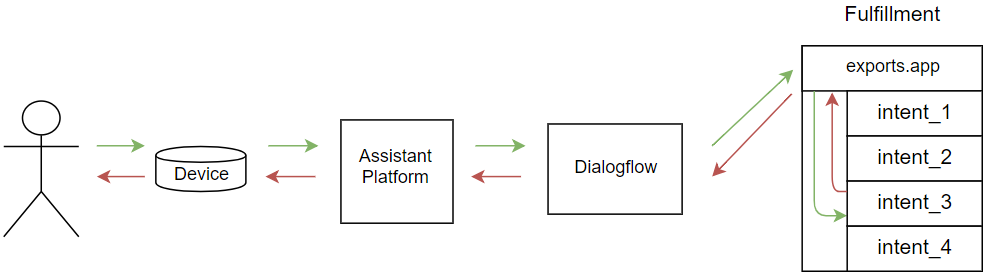
Figure 12.1. Data flows between human and fulfillment and several steps in-between
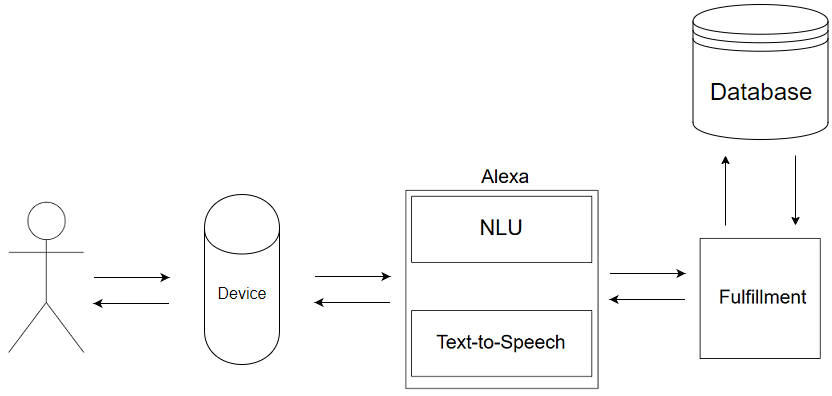
Figure 12.2. Data flow in an Alexa skill
Figure 12.3. Data flow in an Actions SDK app
Summary
The Actions SDK is available for developers who want to build applications with their own NLU
The actions package establishes the application configuration
Regular expressions can parse user requests to find entities and match intents
FAQ
What’s the key difference between building with Dialogflow and the Actions SDK?Dialogflow supplies the NLU for you (intents, entities/slots, and matching), while the Actions SDK ships with no NLU. With the SDK, Assistant forwards the user’s transcribed text to your fulfillment and you’re responsible for intent detection and argument extraction (for example, via regular expressions). Typically the first turn is actions.intent.MAIN, and most subsequent turns arrive as actions.intent.TEXT.What is an action package (action.json) and what does it contain?The action package defines your app’s actions (intents + fulfillment). It includes: actions (built-in like MAIN and custom), optional trigger queryPatterns for custom intents, arguments (built-in Schema.org-like or custom), conversations mapping a conversationName to a fulfillment URL and fulfillmentApiVersion, and the locale. Different intents can point to different fulfillment endpoints, though many apps use one.How do query patterns and arguments work in the action package?queryPatterns are example-like strings that Assistant uses to recognize how users might phrase a request. You can mark optional words with (word)? and include arguments such as $SchemaOrg_YesNo:answer or $SchemaOrg_Color:color. For custom intents, these patterns help Assistant route to your fulfillment; with the Actions SDK you’ll still parse most inputs yourself.How do I initialize and use the gactions CLI?Download the gactions executable from Google, make it executable (chmod +x gactions on macOS/Linux), optionally add it to your PATH, then: gactions init to create action.json; later use gactions update --project --action_package action.json to push metadata, and gactions test --project --action_package action.json to enable simulator testing.How do I set up and deploy fulfillment with Firebase?Initialize Firebase Functions (firebase init), install actions-on-google in functions/ (npm install actions-on-google --save --prefix functions/), implement an actionssdk app in functions/index.js (define handlers like actions.intent.MAIN and respond with conv.ask/conv.close), then deploy (npm run deploy). Copy the generated function URL into action.json under conversations → your conversationName → url.Why do most turns arrive as actions.intent.TEXT with the Actions SDK?Because you’re owning the NLU, Assistant primarily sends you the raw user text through actions.intent.TEXT after the initial launch. You can still declare additional intents in the action package (to enable implicit invocation), but many requests will be handled uniformly in your TEXT handler where you parse the utterance.How can I parse user input without Dialogflow?Use regular expressions to match patterns and capture variable parts. For example, to route “engage echo to …”, match engage (\w+) (?:to|and|for|with) to capture the functionality name and ignore bridge words. You can then match secondary patterns for the requested action and extract slot-like values from capture groups.What are “functionalities” and “capabilities” in the Exhibit Engine example?Functionalities are sub-apps (for example, echo or calculator). Each functionality exposes one or more capabilities (for example, RepeaterCapability, CounterCapability, TwoNumberCapability), each defined by a regex matcher and a handler. The matcher detects the user’s request; the handler executes and replies via the conv object.How should I handle unsupported or malformed requests?Give targeted feedback. If the user doesn’t follow the expected pattern (for example, misses “engage”), prompt with a brief coaching tip and keep the mic open (conv.ask). If they request an unknown functionality/capability, reply concisely that you can’t engage that one (conv.close). Tailoring these messages trains users on the app’s phrasing and options.How do I test the action and what about invocation names?After gactions test, use the simulator in the Developer Console. You can trigger the MAIN intent by “talking” directly to the app or try phrases that match your custom intent patterns (like help). Until you change it in the console, the test invocation name is “my test app.” For broader entry points (implicit invocation), define the relevant intents in action.json.
pro $24.99 per month
access to all Manning books, MEAPs, liveVideos, liveProjects, and audiobooks!


 Voice Applications for Alexa and Google Assistant ebook for free
