Most voice interactions begin with the user, but this chapter explains how thoughtfully designed push interactions can let the assistant take the initiative without becoming noisy or intrusive. Proactive engagement reduces users’ mental load—timely nudges like a favorite team’s game starting or a daily training target help people accomplish goals with less effort. The chapter surveys the main tools for this on Google Assistant—routine suggestions, daily updates, and push notifications—along with the data practices needed to make them useful and relevant, and closes by showing how implicit invocation helps users reach the right action without knowing an app’s name. Alexa’s analogous capabilities (for example, proactive events) are noted for contrast.
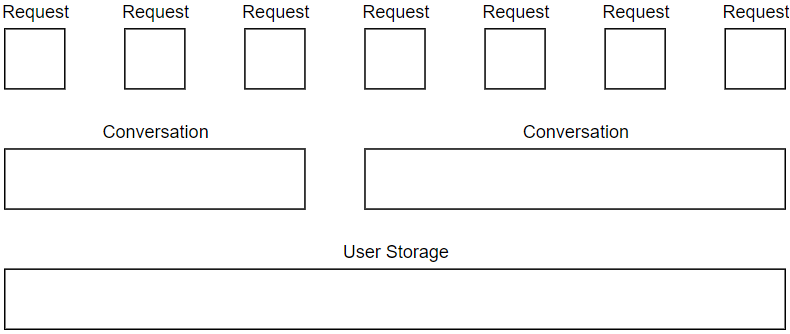
For routines, actions must be “one-shot” intents that can run without extra user input; developers can expose and suggest these so they’re executed whenever a user’s routine fires. Making these experiences feel progressive and personal hinges on storing state at the right lifespan: request-only variables, conversation-scoped data (conv.data passed via Dialogflow contexts), and long-term user storage (conv.user.storage, capped at 10kB) for preferences like “last item seen.” Daily updates suit content that changes each day and can be offered either by Assistant or fully controlled by the developer: a suggestion chip or voice phrase triggers a registration flow using the RegisterUpdate helper, Assistant gathers the delivery time, and the app confirms success. Practical caveats include Android-only delivery for daily updates, minimizing nagging, and tailoring surfaces and responses.
Push notifications cover time-sensitive or irregular updates but require explicit opt-in, adhere to rate limits, and don’t reach speaker devices. Registration uses UpdatePermission, returns an updates user ID, and the app must persist that ID and targeted intent for later use. Sending notifications happens outside fulfillment via a service account authorized for the Actions API and a script that posts a custom push message; when the user taps, Assistant invokes the registered intent. Finally, implicit invocation broadens discovery: by exposing concise, directly answering one-shot intents in Dialogflow’s Assistant integration, developers let Assistant match user goals (without app names) to the best action, ask for handoff, and route accordingly. The chapter also suggests creating separate but functionally equivalent intents to log whether an invocation came from a routine, daily update, or direct request.
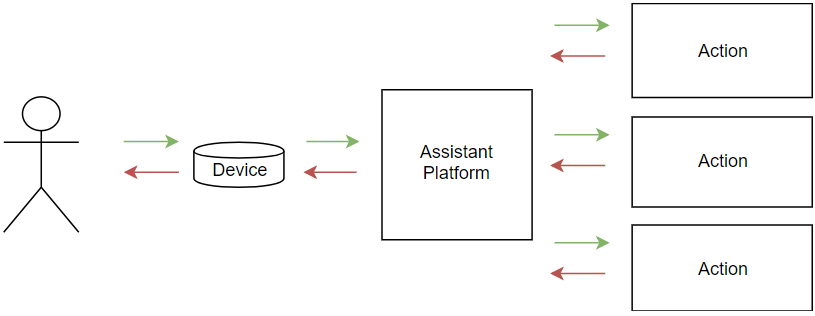
Figure 11.1. A routine invokes multiple actions in multiple applications
Figure 11.2. Data has three different lifespans depending on its purpose: request, conversation, long-term
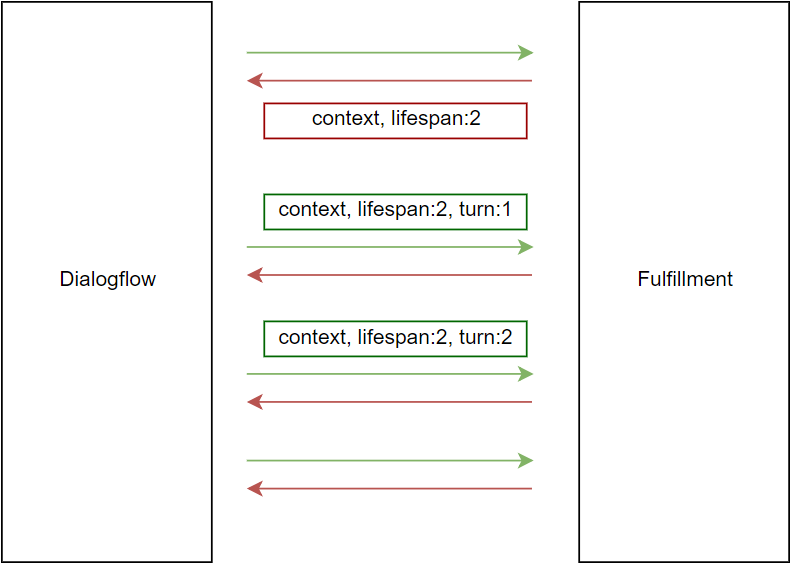
Figure 11.3. Dialogflow passes context between its platform and the fulfillment
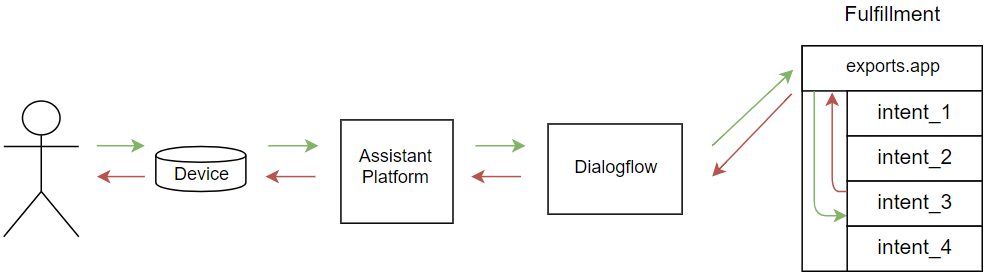
Figure 11.4. Data flows between human and fulfillment and several steps in-between
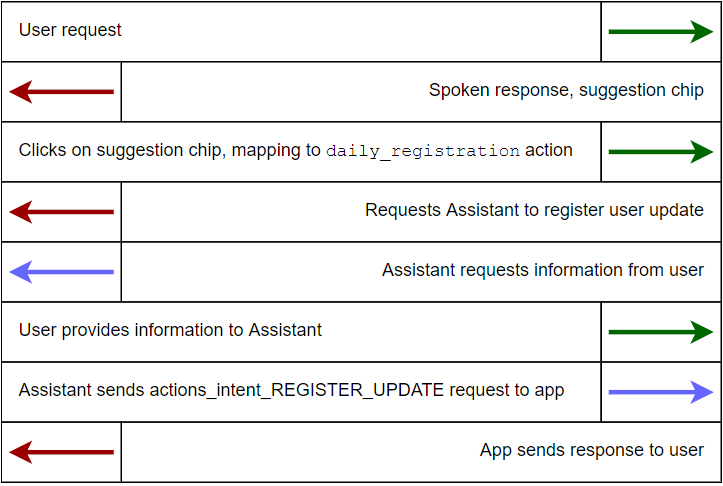
Figure 11.5. We provide control to Assistant for part of the daily update registration flow
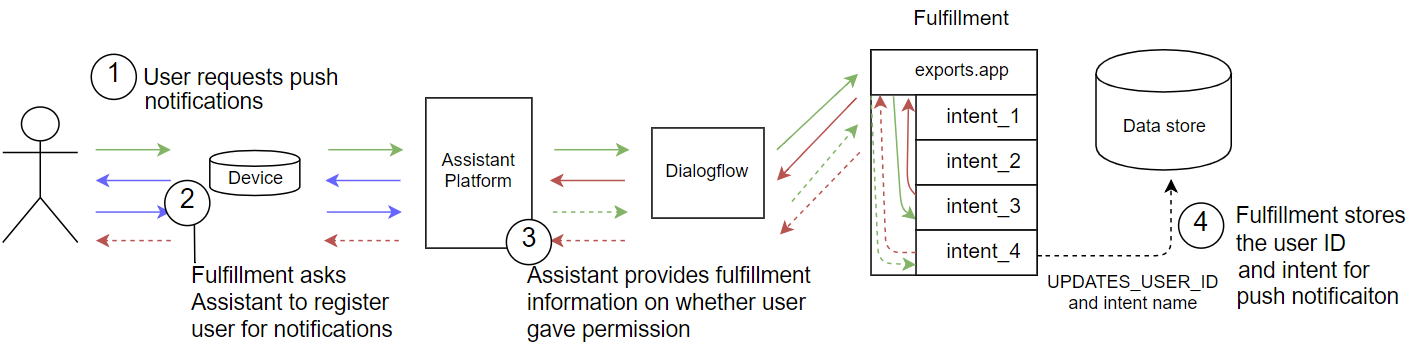
Figure 11.6. The notification registration flow requires hand-off to Assistant
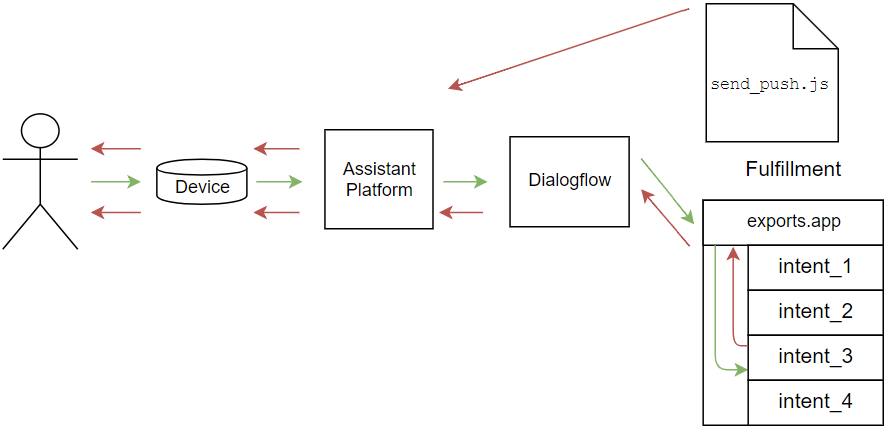
Figure 11.7. A script kicks off the flow by sending a push notification, and a user triggers an action when interacting with the notification
Summary
Routine suggestions are a way to have a user trigger an action along with others, often at the same time each day
Notifications and daily updates communicate with users proactively, and trigger an action in a "one-shot" mechanism
Implicit invocation lets users invoke an action without specifying its invocation name
Google determines the action best equipped to serve a user’s request based on a list of actions provided by developers
FAQ
What are “push interactions” in voice apps, and why use them?Push interactions let the Assistant or Alexa reach out to users proactively instead of waiting for the user to start a session. They reduce user effort by delivering timely information (for example, a game about to start, a daily training target) and keep users engaged without requiring them to remember to ask.How do routine suggestions work on Google Assistant?Routine suggestions let Assistant add your one-shot actions to a user’s existing Assistant routine (like “Good morning”). The action must be invokable without follow-up questions or parameters. You can let Assistant suggest it via the console, or you can suggest it yourself in code (for example, with a suggestion chip).What are the main types of user data I can store, and where?- Request-scoped: temporary variables for the current turn only. - Conversation-scoped: use conv.data (passed back and forth via Dialogflow contexts) to persist across turns in one session. - Long-term: use conv.user.storage for cross-session data (for example, preferences, last item seen), up to about 10 kB.How do I make my Dialogflow intents eligible for routines or other proactive features?Expose your one-shot intents to Assistant via Dialogflow’s Integrations settings (Google Assistant). In the Actions console, enable routine suggestions or daily updates per intent. Only intents surfaced to Assistant can be suggested or routed implicitly.How can I offer daily updates and control the opt‑in flow myself?Show a suggestion chip (for example, “Get a daily update”) and handle a dedicated intent (such as daily_registration). In that handler, use the RegisterUpdate helper to let Assistant finish registration (intent name + frequency like DAILY). After Assistant returns via actions_intent_REGISTER_UPDATE, confirm success and persist a flag in conv.user.storage.What’s the difference between daily updates and push notifications?- Daily updates: scheduled, once per day at a user-selected time; Android phones only. - Push notifications: event-driven or custom cadence, limited to about one per minute or ten per day, require opt-in, and are not delivered to speaker-only devices.How do I register users for push notifications and send one?In fulfillment: ask for permission with UpdatePermission(intent: "your_intent"), then, on completion, read the UPDATES_USER_ID argument and store it server-side. From an external script (not your fulfillment), authenticate with a service account (Actions API scope), then POST a customPushMessage to actions.googleapis.com/v2/conversations:send with userId, intent, and locale.Any common pitfalls and best practices for notifications?- Enable push notifications for the intent in the Actions console and allow time for propagation. - Store UPDATES_USER_ID outside user storage so your external script can access it. - Respect rate limits and screen space; avoid nagging. - Keep notifications timely and actionable, and close the microphone unless expecting a reply.What is implicit invocation and how do I benefit from it?Implicit invocation lets Assistant route a user’s generic request to your app when your exposed one-shot intent best matches the user’s phrasing. Provide clear, specific training phrases and direct, self-contained answers so new users get value immediately. This can drive significant organic usage without users knowing your app name.How can I track “where an invocation came from” and tailor behavior?Create dedicated intents for routine-driven and update-driven invocations that perform the same action but log their entry point. This allows analytics and different messaging if needed. Note that Assistant only suggests directly invokable intents, so manage opt-in and routing accordingly.
pro $24.99 per month
access to all Manning books, MEAPs, liveVideos, liveProjects, and audiobooks!

 Voice Applications for Alexa and Google Assistant ebook for free
