This appendix introduces the core ideas behind Java threads and why they matter when troubleshooting JVM applications. A thread is an independent sequence of instructions within a running process, and modern Java applications almost always rely on multiple threads to handle work concurrently and, at times, in parallel. Because threads interact in subtle ways, understanding their behavior is essential for debugging, profiling, and diagnosing performance or correctness problems throughout the book.
It then explains how threads execute and how to interpret their life cycle. A thread begins in a new state, becomes runnable once started, and then alternates between ready and running as the JVM schedules it. Threads can also become blocked in several ways, including synchronization, waiting, sleeping, parking, or joining another thread, and eventually they reach a dead state when execution ends or is interrupted. The appendix emphasizes that these state transitions are key clues when analyzing profiler views or thread dumps.
Finally, the text covers the main synchronization techniques and the most common multithreading problems. It describes synchronized blocks and methods, the role of monitors, and how wait, notify, and notifyAll can coordinate thread activity, especially in producer-consumer style designs. It also reviews higher-level concurrency tools such as semaphores, barriers, locks, and latches, while warning that misuse or overengineering often creates trouble. The appendix closes by outlining common issues like race conditions, deadlocks, livelocks, and starvation, showing how they arise and why they are important to recognize during investigation.
Figure D.1 A multithreaded app visualized as a group of sequence timelines. Each arrow in the figure represents the timeline of a thread. An app starts with the main thread, which can launch other threads. Some threads run until the process ends, while others stop earlier. At a given time, an app can have one or more threads running in parallel.

Figure D.2 With two instructions on one thread, we can always know the exact order of execution. But because two threads are independent, if instructions are on different threads, we can’t know the order in which they will execute. At most, we can say that one scenario is more likely than another.

Figure D.3 VisualVM shows thread execution as sequence timelines. This visual representation makes the app’s execution easier to understand and helps you to investigate possible problems.

Figure D.4 A thread life cycle. During its life, a thread goes through multiple states. First, the thread is new, and the JVM cannot run the instructions it defines. After starting the thread, it becomes runnable and starts to be managed by the JVM. The thread can be temporarily blocked during its life, and at the end of its life it goes to a dead state, from which it can’t be restarted.

Figure D.5 An example of using synchronized blocks. Multiple synchronized blocks of the app can use the same object instance as a monitor. When this happens, all threads are correlated such that only one active thread executes in all. In this image, if one thread enters the synchronized block, defining instructions A and B, no other thread can enter in the same block or in the one defining instruction C.

Figure D.6 When two synchronized blocks don’t use the same object instance as the monitor, they are not synchronized. In this case, the second and the third synchronized blocks use different monitors. That means instructions from these two synchronized blocks can execute simultaneously.

Figure D.7 VisualVM indicates the state of a thread. The Threads tab in the profiler provides a complete picture of what each thread does and, if a thread is blocked, what blocked that thread.

Figure D.8 In some cases, a thread should pause from executing and wait for something to happen. To make a thread wait, the monitor of a synchronized block can call its wait() behavior. When the thread becomes executable again, the monitor can call the notify() or notifyAll() methods.

Figure D.9 A use case for wait() and notify(). When a thread brings no value by executing in the current conditions, we can make it wait until further notice. In this case, a consumer should not execute when it has no value to consume. We can make the consumers wait, and a producer can tell them to continue only after it adds a new value to the shared resource.

Figure D.10 In some cases, you can improve the app’s performance using multiple threads. But you need to make some threads wait for others since they depend on the execution result of those threads. You can make a thread wait for another using a join operation.

Figure D.11 A timed waiting approach instead of wait() and notify() is usually not the best strategy. Whenever your code can determine when the thread can continue its execution, use wait() and notify() instead of sleep().
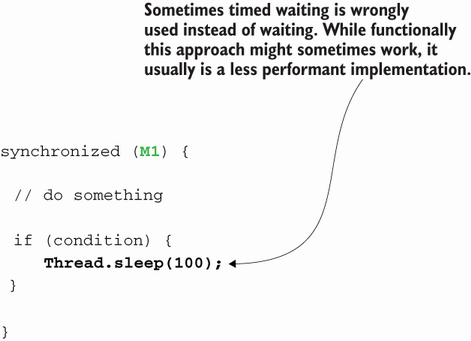
Figure D.12 A race condition. Multiple threads concurrently try to change a shared resource. In this example, threads T1 and T2 try to change the value of variable x simultaneously, which can result in different outputs.
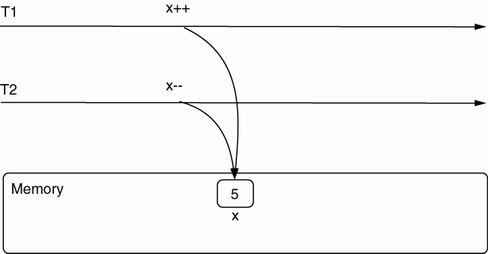
Figure D.13 Example of a deadlock. In a case in which T1 waits for T2 to continue the execution and T2 waits for T1, the threads are in a deadlock. Neither can continue because they are waiting for the other.

Figure D.14 A deadlock. Thread T1 can’t enter the nested synchronized block because T2 has a lock on resource A. Thread T1 waits for T2 to release resource A so that it can continue its execution. But thread T2 is in a similar situation: it cannot continue its execution because T1 acquired a lock on resource B. Thread T2 waits for thread T1 to release resource B so that it can continue its execution. Since both threads wait for each other and neither can continue its execution, the threads are in a deadlock.

Figure D.15 An example of a livelock. Two threads rely on a condition to stop their execution. But when changing the value of the condition so that they can stop, each thread causes the other to continue running. The threads cannot stop, and thus unnecessarily spend the system’s resources.

D.5 Further reading
Threads are complex, and in this appendix we discussed the essential topics that will help you understand the techniques addressed throughout this book. But, for any Java developer, understanding how threads work in detail is a valuable skill. Here is a list of resources I recommend you read to learn about threads in depth:
- Oracle Certified Professional Java SE 11 Developer Complete Study Guide by Jeanne Boyarsky and Scott Selikoff (Sybex, 2020). Chapter 18 describes threads and concurrency, starting from zero and covering all the thread fundamentals OCP certification requires. I recommend you start with this book to learn threads.
- The second edition of The Well-Grounded Java Developer by Benjamin Evans, Jason Clark, and Martijn Verburg (Manning, 2022) teaches concurrency, from the fundamentals to performance tuning.
- Java Concurrency in Practice by Brian Goetz et al. (Addison-Wesley, 2006) is an older book, but it hasn’t lost its value. This book is a must-read for any Java developer wanting to improve their threads and concurrency knowledge.
