8 Investigating deadlocks with thread dumps
This chapter uses a relatable deadlock story to motivate why Java applications can freeze when threads wait on each other, and explains why thread dumps are the right tool when that happens. A thread dump is a point-in-time snapshot of every thread’s state, stack, and locks, making it ideal when an app is unresponsive, whereas profilers and samplers excel at showing behavior over time. The focus is on learning how to capture these snapshots and interpret them to diagnose deadlocks, high CPU, slowdowns, and other concurrency pathologies—plus how AI can help streamline the analysis without replacing core skills.
You can obtain a thread dump in two main ways. With a profiler (such as VisualVM or JProfiler), it’s typically a single button to capture the dump and often to flag potential deadlocks directly in the UI. From the command line—useful and often necessary in remote or production environments—you first identify the process with jps, then generate the dump with jstack, usually saving the raw text to a file for later analysis in a tool. The chapter demonstrates this on a small app that deliberately deadlocks by nesting synchronized blocks on two shared lists in opposite order, a classic lock-ordering mistake that thread dumps make straightforward to expose.
Reading a raw dump efficiently hinges on a few key fields: thread name plus JVM and native IDs, OS priority, CPU and elapsed times, the state and its description, the stack trace, and the locks held or awaited. To uncover a deadlock, filter to blocked threads, follow the lock identity a thread is waiting on to find the owner, and continue until you either resolve the chain or loop back to the starting thread (indicating a cycle). The chapter distinguishes simple two-thread deadlocks from complex multi-thread cycles, and contrasts them with cascading blocked threads caused by an external wait. While tools such as fastThread and AI assistants can visualize dependencies, highlight suspects, and suggest causes, being able to parse the plain-text dump remains essential for tough scenarios and constrained environments.
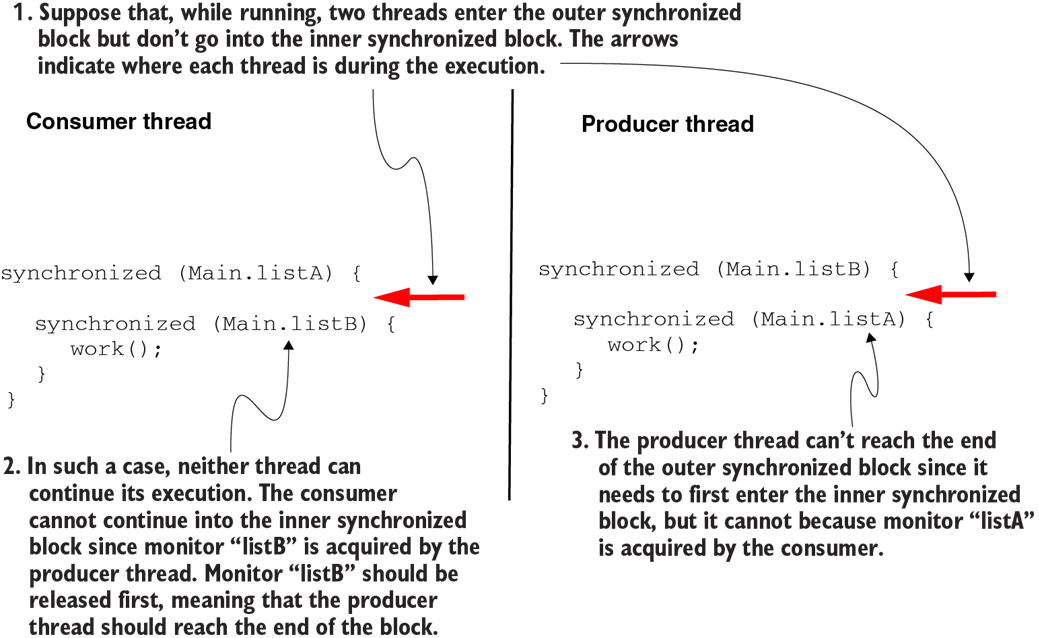
If both threads enter the outer synchronized block, but not the inner one, they remain stuck and wait for each other. We say that they went into a deadlock.
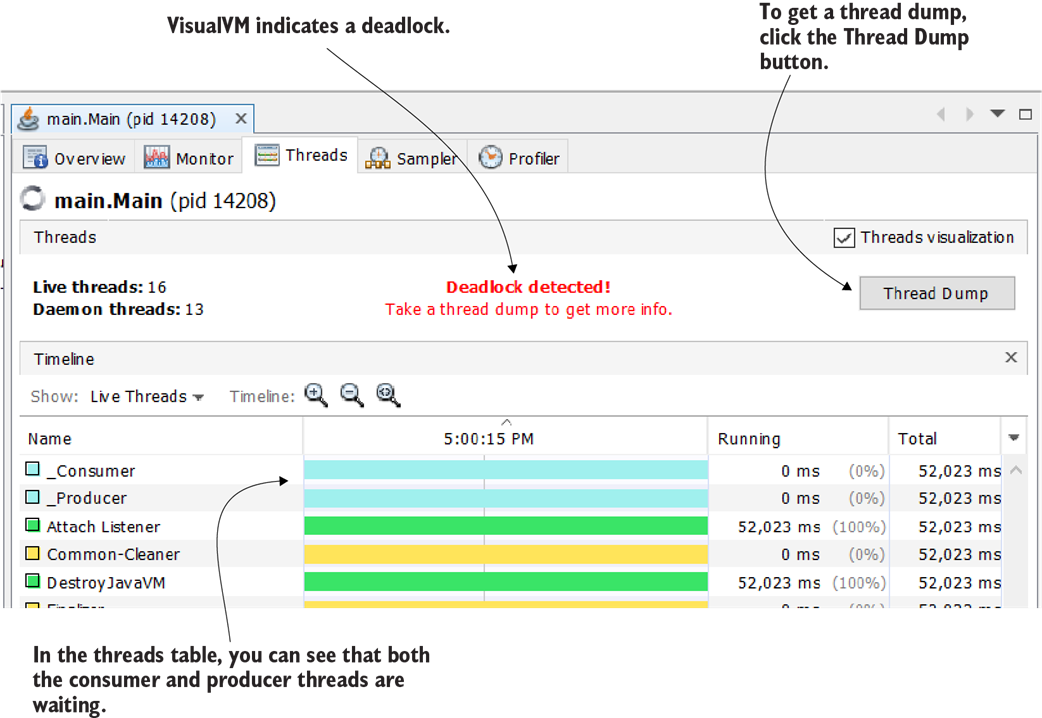
When some of the app’s threads get into a deadlock, VisualVM indicates the situation with a message in the Threads tab. Notice that both the _Consumer and _Producer threads are locked on the graphic timeline. To get a thread dump, you simply select the Thread Dump button in the window’s upper-right corner.
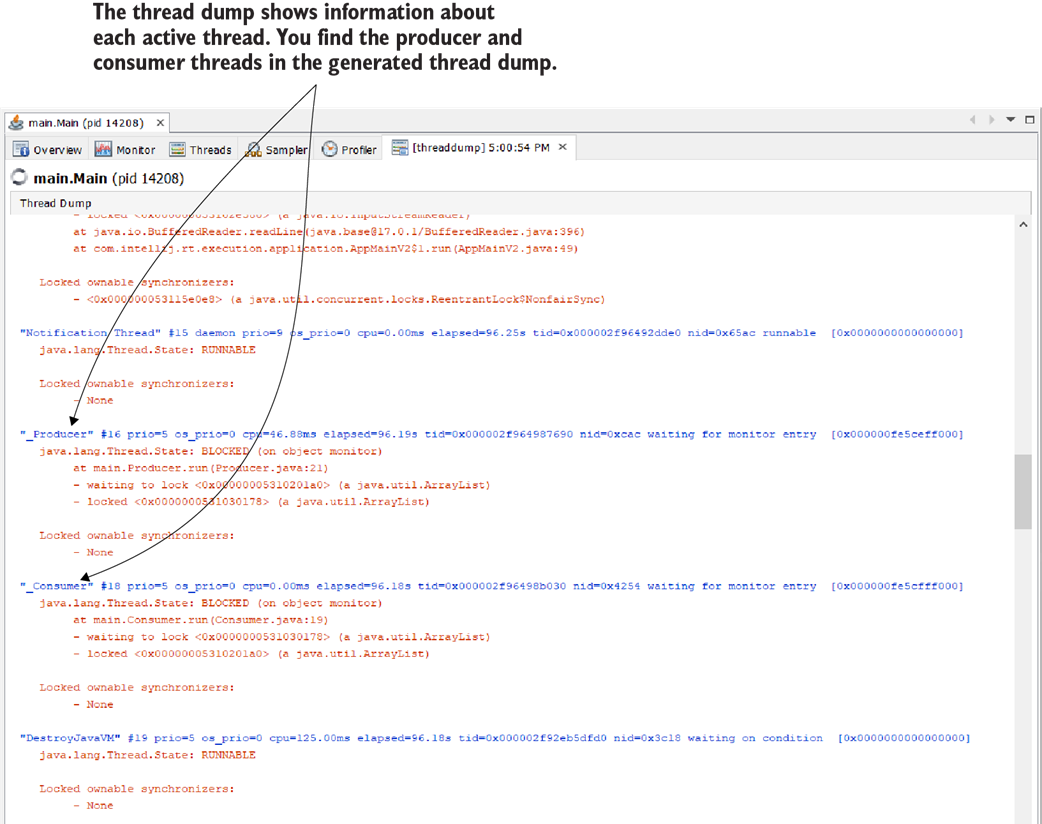
A thread dump in plain text that describes an app’s threads. In the thread dump we collected, we can find the two deadlocked threads _Consumer and _Producer.

Follow three simple steps to get a thread dump using the command line. First, find the process ID for which you want the thread dump. Second, use a JDK tool to get the thread dump. Finally, open the thread dump in a profiler tool to read it.
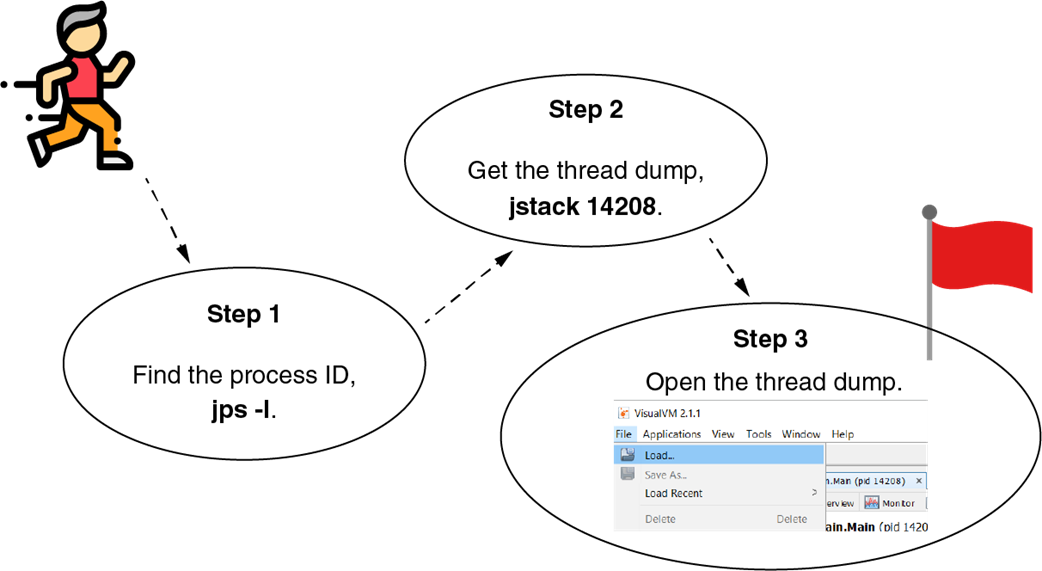
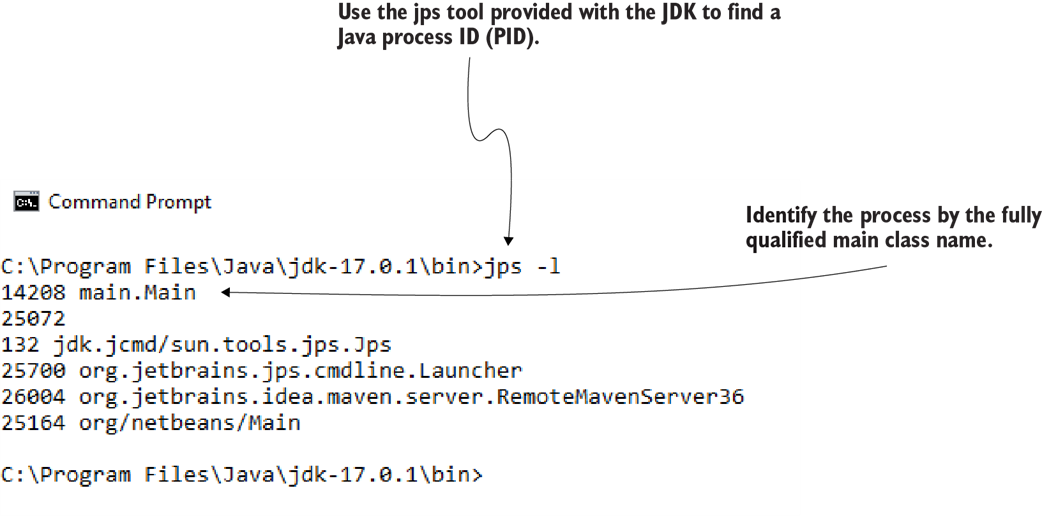
By using the jps tool provided with the JDK, we get the PIDs of the running Java processes. These PIDs are necessary to get thread dumps for a given process.
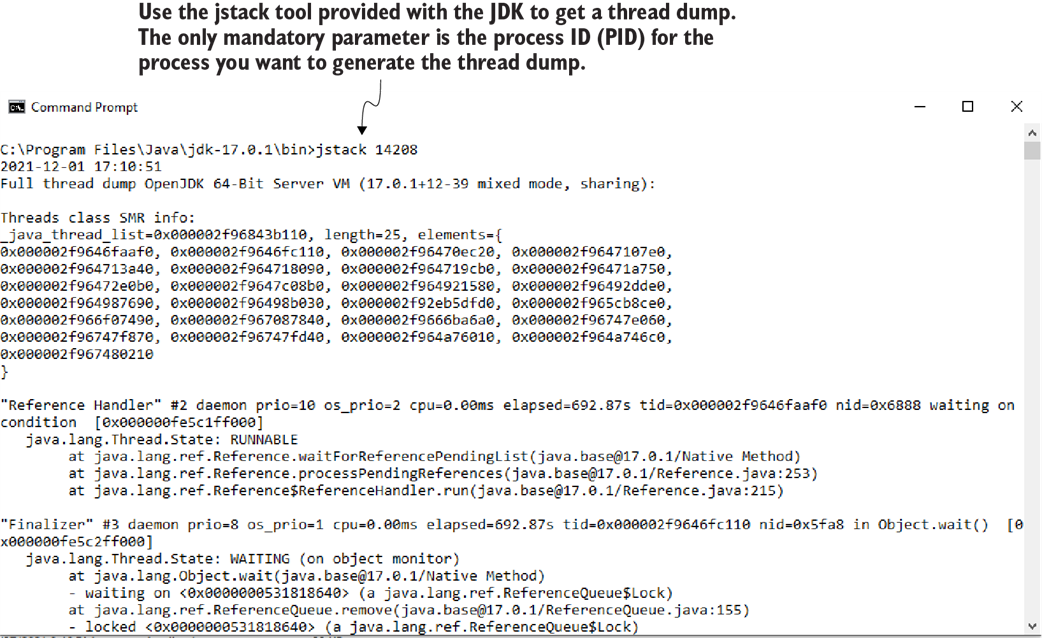
The jstack command followed by a PID will generate a thread dump for the given process. The thread dump is shown as plain text (also called a raw thread dump). You can collect the text in a file to import it and investigate it later.
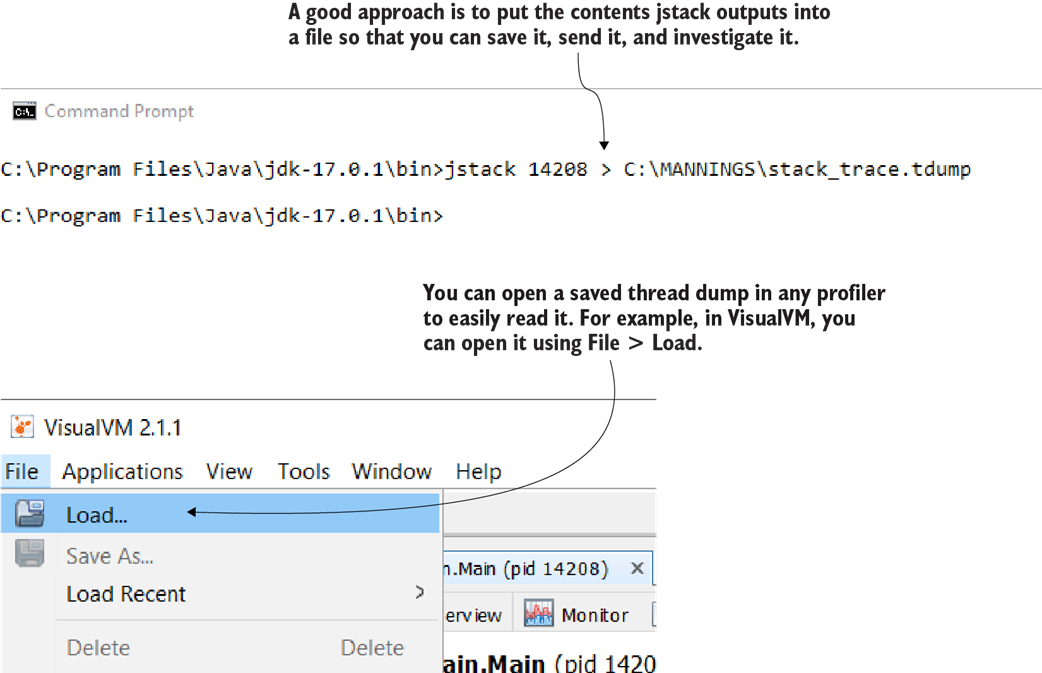
Once you save the thread dump into a file, you can open it in various tools to investigate it. For example, to open it in VisualVM, you select File > Load.

To find a deadlock with a thread dump, follow these three easy steps. First, remove all threads that are not blocked. Then, start with one of the blocked threads and find what is blocking it using the lock ID. Continue this process for each thread. If you return to a thread you already investigated, it means you found a deadlock.

When only two threads block each other, it’s called a simple deadlock, but a deadlock can be caused by multiple threads that block each other. More threads means more complexity. Thus, when more than two threads are involved, it's called a complex deadlock.

Cascading locks appear when multiple threads enter a chain where they wait for one another. The last thread in the chain is blocked by an external event, such as reading from a data source or calling an endpoint.

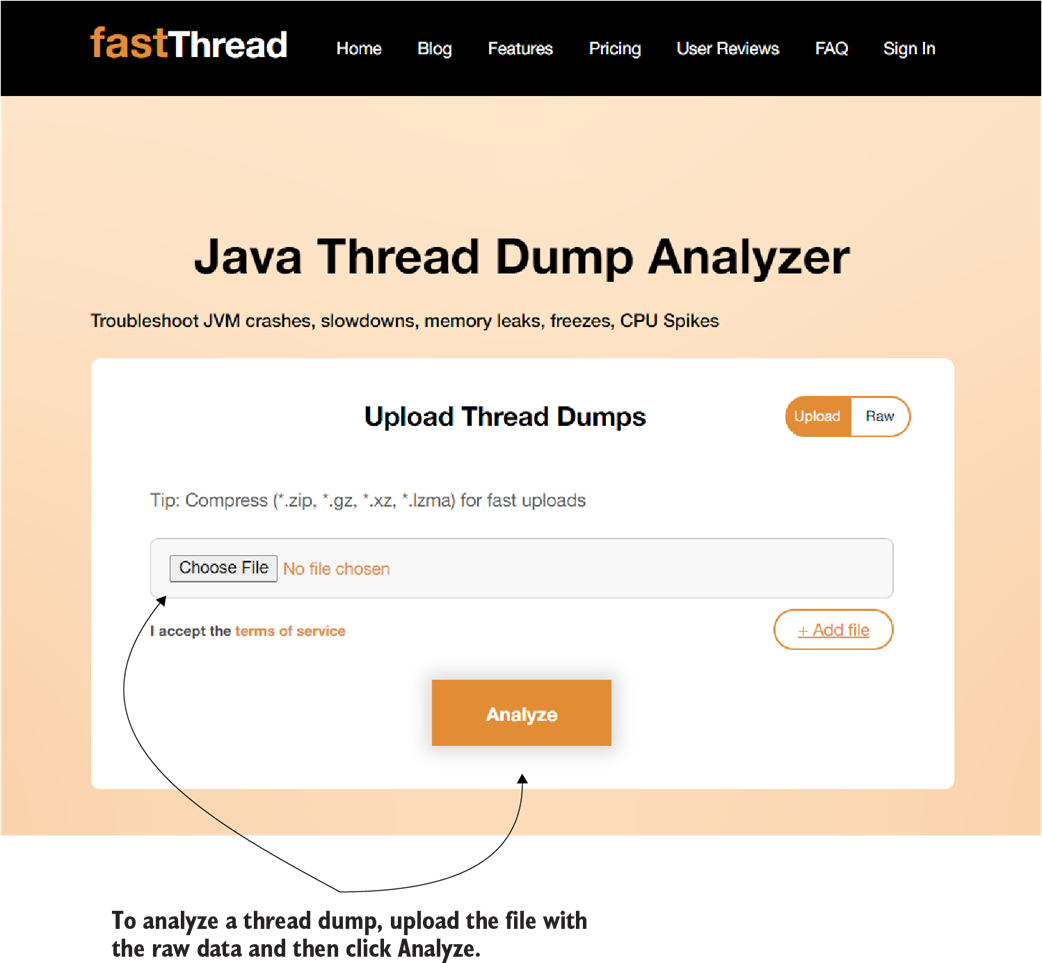
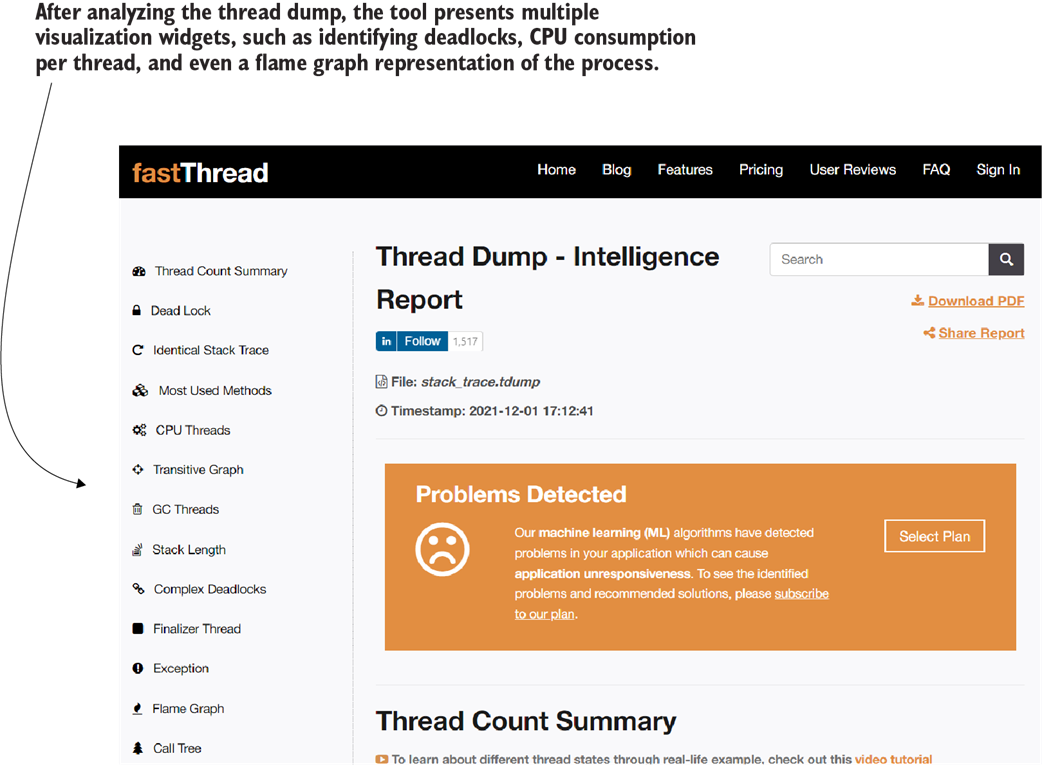
To analyze a thread dump, upload a file containing the thread dump raw data to fastThread.io and wait for the tool to present the details in a simple-to-understand shape.
fastThread provides various details in an easy-to-read format. These details include deadlock detection, dependency graphs, resource consumption, and a flame graph.
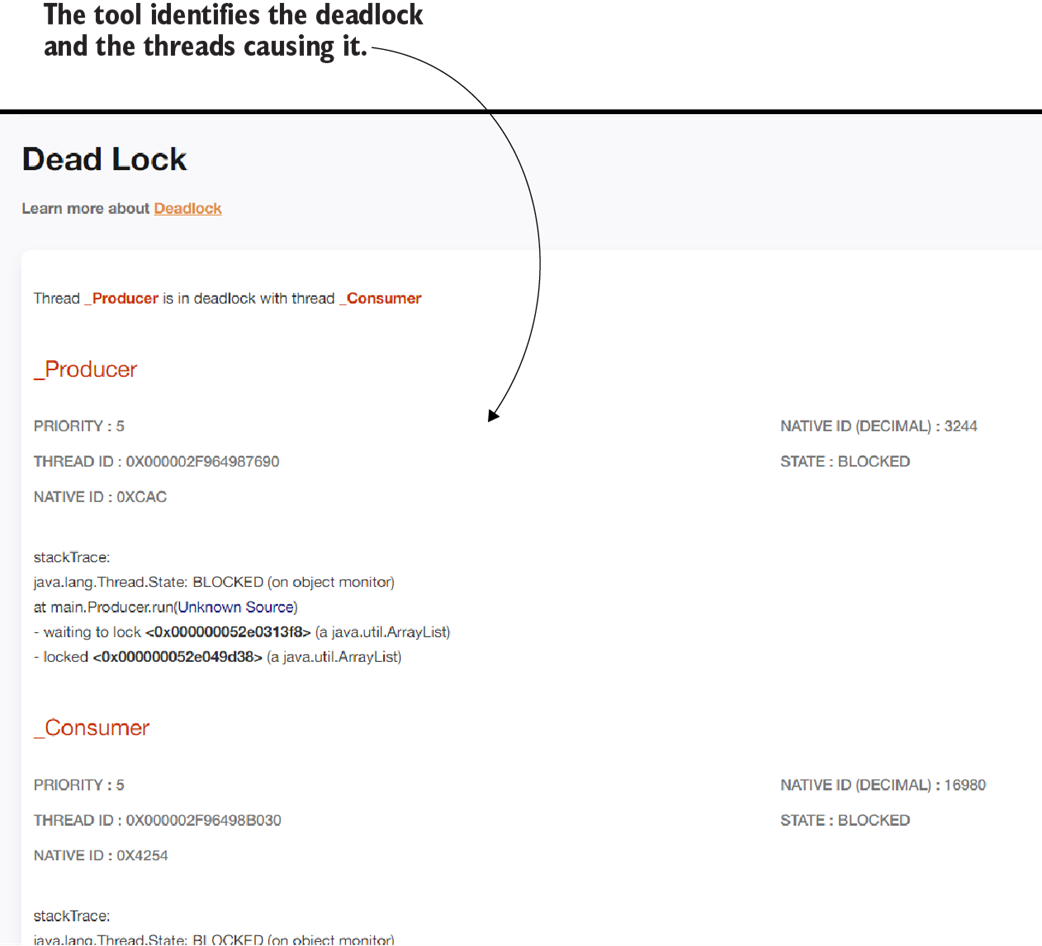
After analyzing the thread dump raw data, fastThread identifies and provides details about the deadlock caused by the _Consumer and _Producer threads.
Summary
- When two or more threads get blocked while waiting for each other, they are in a deadlock. When an app gets into a deadlock, it usually freezes and can’t continue its execution.
- You can identify the root cause of a deadlock using thread dumps, which show the status of all threads of an app at the time the thread dump was generated. This information allows you to find which thread is waiting for another.
- A thread dump also shows details such as resource consumption and stack traces for each thread. If these details are sufficient, you can use a thread dump instead of instrumentation for your investigation. Imagine the difference between a thread dump and profiling as the difference between a picture and a movie. With a thread dump, you only have a still image, so you miss the execution dynamics, but you can still get a lot of relevant and helpful details.
- The thread dump provides information about the threads that were executing in the app when the dump was taken. The thread dump shows essential details about the threads in a plain-text format, including resource consumption, thread state in its life cycle, if the thread is waiting for something, and which locks it’s causing or being affected by.
- You can generate a thread dump with either a profiler or using the command line. Using a profiling tool to get the thread dump is the easiest approach, but when you can’t connect a profiler to the running process (e.g., due to network constraints), you can use the command line to get the dump. The thread dump will allow you to investigate the running threads and the relationships between them.
- The plain-text thread dump (also known as a raw thread dump) can be challenging to read. Tools such as fastThread.io help you to visualize the details.
FAQ
What is a thread dump, and why is it useful for investigating deadlocks?
A thread dump is a snapshot of all JVM threads at a specific moment. It shows thread states, stack traces, and locks held or waited on. Unlike profilers that sample over time, a dump captures a single instant—ideal when an application is frozen or unresponsive. It helps you see which threads are BLOCKED, who owns the locks, and how threads interact, making deadlocks and bottlenecks easier to diagnose.How do I get a thread dump with a profiler like VisualVM or JProfiler?
Attach the profiler to the running process, open the Threads view, and look for deadlock indicators (e.g., in VisualVM’s Threads tab). Click the “Thread Dump” button to capture the dump as plain text. You can then inspect thread states, stack traces, and locks directly in the tool.How do I generate a thread dump from the command line on a remote server?
Use three steps: 1) Find the Java process ID withjps -l. 2) Generate the dump with jstack <PID> (for example, jstack 14208). 3) Redirect output to a file (e.g., jstack 14208 > dump.txt) and load it into a tool like VisualVM (File > Load) for easier analysis.
 Troubleshooting Java, Second Edition ebook for free
