6 Finding hidden issues using profiling techniques
This chapter explains how to uncover hidden performance and behavior issues in Java applications using profiling, emphasizing that profilers are practical, approachable tools rather than last-resort, complex instruments. It focuses on three complementary techniques—sampling to discover what code is running, instrumentation (profiling) to measure execution details like call counts and timings, and JDBC profiling to see the exact SQL sent to a database. The guidance stresses a disciplined workflow: start broad with sampling to find hotspots and execution paths, then narrow down with targeted instrumentation, and finally examine database interactions, all while distinguishing wall-clock time from CPU time to separate “waiting” from “working.”
Sampling provides a fast, low-overhead way to map executing methods and threads, making it invaluable for unfamiliar or opaque codebases, including those that rely on dynamic proxies and frameworks. Through a latency example, the chapter shows how sampling reveals that an endpoint’s 5-second delay is caused by an external HTTP call rather than CPU-heavy work, highlighting the importance of comparing total time with CPU time. Instrumentation then adds precision—counting method invocations and attributing time to specific code regions—so you can confirm whether slowness stems from a single slow call or an inefficient design that repeats calls. The advice includes scoping instrumentation to relevant packages to reduce overhead and using the profiler’s call trees to decide where to debug next.
For database issues, the profiler can intercept JDBC calls to capture full SQL, execution times, counts, and the originating call stacks—crucial for diagnosing slow queries, N+1 problems, and long commits. This works even when frameworks like Hibernate or Spring Data generate queries behind the scenes, enabling you to copy queries into a SQL client, analyze plans, and connect queries back to application code. The chapter contrasts this with logging, which often obscures parameters and origins, and illustrates common pitfalls such as per-row lookups that should be replaced by joins, and criteria API mistakes that inadvertently trigger cross joins. It concludes by recommending profiling as a routine audit step during development and noting that exported profiling data can be further analyzed with AI assistants to accelerate diagnosis and remediation.

The app we are investigating exposes an endpoint: /demo. When you call this endpoint, you must wait 5 seconds for the app to respond. We need to understand why it takes so long for the endpoint to respond. We know our app calls a mock endpoint from httpbin.org, which causes the delay, but we want to learn how to investigate this scenario with a profiler. This way, you’ll know how to use similar techniques for real-world situations.
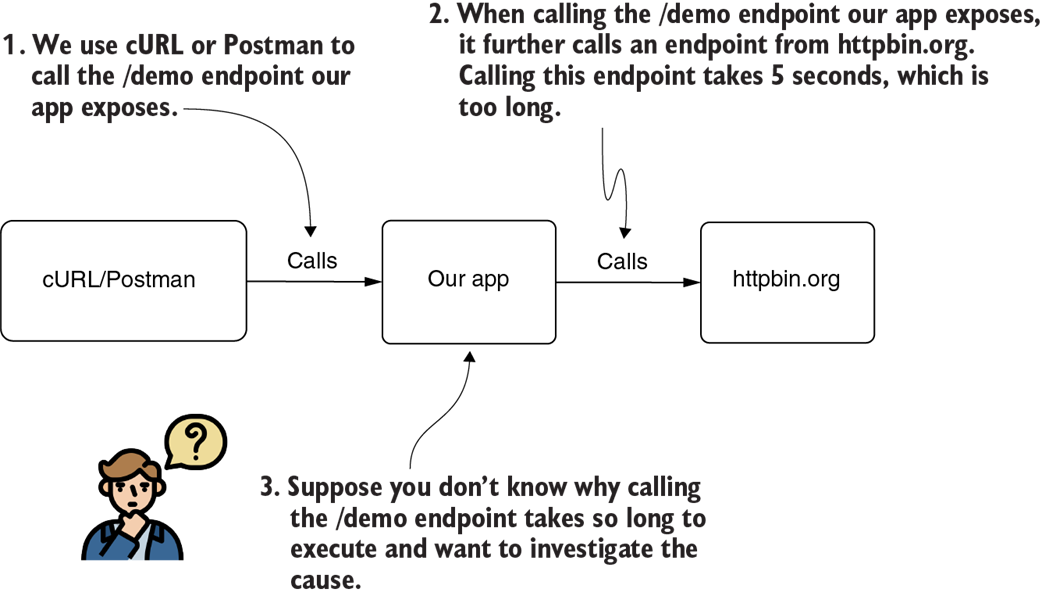
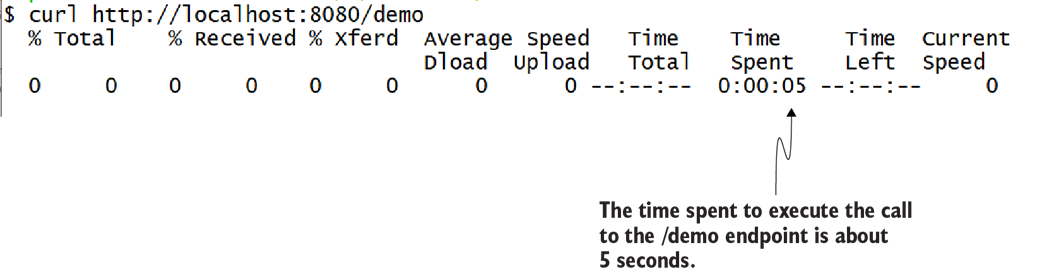
When the endpoint is called (in this figure, using cURL), the app takes about 5 seconds to respond. In our scenario, we use a profiler to investigate this latency problem.
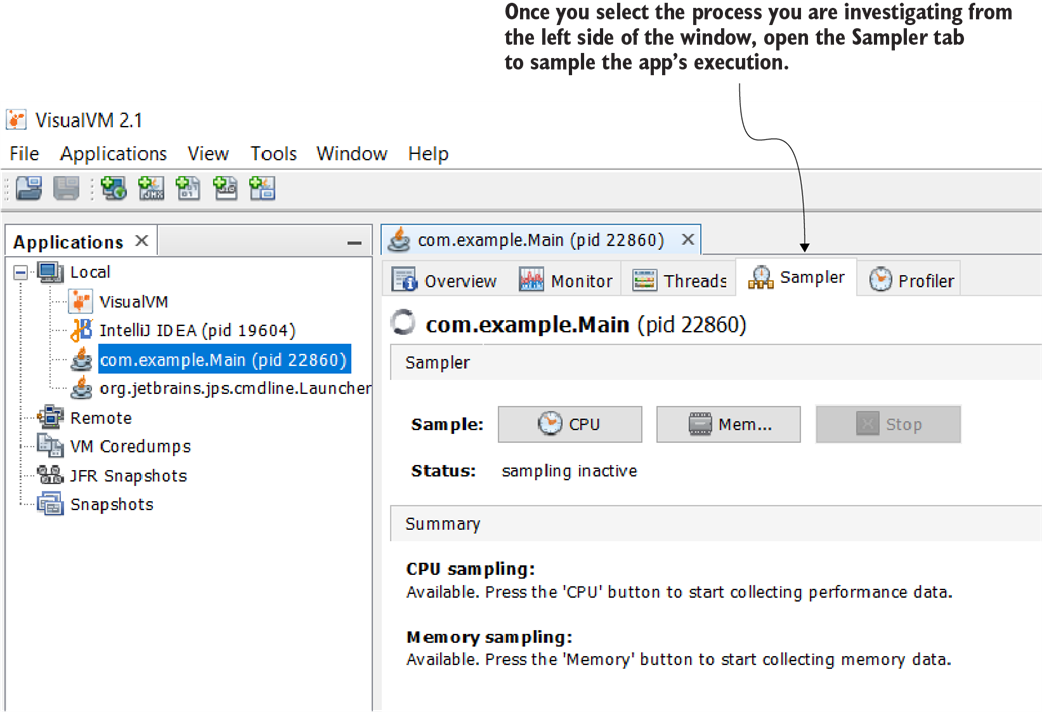
To start sampling the execution, select the process from the list on the left side, and then select the Sampler tab.
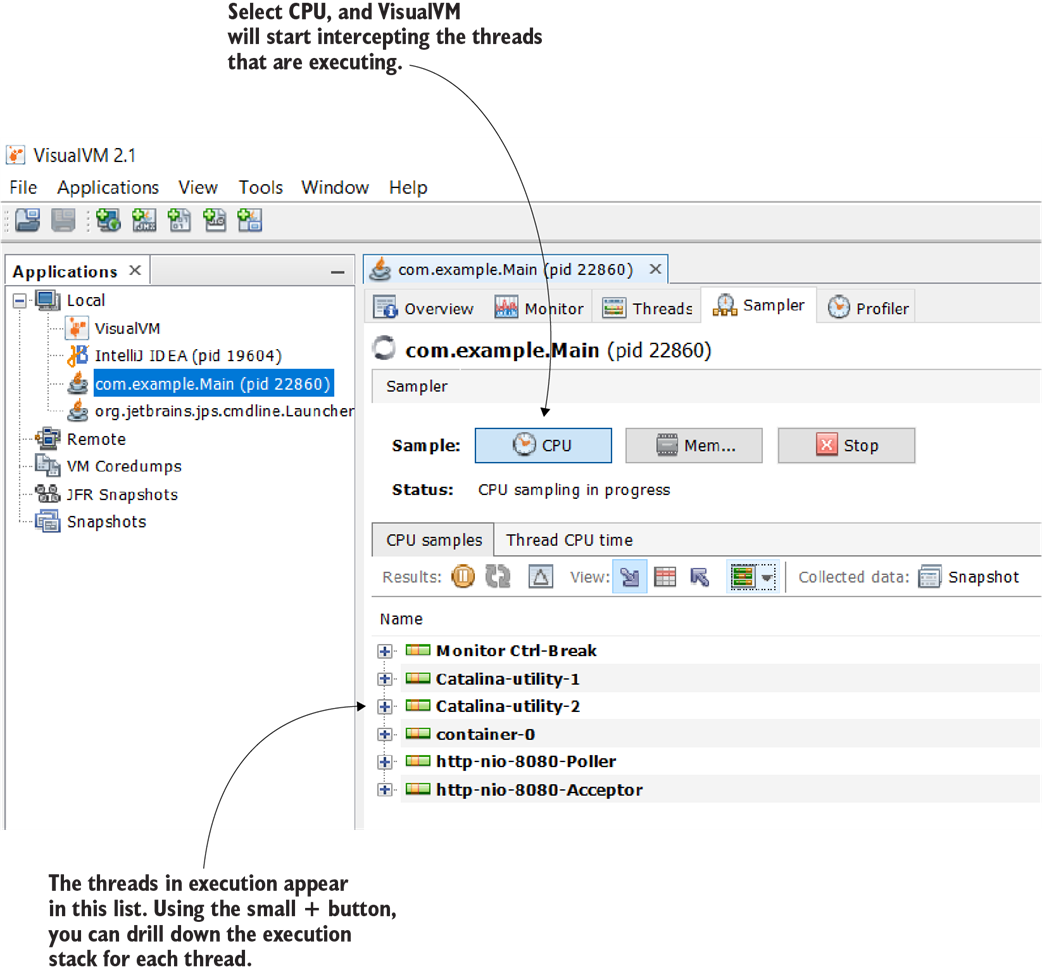
The profiler shows all the active threads in a list. You can expand each item to see the execution stack and an approximate execution time. When the app executes, the newly created threads appear in the list, and you can analyze their execution.
The stack trace shows what the app executes. You can see every method and each subsequent method that is called. This view helps you quickly find the code you want to focus on when investigating a certain capability.
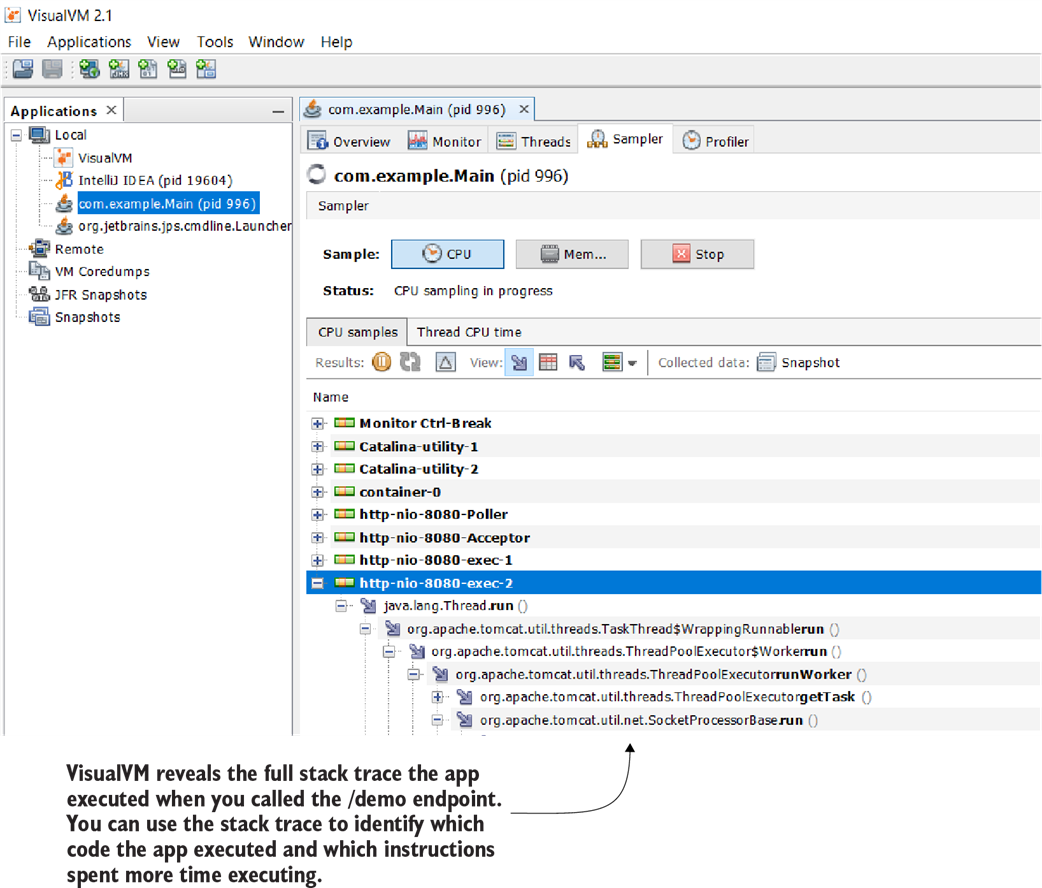

When you expand the execution stack, you find which methods execute and how much time they spend executing. You can also deduce how long they wait and how much they work. The profiler shows both the app’s codebase methods and the methods called from specific dependencies (libraries or frameworks) the app uses.
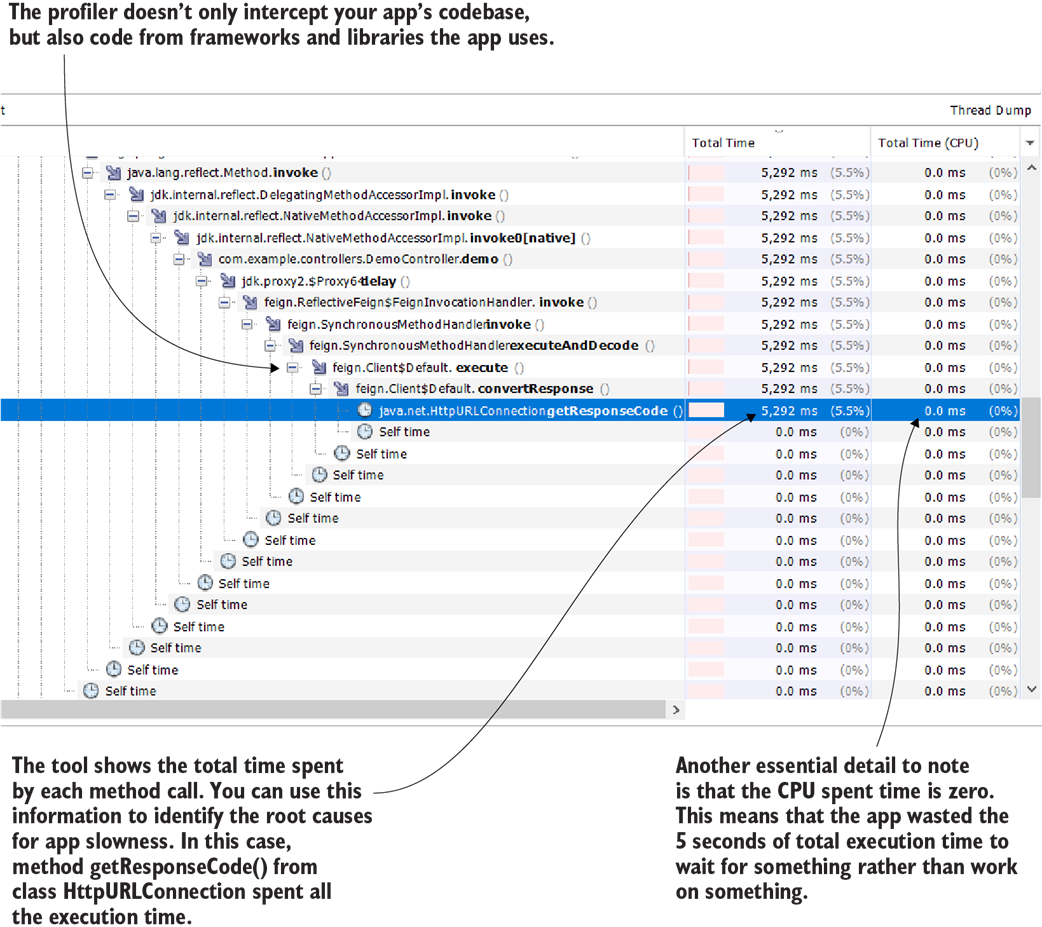
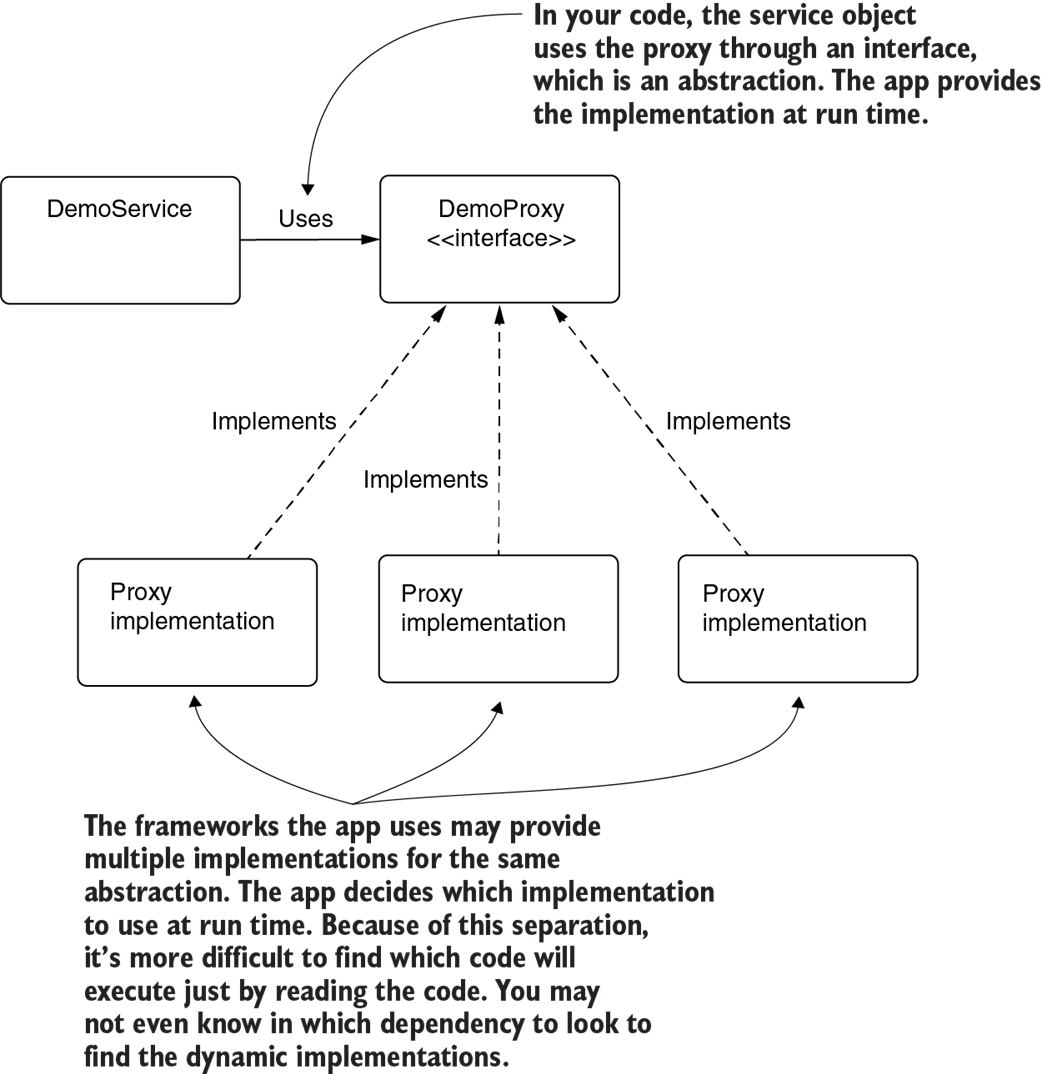
The framework keeps the implementations for an abstraction separate and provides them dynamically during execution. Because the implementation is decoupled and the app provides it during run time, it’s more difficult to find it by reading the code.

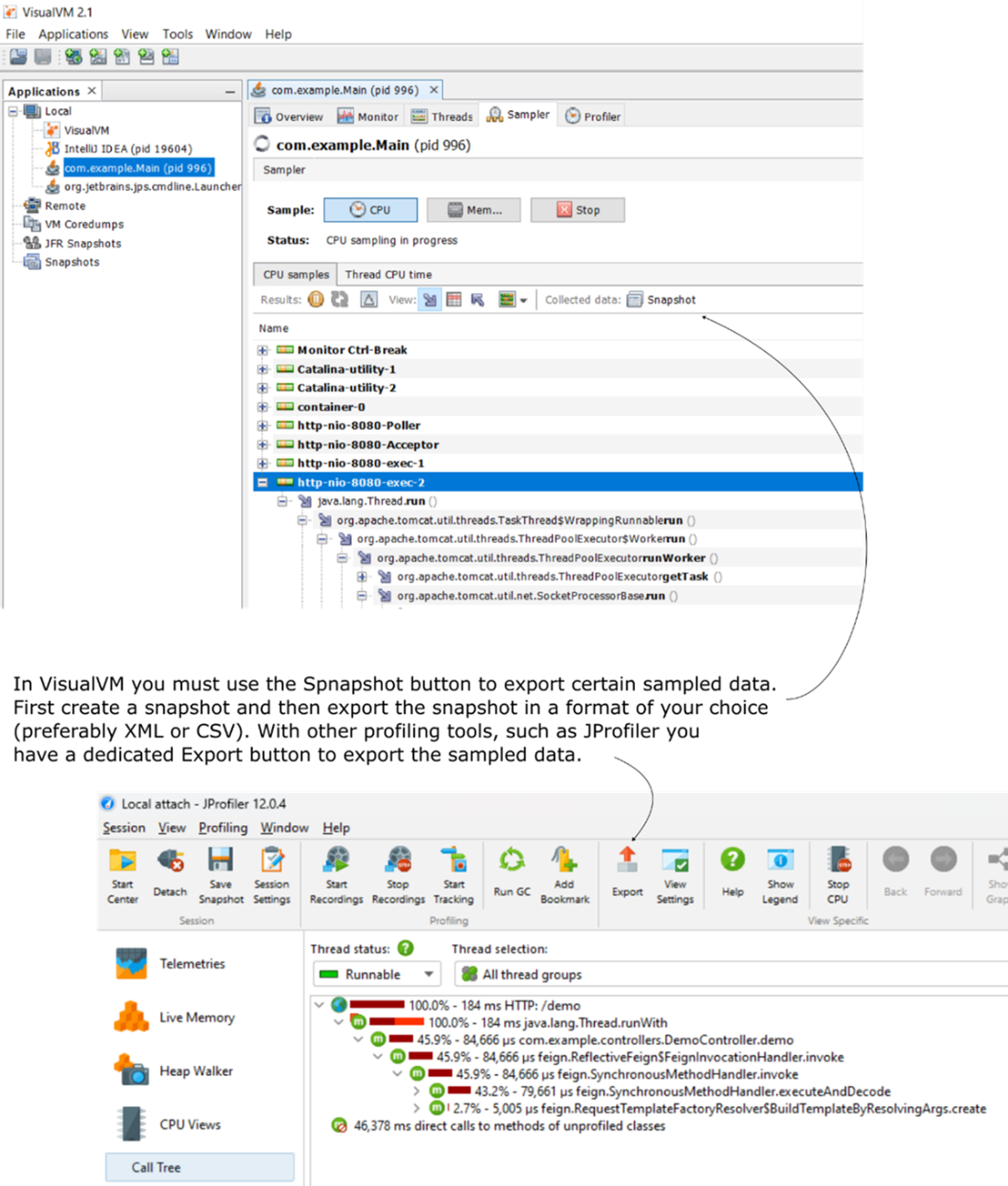
Saving sampled data in VisualVM (top) and JProfiler (bottom). VisualVM allows CPU sampling snapshots, while JProfiler provides options to export profiling data, ensuring easy analysis and sharing of performance metrics.
Example of using an AI assistant to analyze exported profiling data. The AI identifies latency bottlenecks in the /demo endpoint, highlighting issues in the DemoController.demo method and the Feign client for troubleshooting.
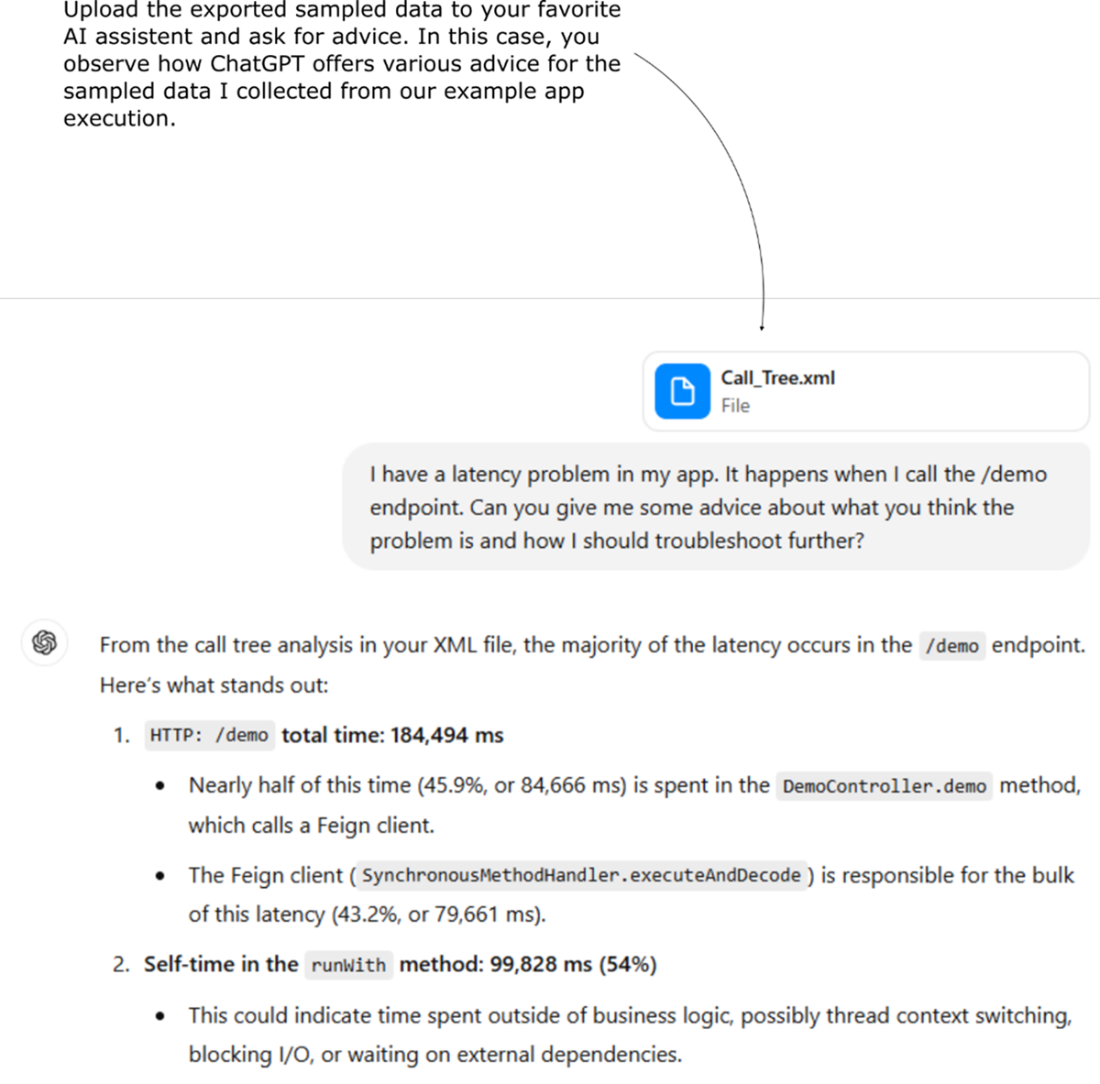

Profiling a part of the app during execution to get details about the times a given method was invoked. We can see that the method causing the 5 seconds of latency is invoked only once, meaning the number of invocations doesn’t cause a problem here.
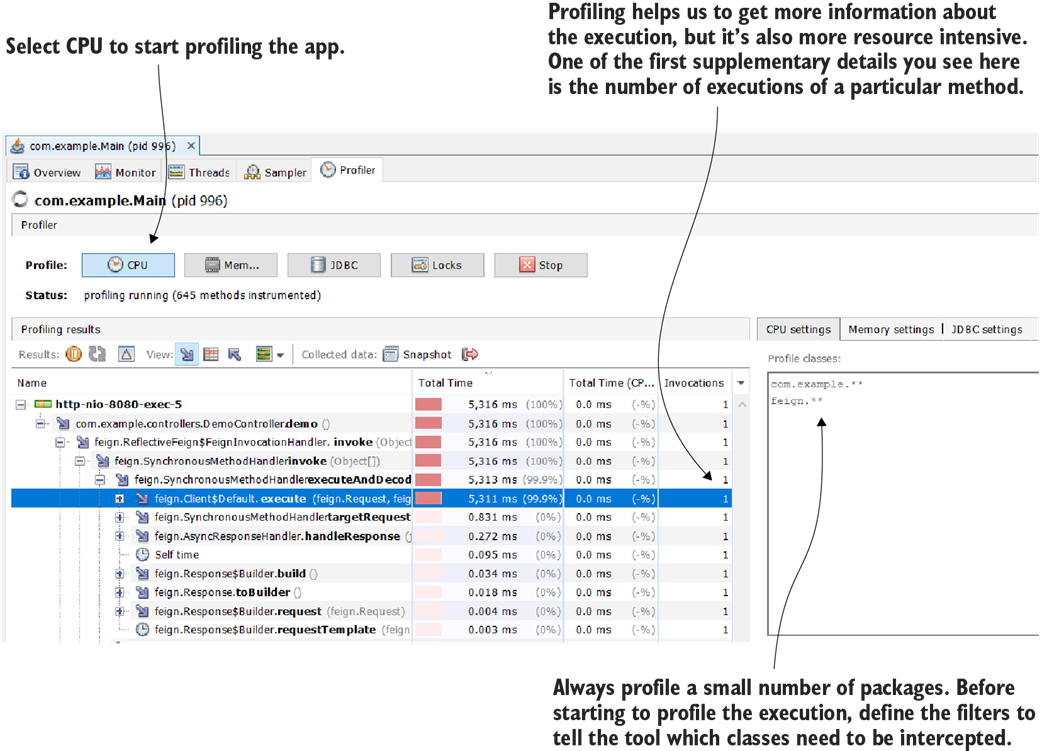
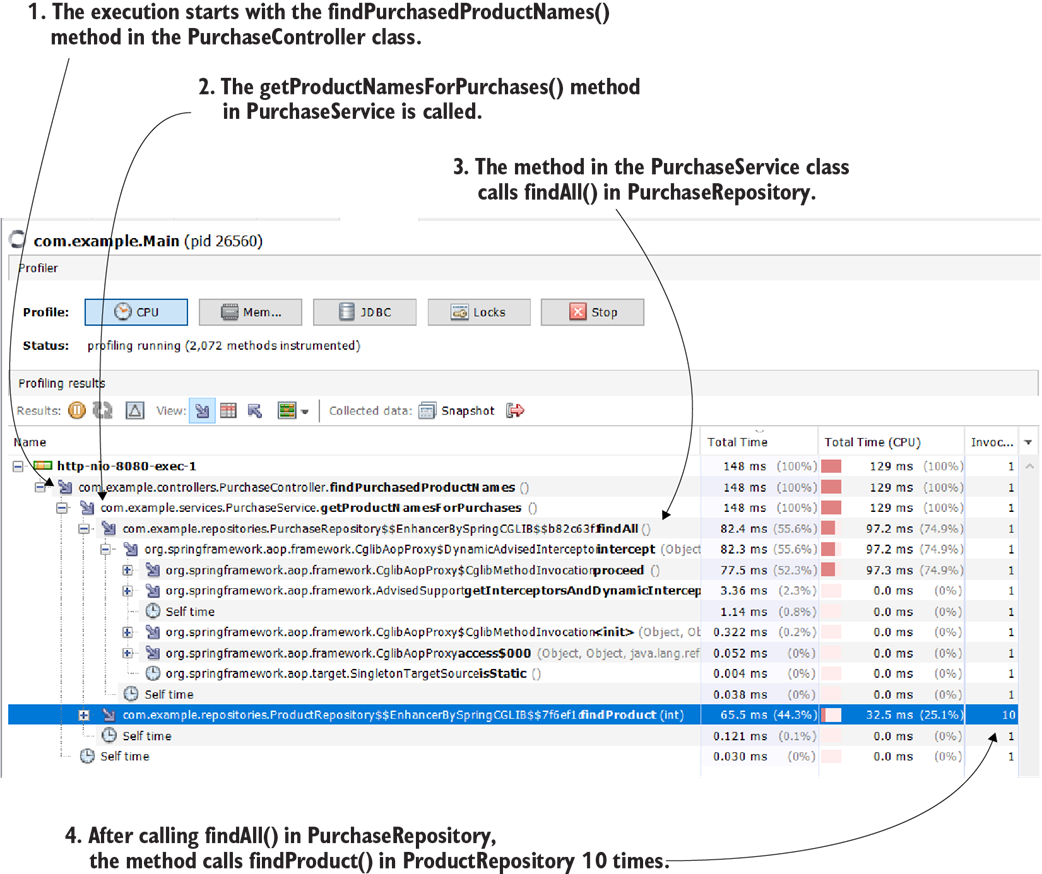
When profiling the app, we observe that one of the methods is called 10 times. We now need to ask ourselves if this is a design issue. Since we now have a big picture of the entire algorithm and we know what code is executed, we can also debug the app if we can’t figure out what happens.
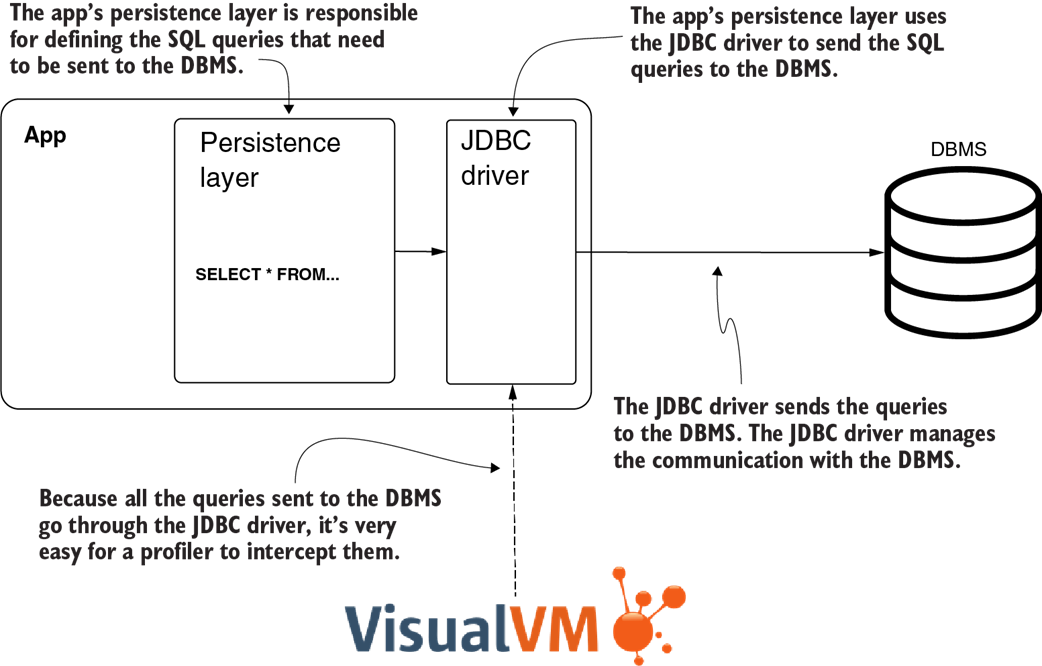
The profiler intercepts the SQL queries the app sends to the DBMS through the JDBC driver. This gives you an easy way to get the queries, run them, observe what part of the codebase runs them, and know how many times a query is executed.
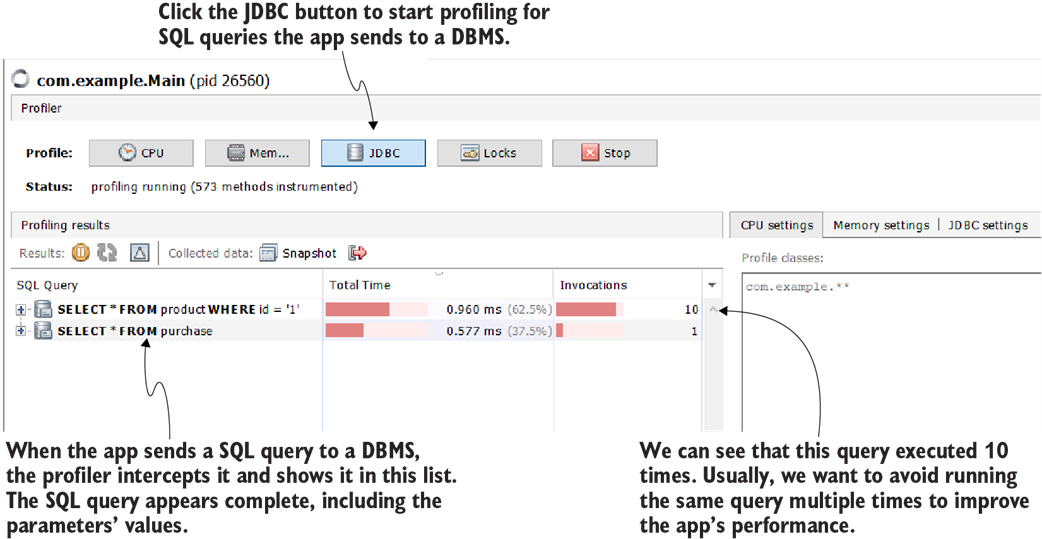
In a Java app, the communication with a relational DBMS is done through the JDBC driver. A profiler can intercept all method calls, including those of the JDBC driver, and retrieve the SQL queries the app sends to a DBMS. You can get the queries and use them in your investigations.
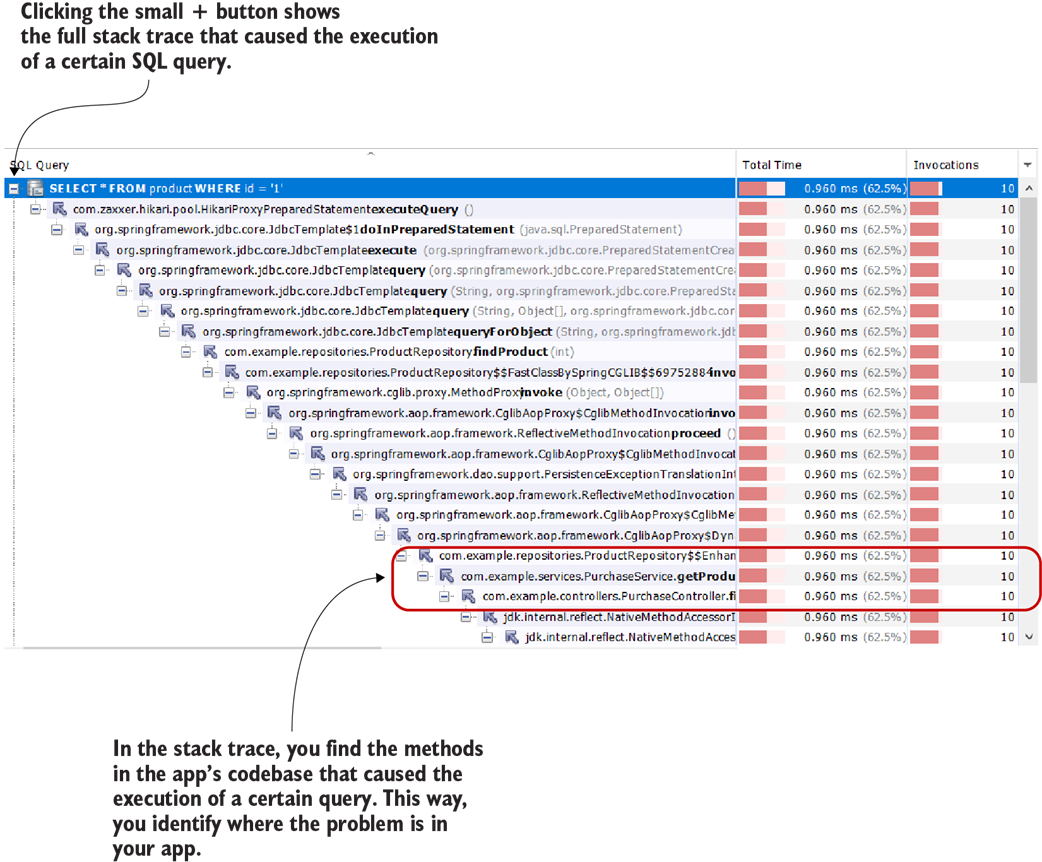
For each query, the profiler also provides the execution stack trace. You can use the stack trace to identify which part of your app’s codebase sent the query.
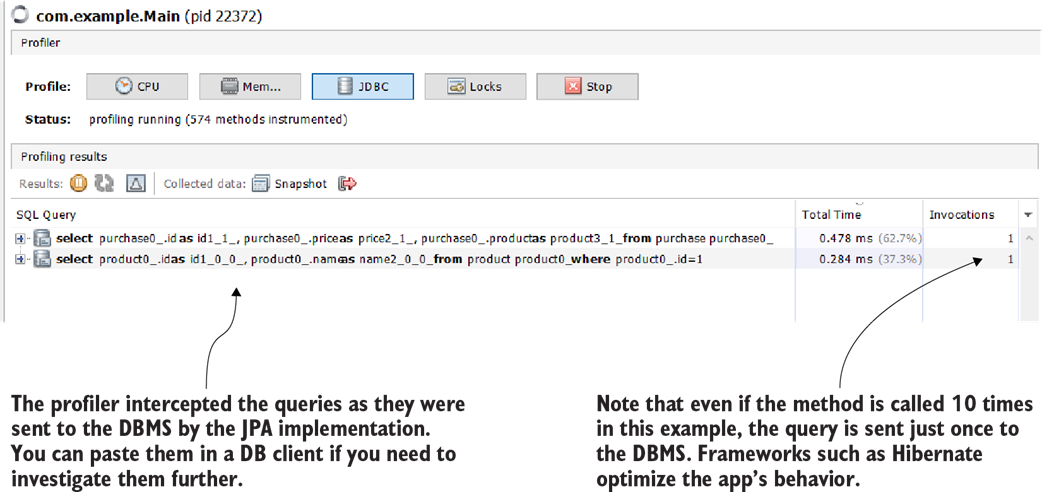
Even when working with a framework, the profiler can still intercept the SQL queries. This makes your investigation a lot easier because you can’t copy the query directly from the code as you can when using JDBC and native queries.

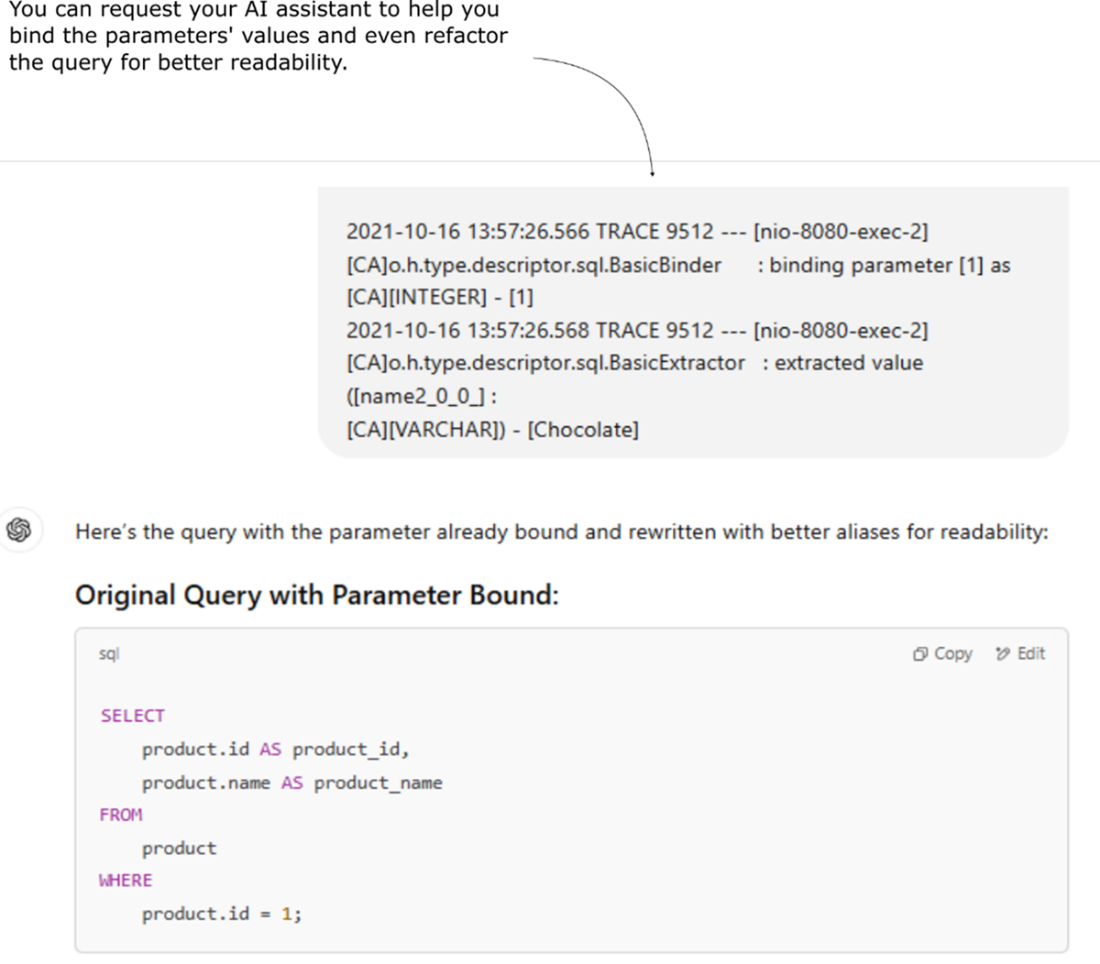
An AI assistant can be a powerful tool for extracting and refactoring data from logs. In this example, you can see how I use ChatGPT to transform a partial or complex query into a complete, well-structured, and more readable version, making troubleshooting and analysis much easier.
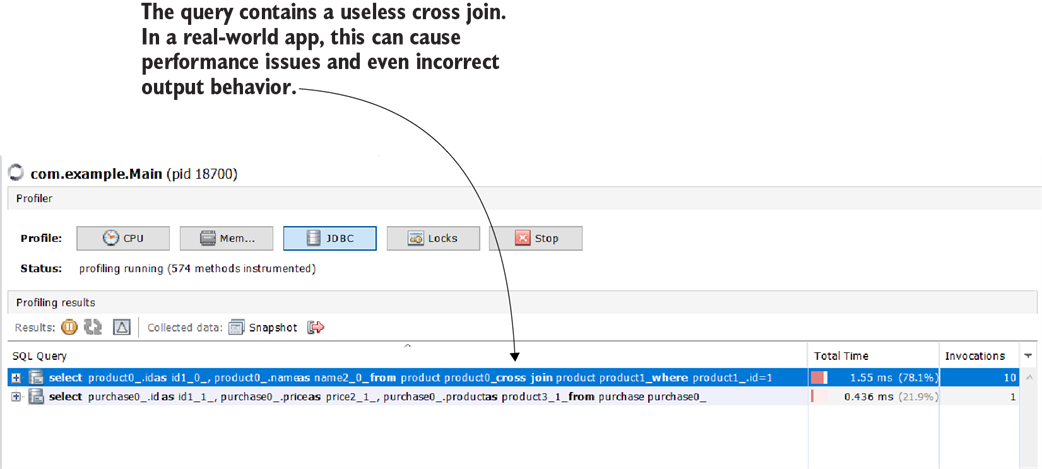
The profiler can intercept any SQL query sent to the DBMS through the JDBC driver. Here, we spot an issue in the generated query—an unneeded cross join that causes performance problems.
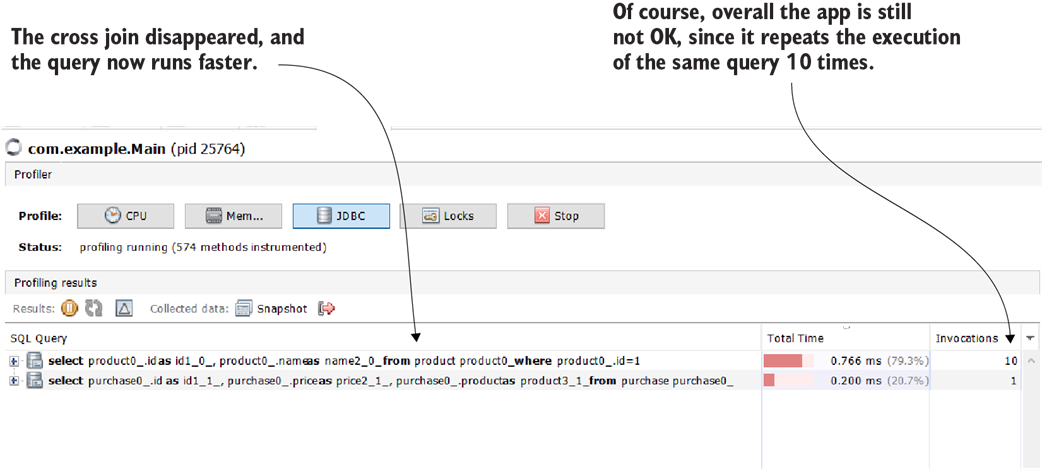
By eliminating the supplementary select() method call, the cross join disappeared. However, the overall algorithm for this app should be revised, since it still runs the same query multiple times, which is not optimal.
Summary
- A profiler intercepts the app’s execution and provides essential details about the code in execution, such as the execution stack trace for each thread, how long it takes for each method to execute, and how many times a certain method was called.
- When investigating latency problems, the first step to using a profiler is sampling—a way for the profiler to intercept the executing code without getting many details. Sampling is less resource consuming and allows you to observe the big picture of execution.
- Sampling gives you three essential details:
- What code executes—When investigating an issue, you sometimes don’t know what part of the code executes, and you can find this aspect by sampling.
- Total execution time of every method—This detail helps you to identify what part of the code causes potential latency problems.
- Total CPU execution time—This detail helps you to identify whether your code spends the execution time “working” or waiting for something.
- Sometimes sampling is enough to understand where a problem comes from. But in many cases, you need more details. You can get these details profiling the execution.
- Profiling is a resource-consuming process. With a real-world app, it’s almost always impossible to profile the whole codebase. For this reason, when profiling for details, you should filter specific packages and classes on which you want to focus your investigation. You can usually determine what part of the app to focus on by sampling the execution first.
- An essential detail you get by profiling is the number of invocations of a method. When sampling, you know the total time a method spends executing, but not how often it was called. This aspect is important in identifying a method that is slow or wrongly used.
- You can use a profiler to get SQL queries the app sends to a DBMS. The profiler intercepts any queries, regardless of the technology used to implement the app’s persistence layer. This is invaluable when investigating slow queries for apps that use frameworks (such as Hibernate) to work with a database.

 Troubleshooting Java, Second Edition ebook for free
