4 Representing operations with HTTP
Designing a web API means turning identified capabilities—resources, actions, inputs, and outputs—into clear, interoperable HTTP interactions. This chapter shows how to do that systematically, starting from the API Capabilities Canvas and proceeding step by step to define paths, methods, input/output locations, and status codes. It highlights that not every operation fits cleanly into CRUD; verb-like “do” actions (such as “check out” or “like”) can be trickier to express, so the chapter offers practical recipes and patterns to keep designs consistent and user-friendly while uncovering and filling gaps that earlier analysis may have missed.
The core mechanics revolve around four decisions. First, represent resources with meaningful, hierarchical paths that reflect relationships, commonly using the collection-and-element pattern: /elements and /elements/{id}. Second, map actions to standard methods: POST (often create or generic processing), GET (read/search), PUT/PATCH (update), and DELETE (delete), with simple recipes for typical operations. Third, place inputs by nature: resource identifiers in path parameters, resource modifiers (filters, format hints) in query parameters or standard headers, and resource representations (create/update data) in the body. Fourth, express outcomes with appropriate HTTP statuses and outputs: 201 for creations (with the new resource in the body and its URL in the Location header), 200 for reads/searches and most updates when data is returned, 204 when no body is returned (commonly for delete), 4xx for consumer errors (notably 400 for invalid input and 404 for missing resources), and 5xx for provider errors. Output representations and error details belong in the response body.
For non-CRUD “do” operations, the chapter presents three workable strategies: create an action resource (POST /do-like endpoints, possibly scoped under related resources), turn the verb into a noun to form a first-class business concept (for example, /checkouts), or focus directly on the result (for example, POST /orders). Finally, it connects these practices to the REST architectural style—client/server separation, statelessness, caching, layered systems, a uniform interface, and optional code-on-demand—explaining how these constraints guide robust, scalable API designs. It also cautions against sterile “what is RESTful” debates, advocating pragmatic, consistent use of HTTP and REST principles to improve interoperability, evolvability, and developer experience.
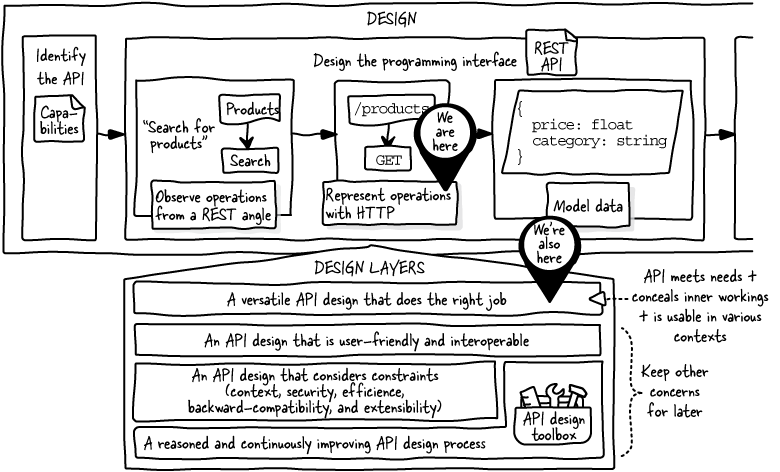
After identifying API capabilities, including operations, we observed them from the REST angle. We identified resources, actions, inputs, and outputs that we can now represent with HTTP.
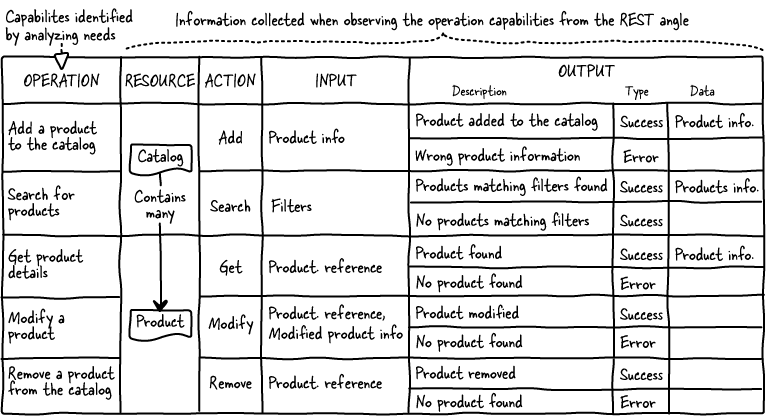
When observing the operations in the API Capabilities Canvas of the Online Shopping API from the REST angle, we identified resources, the actions that apply to them, and their inputs and outputs.
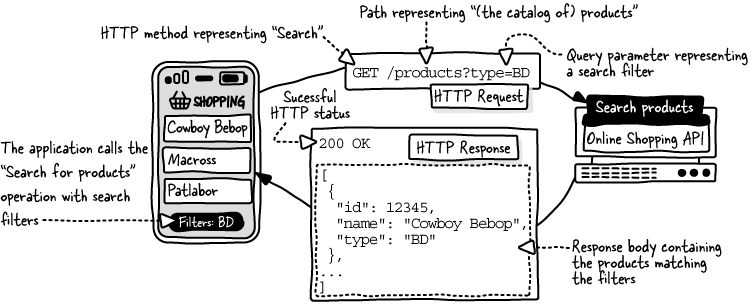
The mobile application searches the catalog for BD products. The API server returns the products with type BD.
We focus on paths, HTTP methods, HTTP statuses, and the locations of input and output data in HTTP requests and responses.
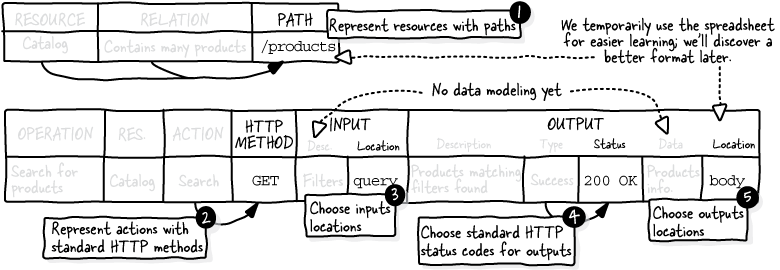
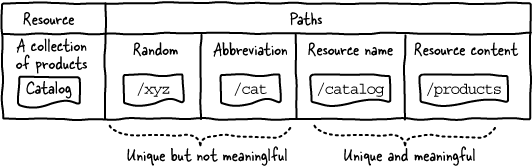
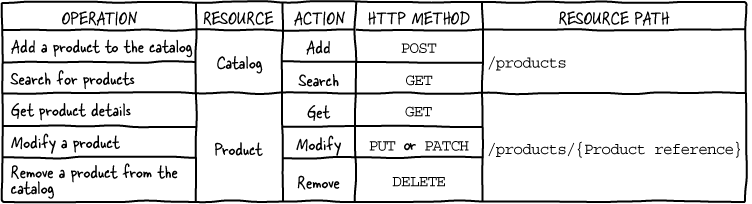
From a REST perspective, a path only needs to be unique. However, we better ensure our paths mean something to our API users.
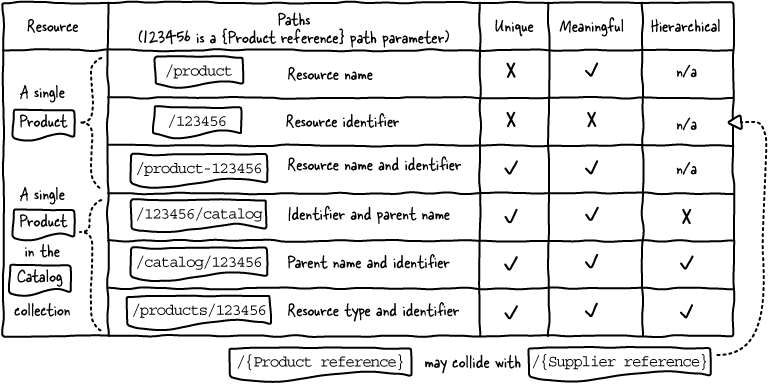
The product resource path requires a unique resource identifier path parameter. Multiple segments can show the relationship between catalog and product resources.
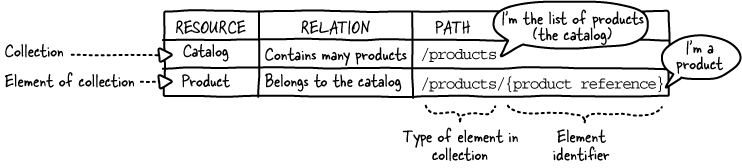
A list is represented by a noun that indicates its element type (usually plural, but singular is also possible). The element identifier is added to the list path, forming the element path. This pattern is widely adopted in REST APIs.
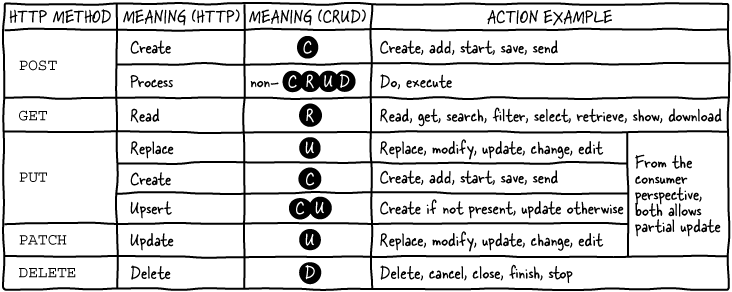
Refer to this mapping in case of doubt about choosing an HTTP method for an action. CRUD stands for Create, Read, Update, Delete.
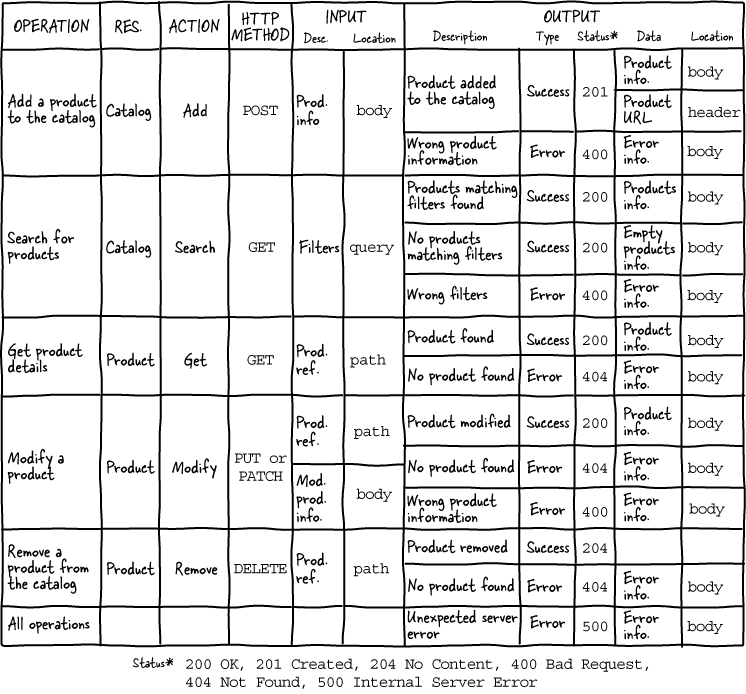
We added the action and HTTP method mapping to the operation table of the API spreadsheet.
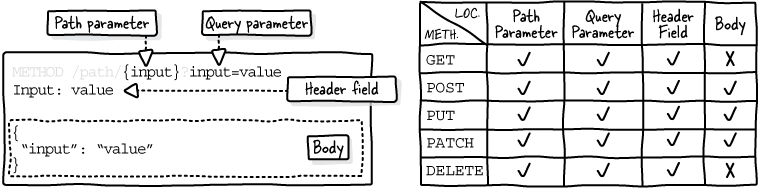
An HTTP request can contain data in path parameters, query parameters, header fields, and the body, which is only available for POST, PUT, and PATCH.
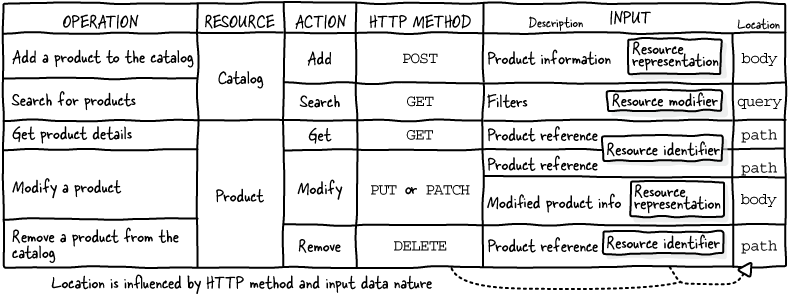
We added the input data location to the operations table of the API spreadsheet based on HTTP methods and the nature of the input data (resource identifiers, representations, or modifiers).
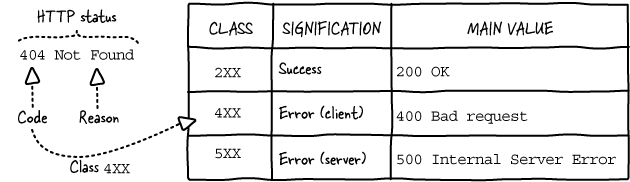
An HTTP status has a numeric code and human-readable reason. The class system allows for easily identifying if the code signifies a success or an error and who is at fault.
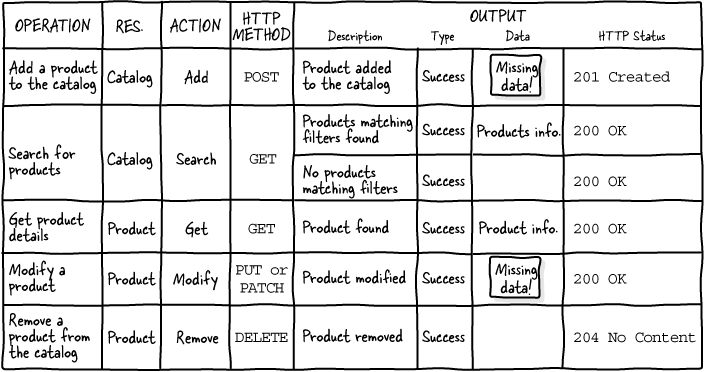
We added the HTTP status corresponding to each successful output and spotted missing output data in the making.
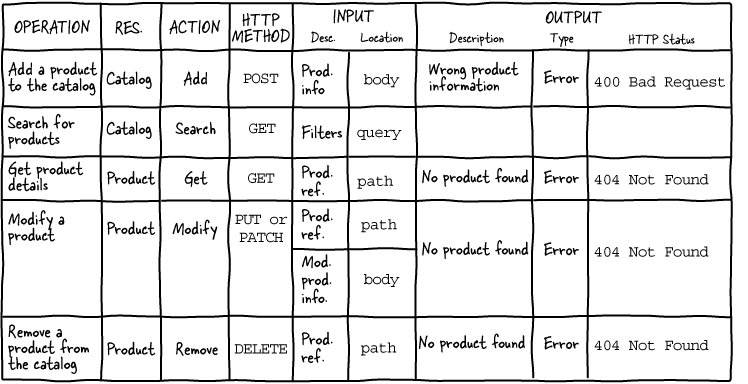
We added the HTTP status corresponding to each error output.
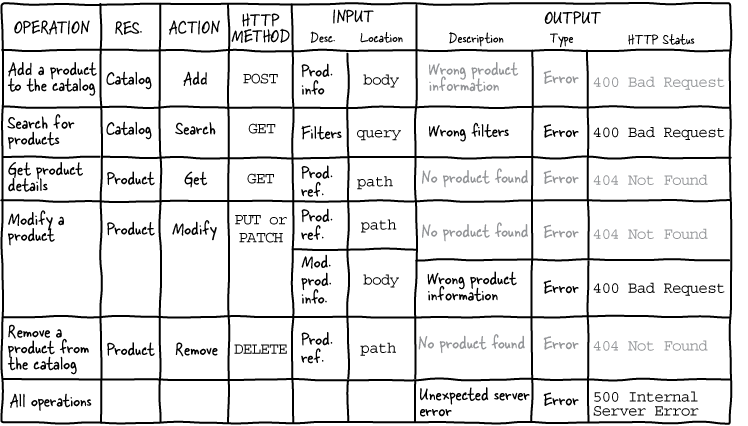
Analyzing inputs helps to identify errors missed during needs analysis. Additionally, all operations need a 500 error.
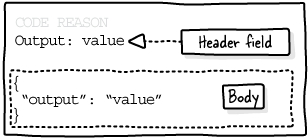
There are only two locations for data in an HTTP response: headers and body.
This is the finalized operation table of the API spreadsheet completed with all output data and their locations.
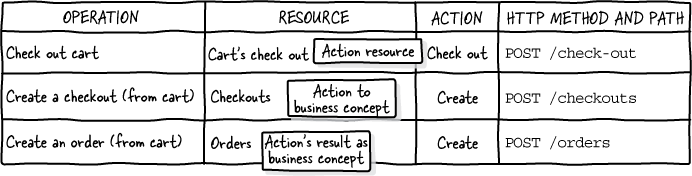
To represent a do action, we can create an action resource, turn the action into a business concept, or focus on the action’s result.
FAQ
How should I design resource paths that are both unique and easy to understand?
Pick paths that uniquely identify resources and are meaningful to users.
- Use nouns that name the resource: /products, /orders.
- Use the collection/element pattern: /products and /products/{productId}.
- Show relationships with hierarchy: /merchants/{merchantId}/products/{productId}.
- Avoid cryptic abbreviations and trailing slashes (prefer /path over /path/).
- Remember: the path is about the API’s conceptual model, not your database or filesystem layout.
When do I use path parameters versus query parameters?
Put identifiers that participate in resource identification in the path; put optional, non-hierarchical tweaks in the query.
- Resource identifiers → path parameters: /products/{productId}.
- Resource modifiers (filters, sort, pagination) → query: /products?type=BD&sort=price.
- Rule of thumb: if the operation still makes sense without the value, it’s likely a modifier (query); if not, it’s an identifier (path).
- GET/DELETE do not use bodies; don’t try to stuff representation or filters there.
How do typical CRUD-like operations map to HTTP methods?
- Create: POST /elements (default) or PUT /elements/{id} when the client supplies a unique ID.
- Search/List: GET /elements.
- Read: GET /elements/{id}.
- Update: PUT or PATCH /elements/{id}.
- Delete: DELETE /elements/{id}.
Should I use POST or PUT to create a resource?
- Use POST /elements when the server generates the identifier (most common).
- Use PUT /elements/{id} when the client provides a predefined, globally unique ID (for example, ISBN).
- Avoid PUT /elements (that implies replacing the whole collection).
What’s the difference between PUT and PATCH for updates?
- Both update a resource at /elements/{id}.
- PUT typically sends a complete representation (replace semantics); PATCH typically sends only changes.
- From a consumer’s perspective, either can support partial updates; choose one as a default (PUT is often simpler) or offer both.
Which HTTP status codes should I use for successful operations?
- Create: 201 Created (+ Location header with the new resource URL; body usually returns the created resource).
- Read: 200 OK (resource in body).
- Search/List: 200 OK (results in body; empty list when none found).
- Update: 200 OK if returning the updated resource, or 204 No Content if not.
- Delete: 204 No Content if nothing is returned, or 200 OK if you return status/details.
- Long-running operations: 202 Accepted (when processing will complete later).
How do I choose error status codes and ensure I handle errors exhaustively?
- Invalid or missing inputs (query/body): 400 Bad Request.
- Resource not found (path parameter doesn’t match an existing resource): 404 Not Found.
- Unexpected server or infrastructure failures: 500 Internal Server Error.
- Do not invent custom status codes; stick to registered ones.
- Review each operation’s inputs and add missing error cases (for example, 400 for bad filters on search).
Where should input data go in HTTP requests?
- Path parameters: identifiers that select the resource (/products/{productId}).
- Query parameters: non-hierarchical modifiers like filters, sort, pagination (/products?type=BD).
- Headers: standard metadata (for example, Accept, Authorization).
- Body (POST/PUT/PATCH only): resource representations for create/update.
Where should output data go in HTTP responses?
- Body: resource representations (read/search/create/update results) and error information.
- Headers: standard metadata only; for creation, include Location with the URL of the created resource when returning 201 Created.
- Delete typically returns no body (204 No Content).
How do I represent non-CRUD “do” operations like “check out” with HTTP?
You have three valid options; choose based on your domain:
- Action resource: POST /check-out or POST /carts/{cartId}/check-out → returns 201 Created with order details and Location.
- Nominalize to a business concept: POST /checkouts, GET /checkouts/{id} → unlocks more capabilities (search, read).
- Focus on the result: POST /orders (create an order from the cart) → returns 201 Created with order and Location.
- All are valid in REST; the latter two are often preferred for extensibility and clarity.

 The Design of Web APIs, Second Edition ebook for free
