Apache Ant is presented as a common Java build tool that has long included JUnit integration, making it well suited for automating compilation, test execution, and result reporting. The text emphasizes that the goal of the build process is not to inspect application behavior directly, but to ensure the code compiles, tests can be run automatically, and failures can be reviewed in a useful format. It also notes an important compatibility point: JUnit 4 support arrived in Ant 1.7, so older Ant versions may require using JUnit 3.8-style tests.
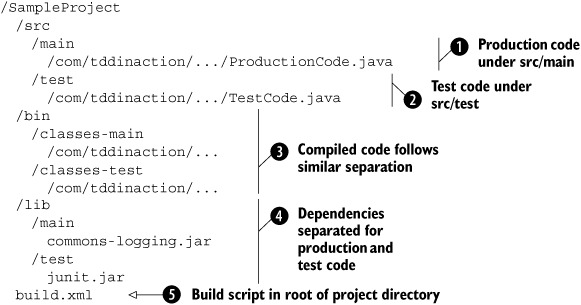
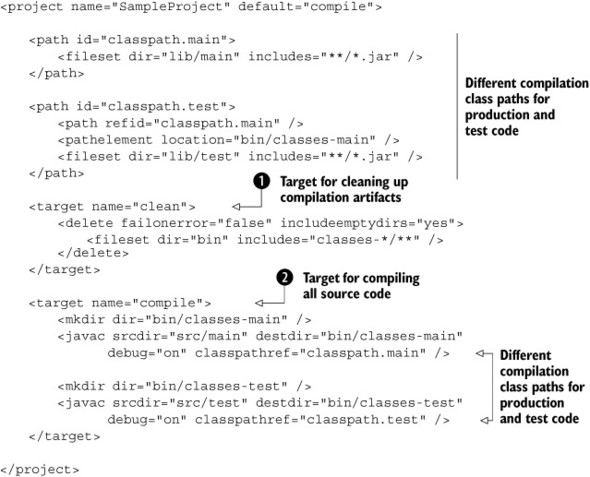
The discussion then focuses on how project layout shapes the build script. A clean separation between production and test sources, compiled output, and dependencies makes Ant scripting simpler and helps distinguish runtime code from test-only code. Typical directories include separate trees for main and test sources, separate output folders for compiled classes, and separate library folders for production and test dependencies, while the build file itself lives at the root of the project. With that structure in place, the first build step is straightforward: define targets for cleaning compiled files and compiling all source code.
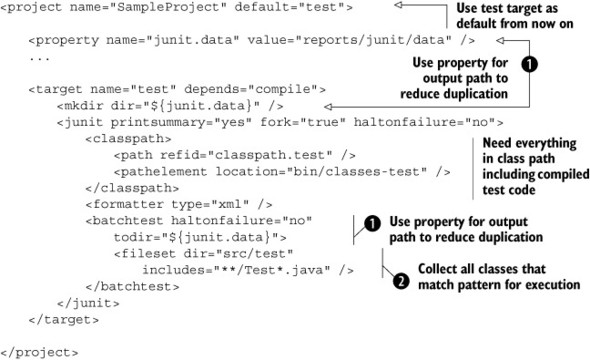
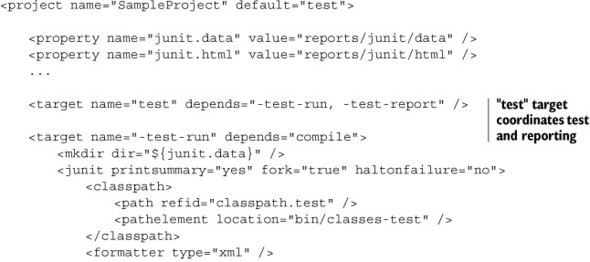
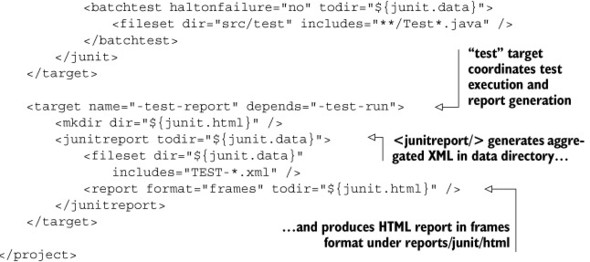
After compilation, the build is extended to run tests using Ant’s built-in JUnit task. This target gathers all unit tests from the test source tree and produces XML result files that record what ran and how it performed. Since those XML files are not easy to read directly, the process is completed by adding the JUnit report task, which transforms the raw test output into a compact HTML report. The result is a practical Ant build that can clean, compile, execute tests, and generate a readable summary of the test run.
Listing D.1. Sample directory structure
Listing D.2. build.xml for compiling all code for the SampleProject
Listing D.3. build.xml with a test target using Ant’s standard <junit/> task
Listing D.4. build.xml with a target for running tests and generating the report
FAQ
What is Apache Ant used for in a Java project?Apache Ant is a build tool commonly used by Java developers to automate tasks such as compiling source code, running tests, and generating reports.How does Ant fit into JUnit test execution?Ant has built-in JUnit integration through the <junit/> task, which lets you run unit tests as part of the build process.What project directory structure does the chapter recommend?The chapter recommends separating source into src/main and src/test, compiled classes into bin/classes-main and bin/classes-test, and dependencies into lib/main and lib/test.Why is separating main and test source code useful?It makes the project easier to understand and simplifies build scripting because production code and test code are kept in clearly distinct locations.Where should the Ant build script be placed?The build.xml file should be located in the root of the project directory.What targets are typically included in the basic Ant build script?The basic script in the chapter includes clean and compile targets.What does the clean target do?The clean target deletes all compiled class files from the output directories.What does the compile target do?The compile target compiles all .java source files into the appropriate bin directory.How are test results generated by Ant’s <junit/> task?The <junit/> task collects and runs tests, then generates XML result files in a configured reports directory such as reports/junit/data.How do you produce a human-readable test report from Ant test results?You use Ant’s <junitreport/> task to transform the XML test results into a readable HTML report.
pro $24.99 per month
access to all Manning books, MEAPs, liveVideos, liveProjects, and audiobooks!

 Test Driven ebook for free
