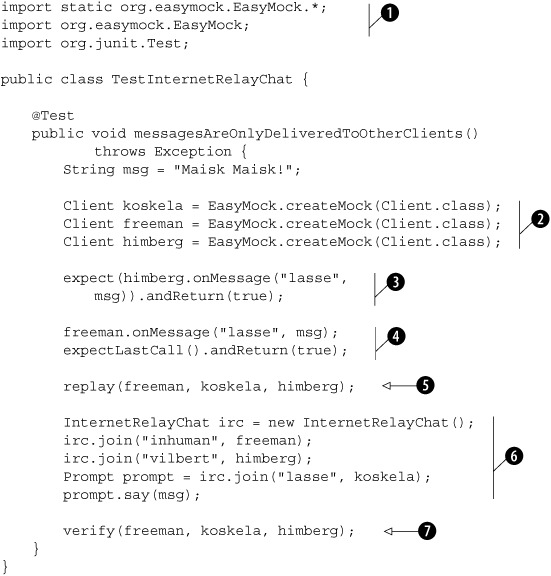
The appendix gives a compact introduction to using EasyMock for unit testing Java code by simulating the behavior of collaborating objects. It emphasizes the overall flow: bring in the EasyMock API, create mock instances for interfaces, define what interactions the test expects, and then switch the mocks into a mode where those expectations are actually exercised during the test run.
At a high level, EasyMock supports a clear arrange-act-assert style. First, you set up mocks and record the calls they should receive, including any alternative syntax that accomplishes the same thing. Then you transition the mocks into replay mode so they stop recording and start behaving according to the script you defined. This makes it possible to isolate the class under test from its dependencies and verify that its behavior is correct without relying on real implementations.
After the setup is complete, the test drives the production code and lets the mock objects stand in for external collaborators. Once the code under test has run, the mocks are checked to confirm that the expected calls happened in the right way. The appendix’s main message is that EasyMock helps testers express interaction-based expectations clearly and verify them reliably, while keeping the focus on the behavior of the unit being tested.
FAQ
What is EasyMock used for in a TDD workflow?EasyMock is used to create mock objects that simulate dependencies, allowing you to record expected interactions, switch the mocks to replay mode, exercise the code under test, and then verify that the expected calls happened.How do you start using EasyMock in a test?You typically import the static utility methods from EasyMock and the EasyMock class itself, so you can call its mocking and verification methods conveniently in your test code.How does EasyMock create a mock object?You ask EasyMock to create a mock for a given interface, which gives you a test double that can stand in for a real dependency during the test.What does it mean to record expected interactions?Recording expected interactions means defining which methods should be called on the mock, with what arguments, and sometimes in what order, before the actual test execution begins.Is there more than one way to record expectations in EasyMock?Yes. EasyMock provides an alternative syntax that is functionally equivalent to the standard expectation-recording style, so you can choose the form that reads best for your test.Why do you switch mocks to replay mode?You switch the mocks to replay mode when you are finished recording expectations so that EasyMock stops accepting setup calls and starts checking actual interactions against the recorded expectations.When should the code under test be exercised?After the mocks are in replay mode and everything is set up, you run the code under test to see whether it uses the dependencies as expected.What is the purpose of verifying mocks at the end of a test?Verification confirms that the expected interactions actually took place during execution, helping you ensure the unit behaved correctly.What happens if the code under test does not make the expected mock calls?During verification, EasyMock will report a failure if the expected interactions were missing, incorrect, or otherwise not matched by what actually happened.What is the overall sequence for using EasyMock in a test?The typical sequence is: import EasyMock utilities, create mock objects, record expectations, switch to replay mode, exercise the code under test, and finally verify the mocks.
pro $24.99 per month
access to all Manning books, MEAPs, liveVideos, liveProjects, and audiobooks!

 Test Driven ebook for free
