Overview
4 Expressions and Iterations
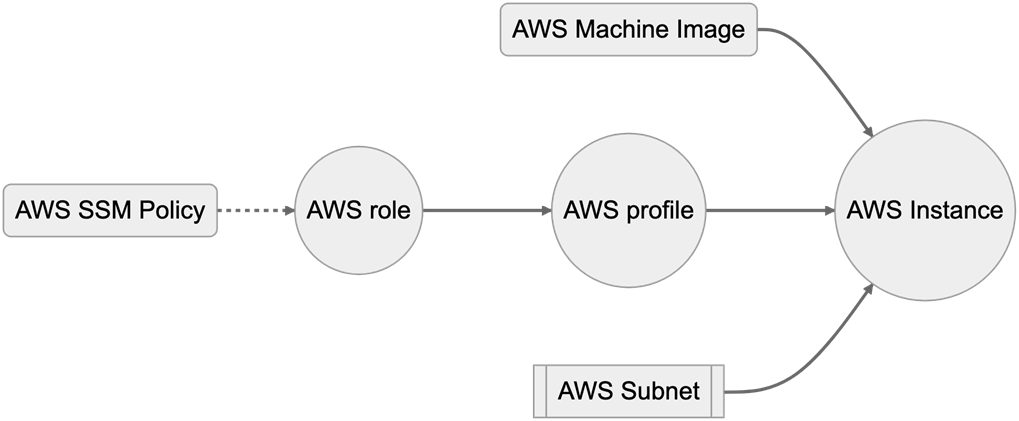
This chapter moves beyond defining static resources to show how expressions, operators, functions, and iteration make Terraform and OpenTofu configurations dynamic and reusable. Through an evolving EC2 module, it demonstrates adding tags and a name_prefix, scaling instances with count, wiring IAM roles and instance profiles for permissions, and optionally enabling AWS Systems Manager via a simple boolean toggle. The thread emphasizes researching requirements, designing for flexibility, and testing expressions with the terraform console to build features that teams can enable, disable, or customize without changing module code.
The language fundamentals cover expressions and operators (math, comparison, boolean), conditional expressions for branching, and the importance of operator precedence and clarity with parentheses. Functions are presented as data transformers—string, numeric, collection, encoding, date/time, hashing, IP, and type conversion—with guidance to avoid impure functions (like uuid and timestamp) in resource arguments to prevent perpetual diffs. The chapter shows building strings with interpolation and templates using file, templatefile, and templatestring, including directives for conditionals and loops, and advises favoring jsonencode/yamlencode and data sources (such as IAM policy documents) over hand-rolled templates for structured formats. It also introduces regex, regexall, and replace for pattern matching and transformation, implicit and explicit type conversions, sensitivity controls (sensitive/nonsensitive), and pragmatic error handling with try and can, especially in variable validation.
Iteration is addressed in two forms: multiplying resources and transforming data. The count and for_each meta-arguments create many resources from one block, expose indices or key/value pairs, and pair well with booleans to toggle resources; outputs and attributes are accessed by index or via splat syntax. The chapter highlights plan-time constraints—values for count/for_each must be known early—and offers safe workarounds (e.g., using count with local values) rather than splitting applies. For data transformation, for expressions convert and filter collections, return lists or objects, support grouping mode for aggregation, and can be shortened with splat expressions for common projections. Finally, dynamic blocks generate repeated nested configuration (such as security group rules) and can be conditionally enabled, rounding out a toolkit for concise, composable, and maintainable infrastructure code.
Summary
- Terraform has a variety of operators that can be used to perform math, boolean operations, and comparisons (such as greater than/equals to).
- There is a rich standard library of functions built into Terraform, and starting with Terraform v1.8 providers can also add their own functions.
- Functions in Terraform are primarily used to transform data, not to take action.
- Larger strings can be stored as either files or templates, with templates having their own small language that can be used to generate complex strings from developer input.
- Resources and Modules can have multiple instances of resources created from the same block through the use of count and for_each.
FAQ
When should I use count vs for_each to create multiple resources?
Use count when you just need N copies of the same resource and can index them with count.index. Use for_each when each instance needs its own key and configuration (map/object or set input), accessed via each.key and each.value. Lists are not allowed directly in for_each; convert with toset(list). Both metaparameters must be known at plan time and you cannot use both in the same block.How do Terraform’s conditional expressions (ternary) work, and what’s the main caveat?
The syntax is condition ? true_value : false_value and it can be used anywhere an expression is allowed (commonly to toggle resources with count = var.enabled ? 1 : 0). Caveat: Terraform evaluates both true and false branches, even though only one is returned. If one branch may error (for example, referencing a resource that doesn’t exist), wrap the whole expression with try(...) to provide a safe fallback.What operator types are available and what is the precedence (order of operations)?
Terraform supports math (+, -, *, /, %), comparison (==, !=, <, <=, >, >=), and boolean (&&, ||, !) operators. Precedence from highest to lowest: ! and unary -, then *, /, %, then + and -, then comparisons (>, >=, <, <=), then equality (==, !=), then &&, then ||. Use parentheses for clarity in complex expressions.What’s the difference between pure and impure functions in Terraform, and why does it matter?
Pure functions always return the same output for the same input (e.g., min, merge, upper). Impure functions (e.g., uuid, timestamp) change between applies and can force perpetual diffs if used in resource arguments. Avoid impure functions in resource configuration; if you need randomness or time-based values, use dedicated providers like random and time (discussed later in the book).How do I convert types explicitly and manage sensitive values?
Terraform implicitly converts types when it can, but for reliability prefer explicit conversions: tobool, tonumber, tostring, tolist, toset, tomap. For sensitivity, use sensitive(value) to mark a value as sensitive (hidden in logs/outputs) and nonsensitive(value) to remove that flag when you’re sure it’s safe to display. These return new values; they don’t mutate the original.How can I read files or build dynamic text, and when should I avoid templates?
Use file(path) to read a static file. Use templatefile(path, { vars... }) to interpolate and loop in templates stored on disk. OpenTofu and Terraform v1.9+ add templatestring(template, { vars... }) for inline templates. Prefer encoding functions (jsonencode, yamlencode) or purpose-built data sources (e.g., aws_iam_policy_document) over hand-written templates for JSON/YAML or structured policies. The old template_file data source is deprecated—use functions instead.How do I validate and extract text with regular expressions?
Use regex(pattern, text) to return a single match; it errors if no match. Use regexall(pattern, text) to return all matches; it returns an empty list if none. Patterns support unnamed capture groups (return list) and named capture groups (return map). Use replace(text, pattern_or_plain, replacement) to substitute text; with regex you can reuse captures (e.g., $1 or named $group). Terraform follows Go’s regex syntax; test patterns accordingly.How do I transform and filter collections with for-expressions and the splat operator?
A for-expression maps over a list/object and returns a new list [for v in xs : expr] or object { for k, v in obj : new_key => new_value }. Add if to filter ([for x in xs : x if x != null]). “Grouping mode” uses an ellipsis ... to accumulate multiple values under the same key. The splat operator ([*]) is shorthand for building lists of attributes (e.g., resources[*].id) and can also turn a single value into a one-item list (var.sg_id[*]).Why do count/for_each sometimes fail during plan, and what are the workarounds?
Their values must be known at the start of planning; they can’t depend on resource attributes or impure functions like timestamp/uuid. If for_each would be unknown, consider switching to count and index into precomputed locals or inputs (e.g., element(var.subnet_ids, count.index)). Avoid splitting applies into “batches”—it complicates workflows. Refactor inputs so metaparameters are plan-time known.What are dynamic blocks and how can I toggle subblocks on and off?
Dynamic blocks generate repeated subblocks with iteration: dynamic "ingress" { for_each = ... content { ... } }. Inside content, reference the iterator by the subblock name (e.g., ingress.value). To toggle a single optional subblock, use a conditional list: for_each = var.enable ? ["placeholder"] : [] so zero items disables the subblock and one item enables it.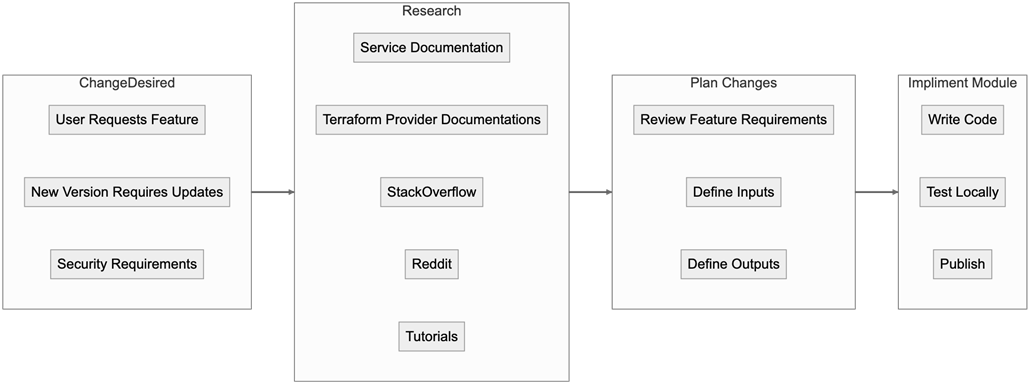

 Terraform in Depth ebook for free
