This chapter introduces Terraform’s declarative approach to Infrastructure as Code and explains how HashiCorp Configuration Language (HCL) acts as the “blueprint” for real systems. Using an end-to-end “hello world” example that provisions an AWS instance, it shows how plans defined in code become repeatable, reviewable infrastructure, creating a shared source of truth for teams. The emphasis is on expressing desired state rather than imperative steps, enabling consistent builds across accounts and regions while remaining easy to evolve and reuse.
At the heart of Terraform are blocks—the nouns of the language—that declare configuration and infrastructure. The chapter breaks down core block types and their roles: settings and providers to configure the workspace; resources to create or update infrastructure; data sources to read existing state; and supporting blocks like variables, locals, modules, outputs, checks, and the refactoring trio import/moved/removed. It details block anatomy (type, labels, arguments, subblocks), how attributes are exposed and consumed, and how Terraform infers ordering by building a dependency graph rather than relying on file order. Clear style guidelines, while not enforced by the engine, improve readability and collaboration.
Practically, the chapter shows how to declare required providers, authenticate and scope provider configurations, and use aliases for multi-account or multi-region work. It demonstrates using data sources to dynamically discover inputs (such as AMIs and subnets) and mapping them into resource arguments, then refines behavior with meta arguments: selecting provider instances, controlling replacement and update behavior with lifecycle settings (create_before_destroy, prevent_destroy, ignore_changes, replace_triggered_by), and declaring explicit dependencies with depends_on. It also introduces state backends and the cloud block for remote state, experiments for opt-in features, and modules for reuse with source, version, and provider wiring. Together, these concepts form a practical toolkit for building portable, maintainable, and safely evolvable infrastructure with Terraform and OpenTofu.
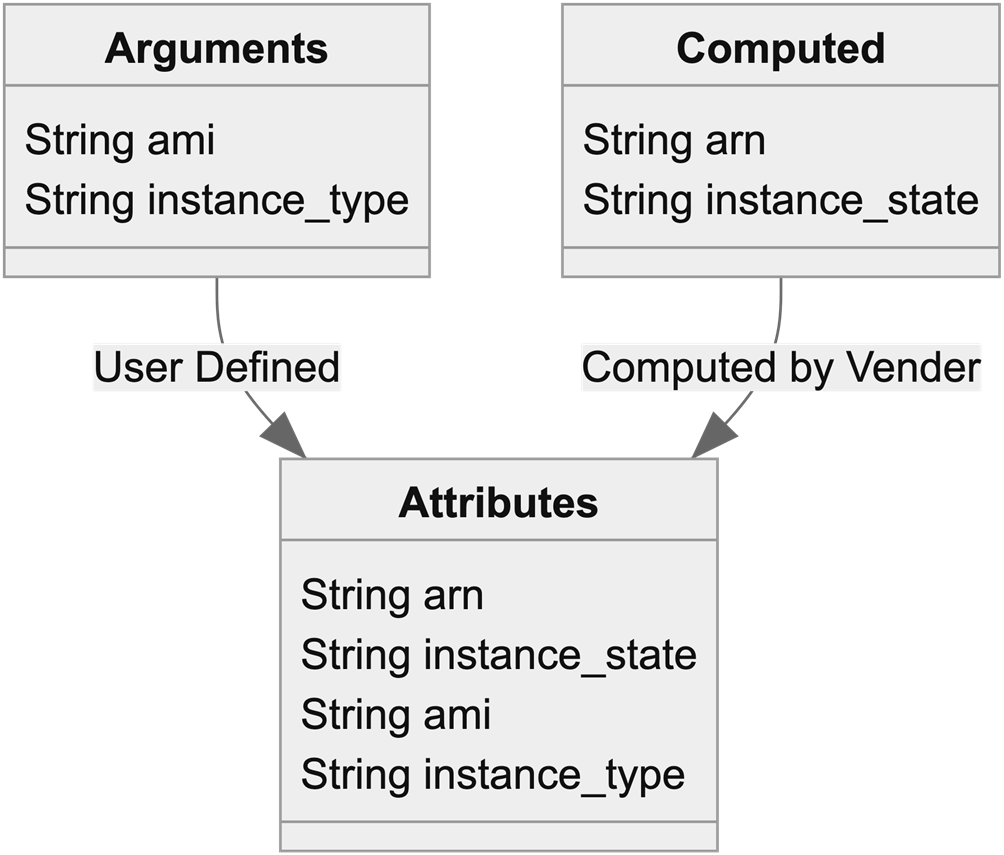
The aws_instance resource used in our Hello World example has two attributes, arn and instance_state, that are only exposed after the resource is created. The Arguments are also passed through as accessible Attributes.
Summary
The Terraform Language is largely centered around blocks.
There’s a Terraform Settings block that’s used to configure Providers and Workspace settings.
Data Sources are read-only blocks used for looking up data.
Resource blocks are the primary reason Terraform exists and are used to manage infrastructure.
Data Sources and Resources can be abstracted into reusable Modules, which are the building blocks of large systems.
Lifecycle arguments can change how a Resource is managed.
FAQ
What is Terraform HCL and what is a “block”?Terraform’s HashiCorp Configuration Language (HCL) is expressed as blocks. A block has:
- A type (for example: terraform, provider, resource, data)
- Optional labels (identifiers)
- Arguments (key = value settings)
- Optional subblocks (nested blocks)
Blocks export attributes that other blocks can reference. Core block types you’ll use to launch and update infrastructure include: terraform (settings), provider (vendor config), resource (create/update infrastructure), and data (read-only lookups). Other important types include variable, locals, module, output, import, moved, removed, and check.What’s the difference between required_providers and provider blocks?- required_providers (inside the terraform block) declares dependencies: the provider’s source (e.g., hashicorp/aws) and version constraints. It tells Terraform what to download.
- provider blocks configure a given provider instance: authentication, region/project, and other settings. You can define multiple provider instances using aliases.
- Providers are configured only in the root module. Terraform can infer providers from resource names, but explicitly defining them is best practice.How do Data Sources differ from Resources?- Resources manage infrastructure: they create, update, and destroy components exposed by a provider (e.g., aws_instance).
- Data sources are read-only: they look up existing information (e.g., VPCs, subnets, AMIs) and expose attributes you can feed into resources.
- Data sources often support filters and owners to precisely select items (for example, most recent Ubuntu AMI from Canonical).How do labels and references work in Terraform?- Some blocks have no labels (terraform, locals). Others have one label (provider, variable, module, output). Resource and data blocks have two labels: subtype (e.g., aws_instance) and a local name (e.g., hello_world).
- A reference typically looks like type.subtype.name (for example, resource.aws_instance.hello_world). In many expressions you use the short form (aws_instance.hello_world or data.aws_subnets.main.ids).
- Variables are referenced as var.name. Module outputs are module.module_name.output_name.How does Terraform decide the order of operations?File and line order don’t matter. During plan, Terraform builds a dependency graph (DAG) by tracing references:
- Implicit dependencies: when one block uses another block’s attributes.
- Explicit dependencies: the depends_on meta argument lets you force ordering when no attribute reference exists (e.g., ensure a NAT Gateway waits for an Internet Gateway).What are Meta Arguments and when would I use them?Meta arguments modify how Terraform plans and applies, not the vendor resource itself.
- provider: pick a specific provider alias for a block.
- lifecycle subblock:
- create_before_destroy: build the replacement first (useful for HA resources).
- prevent_destroy: fail any plan that would destroy the resource (use sparingly).
- ignore_changes: don’t update on changes to specific arguments (or all).
- replace_triggered_by: force replacement when other resources or attributes change.
- depends_on: force explicit dependencies.
Note: Many lifecycle fields must be literal or known at plan time.How can I use multiple regions/accounts with one provider?- Define multiple provider blocks with different settings and an alias for each (e.g., aws.west).
- On resources/data sources, set provider = aws.alias to use a non-default instance.
- When calling modules, pass specific provider aliases via the module’s providers argument to control which provider instance the module uses.What does the Terraform settings block do, and how do backends and cloud fit in?The terraform block configures:
- required_providers
- experiments (opt-in, unstable features)
- version constraints for Terraform itself
- backend or cloud (state storage)
Backends store state remotely (S3, GCS, AzureRM, Consul, remote). If none is set, Terraform uses a local backend (not recommended for production). The cloud block configures Terraform Cloud/Enterprise and replaces backend when used.How do I create reusable components with modules?- Use the module block with source (registry URL, VCS ref, or local path) and optional version constraints.
- Pass inputs as arguments (the module declares them via variable blocks) and consume outputs via module.module_name.output_name.
- Modules can accept meta arguments such as providers and depends_on. They’re the preferred way to package and reuse infrastructure patterns.How do Import, Moved, and Removed blocks help with existing or refactored infrastructure?- import: codifies importing existing resources into state (mapping an external ID to a resource block). Remove these once imports are complete to keep configs reusable.
- moved: records renames or moves (e.g., into a module) so Terraform can relate state to the new address. Safe to leave in code.
- removed: marks items as removed without destroying live infrastructure, aiding refactors and deprecations.
pro $24.99 per month
access to all Manning books, MEAPs, liveVideos, liveProjects, and audiobooks!

 Terraform in Depth ebook for free
