3 Allocators, data, and comptime
This chapter uses the humble cat utility as a running example to give a grounded tour of systems programming in Zig. It balances performance and reliability while showing how to write cross‑platform file I/O, reason about memory with explicit allocators, structure control flow with defer and robust error handling, and ultimately shape programs at compile time with the build system and comptime. The narrative emphasizes practical trade‑offs: code need not be glamorous to be invaluable, but it should be explicit, predictable, and easy to adapt to real‑world constraints.
The journey starts with a minimal prototype that reads and prints files using std.fs and the current working directory, then deepens into memory management: when to prefer stack vs. heap, how allocators abstract heap operations, and how DebugAllocator plus defer makes leaks and cleanup evident. Errors are modeled as error sets and error unions; try cleanly propagates failures, catch handles them locally, and the code distinguishes between developer‑facing crashes and user‑facing messages. The chapter introduces the interface pattern through Writers (and later Readers), shows how to buffer stdout, and replaces read‑whole‑file allocation with streaming from a Reader to a Writer to avoid unnecessary memory use. Along the way, it teaches expressive for and while loops (including ranges, multi‑sequence iteration, break/continue, and loop‑as‑expression) to keep control flow concise and clear.
Finally, the chapter builds configurable, production‑ready variants of cat with Zig’s build system and comptime. It explains build graphs, target and optimize modes, and injects build options (such as reader and writer buffer sizes) into the program via a generated options module. Optionals facilitate ergonomic configuration handling, and comptime lets those options shape types (like buffer‑backed arrays) without runtime overhead. The result is a single codebase that can be compiled into tailored executables—tiny, low‑memory builds for constrained devices or high‑throughput builds with larger buffers—illustrating how Zig’s explicit allocation, error semantics, interfaces, loops, and build tooling combine to produce robust, adaptable systems software.
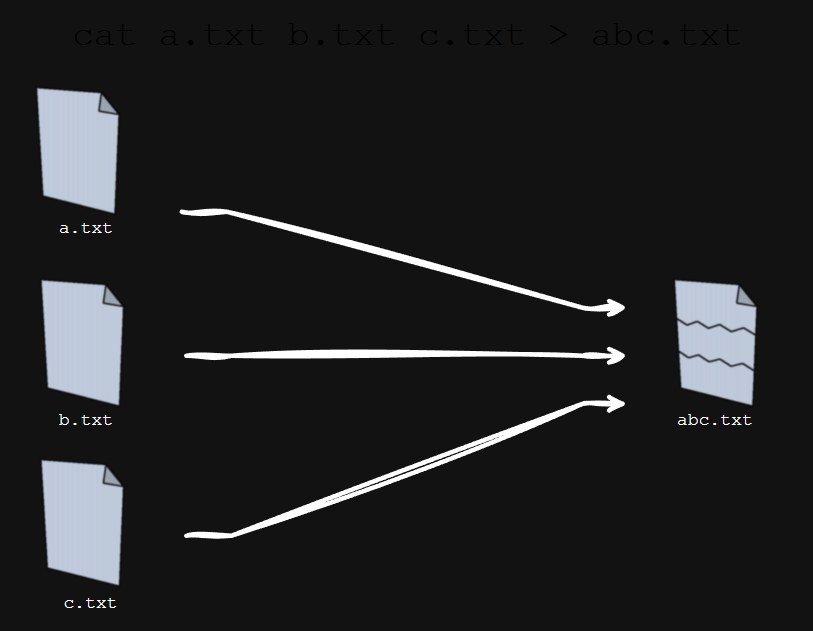
How cat works
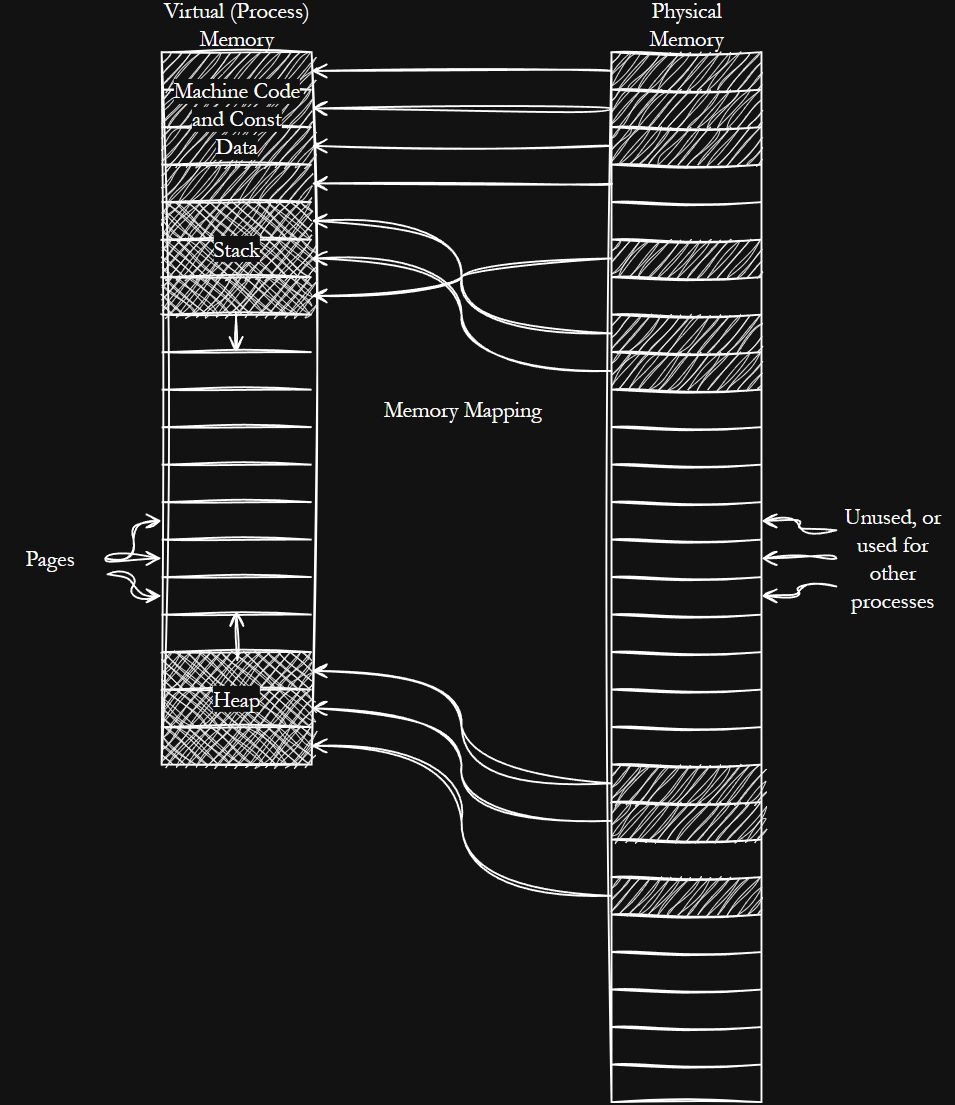
Memory as seen by a process
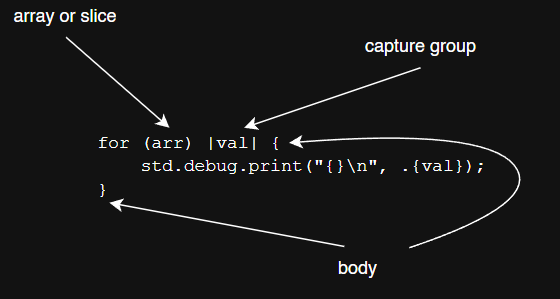
The humble for loop
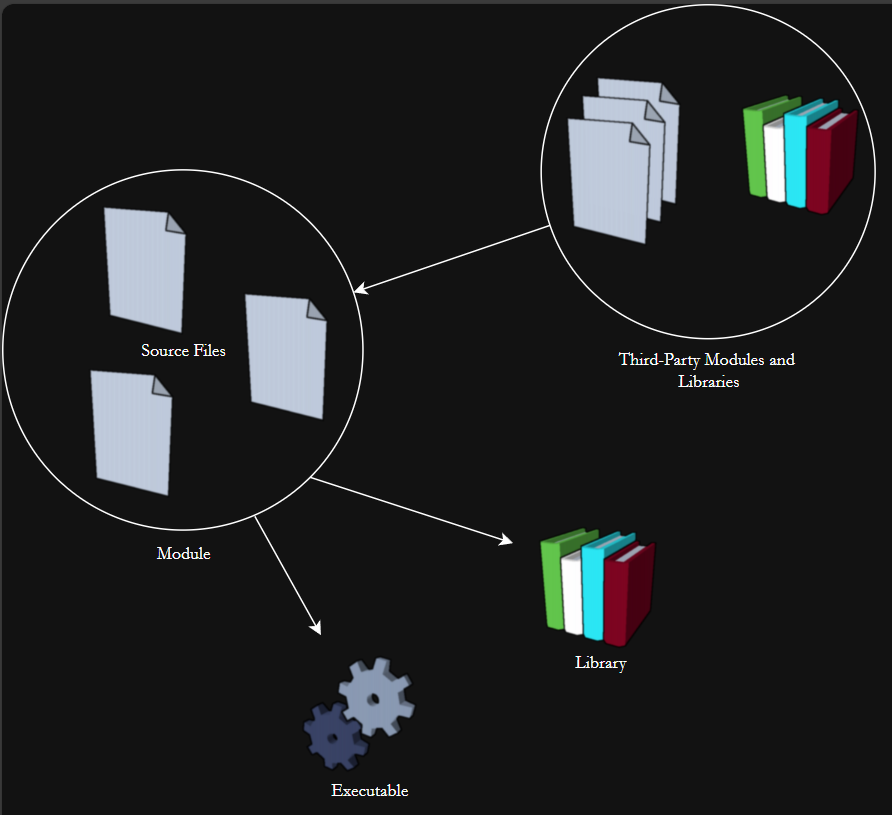
Build graphs
Summary
- Errors contain an array of tools to explicitly handle unexpected circumstances.
- Use allocators to dynamically allocate memory, but use them wisely.
- The standard library provides friendly and cross-platform tools to interact with the operating system.
- For loops, while loops, break, and continue provide a ton of flexibility to express control flow.
- Build scripts and comptime are able to encode flexible logic and streamline development before you actually deploy your project.
- Use prototyping and iteration to explore problems and adapt to changing requirements.
FAQ
Why does Zig make you pass an Allocator instead of hiding it?
Zig treats allocation as an explicit, pluggable dependency so you control performance, memory layout, and diagnostics. By passing an allocator: - You can choose a strategy (DebugAllocator, ArenaAllocator, FixedBufferAllocator, StackFallbackAllocator, C allocator) per use case. - You keep third-party code honest: libraries don’t allocate behind your back with unknown policies. - You can debug leaks and misuse (DebugAllocator tracks allocations in Debug mode). - You can minimize heap usage or avoid it entirely where needed.How do I read a file safely and avoid memory leaks?
- Get a directory handle:const cwd = std.fs.cwd();
- Read with an allocator and a size cap: const text = try cwd.readFileAlloc(ally, path, max_bytes);
- Always free what you allocate: defer ally.free(text);
- In Debug mode, DebugAllocator reports leaks with stack traces, making it easy to find missing frees.What’s the difference between error sets, error unions, try, and catch?
- Error set: a type that enumerates possible errors, e.g.const E = error{TooLong, TooShort};
- Error union: a value that is either an error or a payload, e.g. E!i32.
- try: unwraps an error union, propagating the error on failure, e.g. const v = try f();
- catch: handles an error locally and provides a fallback, e.g. const v = f() catch default_value; or f() catch |e| return e;What does defer do and when should I use it?
defer schedules cleanup when the current scope exits (success or error). Common uses:
- Deinitialize and release: defer _ = gpa.deinit();
- Free memory: defer ally.free(buf);
- Close files: defer file.close();
- Flush I/O: defer stdout.flush() catch {};
This pattern prevents leaks and missed cleanup on early returns.How do Writers and Readers work, and what is the interface pattern?
- Files expose concrete Writer/Reader types backed by buffers:std.fs.File.stdout().writer(&buf), file.reader(&buf).
- You typically use their std.io.Writer/std.io.Reader interface via &writer.interface or &reader.interface.
- Under the hood, a vtable pairs an opaque context with function pointers (no runtime magic).
- With both sides, you can stream: try reader.streamRemaining(writer); to copy bytes without allocating whole-file buffers.How do I implement a robust, cross‑platform cat without allocating whole files?
- Iterate CLI args:const args = try std.process.argsAlloc(ally);
- For each path:
- Open file with cwd.openFile(path, .{}), on failure print to stderr and continue.
- Create a reader with a small buffer and a stdout writer.
- Stream: _ = try reader.streamRemaining(stdout);
- defer file.close();
- Flush stdout at the end. This avoids out-of-memory on large files and matches real cat behavior on open failures.How do Zig for loops work (ranges, multiple sequences, and expression form)?
- Range:for (0..n) |i| { ... }
- Multiple sequences together: for (names, counts) |name, count| { ... }
- With index and data: for (items, 0..) |item, i| { ... }
- Expression form returns via break and requires an else fallback: const idx = for (items, 0..) |x, i| if (x==v) break i else null;
- Control flow: break to exit, continue to skip.What are optionals in Zig and how do I unwrap them safely?
- Type:?T means “either T or null.”
- if-unwrapping: if (maybe) |val| { use(val) } else { ... }
- Force unwrap (only when guaranteed non-null): maybe.?; (crashes in safe modes if null)
- Fallback: const v = maybe orelse default_value;
Use optionals for “value may be absent,” not for exceptional conditions (use errors for that).How do I use build.zig and comptime options to tune buffer sizes?
- In build.zig, define flags:b.option(usize, "reader-buffer-size", "Reader buffer bytes") orelse 1024.
- Export them via b.addOptions() and options.createModule(), then mod.addImport("options", options_mod).
- In code: const options = @import("options"); and declare buffers with comptime sizes: var buf: [options.reader_buffer_size]u8 = undefined;
- Build with flags:
- Small buffers: zig build -Dreader-buffer-size=512 -Dwriter-buffer-size=512
- Large buffers: zig build -Dreader-buffer-size=8192 -Dwriter-buffer-size=8192What optimize modes should I choose when building?
- Debug: fast compiles, safety on, best for iteration and debugging. - ReleaseFast: optimized for speed, safety off. - ReleaseSmall: optimized for binary size, safety off. - ReleaseSafe: some optimizations, safety on; great when robustness matters. Select with-Doptimize=Debug|ReleaseFast|ReleaseSmall|ReleaseSafe and optionally set a cross-target via -Dtarget.
 Systems Programming with Zig ebook for free
