9 Using the Spring web scopes
Spring web scopes let you control how long a bean instance lives in a web application and who can access it. Beyond the usual singleton and prototype scopes, Spring offers request, session, and application scopes, each tied to a different web-app lifecycle. The chapter uses these scopes to show how Spring can manage data in ways that match HTTP traffic and user interactions.
The request scope is presented as the best choice for data that should exist only for a single HTTP request, such as credentials used during login. A request-scoped bean gets a fresh instance for every request, which keeps data isolated and avoids concurrency problems, so it is well suited for short-lived, sensitive information. The chapter builds a simple login form and controller, then moves the authentication logic into a request-scoped processor bean that checks credentials and returns a success or failure result.
The session scope is then used to keep information available across multiple requests from the same user, such as remembering that the user is logged in and carrying the username through the app. The chapter adds a session-scoped bean to store logged-in user details, redirects authenticated users to a protected main page, and supports logout by clearing the session data. Finally, the application scope is introduced as a single shared instance for the whole app, illustrated with a login counter, while also warning that it can create concurrency and design risks and is often less desirable than using a database for shared state.
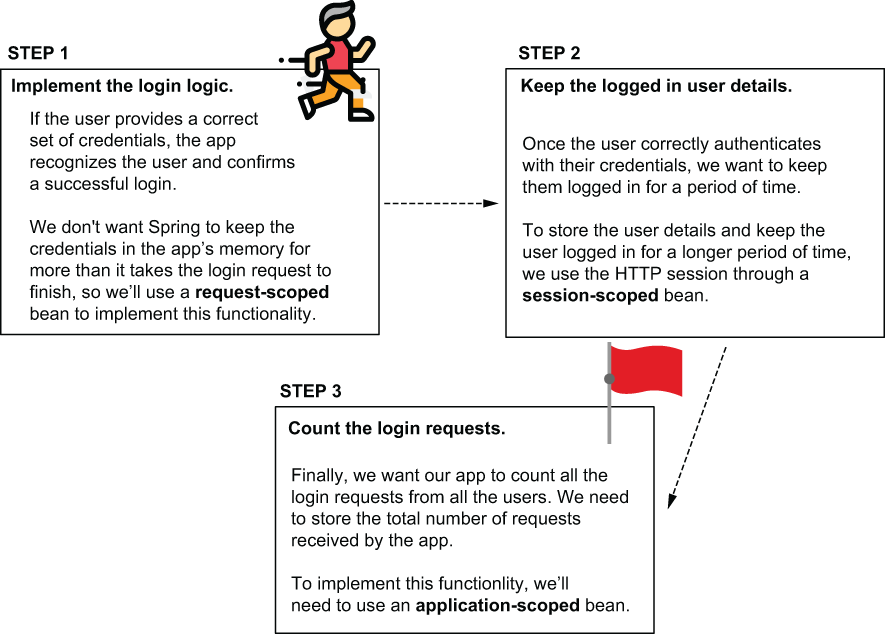
We’ll implement the login functionality in three steps. For each step we implement, we’ll need to use a different bean scope. We use a request-scoped bean to implement the login logic without risking storing the credentials for longer than the login request. We’ll then decide what details we need to store for the authenticated user in a session-scoped bean. Finally, we’ll implement a feature to count all the login requests, and we’ll use an application-scoped bean to keep the number.
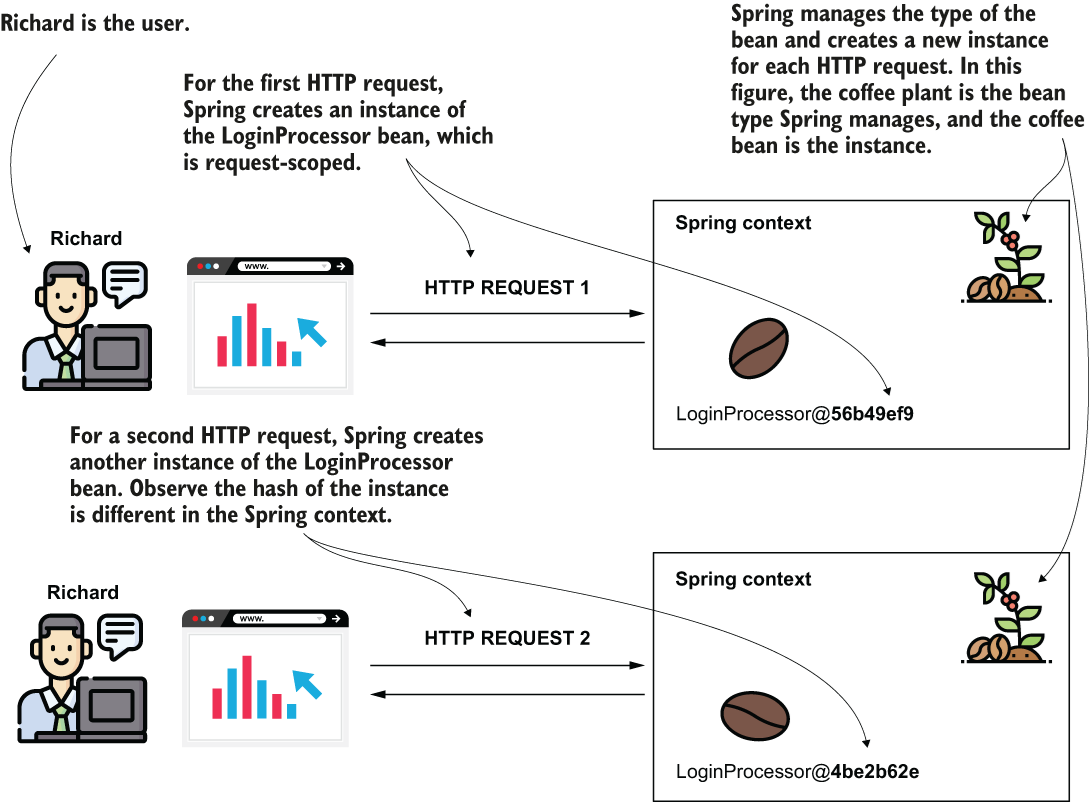
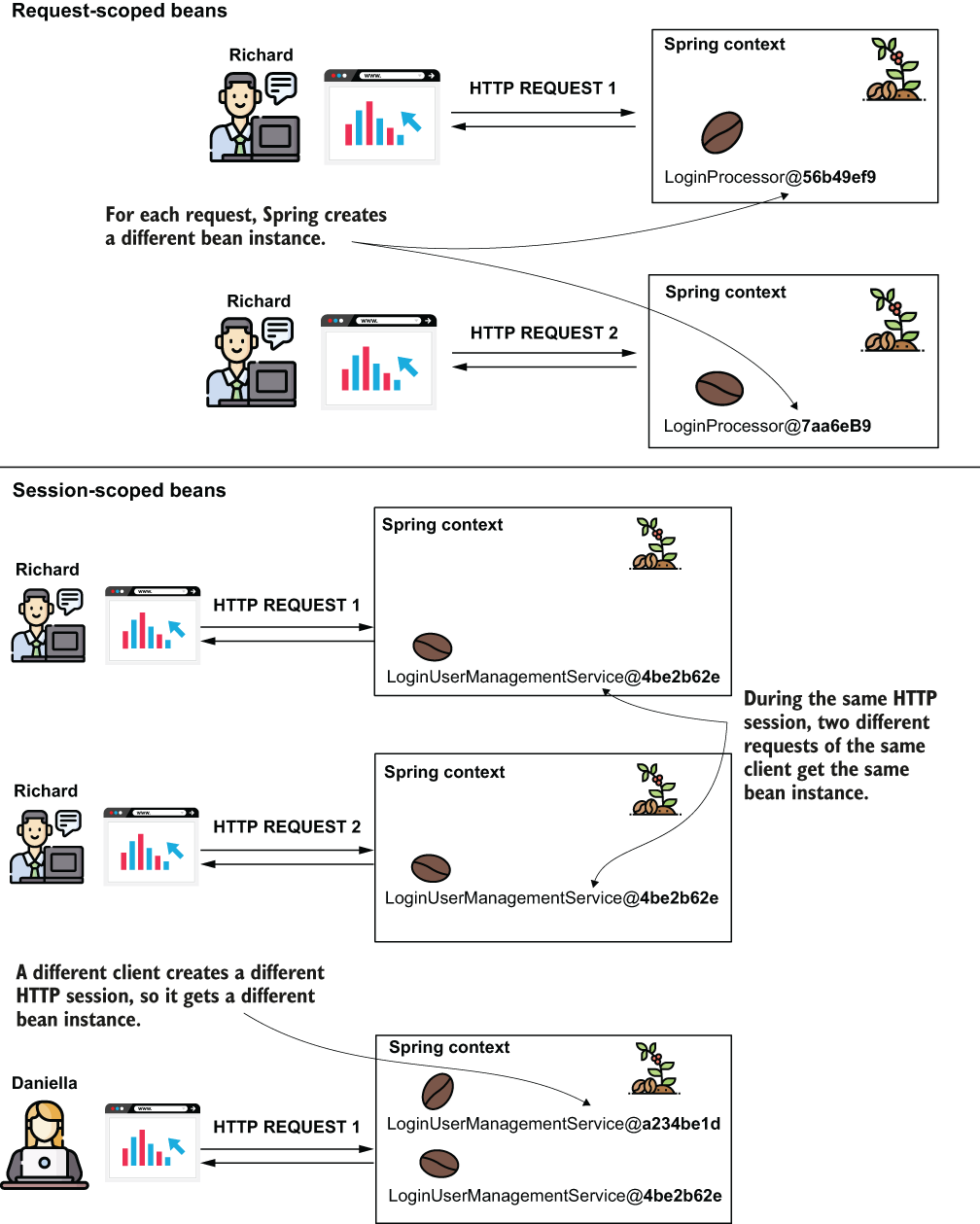
For every HTTP request, Spring provides a new instance for the request-scoped bean. When using a request-scoped bean, you can be sure the data you add on the bean is available only on the HTTP request that created the bean. Spring manages the bean type (the plant) and uses it to get instances (coffee beans) for each new request.
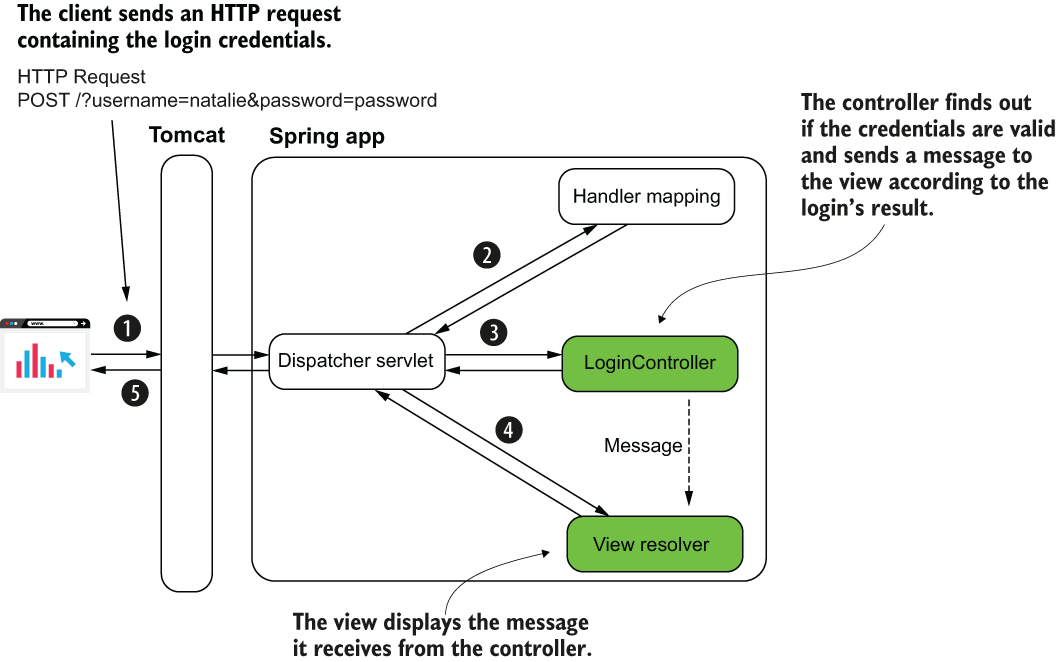
We need to implement the controller and the view. In the controller, we implement an action that finds out if the credentials sent in the login request are valid. The controller sends a message to the view, and the view displays this message.
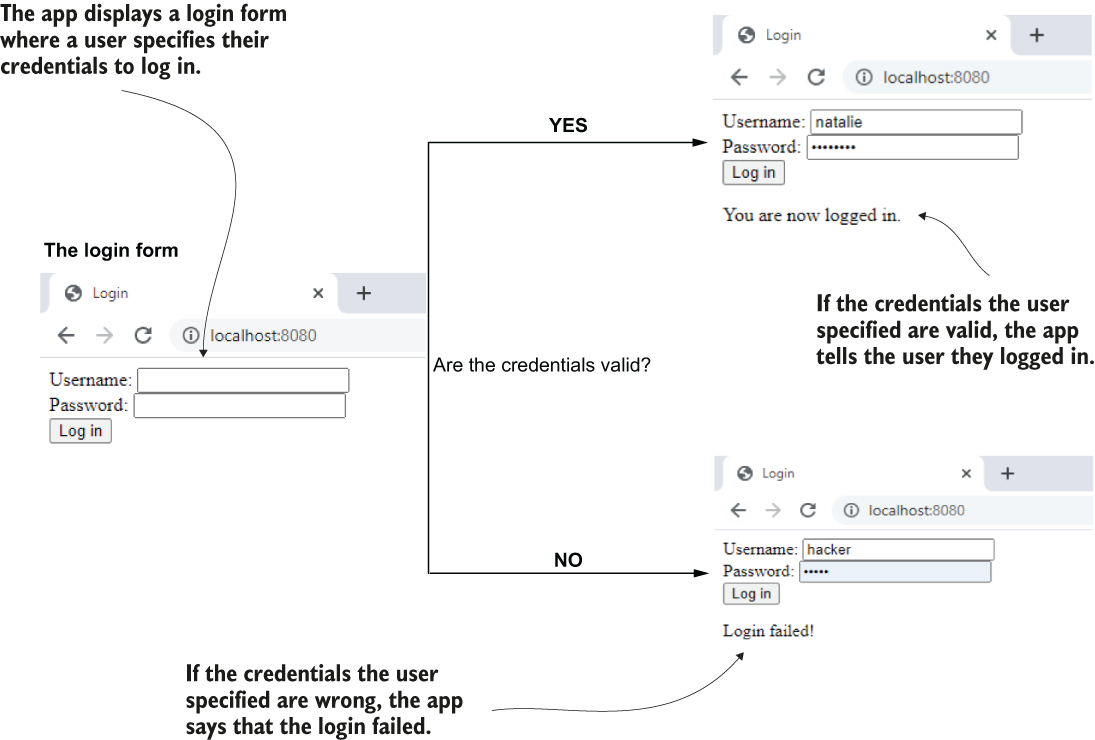
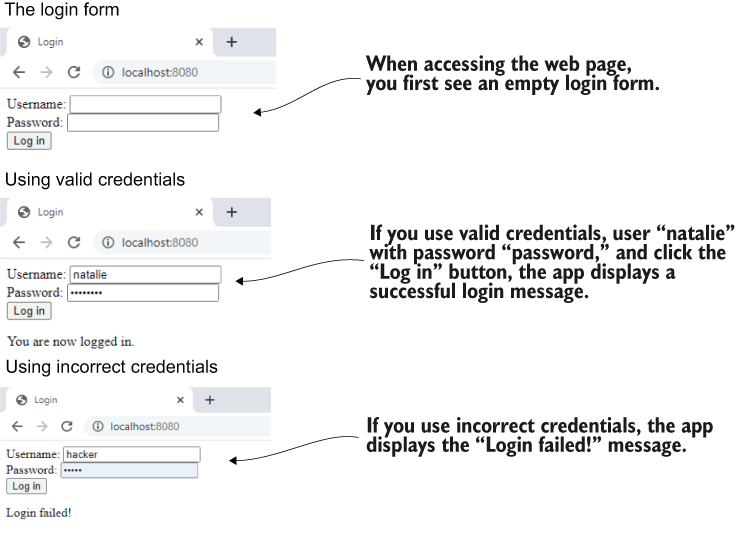
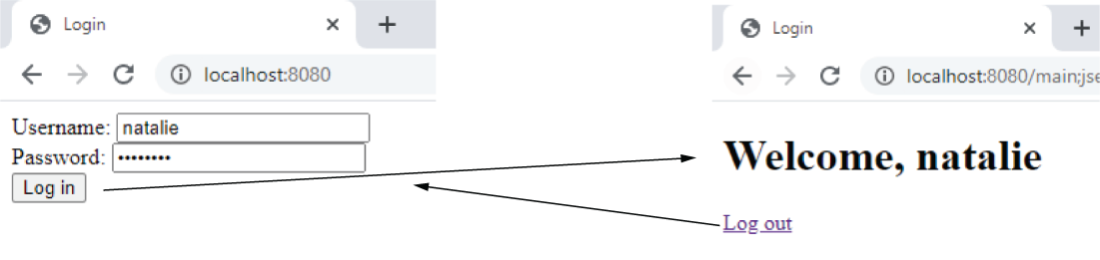
The functionality we implement in this section. The page displays a login form for the user. Then the user provides valid credentials, and the app displays a message that they successfully logged in. If the user provides incorrect credentials, the app tells the user that the login failed.
The dispatcher servlet calls the controller’s action when someone submits the HTML login form. The controller’s action gets the credentials from the HTTP request parameters. According to the login result, the controller sends a message to the view, and the view displays this message under the HTML form.
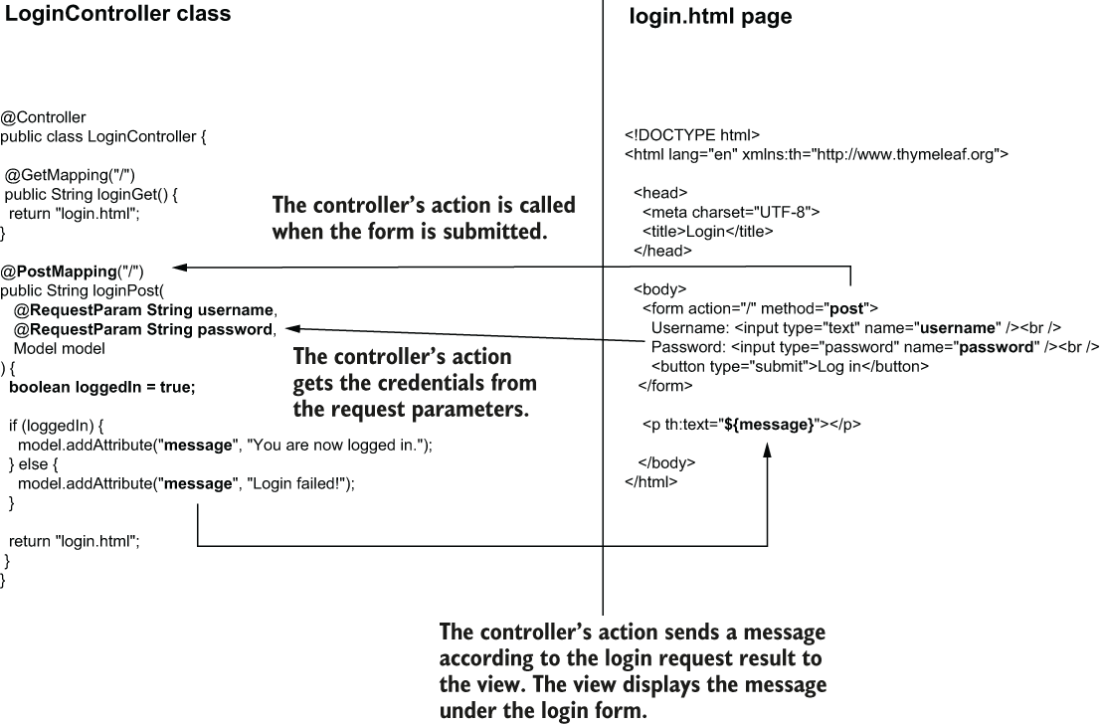
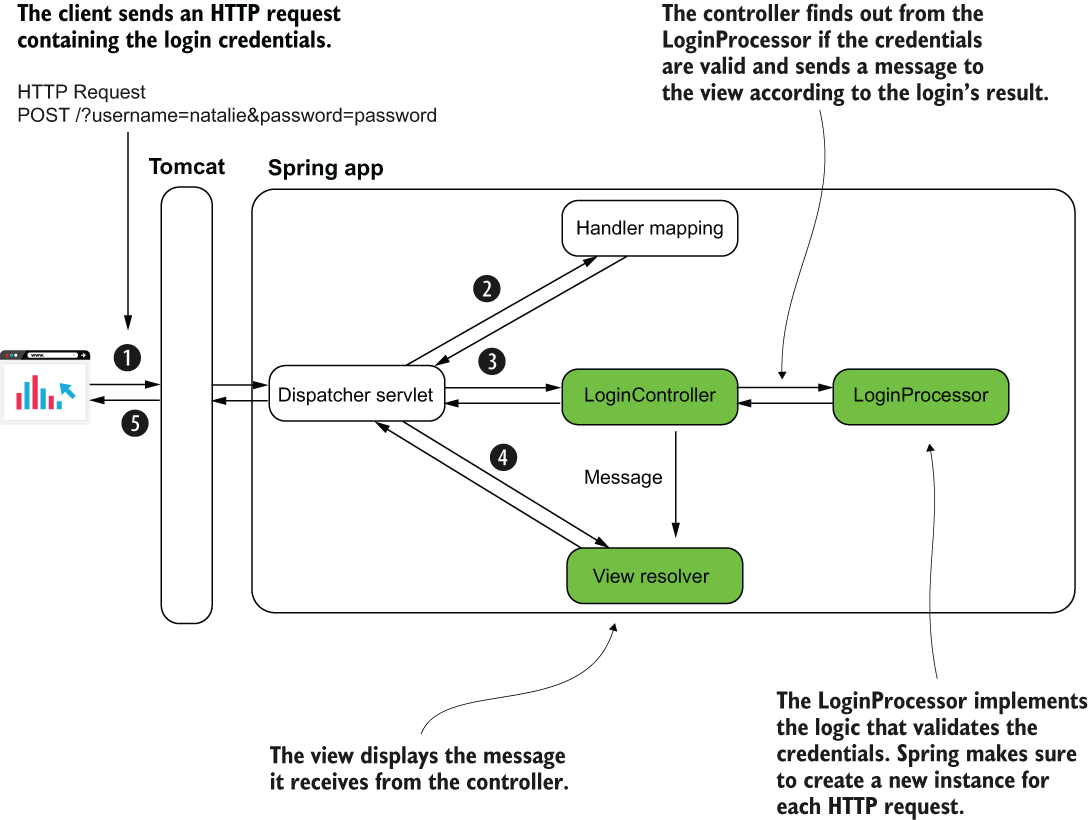
The LoginProcessor bean is request-scoped. Spring makes sure to create a new instance for each HTTP request. The bean implements the login logic. The controller calls a method it implements. The method returns true if the credentials are valid and false otherwise. Based on the value the LoginProcessor returns, the LoginController sends the right message to the view.
When accessing the page in a browser, the app shows a login form. You can use valid credentials, and the app displays a successful login message. If you use incorrect credentials, the app displays a “Login failed!” message.
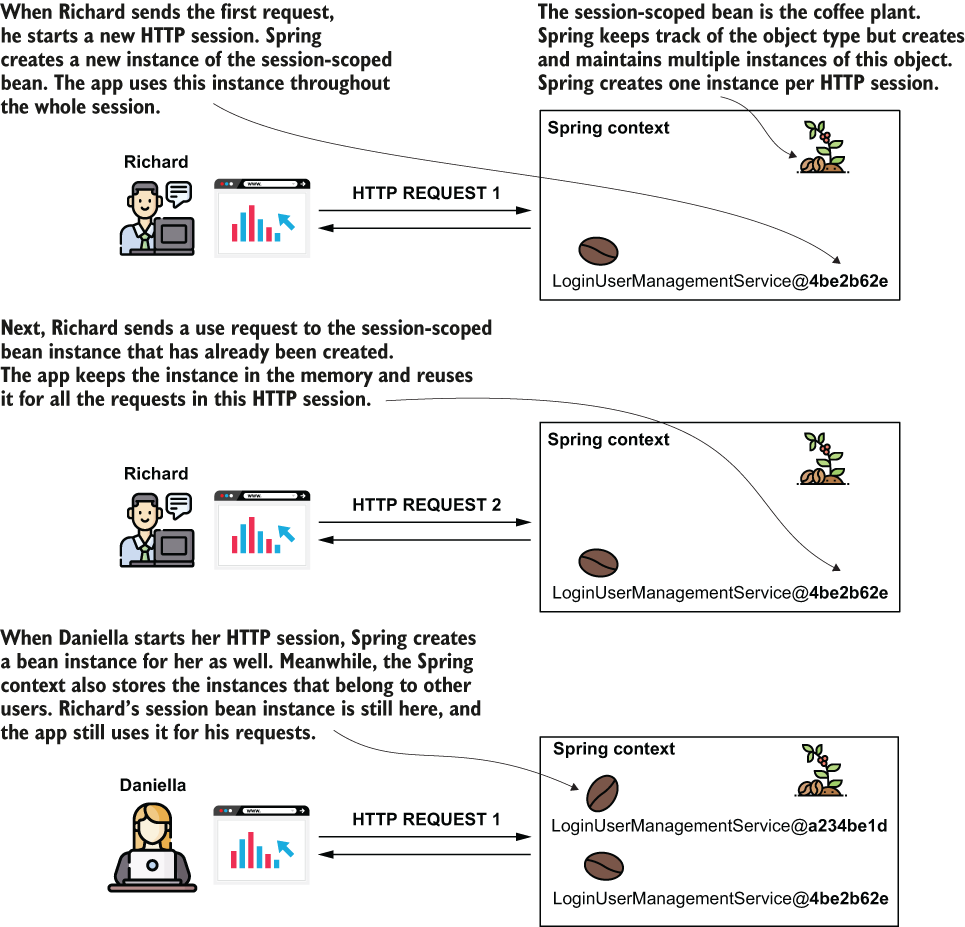
The session-scoped bean is used to keep a bean in the context throughout the client’s full HTTP session. Spring creates an instance of a session-scoped bean for each HTTP session a client opens. The client accesses the same instance for all the requests sent through the same HTTP session. Each user has their own session and accesses different instances of the session-scoped bean.
A comparison between the request-scoped and session-scoped beans to help you visualize the differences between these two web bean scopes. You use request-scoped beans when you want Spring to create a new instance for each request. You use a session-scoped bean when you want to keep the bean (together with any details it holds) throughout the client’s HTTP session.
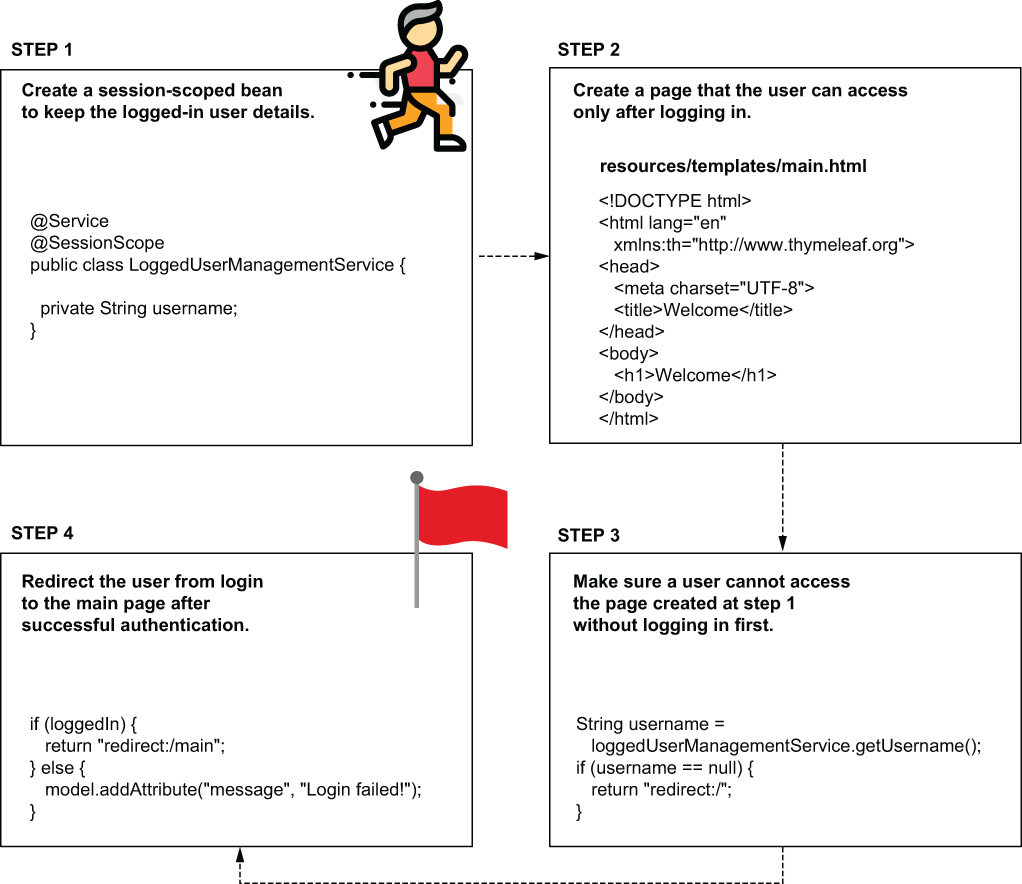
We use a session-bean to implement a section of the app that only a logged-in user can access. Once the user authenticates, the app redirects them to a page they can only access once authenticated. If the user tries to access this page before authentication, the app redirects them to the login form.
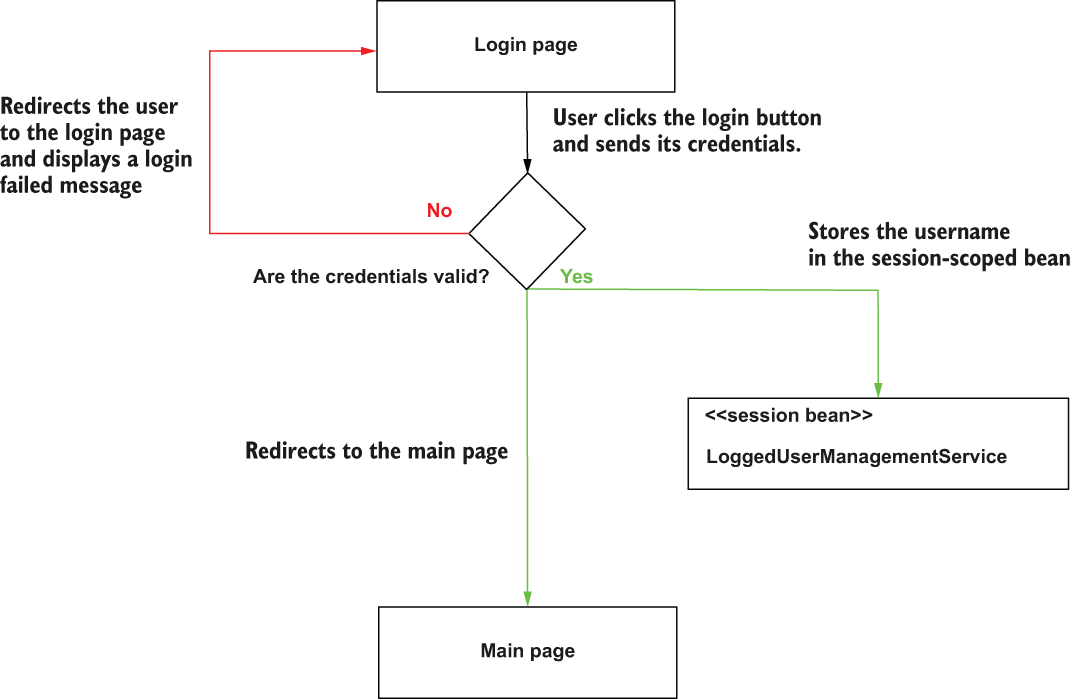
The login flow implemented in the example. When the user submits their credentials, the login process begins. If the user's credentials are correct, the username is stored in the session-scoped bean, and the app redirects the user to the main page. If the credentials are not valid, the app redirects the user back to the login page and displays a failed login message.
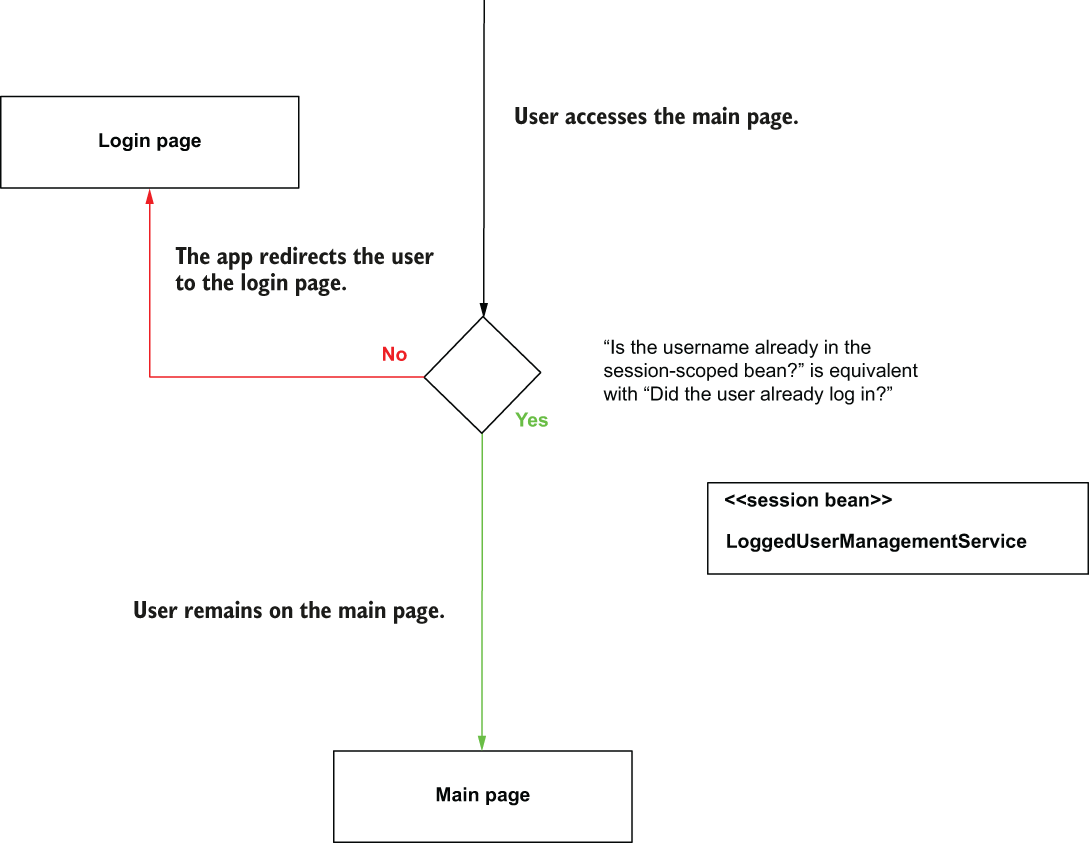
Someone can access the main page only after they are authenticated. When the app authenticates the user, it stores the username in the session-scoped bean. This way, the app knows the user has already logged in. When someone accesses the main page, and the username is not in the session-scoped bean (they did not authenticate), the app redirects them to the login page.
This flow between the two pages. When the user logs in, the app redirects them to the main page. The user can click on the logout link, and the app redirects them back to the login form.
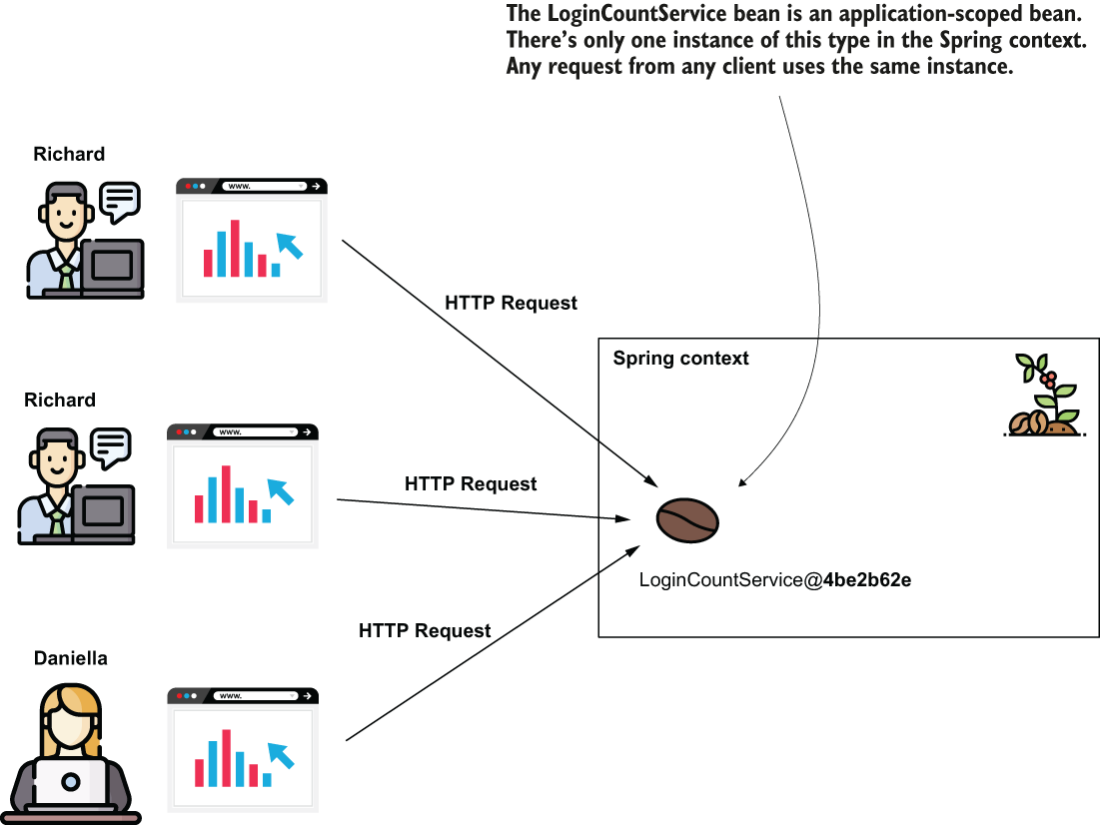
Understanding the application scope in a Spring web app. The instance of an application-scoped bean is shared by all the HTTP requests from all clients. The Spring context provides only one instance of the bean’s type, used by anyone who needs it.
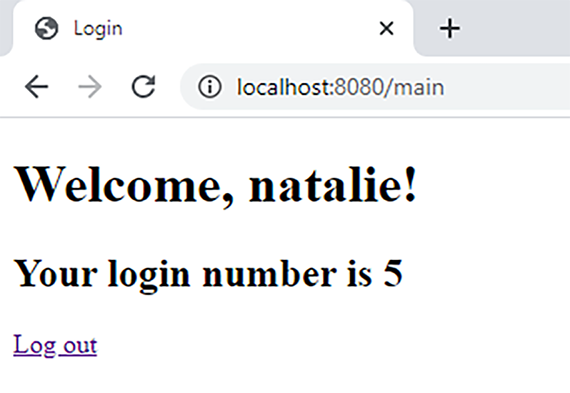
The result of the application is a web page that displays the total number of logins for all the users. This main page displays the total number of login attempts.
Summary
- In Spring web apps, you can use three additional bean scopes:
- Request scope—Spring creates one bean instance for each HTTP request.
- Session scope—Spring creates one bean instance for each HTTP session. Requests from the same client can share it.
- Application scope—Spring creates one bean instance for the whole application, shared by all requests.
- A request-scoped bean belongs to one HTTP request only. Because of this, you don’t usually need to worry about concurrency. The instance is short-lived and can be garbage-collected after the request ends.
- Because Spring creates request-scoped beans often, avoid costly logic in their constructor or @PostConstruct method.
- A session-scoped bean shares data across multiple requests from the same client. However, the same client can send concurrent requests, so changing data in a session-scoped bean can lead to race conditions. You need to avoid this or synchronize the code.
- Application-scoped beans are shared by all requests in the app. I recommend avoiding them for storing mutable data because write operations need synchronization, which can hurt performance. They also live as long as the app, so their data stays in memory. A better option is usually to store shared data in a database.
- Session- and application-scoped beans make the app stateful because requests depend on data stored by the app. Stateful apps are harder to design and scale, so it’s better to consider alternatives when possible.

 Spring Start Here, Second Edition ebook for free
