8 Implementing web apps with Spring Boot and Spring MVC
This chapter explains how to move from a basic Spring web app to one that behaves like a modern application, where the page content changes based on data. It introduces the Spring MVC request flow and shows how a controller can send values to a view through a model object. Using Thymeleaf as the template engine, the chapter demonstrates how HTML pages in the templates folder can display controller-provided data, making the same page render different content for different requests.
The chapter also covers how clients send information back to the server. It distinguishes between common approaches such as request parameters, headers, path variables, and request bodies, with special attention to the first two for simple web apps. Request parameters are shown as a flexible choice for optional or search-like values, while path variables are better for mandatory values that define the resource itself. Through small examples, the chapter shows how to read incoming values with annotations and pass them into the model so the view can use them.
Finally, the chapter introduces HTTP methods as a way to express intent, not just locate an endpoint. GET is used for retrieving data, while POST is used for submitting new data, with PUT, PATCH, and DELETE described as the standard methods for updating or removing resources. A product-list example ties everything together by showing one controller action that displays products with GET and another that adds a product with POST, both backed by a simple service and rendered through a Thymeleaf page with a form. The result is a practical introduction to building dynamic, interactive web apps with Spring Boot and Spring MVC.
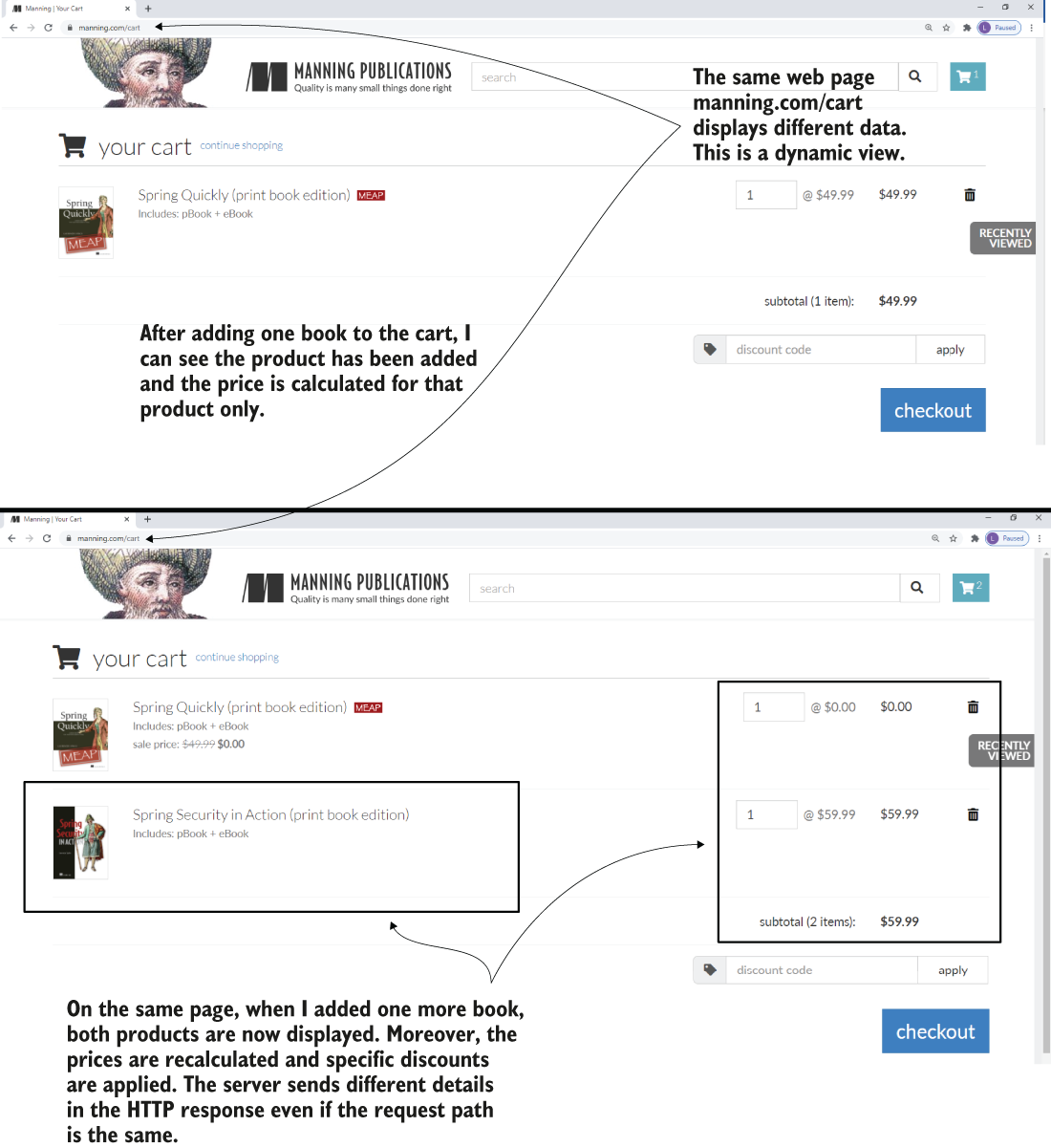
A dynamic view presented with the Manning shopping cart functionality. Even if the requested page is the same, the content of the page is different. The backend sent different data in the HTTP response before and after adding one more product to the cart.
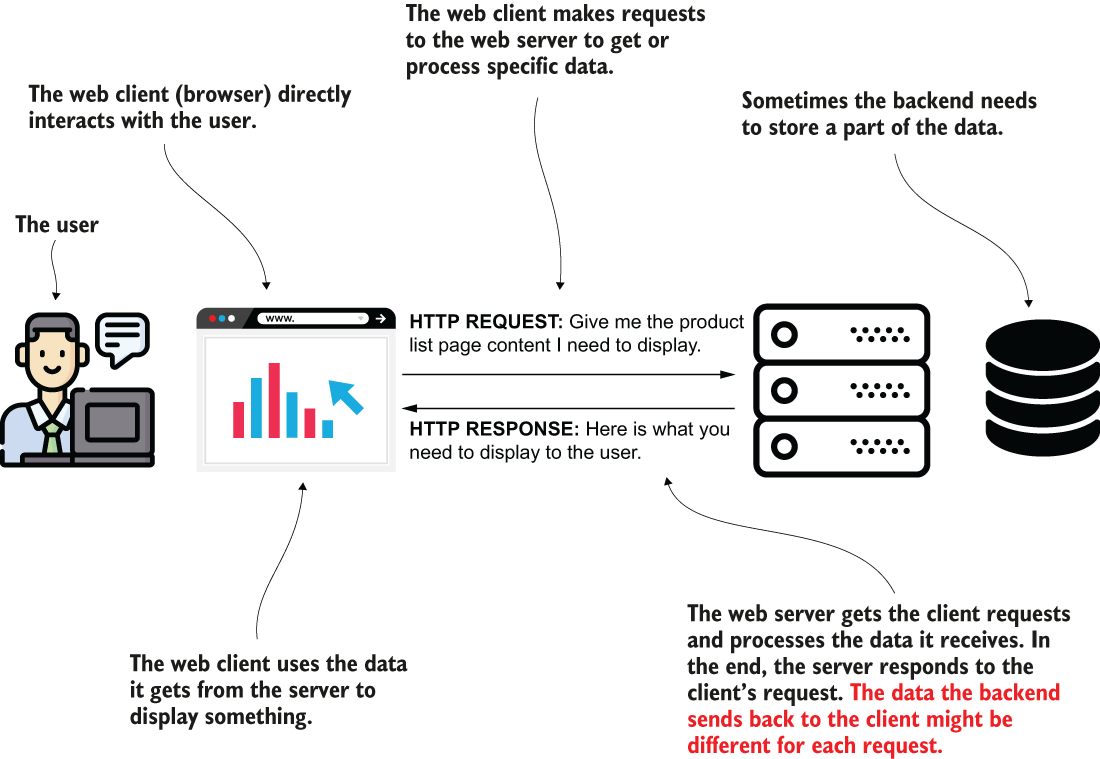
A client sends data through an HTTP request. The backend processes this data and builds a response to send back to the client. Depending on how the backend processed the data, different requests may result in other data being displayed to the user.
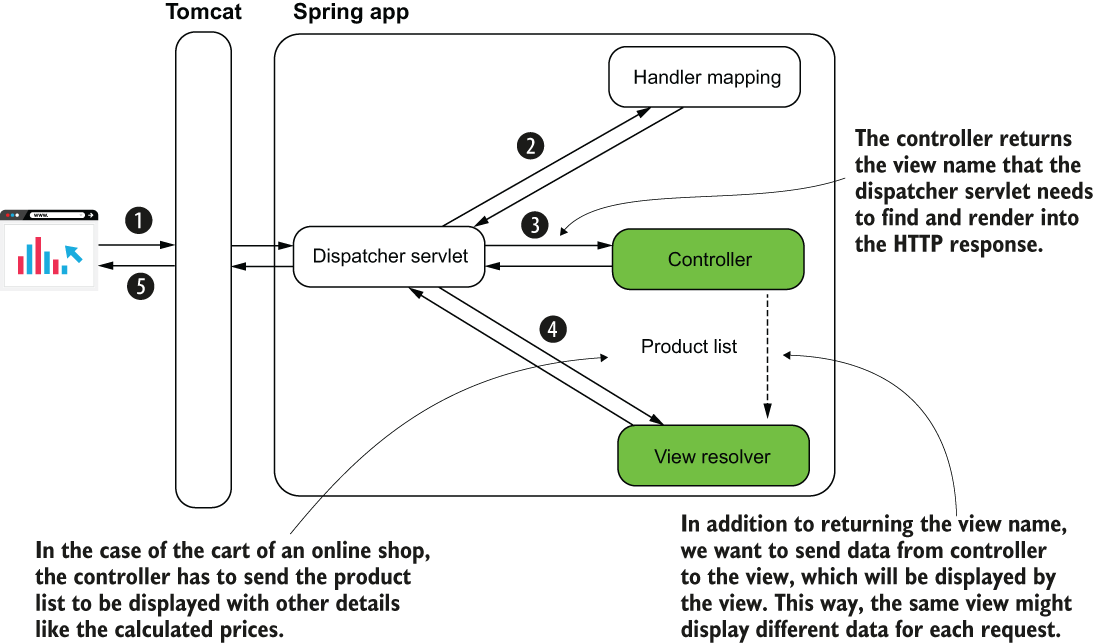
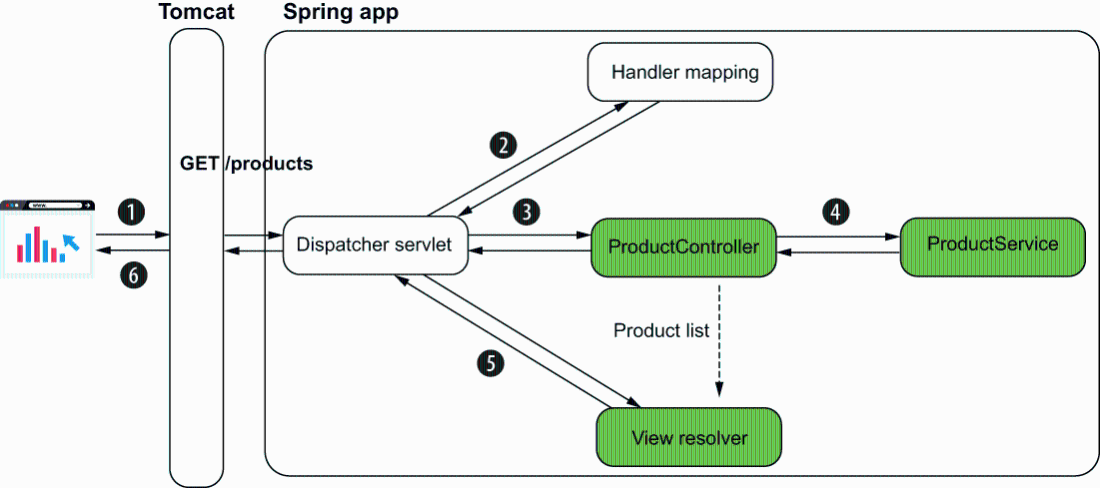
The Spring MVC flow. To define a dynamic view, the controller needs to send data to the view. The data the controller sends can be different for each request. For example, in an online shop’s cart functionality, the controller initially sends a list of one product to the view. After the user adds more products, the list the controller sends contains all the products in the cart. The same view shows different information for these requests.
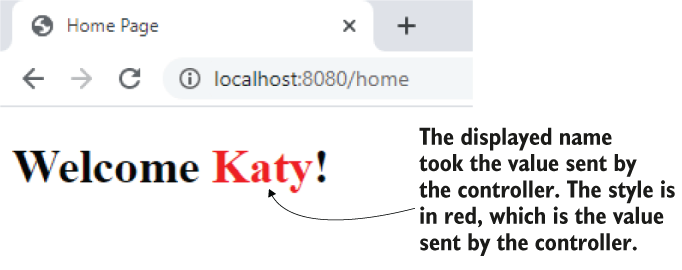
The result. Running the app and accessing the page in a browser, you observe the view that uses the values the controller sent.
A request parameter can be optional. A common scenario for using request parameters is implementing a search functionality where the search criteria are optional. The client sends only some of the request parameters, and the server knows to use only the values it receives. You implement the server to consider that it might not get values for some of the parameters.
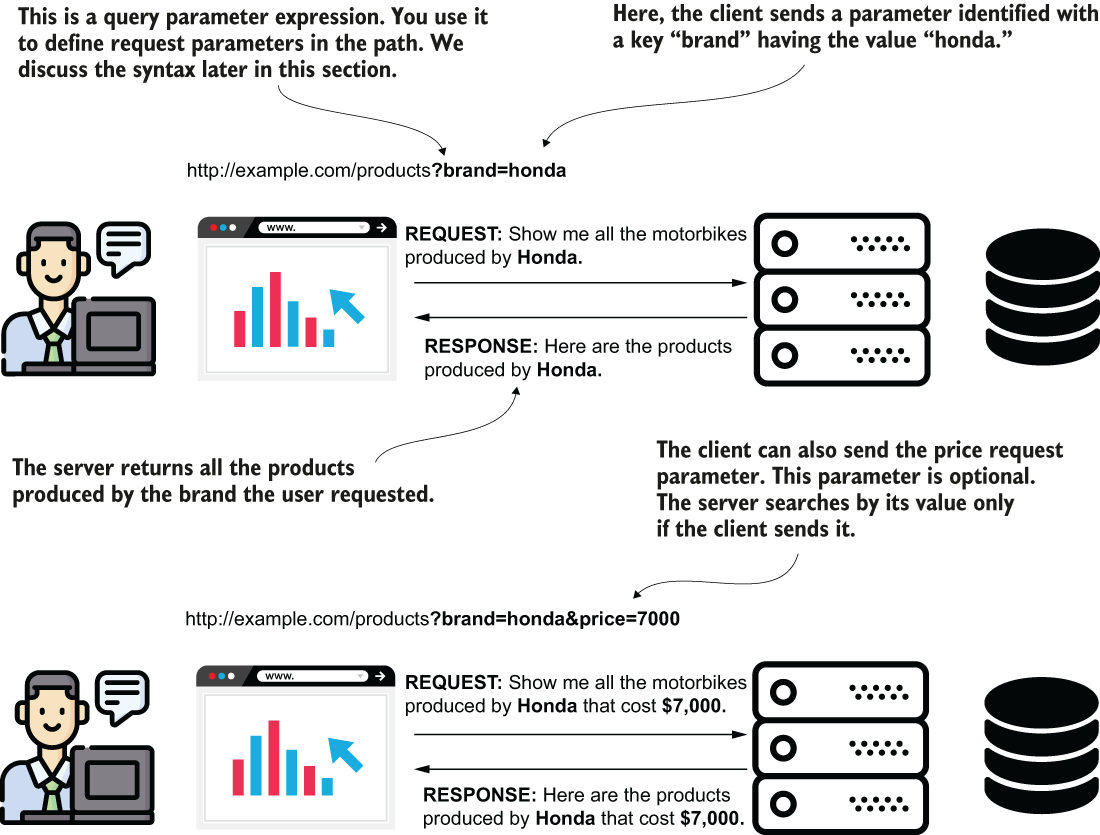
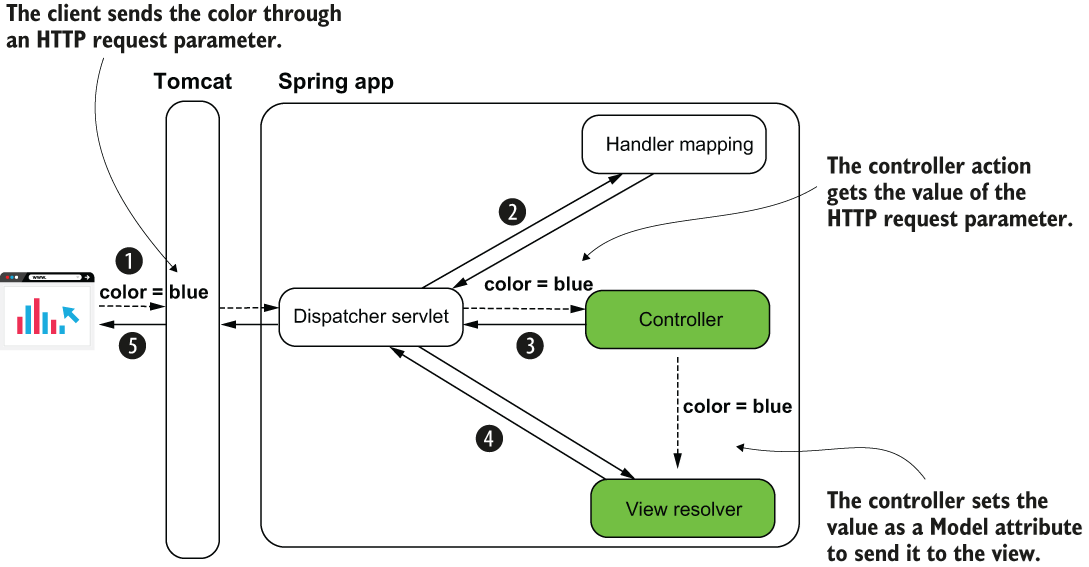
The value sent by the client from the Spring MVC perspective. The controller action gets the request parameters that the client sends and can use them. In our example, the value is set on the Model and delivered to the view.
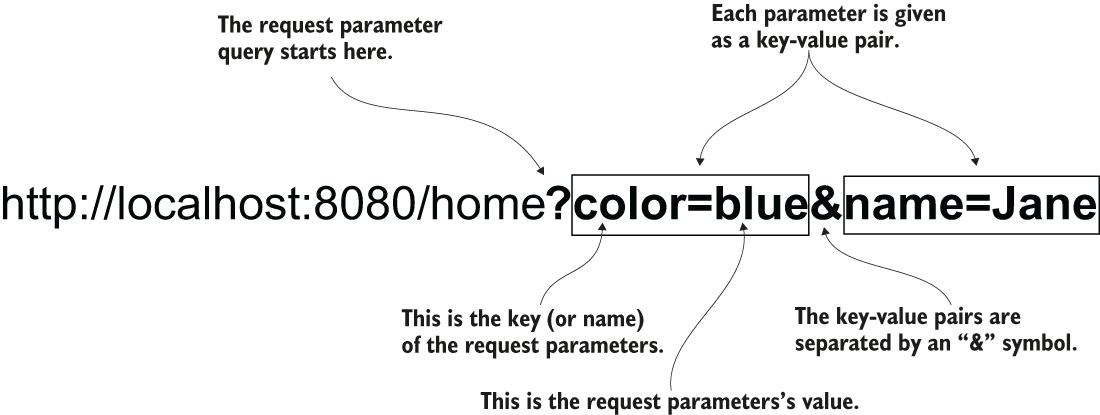
Sending data through request parameters. Each request parameter is a key-value pair. You provide the request parameters with the path in a query starting with the question mark symbol. If you set more than one request parameter, you separate each key-value pair with the “and” (&) symbol.
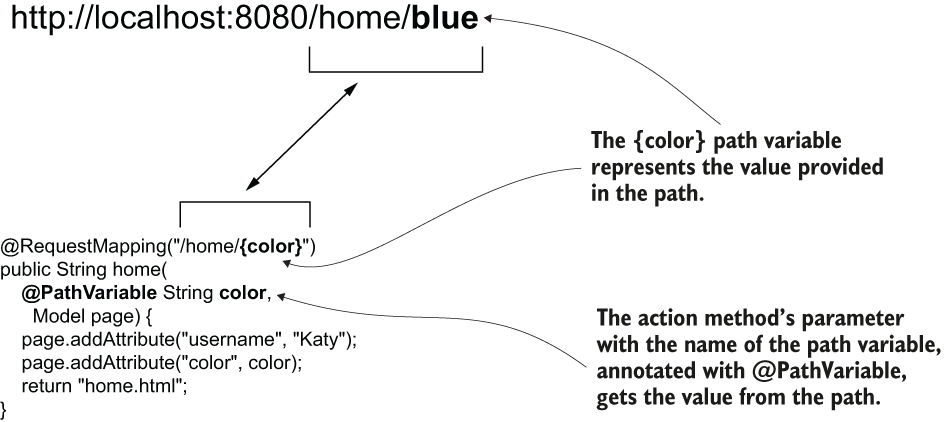
Using path variables. To get a value from a path variable, you give the variable a name between curly braces when defining the path on the controller action. You use a parameter annotated with @PathVariable to get the value of the path variable.
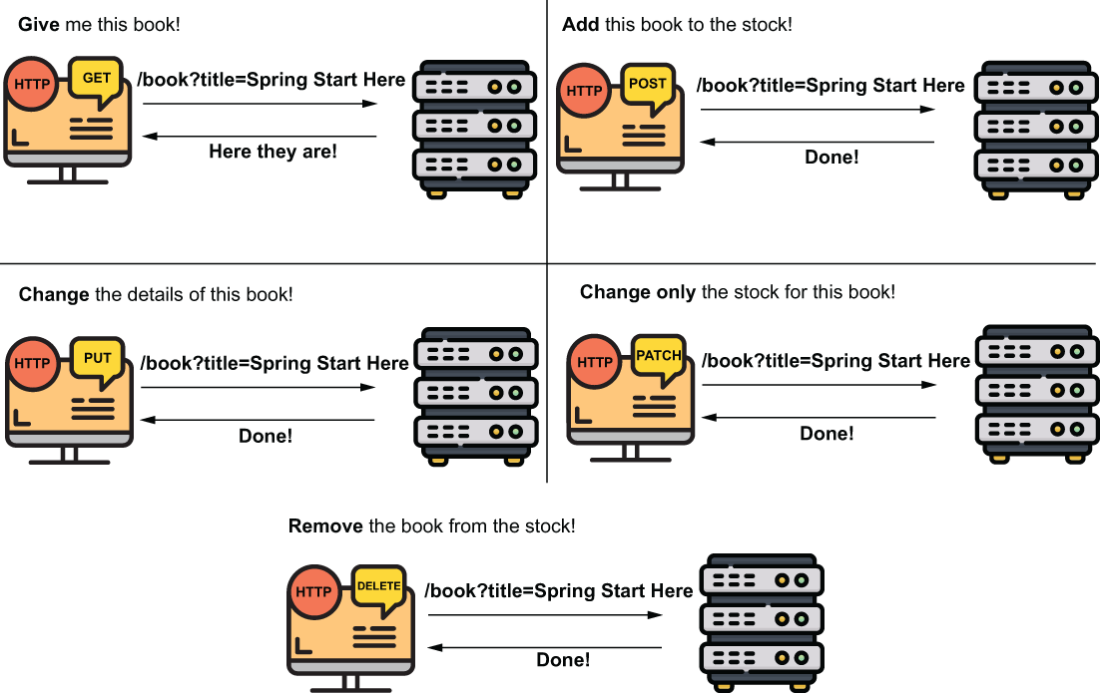
The basic HTTP methods. You use GET for retrieving data, POST for adding data, PUT for changing a record, PATCH for changing a part of the record, and DELETE to remove data. The client must use the appropriate HTTP method to express the action executed by a specific request.
When calling /products with HTTP GET, the controller gets the product list from the service and sends it to the view. The HTTP response contains the HTML table with the products from the list.
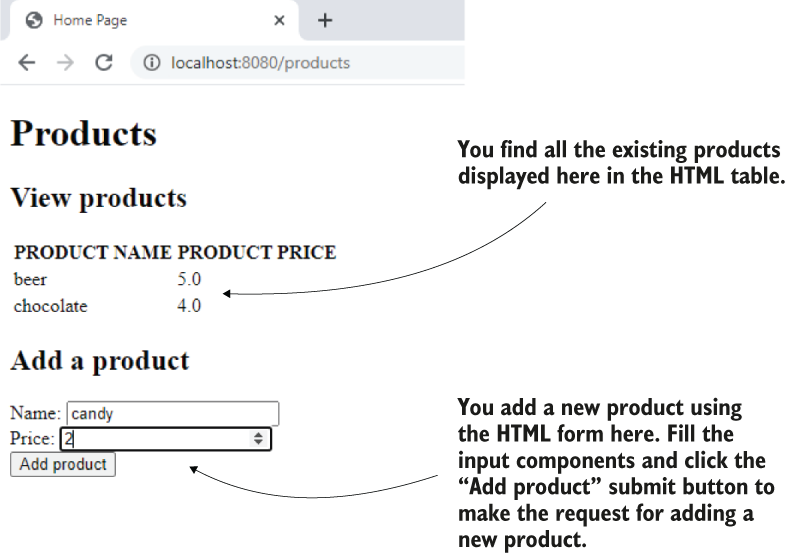
The final result. A user sees the products in the HTML table on the page and can add a new product through the HTML form.
Summary
- Today’s web apps have dynamic pages (also referred to as dynamic views). A dynamic page might display different content for different requests.
- To know what to display, a dynamic view gets the variable data from the controller.
- An easy way to implement dynamic pages in Spring apps is using a template engine such as Thymeleaf. Alternatives to Thymeleaf are Mustache, FreeMarker, and Java Server Pages (JSP).
- A template engine is a library that provides your app with the capability to easily get the data the controller sends and display it on the view.
- The client can send data to the server through request parameters or path variables. A controller’s action gets the details the client sends in parameters annotated with @RequestParam or @PathVariable.
- A request parameter can be optional.
- You should only use path variables for mandatory data the client sends.
- A path and an HTTP method identify an HTTP request. The HTTP method is represented by a verb that identifies the client’s intention. The essential HTTP methods you’ll often find in production apps are GET, POST, PUT, PATCH, and DELETE.
- GET expresses the client’s intention to retrieve data without changing data on the backend.
- POST expresses the client’s intention to add new data on the server side.
- PUT expresses the client’s intention to change a data record on the backend entirely.
- PATCH expresses the client’s intention to change a part of a data record on the backend.
- DELETE expresses the client’s intention to remove data on the backend.
- Through a browser’s HTML form process directly, you can use only HTTP GET and HTTP POST. To use other HTTP methods such as DELETE or PUT, you need to implement the call using a client language such as JavaScript.
FAQ
What is a dynamic view?
A dynamic view is a web page whose content changes based on data sent by the controller, instead of always showing the same static HTML.Why do we need dynamic views in web apps?
We need dynamic views to display different content for different requests or users, such as a shopping cart, search results, or user-specific information.What does a template engine do in Spring MVC?
A template engine helps the controller send data to the view and lets the view render that data into the final HTML response.Where should a Thymeleaf HTML file be placed in a Spring Boot project?
It should be placed in theresources/templates folder, not in resources/static.What is the role of the Model in a controller method?
The Model stores data that the controller sends to the view, using attribute names as keys.How do you get data from an HTTP request in a Spring controller?
You can use request parameters, headers, path variables, or the request body, depending on the type and amount of data.What is a request parameter?
A request parameter is a key-value pair sent in the query string of the URL, such as?color=blue. It is useful for small or optional values.What is a path variable?
A path variable is a value placed directly in the URL path, such as/home/blue. It is typically used for mandatory values.
 Spring Start Here, Second Edition ebook for free
