7 Understanding Spring Boot and Spring
This chapter introduces Spring web development by first clarifying what a web application is and how it works. A web app has a client side, usually the browser where users interact with the application, and a server side, where requests are processed and responses are generated. It also emphasizes that modern web apps often serve many users at once, so backend code must be designed with concurrency in mind. Two common styles of web apps are presented: one where the backend returns fully prepared pages, and another where the backend sends raw data to a separate frontend application.
To support web apps in Java, the chapter explains the role of HTTP and the servlet container. The browser and server communicate through request-response exchanges over HTTP, but developers do not usually implement that communication layer themselves. Instead, a servlet container such as Tomcat translates HTTP messages into calls that a Java app can handle. A servlet acts as the bridge between the container and the application logic, and in Spring MVC the dispatcher servlet becomes the central entry point that receives requests and coordinates what happens next.
The chapter then shows how Spring Boot removes much of the traditional setup work needed for web applications. Using a project initializer, you can generate a ready-to-run Spring Boot project with the right parent, dependencies, plugin, and properties file already in place. Dependency starters simplify dependency management by bundling compatible libraries for a specific capability, and autoconfiguration applies sensible defaults based on what you include. Finally, the chapter demonstrates a basic Spring MVC web page: an HTML file in the static resources folder and a controller method annotated with @Controller and @RequestMapping, which together let Spring route a browser request to the correct page and return it through the framework’s request-handling flow.
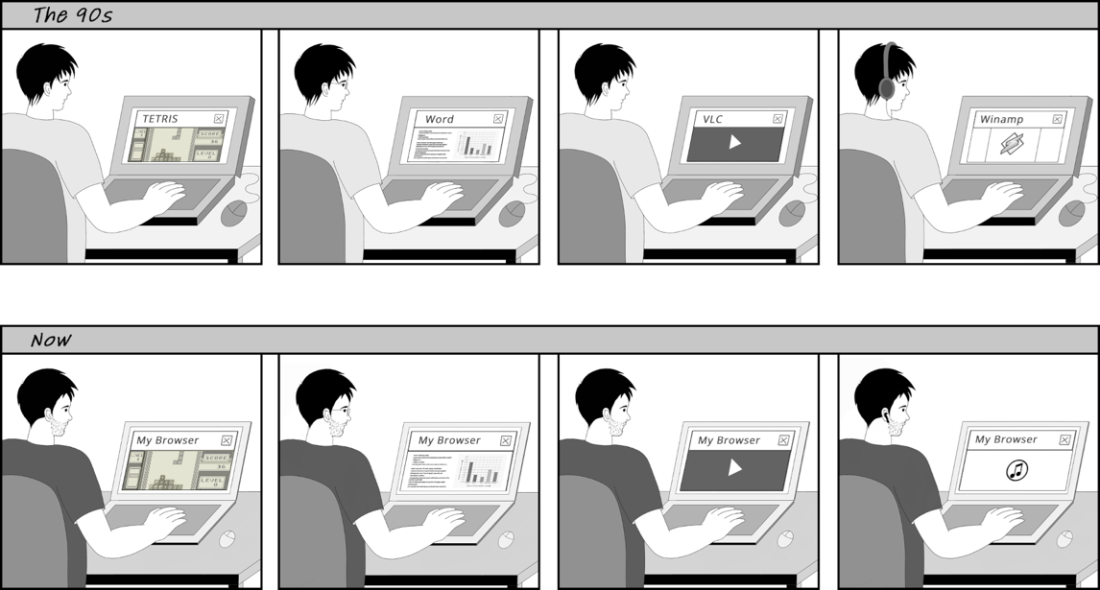
Times change. In the 1990s, we used a desktop app for everything. Today, almost any application we use is a web app. As developers, you must learn how to implement web apps.
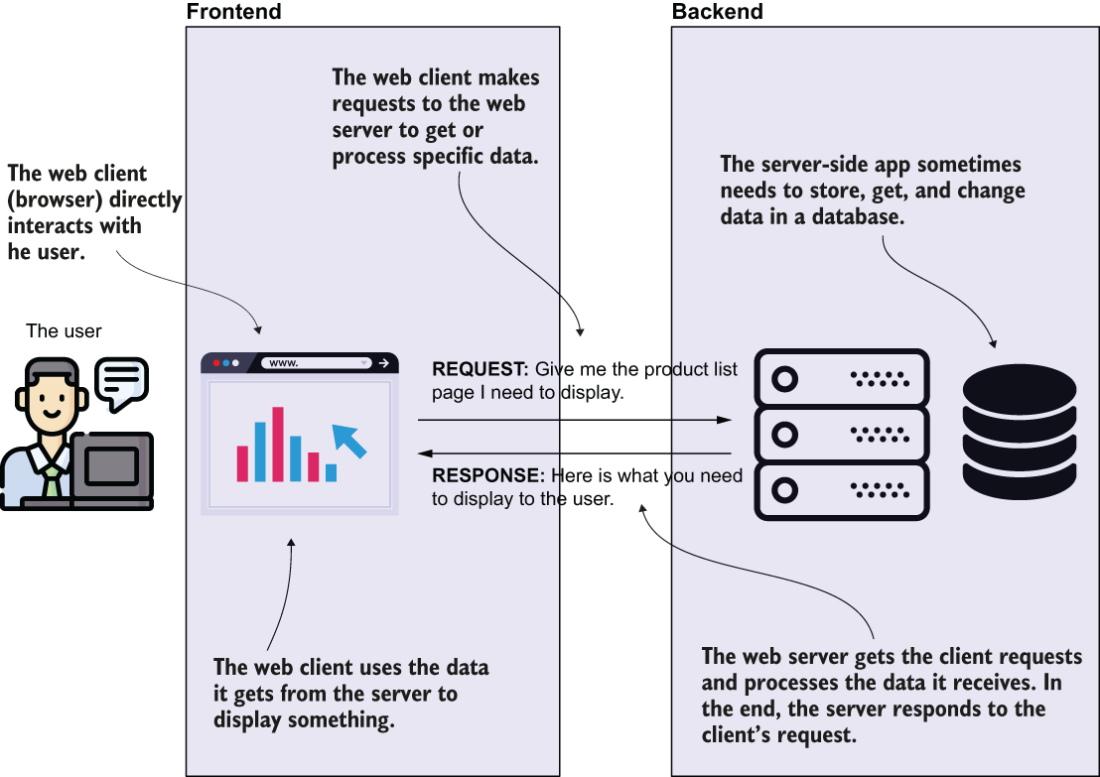
The big picture of a web app: The user interacts with the app through its frontend. The frontend communicates with the backend to execute logic at the user’s request and get the data to display. The backend executes business logic and sometimes persists data in a database or communicates with other external services.
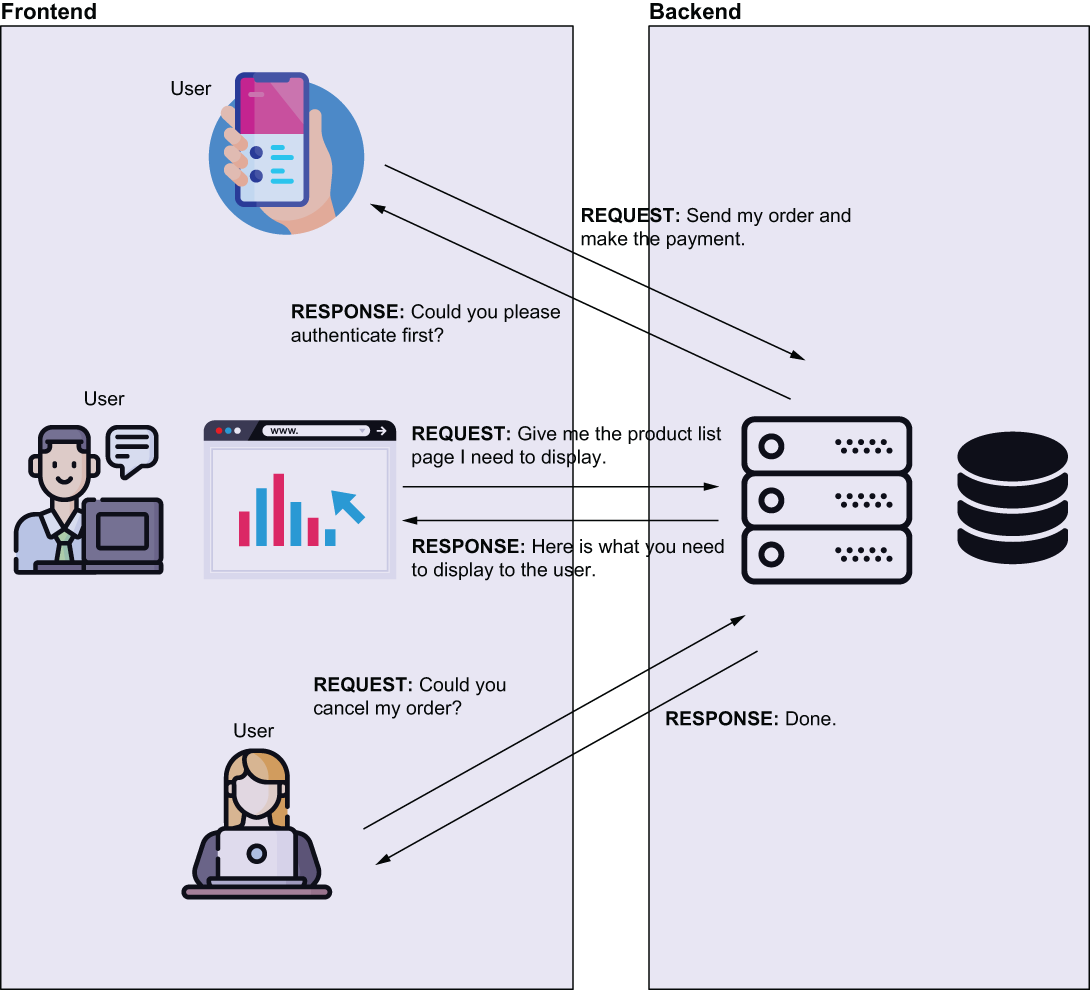
When discussing web apps, we refer to the client as being one instance, but keep in mind that multiple users access a browser and use the same web app concurrently. Each user makes their own requests for specific actions they need to execute. This is important because it means that some operations on the backend execute concurrently. If you write code that accesses and changes the same resource, your app might wrongly behave because of race condition scenarios.
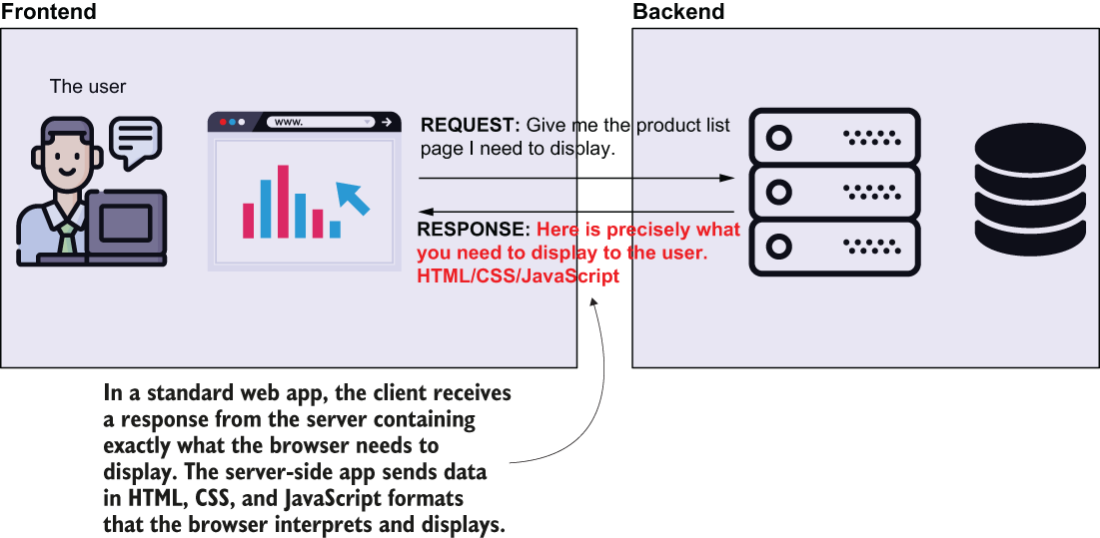
When a web app doesn’t provide frontend-backend separation, the browser precisely displays what it gets from the server. The server gets requests from the browser, executes some logic, and then responds. In response, the backend provides content formatted as HTML, CSS, and other fashions that the browser interprets to display.
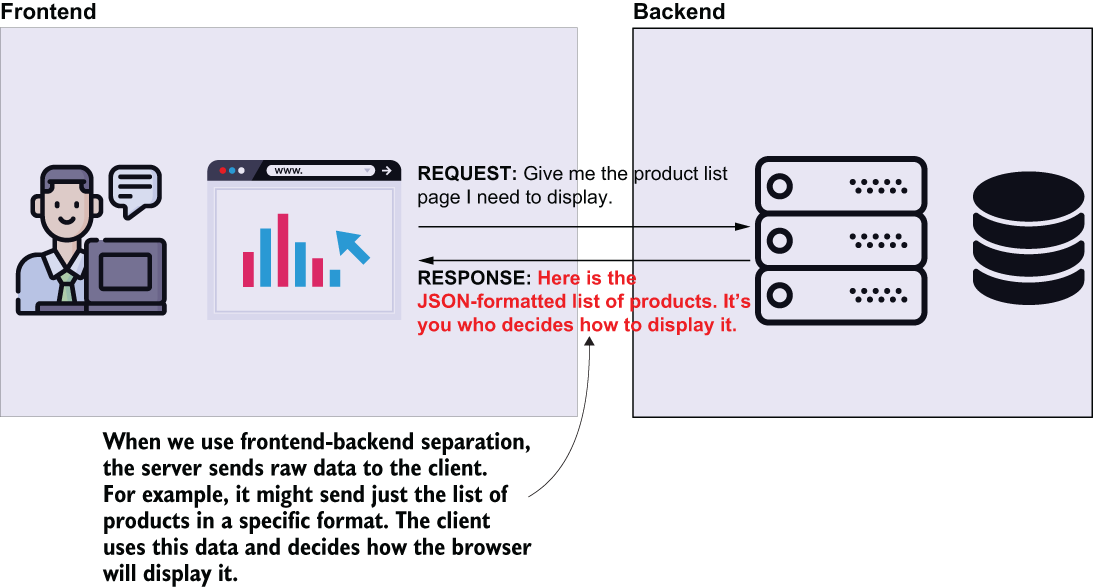
Using frontend-backend separation. The server doesn’t respond with the exact data that needs to be displayed by the browser. The backend sends the data to the client but doesn’t tell the browser how to display this data or what to do with it. The backend now only sends raw data (usually in an easily parsable format like JSON or XML). The browser executes a frontend app that takes the server’s raw response and processes it to display the data.
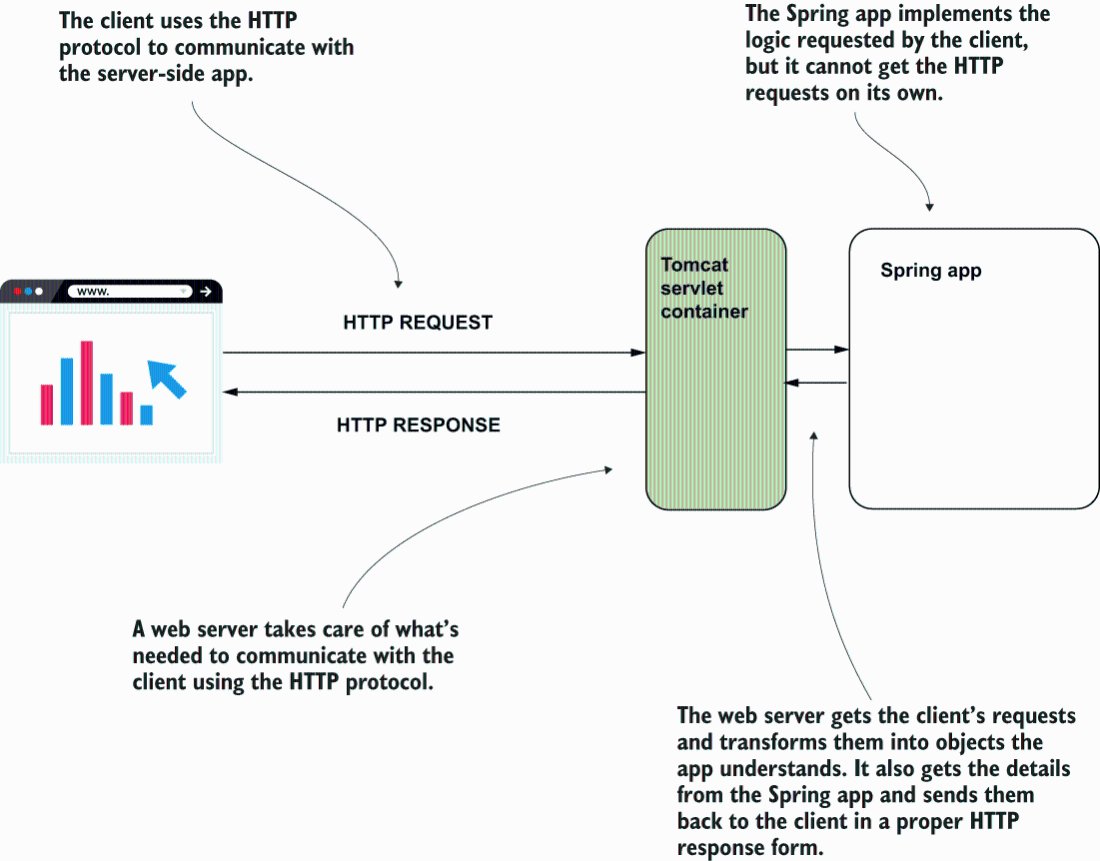
A servlet container (e.g., Tomcat) speaks HTTP. It translates the HTTP request to our Spring app and the app’s response into an HTTP response. This way, we don’t need to care about the protocol used for communication on the network, as we simply write everything as Java objects and methods.
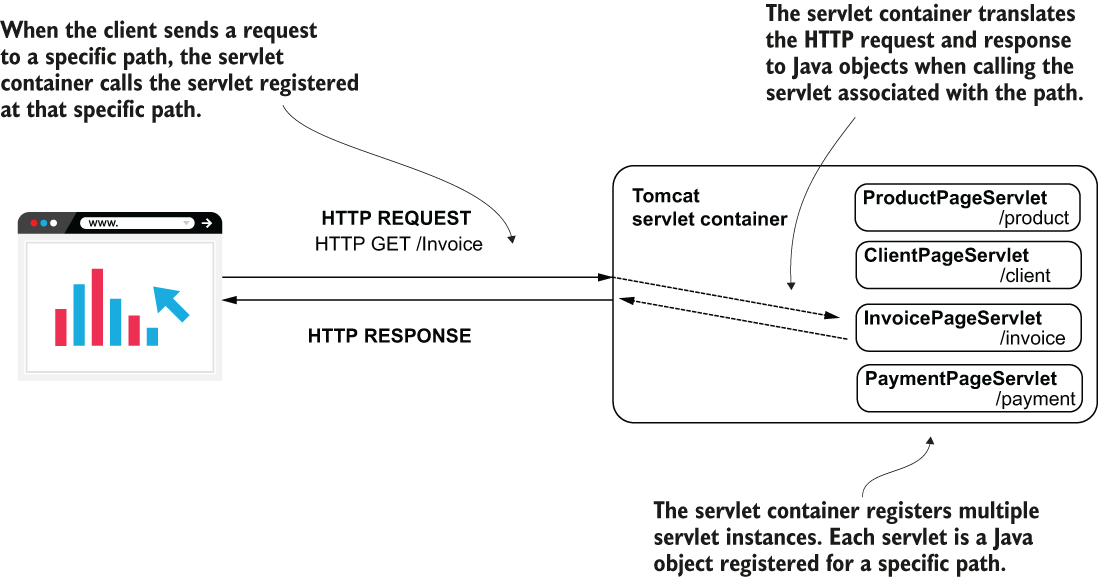
The servlet container (Tomcat) registers multiple servlet instances. Each servlet is associated with a path. When the client sends a request, Tomcat calls a method of the servlet associated with the path the client requested. The servlet gets the values on the request and builds the response that Tomcat sends back to the client.
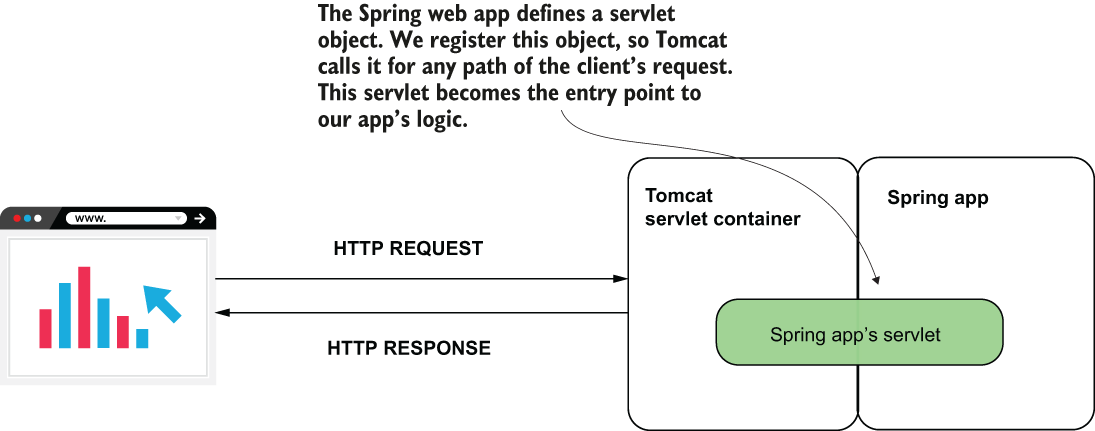
The Spring app defines a servlet object and registers it into the servlet container. Now both Spring and the servlet container know this object and can manage it. The servlet container calls this object for any client request, allowing the servlet to manage the request and the response.
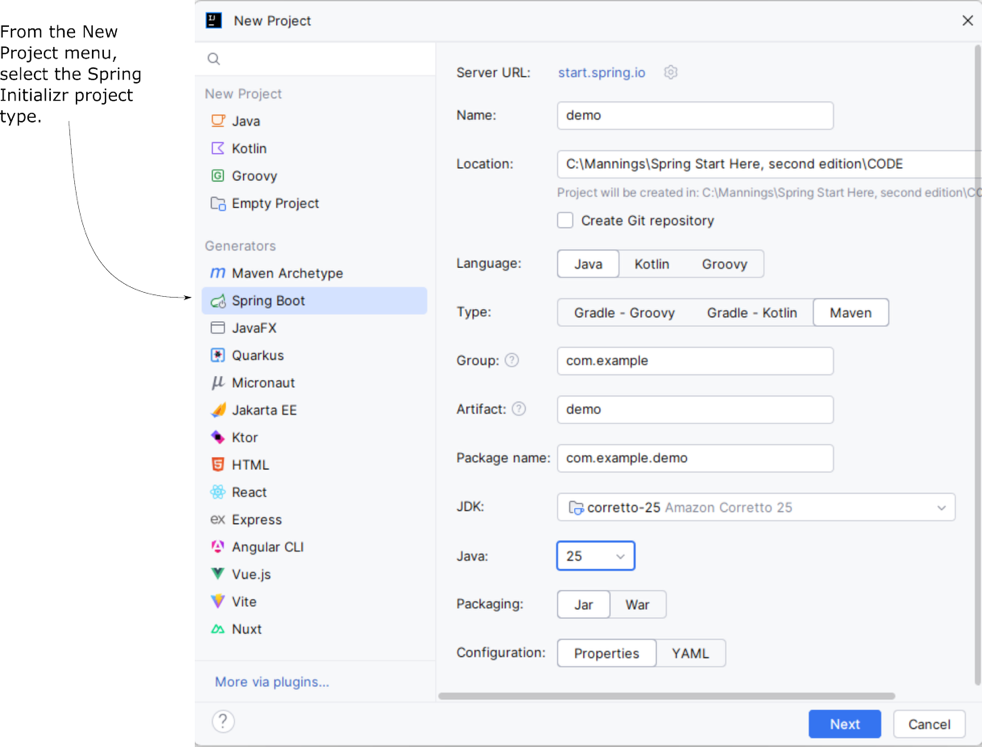
Some IDEs integrate with a project initializer service directly. For example, in IntelliJ Ultimate, you can select Spring Initializr from the New Project menu to create a Spring Boot app with a project initializer service.
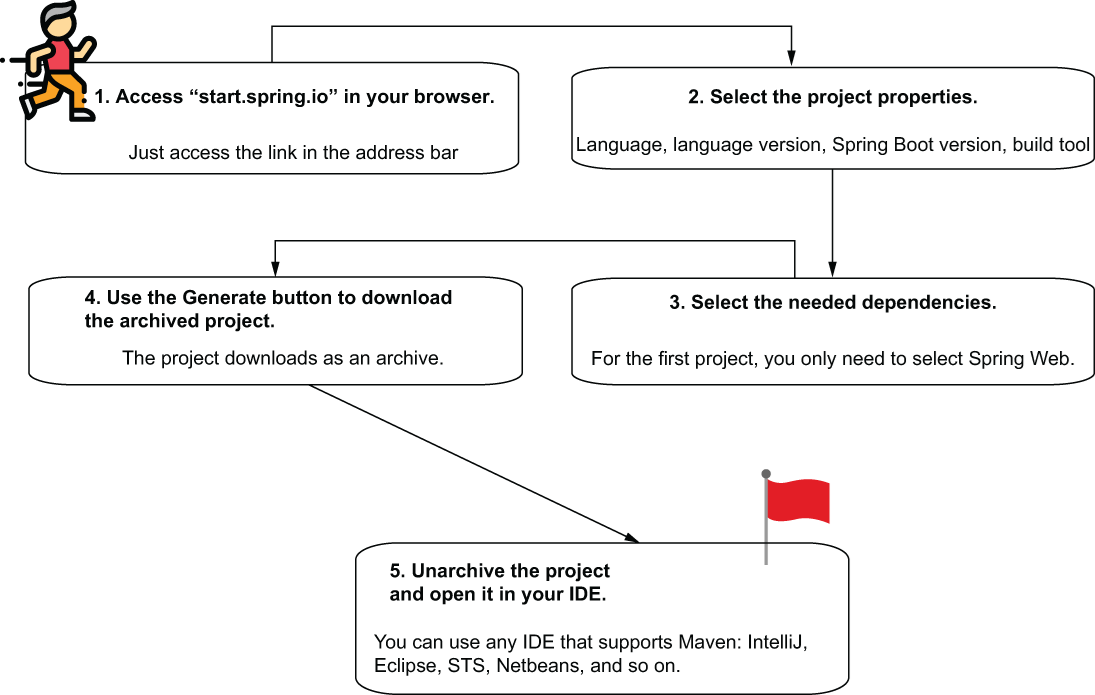
Steps to generate a Spring Boot project using start.spring.io. Access start.spring.io in your browser, select the properties and the needed dependencies, and download the archived project. Then open the project in your browser.
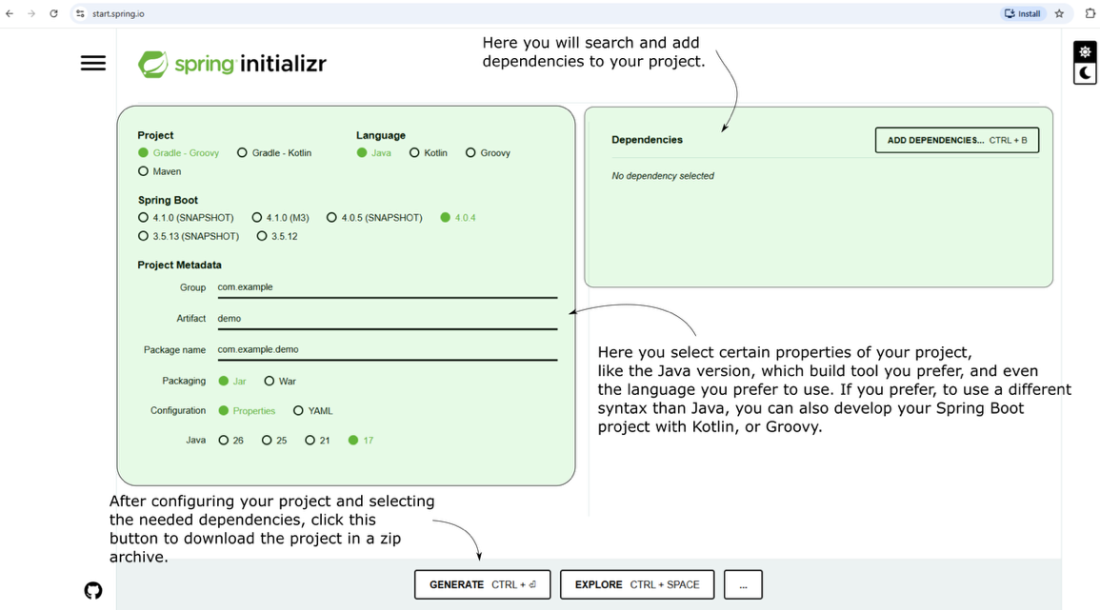
The start.spring.io interface. After accessing start.spring.io, you can specify your project’s main configurations, select the dependencies, and download the archived project.
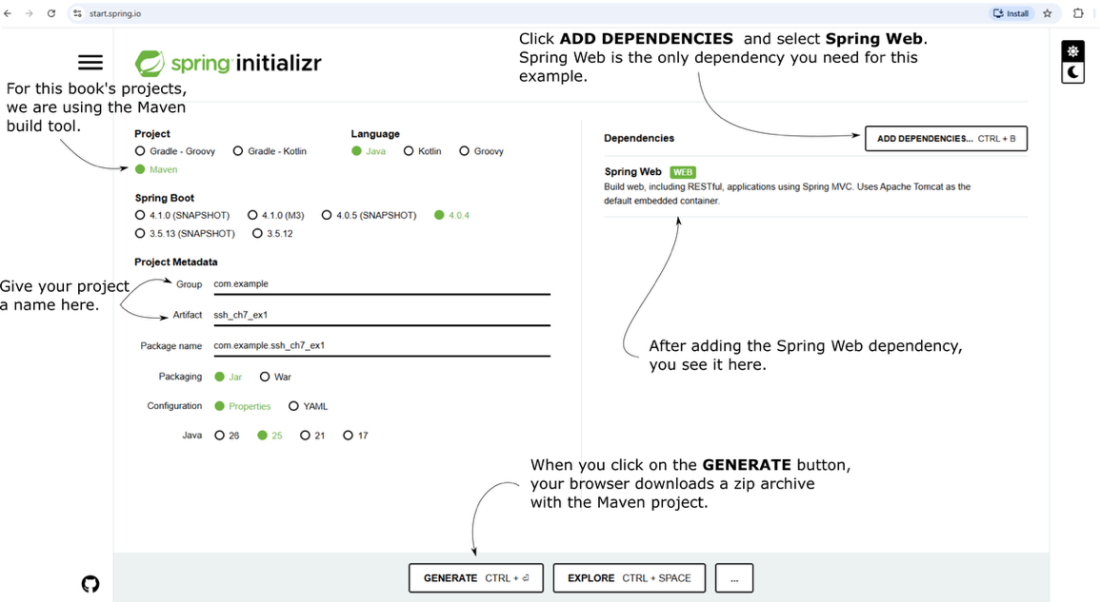
For our example, we need to add the Spring Web dependency. You can add it using the Add Dependencies button on the right upper-hand side of the window. You also need to give a name to your project.
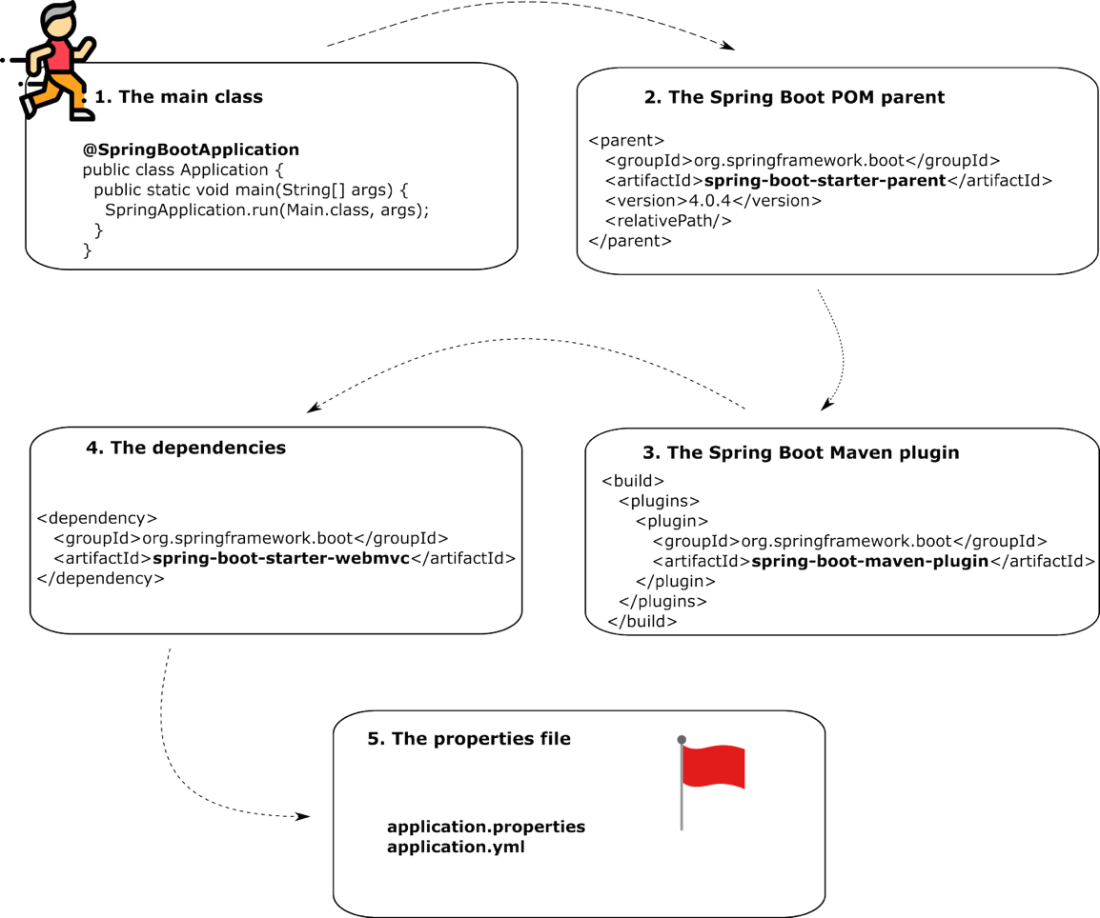
When generating a Spring Boot project with Spring Initializr, it makes some configurations to the project that you don’t find in a plain Maven project.
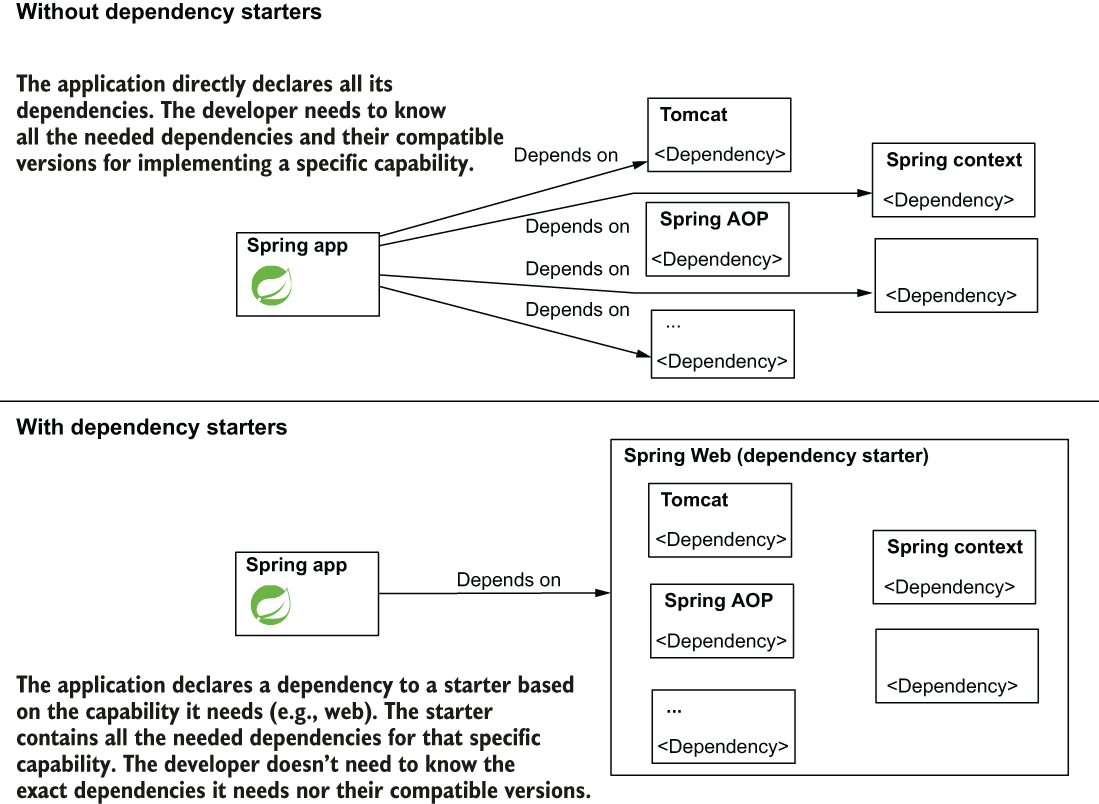
Using dependency starters. Instead of individually referring to specific dependencies, the app now depends on only a starter. The starter contains all the needed dependencies for implementing a specific capability. The starter also makes sure these dependencies are compatible with one another.
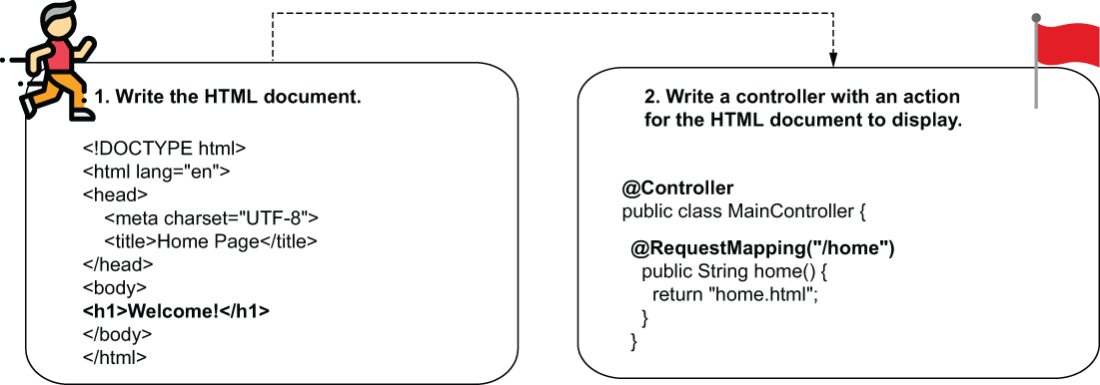
The steps for adding a static web page to your application. Add the HTML document containing the information the browser will display, and then write a controller with an action assigned to it.
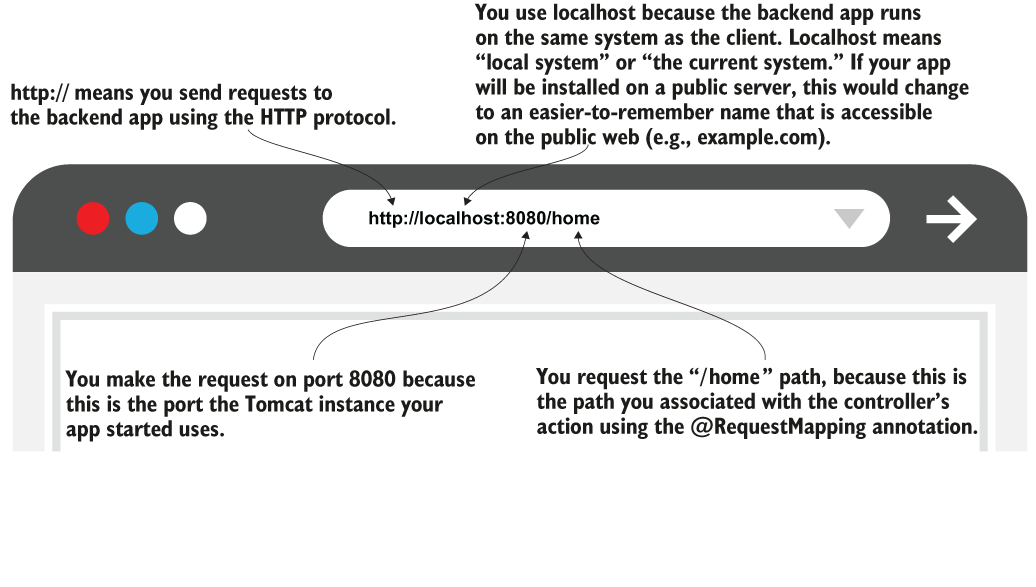
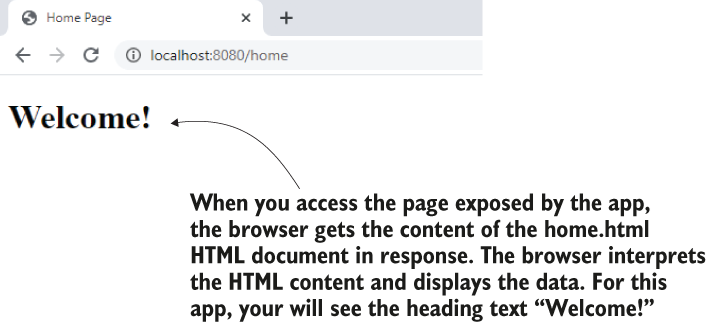
Testing the implementation. Using a browser, send a request to the backend app. You need to use the port Tomcat opened and the path you specified with the @RequestMapping annotation.
Accessing the page in a browser, you’ll see the heading text “Welcome!” The browser interprets and displays the HTML received in response from the backend.
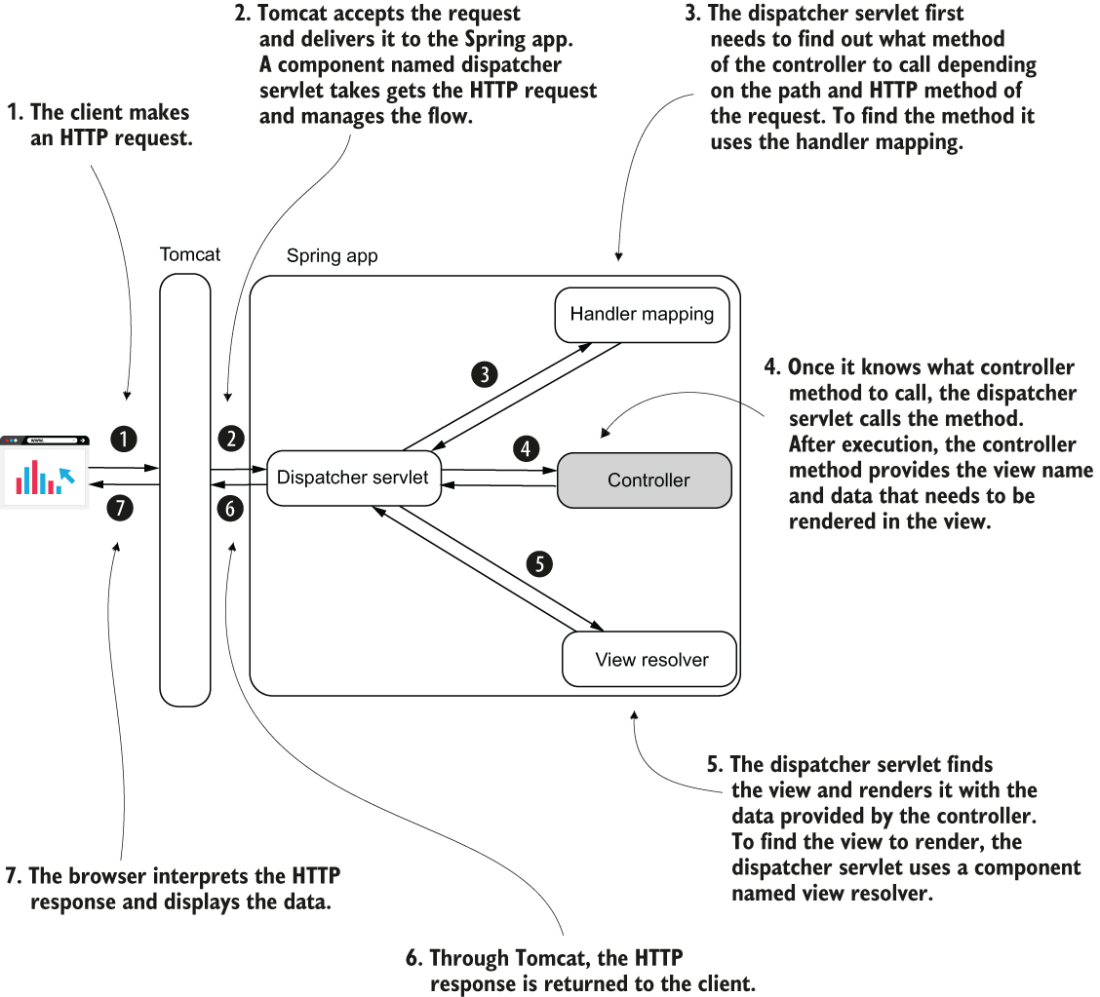
The Spring MVC architecture. In the diagram, you find the main components of Spring MVC. These components and the way they collaborate are responsible for a web app’s behavior. The controller (shaded differently) is the only component you implement. Spring Boot configures the other components.
Summary
- People use web apps more often today than they use desktop apps. For this reason, you must understand how web apps work and learn to implement them.
- A web app is an application that the user interacts with using a web browser. A web app has a client side and a server side, where the data is processed and stored. The client side (frontend) sends requests to the server side (backend). The backend executes the action requested by the frontend and responds.
- Spring offers you the capability of implementing web apps. To avoid writing many configurations, you can use Spring Boot: a Spring ecosystem project that applies the convention-over-configuration principle, providing you with default configurations for the capabilities your app needs.
- Spring Boot also helps you more easily configure your dependencies through the dependency starters it offers. A dependency starter is a group of dependencies with comparable versions to offer your app a specific capability.
- To get the HTTP requests and deliver the responses, a Java backend web app needs a servlet container (e.g., Tomcat): software with the capability to translate HTTP requests and responses to the Java app. With servlet containers, you don’t need to implement communication over the network using the HTTP protocol.
- You can easily create your web app project as a Spring Boot project, which autoconfigures a servlet container and comes with the capabilities you need to write the use cases of your web app. Spring Boot also configures a set of components that intercept and manage HTTP requests. These components are part of a class design we name Spring MVC.
- Because Spring Boot autoconfigures the Spring MVC components and the servlet container, you only need to write the HTML document containing the data the app sends as a response and a controller class for a minimal HTTP request-response flow action.
- You use annotations to configure your controller and the controller’s actions. To mark a class as a Spring MVC controller, use the @Controller stereotype annotation. To assign a controller action to a specific HTTP request, use the @RequestMapping annotation.

 Spring Start Here, Second Edition ebook for free
