15 Unit testing in Spring apps
Testing is presented as a core part of building reliable software, not an optional extra. A test checks that a specific capability behaves as expected, and the chapter distinguishes between unit tests, which isolate a small piece of logic, and integration tests, which verify how multiple parts work together. The main message is that tests protect business value by catching regressions early, documenting intended behavior, and supporting continuous integration pipelines that run tests automatically whenever code changes.
The chapter explains how to think about tests in terms of scenarios. Even a small method can have multiple meaningful cases, so good testing starts by identifying the relevant flows and writing one test method per scenario. The structure is consistent: set up the assumptions, execute the code under test, and verify the outcome. Keeping methods small improves testability because it makes scenarios easier to isolate, understand, and cover.
For Spring apps, the chapter shows how to implement unit tests by removing external dependencies with mocks. Using Mockito and JUnit, you can create controlled fake collaborators, define their behavior, call the target method, and then assert results or verify interactions. The examples cover happy flows, exception flows, and return-value testing, showing how to confirm both expected output and the absence of unintended side effects. The chapter closes by emphasizing that unit tests are fast and focused, but should be complemented by Spring-based tests when framework wiring or infrastructure behavior matters.
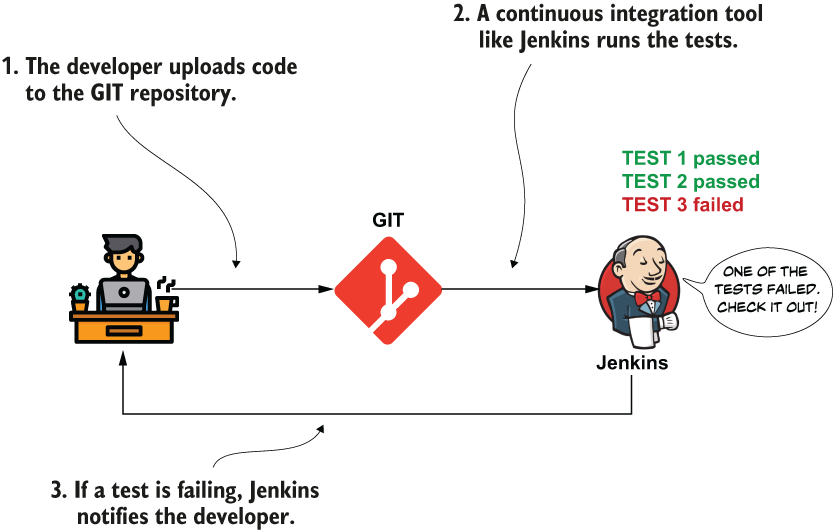
A CI tool, such as Jenkins, runs the tests every time a developer changes the app. If any of the tests fail, the CI tool notifies the developers to check which capability doesn’t work as expected and correct the problem.
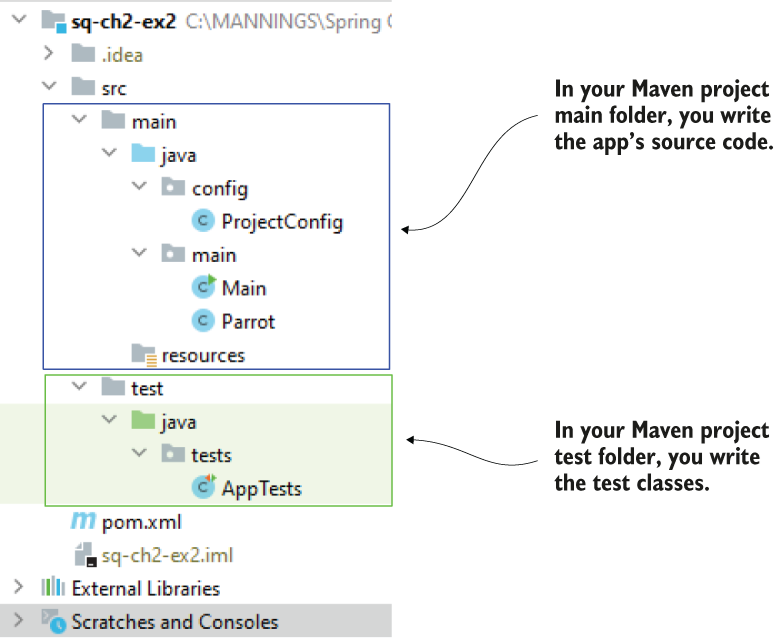
In a Maven project, you write the test classes in the project’s test folder.
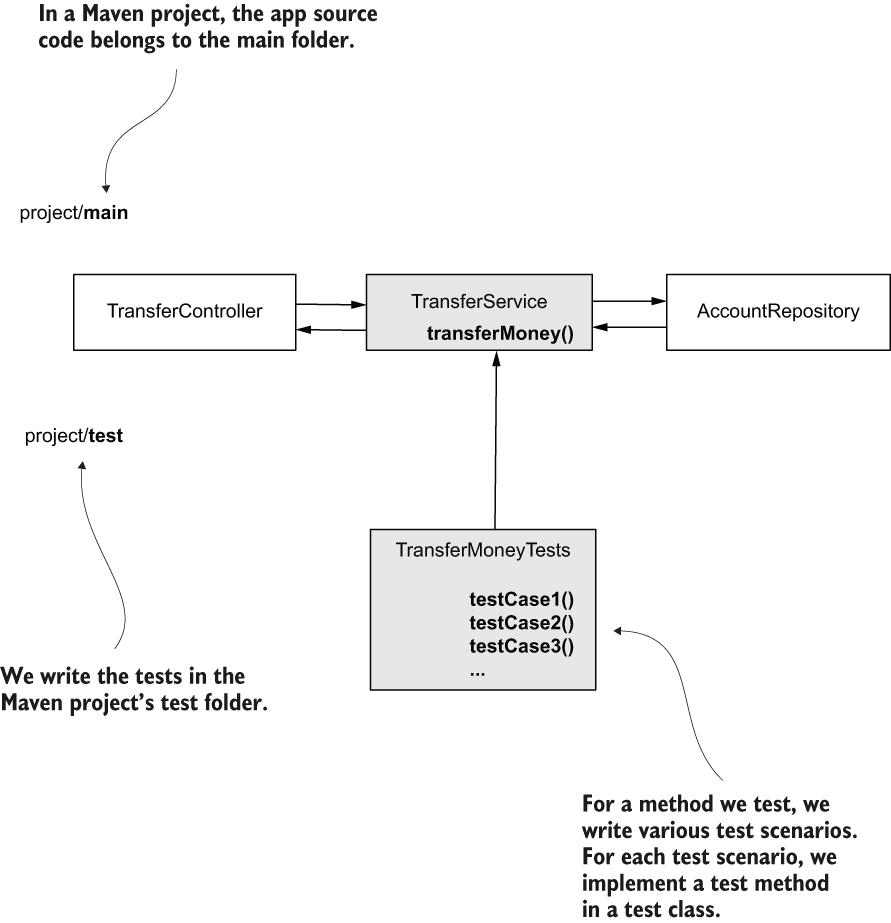
For any piece of logic you test, you need to find the relevant test scenarios. For each test scenario, you write a test method in a test class. You add the test classes in the app’s Maven project test folder. In this figure, the TransferMoneyUnitTests class is a test class that contains the test scenarios for the transferMoney() method. TransferMoneyUnitTests defines multiple test case methods to test each relevant scenario in the transferMoney()’s method logic.
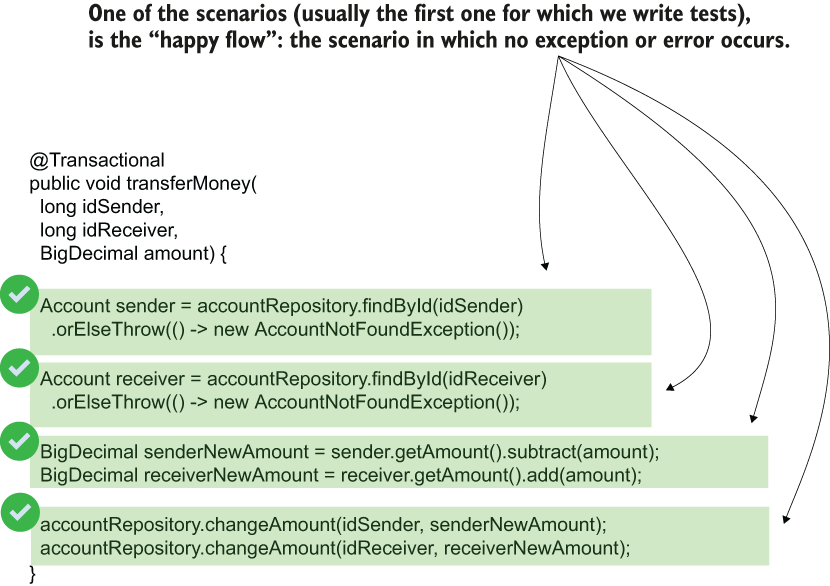
The happy flow: an execution for which no errors or exceptions are encountered. No exception is thrown and all the steps work according to expectations. The amount is subtracted from the sender account and added up in the destination account.
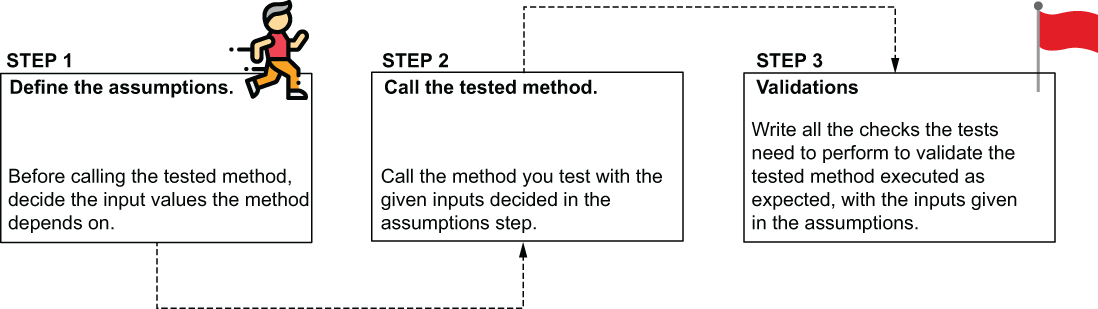
The steps for writing a unit test. Write the assumptions by defining the method inputs. Call the method with the defined assumptions and write the checks the tests need to perform to validate the method’s behavior is correct.
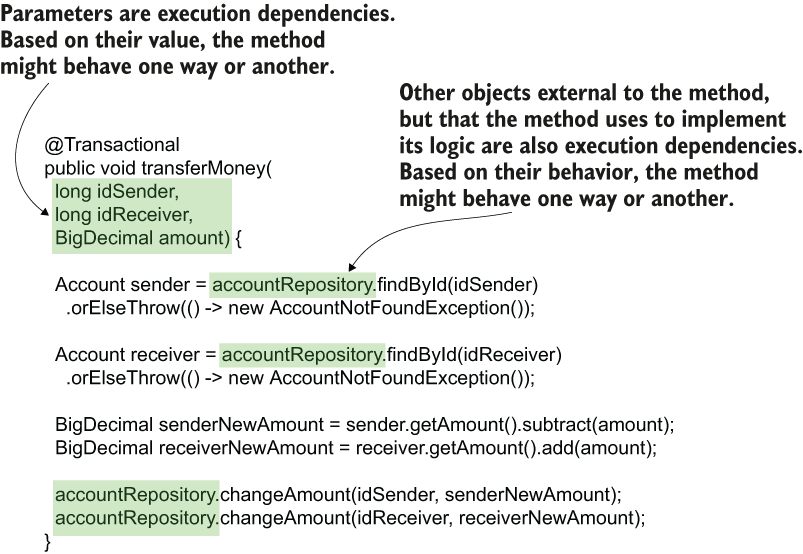
A unit test validates a use case logic in isolation from any dependency. To write the test, we need to make sure we know the dependencies and how to control them. For our scenario, the parameters and the AccountRepository object are dependencies we need to control for the test.
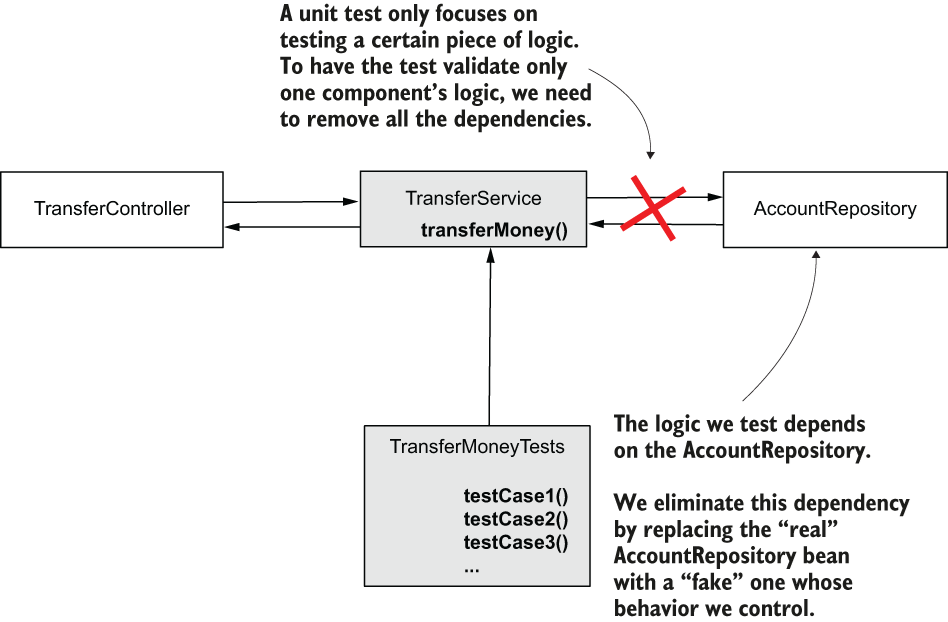
To allow the unit test to focus only on the transferMoney() method's logic, we eliminate the dependency to the AccountRepository object. We use a mock object to replace the real AccountRepository instance, and we control this fake instance to test how the transferMoney() method behaves in different situations.
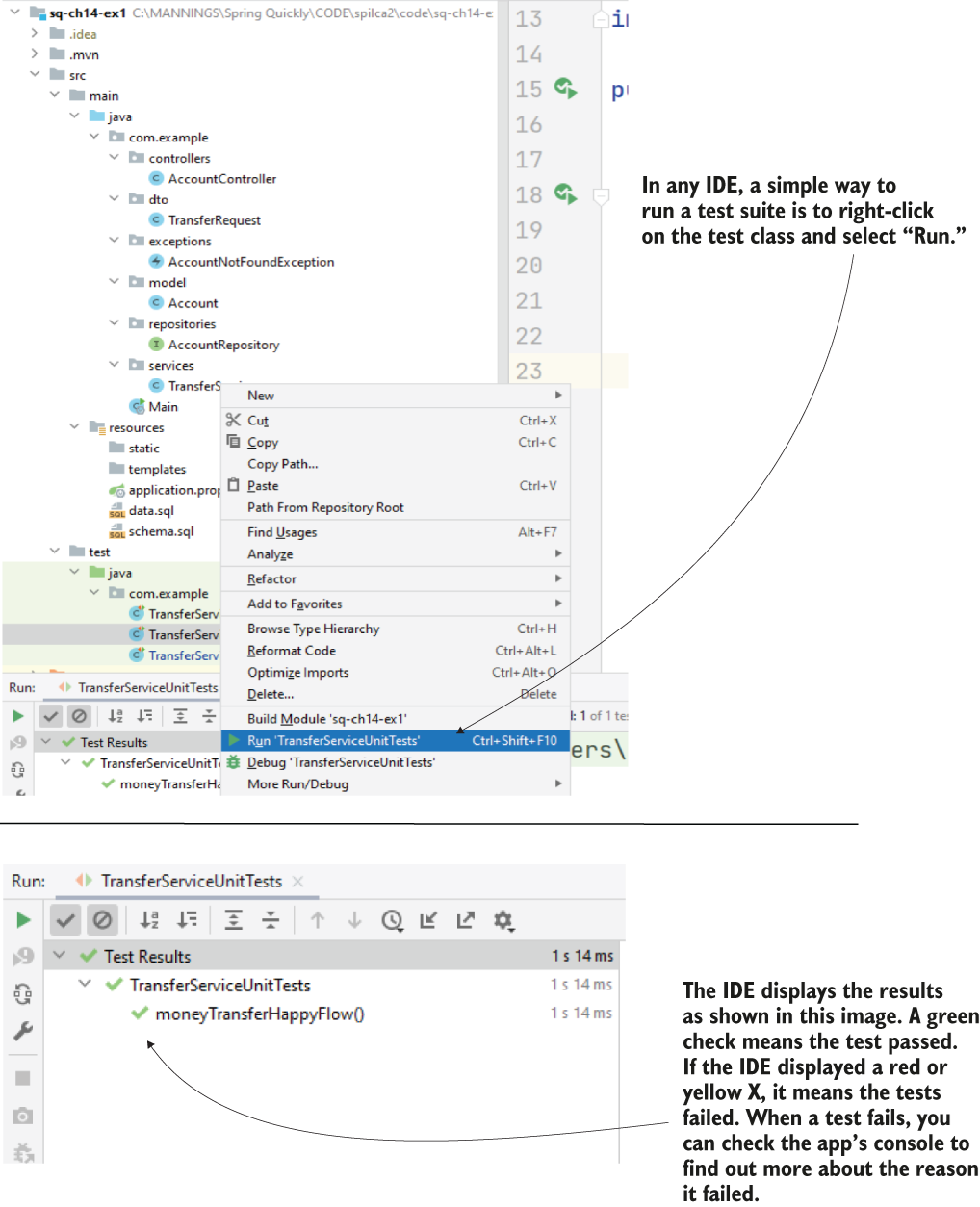
Running a test. An IDE usually offers several ways you can run a test. One of them is to right-click on the test class and select “Run.” You can also run all the project tests by right-clicking on the project name and select “Run tests.” Different IDEs might have slightly different graphical interfaces, but they all look like what you see in this figure. After running the tests, the IDE shows the status for each test.
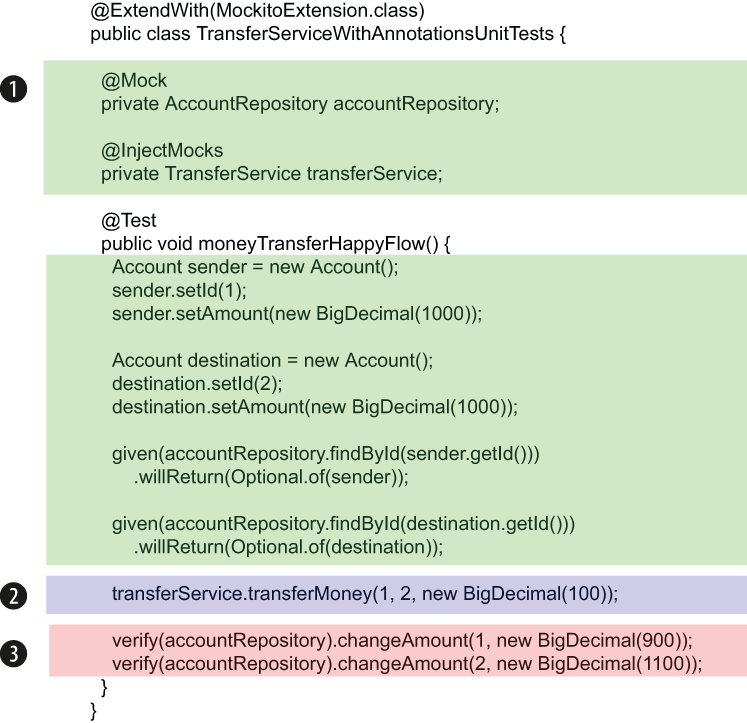
The main parts of the test implementation. (1) Define and control the dependencies, (2) execute the tested method, and (3) verify the method behaved as expected.
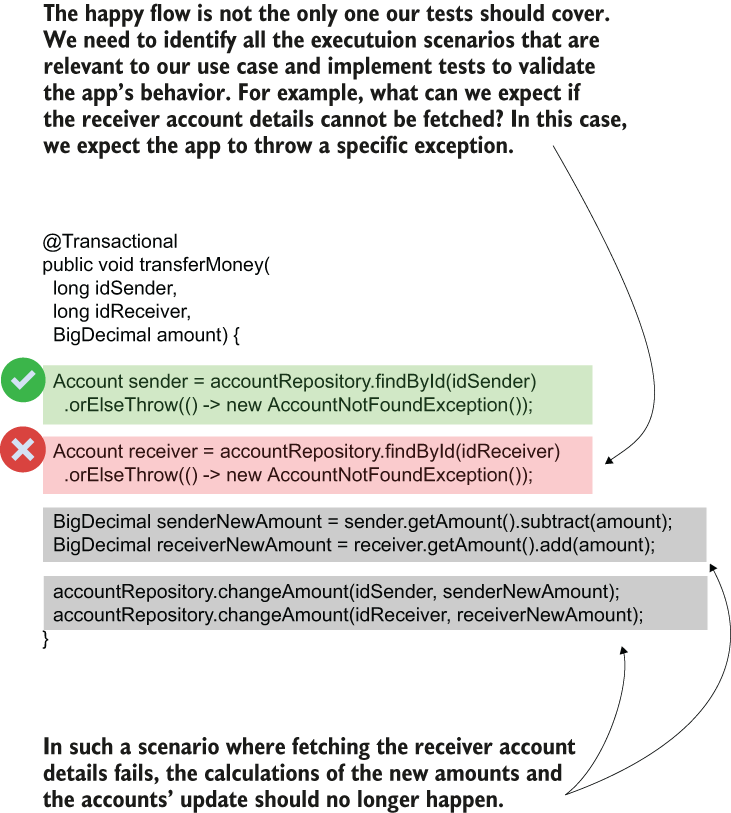
An exception flow is an execution that encountered an error or an exception. For example, if the receiver account details were not found, the app should throw an AccountNotFoundException, and the changeAmount() method should not be called. Exception flows are important as well, and we need to implement tests for these scenarios in the same as we do for happy flows.
Summary
- A test is a small piece of code you write to validate the behavior of certain logic implemented in your app. Tests are necessary because they help you ensure that future app developments don’t break existing capabilities. Tests also help as documentation.
- Tests fall into two categories: unit tests and integration tests. Each has its purposes.
- A unit test only focuses on an isolated piece of logic and validates how one simple component works without checking how it integrates with other features. Unit tests are helpful because they execute fast and point us directly to the problem a specific component might face.
- An integration test focuses on validating the interaction between two or more components. They are essential because sometimes two components might work correctly in isolation but don’t communicate well. Integration tests help us mitigate problems generated by such cases.
- Sometimes in tests, you want to eliminate dependencies to some components to allow the test to focus on how some, but not all, parts interact. In such cases, we replace the components we don’t want to test with “mocks”: fake objects you control to eliminate dependencies you don’t want to test and allow the test to focus only on specific interactions.
- Any test has three main parts:
- Assumptions—Define the input values and the way the mock objects behave.
- Call/Execution—Call the method you want to test.
- Validations—Verify the way the tested method behaved.
FAQ
What is the purpose of a test?
A test is a small piece of logic used to validate that a specific capability in an application works as expected.Why are tests important in an application?
Tests help ensure that code changes do not break existing behavior, provide early feedback during development, and serve as documentation for how the application is supposed to work.What is the difference between a unit test and an integration test?
A unit test validates one isolated piece of logic by eliminating dependencies, while an integration test checks that multiple components work correctly together.What are the three main parts of a unit test?
The three main parts are assumptions, call/execution, and validations. These are also commonly called arrange/act/assert or given/when/then.What is a mock in unit testing?
A mock is a fake object whose behavior you control during the test so you can isolate the logic you are testing from its dependencies.Why do unit tests use mocks?
Mocks let you control how dependencies behave without calling the real objects, which keeps the test focused on one isolated piece of logic.What is a happy flow?
A happy flow is a test scenario where the code executes successfully without errors or exceptions, following the expected path.Why should we also test exception flows?
Because applications must behave correctly when errors happen. Exception flow tests verify that the right exception is thrown and that no unwanted side effects occur.How do you verify that a method returned the expected value in a unit test?
You use an assertion method such asassertEquals() to compare the expected value with the actual returned value.How do @Mock and @InjectMocks work in Spring unit tests with Mockito?
@Mock creates a mock dependency, and @InjectMocks creates the class being tested and injects the mocks into it. They are enabled with @ExtendWith(MockitoExtension.class).
 Spring Start Here, Second Edition ebook for free
