Overview

Chapter 7. Securing your microservices

The chapter explains that security in a microservice system is not optional, even though it can be difficult to understand and debug. It focuses on the core problem of making sure a caller is both authenticated and authorized, while noting that infrastructure hardening and network controls are also important parts of a broader security strategy. To solve the authentication and authorization problem, the chapter uses Spring Cloud Security together with OAuth2, which lets a user log in once, receive a token, and then present that token to multiple services without repeatedly sending credentials.

The chapter then walks through building an OAuth2-based setup for a Spring application. It shows how to create an authentication service, register client applications, define users and roles, and issue tokens using the password grant flow. It also demonstrates how a protected resource checks tokens and permissions, first by allowing any authenticated user to access a service and then by restricting certain operations, such as DELETE requests, to users with an ADMIN role. Because microservices often call each other, the chapter also covers token propagation so that downstream services can continue to validate the same identity across a chain of calls, including through a Zuul gateway.

Next, the chapter introduces JWT as a more structured way to carry token information. JWTs are signed, compact, self-contained, and extensible, which makes them useful for microservices, though the chapter emphasizes that they are not encrypted and should not contain sensitive personal data. It shows how to configure Spring services to issue and consume JWTs, how to pass the token in an Authorization header, and how to extend the token with custom claims such as an organization ID. The chapter closes by stepping back from OAuth2 to broader operational guidance: use HTTPS for all service traffic, route requests through an API gateway, separate public and private service zones, and minimize exposed network ports to reduce the attack surface.

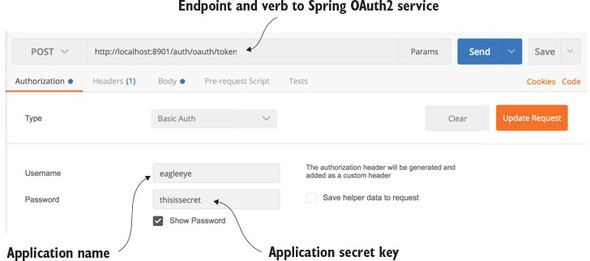
Figure 7.1. OAuth2 allows a user to authenticate without constantly having to present credentials.

Figure 7.2. Setting up basic authentication using the application key and secret

Figure 7.3. When requesting a OAuth2 token, the user’s credentials are passed in as HTTP form Parameters to the /auth/oauth/token endpoint.
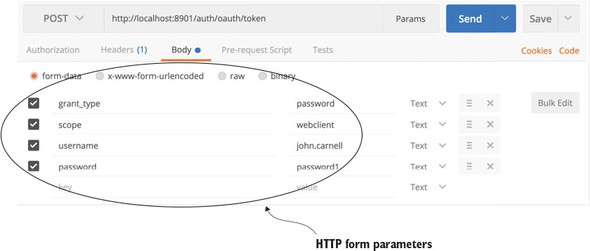
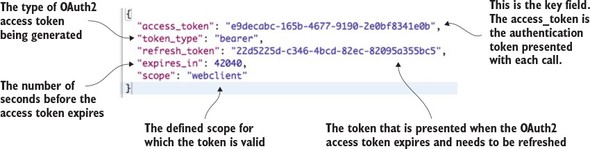
Figure 7.4. Payload returned after a successful client credential validation

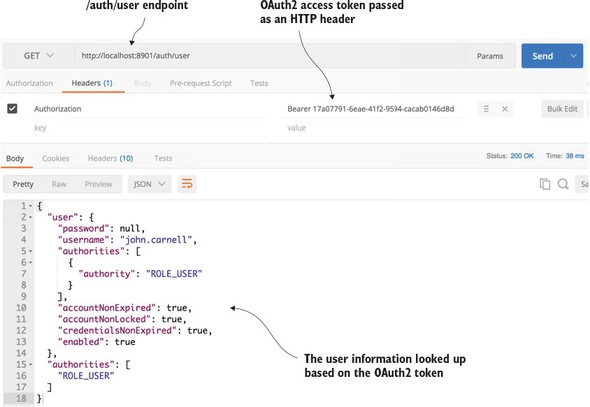
Figure 7.5. Looking up user information based on the issued OAuth2 token

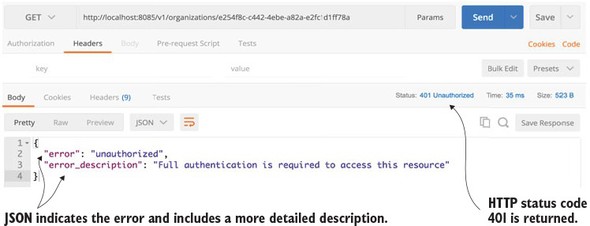
Figure 7.6. Trying to call the organization service will result in a failed call.

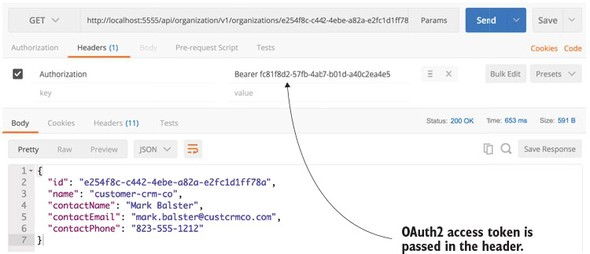
Figure 7.7. Passing in the OAuth2 access token on the call to the organization service

Figure 7.8. The OAuth2 token has to be carried throughout the entire call chain.

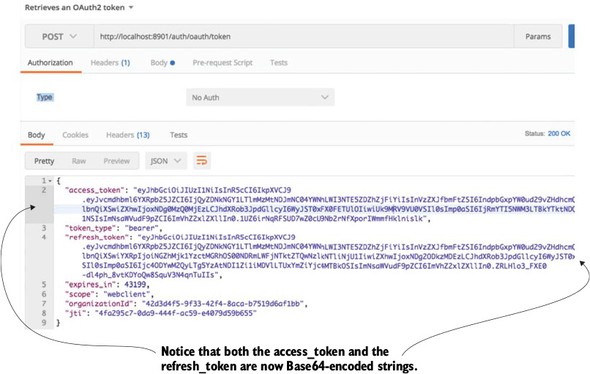
Figure 7.9. The access and refresh tokens from your authentication call are now JWT tokens.

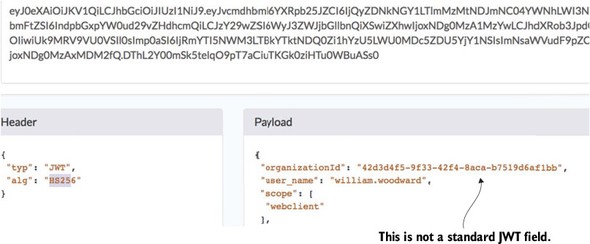
Figure 7.10. Using http://jswebtoken.io allows you to decode the contents.
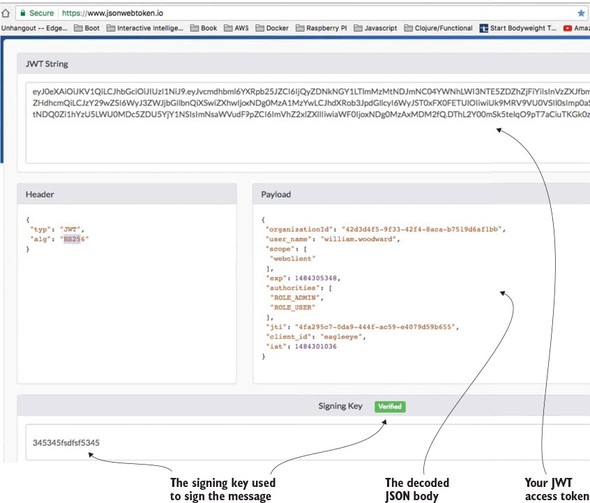
Figure 7.11. An example of extending the JWT token with a organizationId

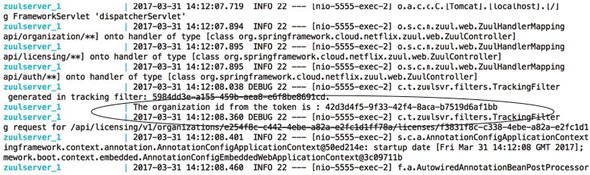
Figure 7.12. The Zuul server parses out the organization ID from the JWT token as it passes through.

Figure 7.13. A microservice security architecture is more than implementing OAuth2.

Summary

  • OAuth2 is a token-based authentication framework to authenticate users.
  • OAuth2 ensures that each microservice carrying out a user request doesn’t need to be presented with user credentials with every call.
  • OAuth2 offers different mechanisms for protecting web services calls. These mechanisms are called grants.
  • To use OAuth2 in Spring, you need to set up an OAuth2-based authentication service.
  • Each application that wants to call your services needs to be registered with your OAuth2 authentication service.
  • Each application will have its own application name and secret key.
  • User credentials and roles are in memory or a data store and accessed via Spring security.
  • Each service must define what actions a role can take.
  • Spring Cloud Security supports the JavaScript Web Token (JWT) specification.
  • JWT defines a signed, JavaScript standard for generating OAuth2 tokens.
  • With JWT, you can inject custom fields into the specification.
  • Securing your microservices involves more than just using OAuth2. You should
  • Use HTTPS to encrypt all calls between services.
  • Use a services gateway to narrow the number of access points a service can be reached through.
  • Limit the attack surface for a service by limiting the number of inbound and outbound ports on the operating system that the service is running on.

FAQ

Why is security especially important in a microservices environment?Security matters more in microservices because many small services communicate across the network, increasing the number of entry points, trust boundaries, and opportunities for unauthorized access. A secure design helps ensure only authenticated and authorized users can access protected resources.
What is the difference between authentication and authorization?Authentication verifies who a user is by checking credentials. Authorization determines what that authenticated user is allowed to do, such as which endpoints they can access or which HTTP methods they may use.
What are the main components of OAuth2 described in this chapter?The chapter describes four OAuth2 components: a protected resource, a resource owner, an application, and an OAuth2 authentication server. Together, they let a user authenticate once and then use a token to access services.
Why does OAuth2 use access tokens instead of passing user credentials to every service?OAuth2 uses access tokens so the user only needs to authenticate once with the authorization server. The token can then be passed between services, which reduces exposure of credentials and simplifies secure communication across multiple services.
How is the OAuth2 authentication service set up in Spring?The authentication service is implemented as a Spring Boot application using Spring Cloud Security and Spring Security OAuth2. It is configured with @EnableAuthorizationServer, and it exposes endpoints such as /auth/oauth/token and /auth/user.
How are client applications registered with the OAuth2 server?Client applications are registered in the OAuth2 configuration using a client ID, a secret, supported grant types, and scopes. In the chapter’s example, the EagleEye application is registered in memory with specific grant types like password and client credentials.
How do you protect a microservice so only authenticated users can access it?You add the Spring Security and OAuth2 dependencies, point the service to the OAuth2 server’s user info endpoint, and mark the service as a protected resource with @EnableResourceServer. Then you configure access rules so all requests require authentication.
How can you restrict a specific endpoint to only users with the ADMIN role?You define authorization rules in a ResourceServerConfigurerAdapter and match the HTTP method and URL pattern. For example, the chapter shows restricting DELETE /v1/organizations/** to users with hasRole("ADMIN").
How is an OAuth2 access token propagated between microservices?When one service calls another, the token must be forwarded in the Authorization header as Bearer <token>. The chapter shows using Zuul to forward the header and using an OAuth2RestTemplate or custom RestTemplate interceptor to pass the token downstream.
What is JWT and why is it used with OAuth2 in this chapter?JWT, or JavaScript Web Token, provides a standard token format for OAuth2. It is small, signed, self-contained, and extensible, allowing services to validate tokens locally and inspect claims without always calling the authorization server.