Appendix A. Running a cloud on your desktop
This appendix explains how to set up and run the book’s microservices examples on a desktop with as little friction as possible. The author’s main design goals are to make the code easy to consume and to ensure that every chapter is self-contained, so readers can work through any chapter independently without needing support from other chapters. To achieve that, the examples consistently use Maven for building, Docker for packaging each service into a portable container, and Docker Compose for starting the required services together as a single runtime environment.
The chapter first outlines the required local tooling: a Java 8-compatible Maven installation, Docker, and a Git client for obtaining the source. Each chapter’s code lives in its own repository, and the projects can be downloaded either through the GitHub interface or by cloning them from the command line. Within each chapter, services are organized in separate project directories, and each service follows the same Maven-based layout, including Java source, Docker-specific files, application configuration, and any database initialization scripts needed to bootstrap the service.
After the code is downloaded, the build process is straightforward: running Maven from a chapter root compiles the services and triggers Docker image creation through the Spotify Docker Maven plugin. The Dockerfile provisions a lightweight Java-based image, adds a small startup script, and uses a simple wait loop to delay service launch until dependencies such as configuration servers or databases are available. Finally, Docker Compose reads a YAML file that defines the chapter’s service group, maps ports, and supplies environment variables, allowing the whole stack to be launched together; the appendix also notes that container logs can be inspected separately and that the containers are ephemeral unless extra persistence is configured.
FAQ
What software do I need installed to work through the book’s code examples?
The appendix says you should have Apache Maven, Docker, and a Git client installed on your desktop. The book was built using Maven 3.3.9, Docker 1.12, and Git 2.8.4, with Java 1.8 used to compile the code examples.Why does the book use Maven for all the chapters?
Maven is used because every project follows the same build structure, making the examples consistent and easy to build. It is also still the predominant build tool in the Java ecosystem, which makes it a practical choice for Spring microservices projects.How are the source code examples for the book organized on GitHub?
Each chapter has its own separate GitHub repository, so you can download and run a chapter independently. This keeps the chapters standalone and avoids dependencies on code from other chapters.How can I download a chapter’s code from GitHub?
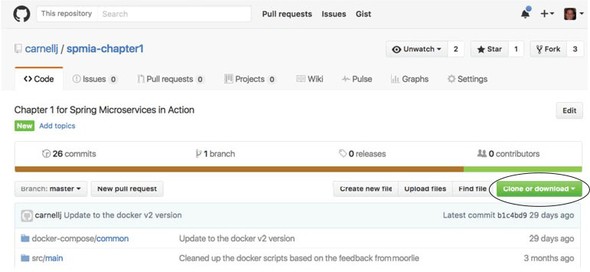
You can either use the GitHub web UI to download the repository as a ZIP file or clone it with Git. For example, chapter 1 can be downloaded withgit clone https://github.com/carnellj/spmia-chapter1.git.What is the basic structure of each service project in a chapter?
Each service is organized as a Maven project and typically contains asrc/main/java directory for source code, a src/main/docker directory for Docker-related files, and a src/main/resources directory for configuration and SQL scripts.What files are found in the src/main/docker directory?
The src/main/docker directory contains a Dockerfile and a run.sh script. The Dockerfile defines how the image is built, and run.sh is used to start the service after checking that its dependencies are available.How do I build the code and Docker images for a whole chapter?
Go to the root of the chapter directory and runmvn clean package docker:build. This builds all services in that chapter and also creates the Docker images locally.How does the Spotify Docker Maven plugin help with the build?
The plugin copies the service JAR and Docker files into the build output, runs the Dockerfile from the generated directory, and pushes the resulting image to the local Docker repository. In other words, it integrates Docker image creation directly into the Maven build process.Why does the Docker image install nc (netcat)?
nc is used to test whether a dependent service’s port is open before starting the application. The run.sh script uses it to wait for services like the configuration server and database before launching the main service.How do I start the services for a chapter with Docker Compose?
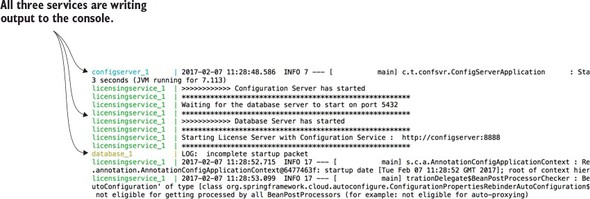
From the chapter root, rundocker-compose -f docker/common/docker-compose.yml up. Docker Compose starts all defined services together, passes environment variables to them, and prints their output to the console.