3 Get requirements to build the right application
This chapter explains how to ensure you build the right application before worrying about building it right. It emphasizes identifying the client (any stakeholder who defines success), recognizing that requirements evolve, and adopting iterative development. The chapter frames requirements as the foundation for design, shows how use cases and a functional specification give shared understanding to clients and developers, and positions UML as a helpful, lightweight way to visualize behavior and document decisions.
It distinguishes functional requirements (what the system must do) from nonfunctional requirements (constraints such as performance, platforms, usability, and internationalization), stressing that both are equally critical and should be stated strongly with “must” or “shall.” Good requirements are clear, consistent, correct, complete, realistic, verifiable, and traceable, and they avoid design details. The chapter outlines practical ways to elicit requirements—multi-round interviews, direct observation of current workflows, close client collaboration, and rapid prototypes—while noting the value of implied requirements, the need for an agreed (but flexible) freeze date, and the importance of encapsulating change-prone areas. Use cases add context by describing actor goals and step-by-step interactions; they should be concise, actor-focused, and paired with simple diagrams and written descriptions (preconditions, triggers, primary/alternate flows, postconditions, and applicable nonfunctional constraints).
The functional specification captures the problem, objectives, functional and nonfunctional requirements, and use cases in nontechnical language; it may also include black-box tests and deployment/maintenance plans. Client approval validates that you’re building the right product, while subsequent testing verifies you’ve built it correctly. Finally, the chapter shows how to move from requirements to an initial design: analyze nouns to propose classes and attributes (for the catalogue example: Catalogue, Book, Attributes, Form) and map verbs to methods (such as add, update, delete, find, verify, and match). This translation is iterative—expect refinement as understanding deepens—and good design encapsulates volatility so later requirement changes can be incorporated with minimal disruption.
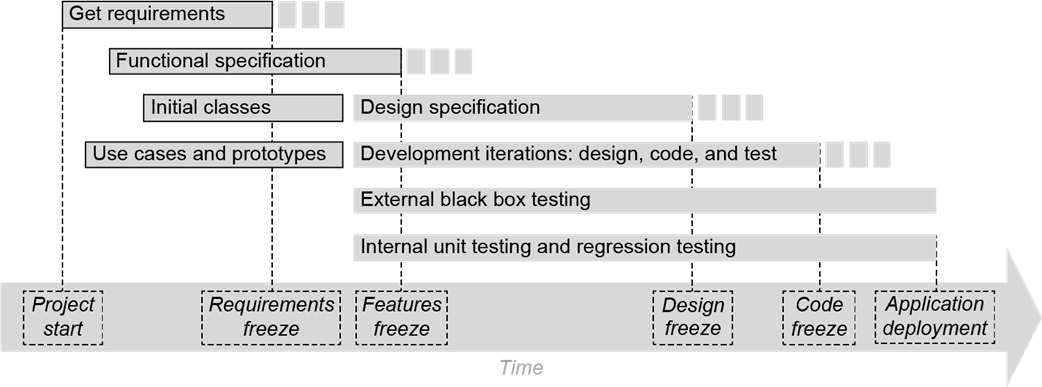
Timeline of the major activities while developing an application. The activities with the bold outlines are the crucial prelude to application design. The dotted time spans following Get Requirements and Functional Specification suggest that their freeze dates must be flexible.
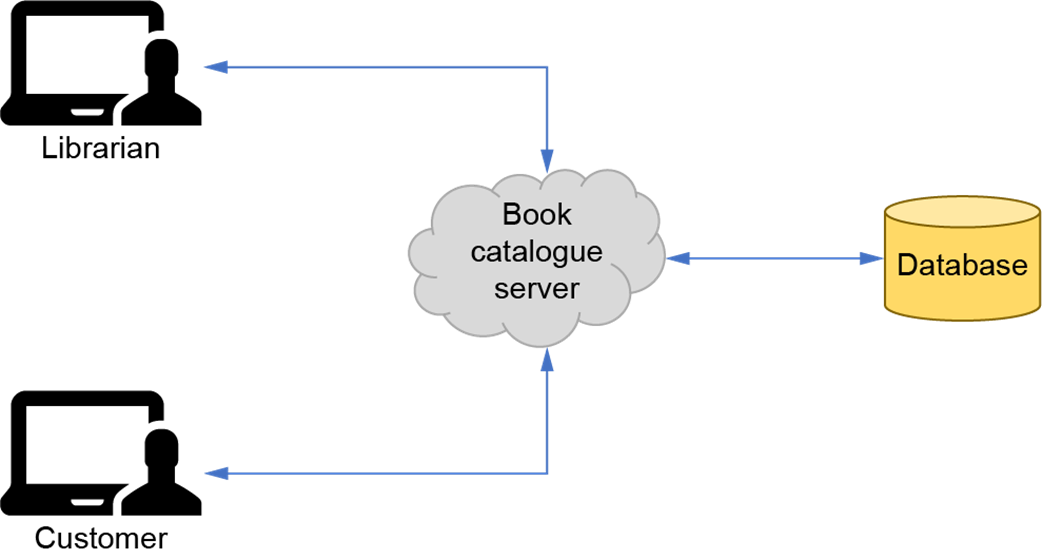
A more advanced version of the book catalogue application. A librarian interacts with the book catalogue server to enter new books into the catalogue and to update and remove existing books. A customer interacts with the server to search for books. The books are stored in a backend database.



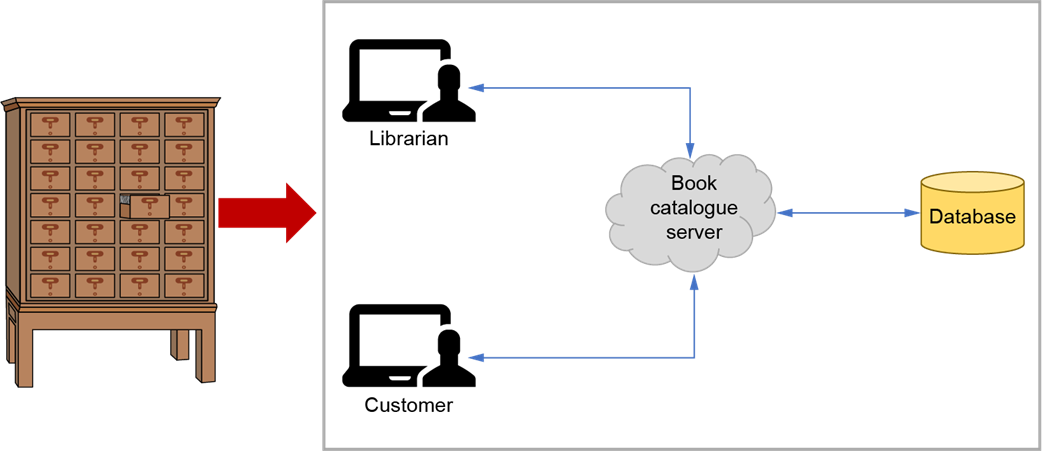
To automate a library’s old-fashioned card catalogue with a software application, you must first get the requirements to develop the right application.


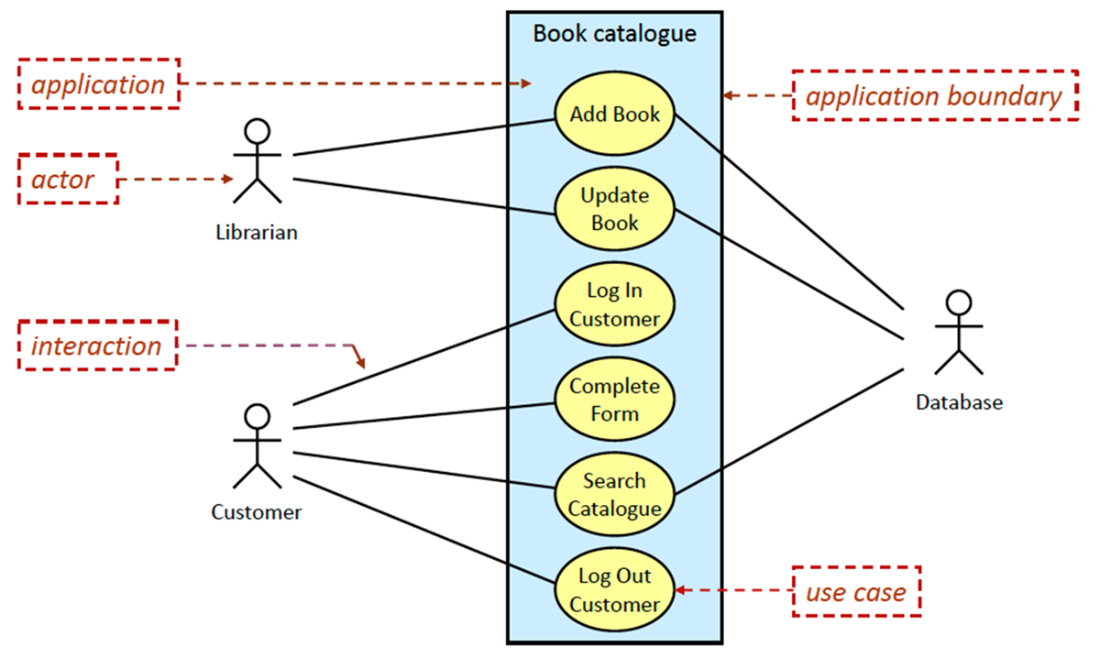
A UML use case diagram containing the names of six use cases for an advanced version of our book catalogue application. The labels in the dashed boxes and the dashed arrows indicate the various components of the diagram. When drawing a use case diagram, do not include these labels and arrows.



Summary
- Functional requirements state what an application must do, or allow a user to do, for the application to be successful.
- Nonfunctional requirements impose restrictions or constraints that the application must meet to be successful. They are just as important as functional requirements. Examples are performance or platform requirements.
- State requirements using the strong verbs must and shall.
- Getting good requirements is crucial. Interview the application’s clients or observe how people currently perform their tasks. Create prototypes of the application to show to the clients. Imagine ways an application can improve their productivity.
- Requirements come from a continuous engagement with clients, who may not always know what they want. Be prepared for the requirements to change during application design and even during coding.
- Good requirements are clear, consistent, correct, complete, realistic, verifiable, and traceable.
- Use cases provide context for the requirements and show how they determine the application’s functionality. Document the use cases with UML use case diagrams and use case descriptions. Use cases can inspire new requirements.
- A functional specification written in nontechnical, jargon-free language informs both the clients and the software developers what the application will do. It can include an external test plan for black-box testing. Some organizations consider this document to be a contract between clients and developers. Ideally, it should be modifiable (up until the features freeze milestone) to accommodate changes to the requirements.
- Clients validate that the software developers are going to build the right application by approving the functional specification. The developers verify that they are building the application right through testing. Software verification and validation (software V&V) is a major topic in the fields of software engineering and software quality control.
- Analyze the requirements to obtain the initial set of classes for the application. Determine which nouns become classes and which verbs become methods that implement behavior. Assign instance variables and methods to the classes.
- Don’t fall victim to paralysis by analysis. Create and show prototypes, start the development iterations, and more classes will arise.

 Software Design for Python Programmers ebook for free
