8 Scalability for Wasm with Kubernetes
WebAssembly brings small binaries, fast startup, and a strong security model, but it benefits from the mature orchestration and tooling of Kubernetes. The chapter shows how Kubernetes’s extensibility—through Custom Resource Definitions (CRDs) and operators—lets us treat Wasm as a first-class workload. By defining custom resources that feel like “applications,” controllers can reconcile desired state into running services, so Wasm components can plug into standard Kubernetes capabilities such as scheduling, networking, observability, and autoscaling.
With SpinKube, Spin applications are packaged as OCI images and run directly as pods via a Wasm-aware runtime class. The setup prepares a cluster, installs support for secure admission webhooks, adds a RuntimeClass that selects the Spin containerd shim, and registers SpinKube’s CRDs (SpinApp and SpinAppExecutor) plus its operator. From there, a Spin app is pushed to a registry, scaffolded into a SpinApp manifest, and applied like any other Kubernetes object. The chapter then demonstrates scaling with a Horizontal Pod Autoscaler by adding CPU- and memory-based targets, setting resource requests and limits, generating load, and observing the operator and HPA scale replicas up and down automatically (with KEDA presented as an alternative event-driven autoscaler).
wasmCloud integrates differently: instead of a node runtime shim, it deploys its application platform into the cluster (hosts, a message broker, and a deployment manager). You install the platform, create hosts with WasmCloudHostConfig, and deploy applications via an Application CRD—reusing the same wadm specs used outside Kubernetes—and operate them with kubectl or wash. The chapter contrasts the operational experience: SpinKube makes Wasm look like conventional pods managed with native tools, while wasmCloud centralizes lifecycle and linking inside its platform. A complete end-to-end example culminates by running the multi-component SmartCMS application on Kubernetes with wasmCloud, including an Ollama-backed provider, illustrating how both approaches scale Wasm workloads using familiar cluster primitives.
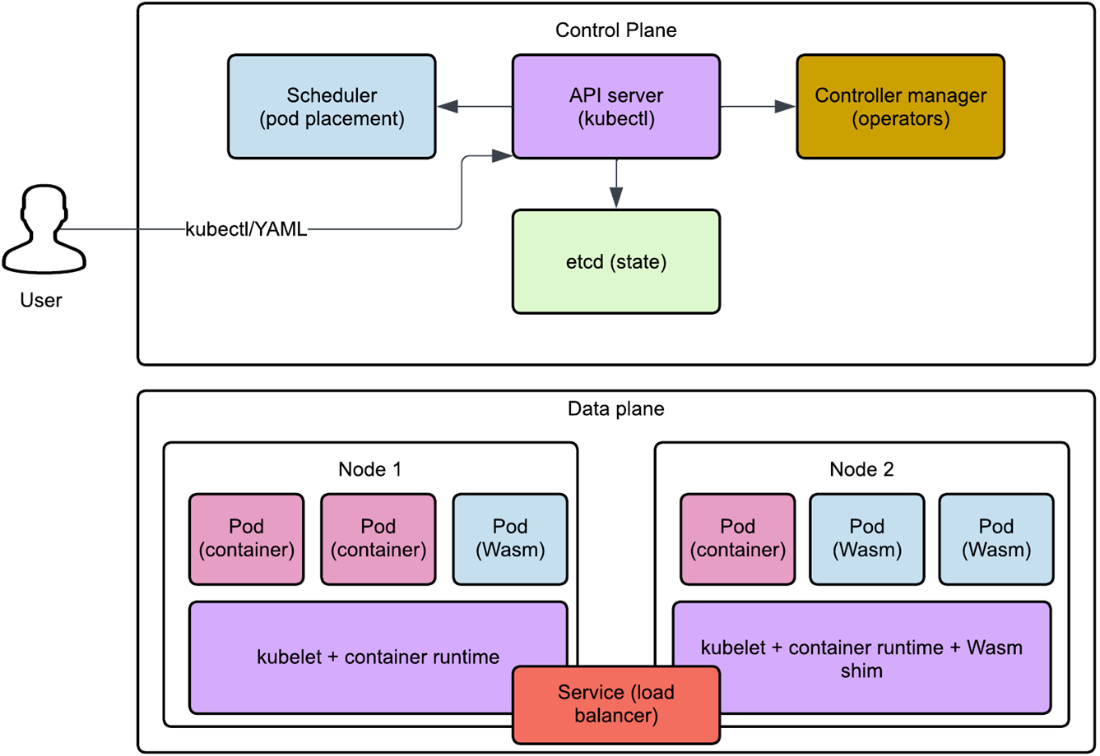
Kubernetes architecture showing the control plane (API server, scheduler, controller manager) and data plane (nodes with pods). The control plane manages cluster state and makes scheduling decisions, while the data plane runs the actual workloads. Users interact with the cluster through the API server, typically using kubectl commands or YAML manifests.
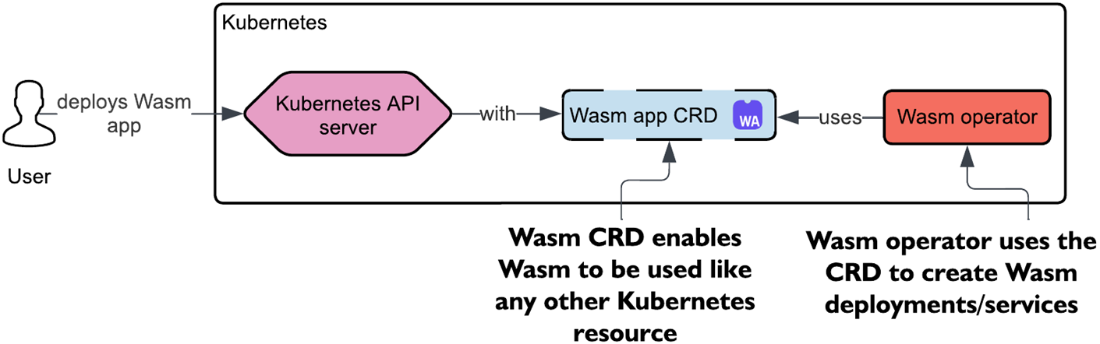
How a Wasm operator fits into Kubernetes: the user deploys a Wasm app by submitting a CR to the Kubernetes API server. This resource is defined by a Wasm-specific CRD, which is handled behind the scenes by a Wasm operator.
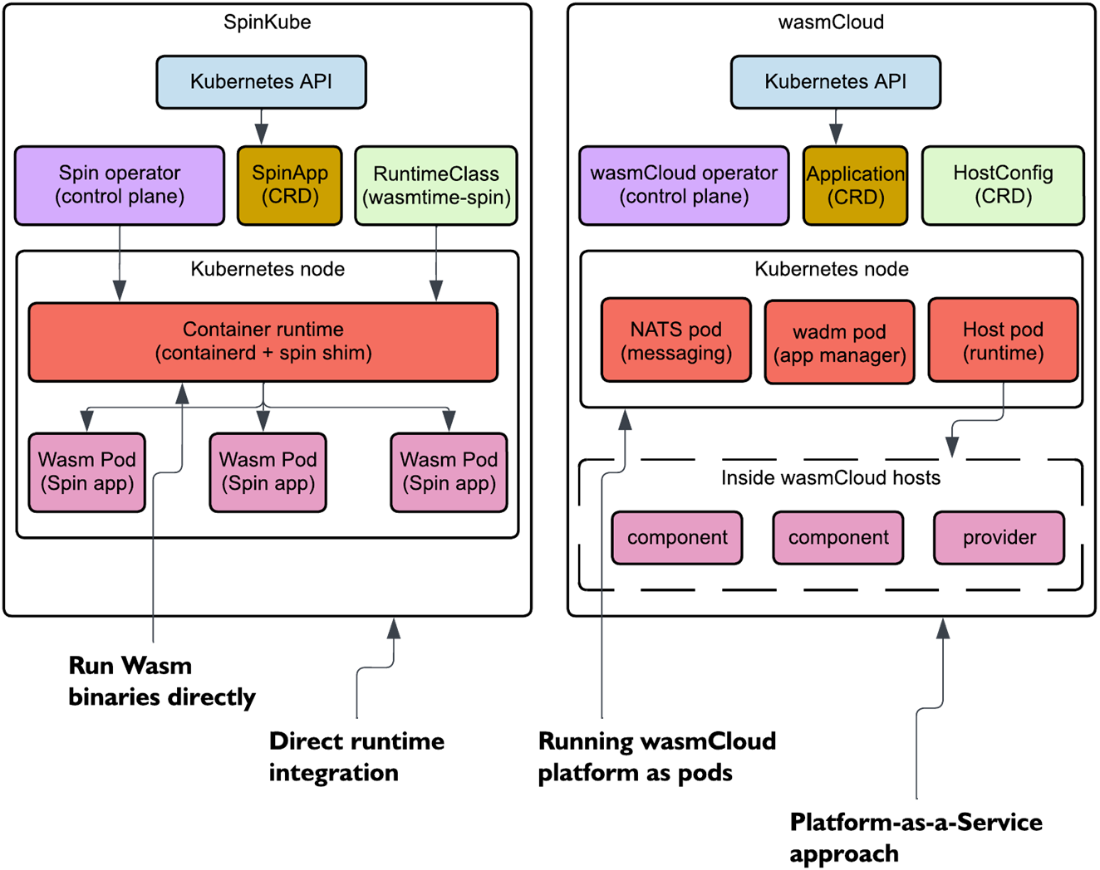
Architectural comparison of SpinKube and wasmCloud in Kubernetes. SpinKube (left) extends the container runtime with a Wasm shim to run Spin applications directly as pods. wasmCloud (right) deploys its platform components (NATS, wadm, and hosts) as regular Kubernetes pods, then orchestrates Wasm workloads within those hosts. Both approaches use CRDs and operators but integrate at different layers of the stack.
Summary
- Wasm can reuse mature, battle-tested components of the container ecosystem, like Kubernetes. This helps solve problems where there’s no good Wasm-native solution yet.
- Custom Resource Definitions (CRDs) and operators enable Kubernetes to manage non-container workloads, including Wasm apps, using native patterns for orchestration and scaling.
- SpinKube integrates Spin with Kubernetes, providing CRDs and an operator that understands how to deploy, scale, and manage Spin applications using Kubernetes-native primitives.
- The Spin kube plugin streamlines deployment by scaffolding Kubernetes manifests for Spin applications, making it easy to move from local dev to production.
- Kubernetes’s Horizontal Pod Autoscaler (HPA) can be integrated with Spin apps, allowing replicas to scale dynamically based on CPU and memory load.
- Unlike SpinKube, wasmCloud does not rely on a specialized container runtime; instead, it deploys its full host environment inside the cluster and manages apps through NATS and wadm.
FAQ
How do CRDs and operators enable running WebAssembly (Wasm) on Kubernetes?
Custom Resource Definitions (CRDs) add new, higher-level APIs that model Wasm apps (for example, SpinApp/SpinAppExecutor in SpinKube and WasmCloudHostConfig/Application in wasmCloud). Operators watch these CRs and reconcile them into working workloads: creating Deployments/Services, wiring networking, applying defaults via admission webhooks, and handling updates and restarts. In short, CRDs describe the desired state; operators make it real.What local setup and tools are recommended to follow the chapter’s examples?
- Spin with the official kube plugin for Kubernetes scaffolding- k3d to run a local Kubernetes cluster (mapped load balancer port, e.g., 8081→80)
- kubectl to interact with the cluster
- Helm to install charts (operators/platforms)
- cert-manager to secure admission webhooks
- Access to a container registry (e.g., GHCR) and authenticated CLI to push images
What is RuntimeClass and why is it needed for Spin-based Wasm workloads?
RuntimeClass tells Kubernetes which runtime to use for a workload. For Spin, you define a RuntimeClass (for example, wasmtime-spin-v2 with handler spin) so pods use the Spin-compatible containerd shim. In local k3d setups, all nodes can be preconfigured with the shim. In production, you’d typically label only compatible nodes and select them via nodeSelector to control placement.What do SpinKube’s SpinApp and SpinAppExecutor resources configure?
- SpinAppExecutor: Chooses the executor/runtime (maps to the RuntimeClass), can auto-create a Deployment, and add default CA certs.- SpinApp: The main workload spec (image, replicas) plus optional registry secrets, probes, resources, environment/Spin variables, volumes, and autoscaling preferences. Together they make Spin apps feel “native” to Kubernetes.
What are the basic steps to deploy a Spin app to Kubernetes with SpinKube?
1) Build your Spin app. 2) Push it as an OCI image to a registry and make it public (if needed). 3) Use spin kube scaffold to generate a SpinApp manifest referencing the image and executor. 4) Apply the manifest (pipe to kubectl or save and kubectl apply). 5) Verify with kubectl get spinapps and test via kubectl port-forward or an exposed Service/Ingress.How do I enable and verify autoscaling (HPA) for a Spin app?
Use spin kube scaffold with --autoscaler hpa and set requests/limits plus min/max replicas. Apply the output to the cluster. Generate CPU/memory load (e.g., a /load route that runs fib(40) and drive it with oha). Verify with kubectl get hpa and kubectl describe deploy to see scaling events. By default, HPA targets 60% utilization unless overridden.What’s the difference between using HPA and KEDA for Spin app autoscaling?
HPA scales based on built-in resource metrics (CPU/memory). KEDA offers event-driven scaling from external sources (for example, queue length, Kafka lag) in addition to resource metrics. Choose HPA for simple CPU/memory-driven scaling and KEDA when you need richer, event-based triggers.How does wasmCloud integrate with Kubernetes, and how is it different from SpinKube?
SpinKube extends the container runtime (via a shim) so each Wasm app runs as its own pod and you operate mostly with kubectl. wasmCloud installs a platform into the cluster (NATS, wadm, wasmCloud hosts) and runs components inside those hosts. You interact via both Kubernetes CRDs and wasmCloud tooling (wash, wadm manifests). The result is two valid but different operational models.How do I install wasmCloud on an existing cluster and deploy an app?
Install wasmCloud with its Helm chart (which brings NATS, wadm, and the operator), wait for components to be ready, then: 1) Create a WasmCloudHostConfig to run hosts. 2) Push your component to a registry. 3) Apply your Application (wadm) manifest. 4) Port-forward the wasmCloud host (for example, to 8080) to test with curl. For introspection, port-forward NATS and use wash (wash get inventory, wash app status).How do I run the SmartCMS example with an Ollama backend on Kubernetes, and what pitfalls should I watch for?
- Push the SmartCMS component to a registry and update wadm.yaml to reference the image.- Bind the HTTP server to 0.0.0.0 (not 127.0.0.1) for container networking.
- Deploy Ollama (Deployment + Service) and point the provider to http://ollama:11434.
- Use a prebuilt provider image compatible with your CPU architecture (the example targets x86_64-linux).
- Apply the app, verify with wash app status and check logs with kubectl logs if needed.

 Server-Side WebAssembly ebook for free
