Overview

7 Introduction to Wasm containers

This chapter introduces how WebAssembly (Wasm) fits into the modern packaging and deployment landscape by comparing it to traditional containers and explaining its distribution story. Whereas containers bundle an application with a userspace environment that runs atop the host kernel, Wasm packages only application logic and relies on a runtime plus WASI for system access. The result is smaller artifacts, faster startup, and hardware-agnostic portability, with runtime implementers bearing most cross-platform responsibility rather than app developers.

Building on that foundation, the chapter shows how “Wasm containers” work within the container ecosystem. Using containerd and a Wasm-aware shim, a Wasm module can be run much like a containerized process, enabling familiar tooling to orchestrate Wasm workloads. It then extends to distribution via the Open Container Initiative: recent OCI specs support artifact types that let Wasm components and their WIT metadata be pushed to and pulled from registries, inspected for capabilities, and integrated into cloud-native workflows. The hands-on walkthroughs cover building a minimal Wasm container image, importing and running it with containerd, and packaging components as OCI images using standard tooling.

Finally, the chapter explores two complementary paths for higher-level runtimes and migration. For full-featured environments like wasmCloud, the runtime and supporting services (such as NATS and orchestration) are packaged into containers and coordinated with tools like Docker Compose, preserving the platform’s ecosystem and developer experience. In parallel, the chapter demonstrates converting existing Linux containers to Wasm with container2wasm, which embeds CPU emulation to run unmodified workloads. While this approach trades off performance and size, it unlocks strong sandboxing, broad portability, and novel scenarios such as in-browser execution, offline-first apps, and secure ephemeral environments.

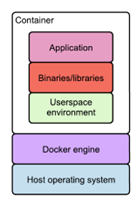
The typical architecture of a containerized system, illustrating how applications are packaged with their dependencies and userspace environment, all managed by the Docker engine on top of the host operating system.
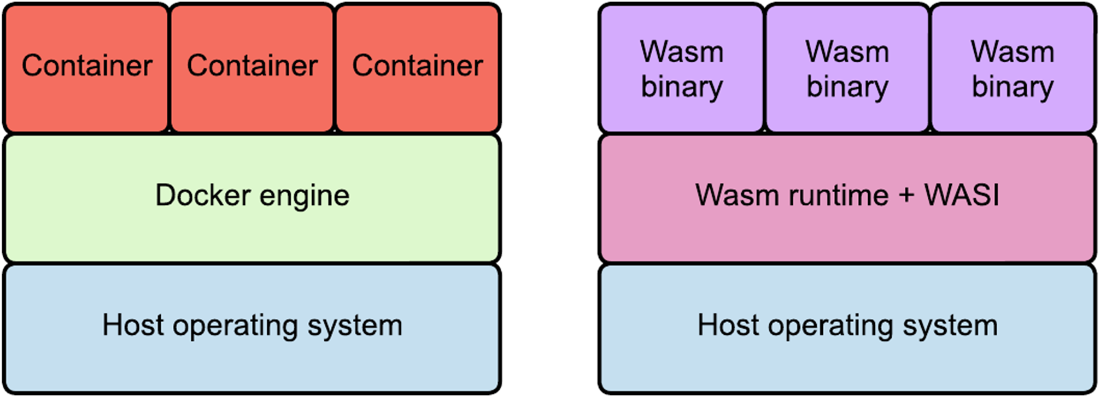
A side-by-side comparison of the execution models for containers and Wasm, showing how both systems provide an abstraction layer between applications and the host operating system.
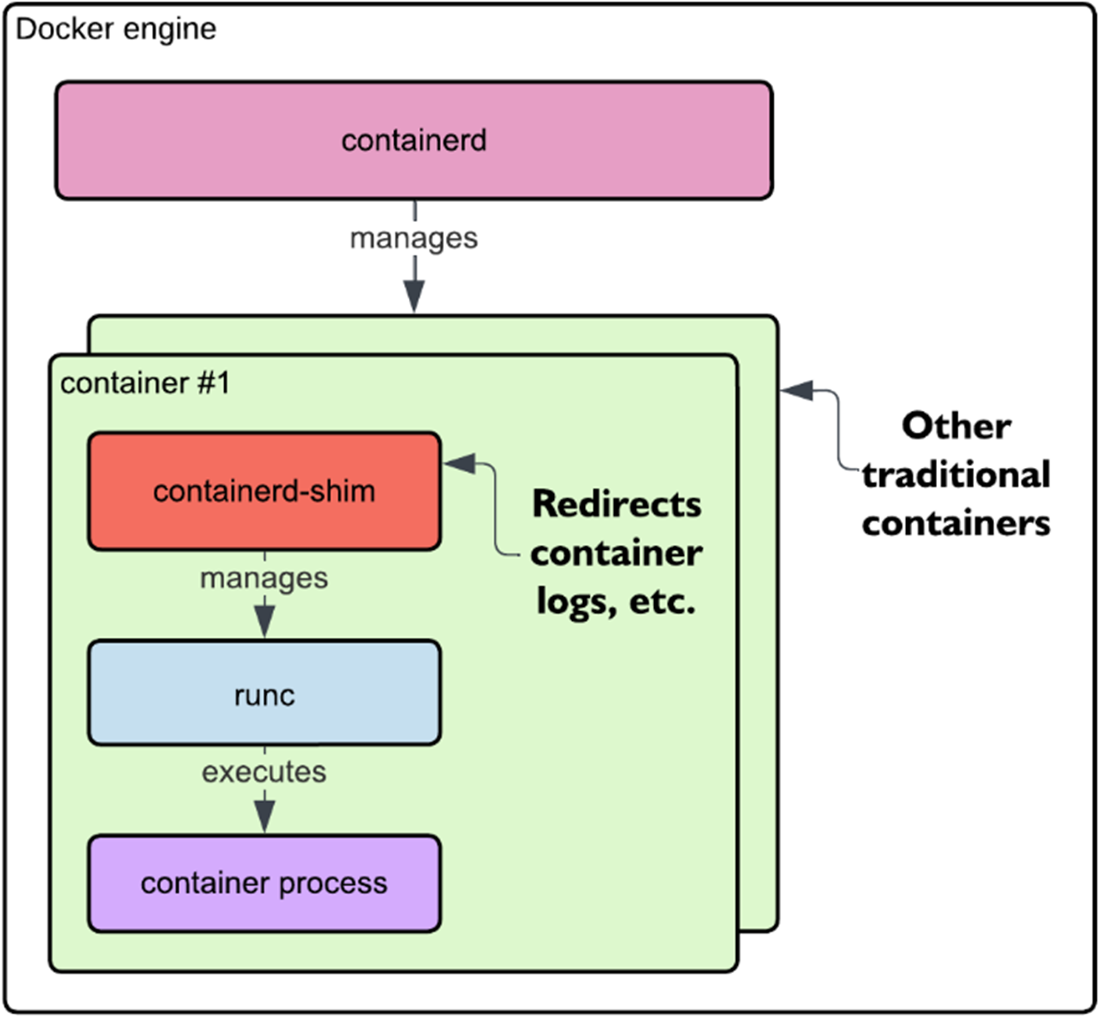
A detailed view inside the Docker engine, showcasing the key components and mechanisms (e.g., containerd, runc, and containerd-shim) responsible for managing and starting container processes.
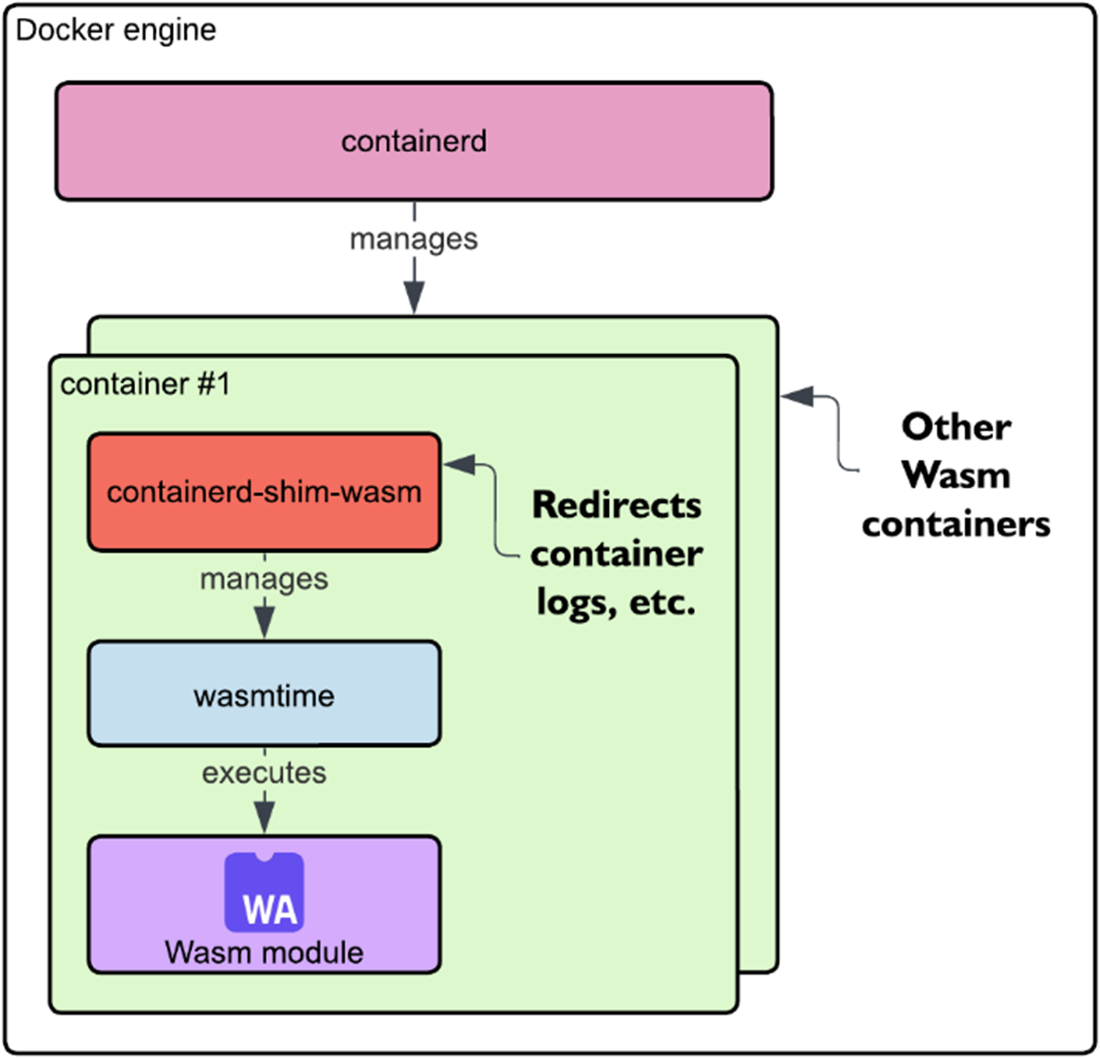
A closer look inside the Docker engine when executing a Wasm module, showing the key components, including containerd-shim-wasm and the Wasm runtime.
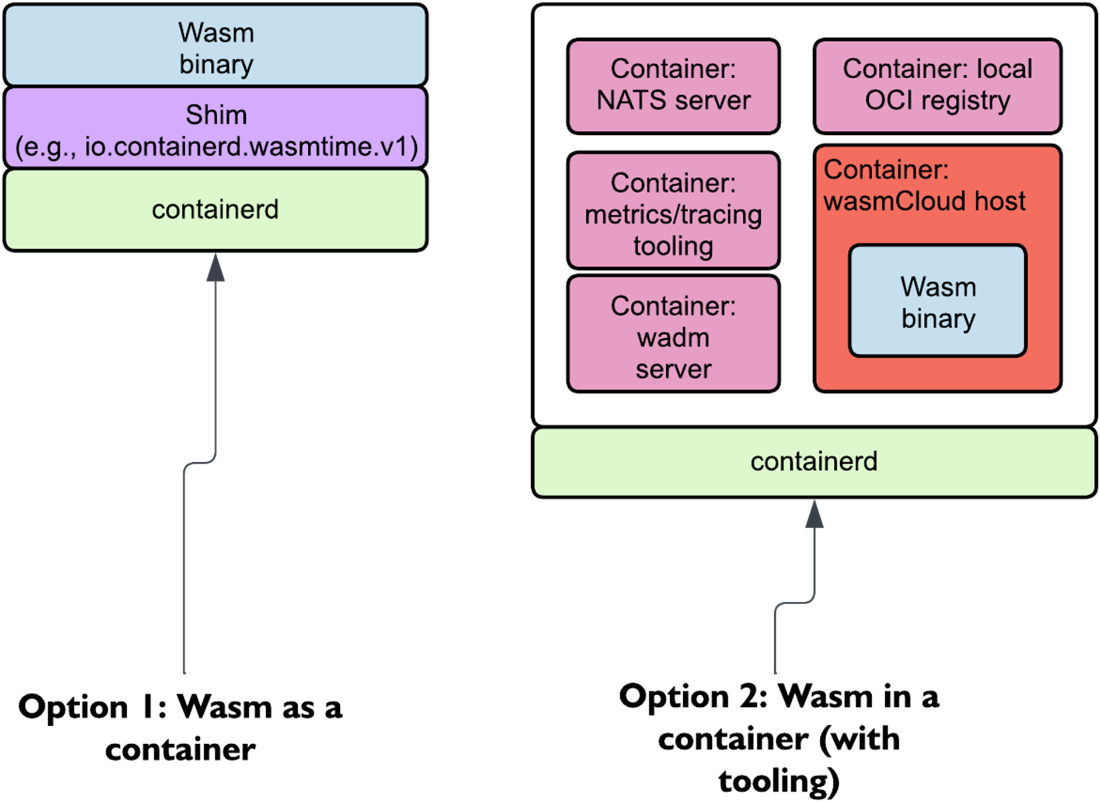
A comparison of two approaches to running Wasm in containers. On the left, Wasm runs directly inside a container using a lightweight shim. On the right, Wasm is packaged within a container alongside supporting infrastructure, as seen in wasmCloud’s approach, which includes components like the NATS server, a local OCI registry, and metrics/tracing tools.
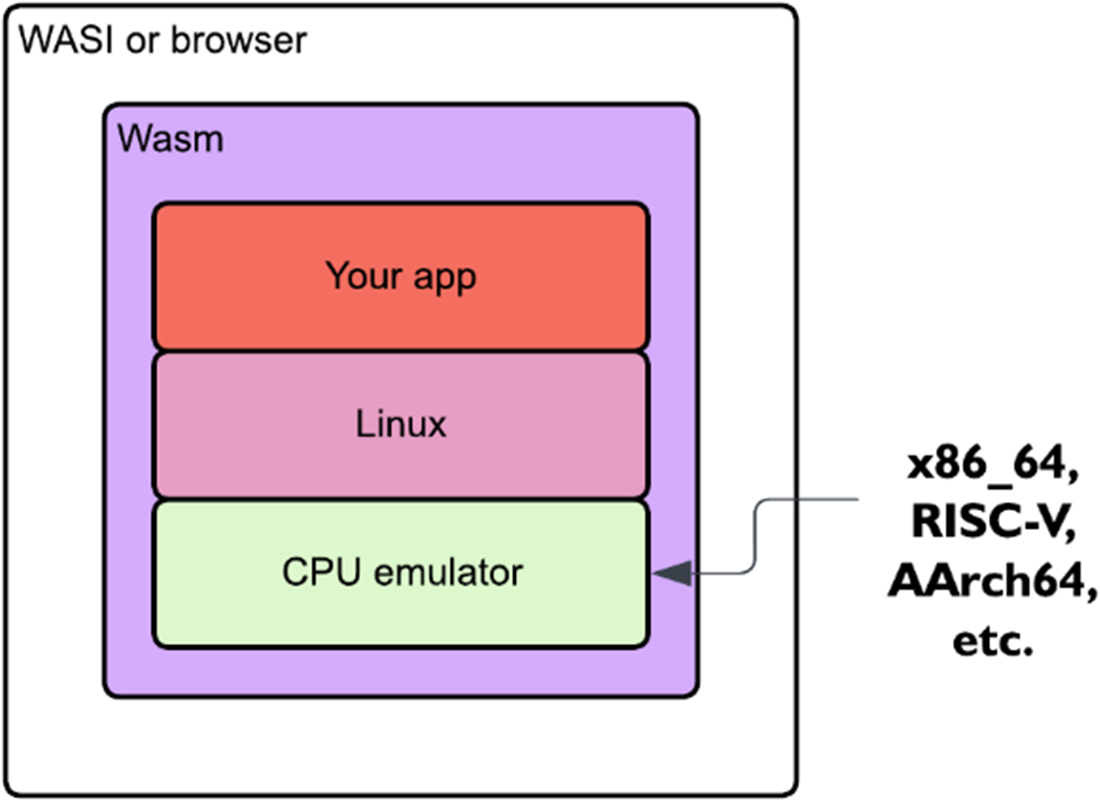
container2wasm encapsulates a CPU emulator to run Linux and Linux applications inside Wasm, enabling execution within either a WASI runtime or a browser environment.
Summary

  • Containers and Wasm share similarities in providing portability and isolation, but Wasm eliminates the need for a guest OS, resulting in smaller binaries and faster startup times.
  • Wasm containers leverage containerization principles to package and distribute Wasm binaries, integrating them into cloud-native ecosystems while maintaining Wasm’s lightweight nature.
  • The Open Container Initiative (OCI) now supports Wasm artifacts, enabling standardized distribution of Wasm components via OCI registries like GitHub Container Registry (GHCR).
  • Unlike traditional container-based Wasm execution, wasmCloud packages an entire host environment inside a container, facilitating managed orchestration of Wasm components.
  • container2wasm enables running Linux applications as Wasm binaries by encapsulating a CPU emulator, expanding Wasm’s use cases to legacy applications and in-browser execution.

FAQ

What’s the key difference between containers and Wasm when distributing applications?Traditional containers bundle your app with a userspace environment (system libraries, utilities, binaries) and share the host kernel. Wasm packages only the application logic and relies on a runtime plus WASI for system interfaces. This yields smaller artifacts and shifts portability work to runtime implementers.
Why do Wasm binaries tend to be smaller and start faster than container images?Because they exclude a full userspace environment. Wasm modules are often kilobytes to low megabytes, download quickly, and start almost instantly. Containers initialize userspace and its resources, adding overhead in size and cold-start time.
Are Wasm binaries portable across CPU architectures?Yes. Containers typically need architecture-specific images or multi-arch builds, but Wasm is hardware-agnostic: the same Wasm binary can run on different CPU architectures (e.g., AMD64 and ARM) as long as a compatible runtime and WASI are available.
What are “Wasm containers,” and how do they run under Docker/containerd?Two patterns exist: (1) native execution via containerd shims (e.g., containerd-shim-wasmtime) where a Wasm runtime executes the module inside a container lifecycle; and (2) embedding a Wasm runtime inside a traditional container alongside any needed services. The first is lightweight; the second is more opinionated and can package supporting infra.
How do I set up containerd and Wasmtime support to run a Wasm container?Install containerd and the Wasmtime shim (e.g., containerd-shim-wasmtime-v1), ensure containerd is running (systemd service), and verify the shim is on PATH. On Linux this can be automated via a script; on Windows use WSL; on macOS use a Linux VM for ctr.
How do I build and run a simple Wasm container image?Compile your app to wasm32-wasip1, use a Dockerfile with FROM scratch, COPY the .wasm, and set ENTRYPOINT to the module. Build with docker buildx using --platform wasi/wasm32 and export as an OCI archive. Import with ctr images import and run with ctr using --runtime io.containerd.wasmtime.v1 and --platform wasi/wasm32.
What is OCI and how does it enable distributing Wasm components?The Open Container Initiative defines specs for images and distribution. Since v1.1, OCI supports artifacts, letting registries store non-container objects. The Wasm OCI artifact format standardizes packaging Wasm components and their WIT dependencies so they can be pushed, pulled, and managed in registries like GHCR.
How can I inspect a Wasm OCI image’s metadata (media types, WIT imports/exports)?Use regctl to fetch the manifest and blobs. Look for Config.MediaType application/vnd.wasm.config.v0+json and Layers.MediaType application/wasm. The config blob exposes architecture "wasm", os "wasip2", and a list of WIT imports/exports (e.g., wasi:cli/run), revealing the component’s capabilities.
How does wasmCloud run in containers compared to shim-based approaches?Instead of a lightweight shim per module, wasmCloud packages a full ecosystem inside containers (e.g., NATS, wadm, the wasmCloud host). This yields larger images but preserves the complete platform experience, typically orchestrated via Docker Compose (and, for production, Kubernetes in the next chapter).
What is container2wasm and how do I convert and run a Linux container as Wasm?container2wasm compiles CPU emulators (like QEMU) into Wasm to run Linux-based containers as Wasm binaries with minimal changes. Steps: build your container (e.g., Python+Flask), run c2w , then execute with c2w-net to proxy networking (e.g., map port 8000). Trade-offs: larger binaries and lower performance versus “native” Wasm, but you gain portability and sandboxing, even enabling in-browser scenarios.

pro $24.99 per month

  • access to all Manning books, MEAPs, liveVideos, liveProjects, and audiobooks!
  • choose one free eBook per month to keep
  • exclusive 50% discount on all purchases
  • renews monthly, pause or cancel renewal anytime

lite $19.99 per month

  • access to all Manning books, including MEAPs!

team

5, 10 or 20 seats+ for your team - learn more


choose your plan

team

monthly
annual
$49.99
$499.99
only $41.67 per month
  • five seats for your team
  • access to all Manning books, MEAPs, liveVideos, liveProjects, and audiobooks!
  • choose another free product every time you renew
  • choose twelve free products per year
  • exclusive 50% discount on all purchases
  • renews monthly, pause or cancel renewal anytime
  • renews annually, pause or cancel renewal anytime
  • Server-Side WebAssembly ebook for free

choose your plan

team

monthly
annual
$49.99
$499.99
only $41.67 per month
  • five seats for your team
  • access to all Manning books, MEAPs, liveVideos, liveProjects, and audiobooks!
  • choose another free product every time you renew
  • choose twelve free products per year
  • exclusive 50% discount on all purchases
  • renews monthly, pause or cancel renewal anytime
  • renews annually, pause or cancel renewal anytime
  • Server-Side WebAssembly ebook for free
choose your plan

team

monthly
annual
$49.99
$499.99
only $41.67 per month
  • five seats for your team
  • access to all Manning books, MEAPs, liveVideos, liveProjects, and audiobooks!
  • choose another free product every time you renew
  • choose twelve free products per year
  • exclusive 50% discount on all purchases
  • renews monthly, pause or cancel renewal anytime
  • renews annually, pause or cancel renewal anytime
  • Server-Side WebAssembly ebook for free