This chapter moves from hand-rolled hosts to production-grade, off-the-shelf runtimes for server-side WebAssembly, showing how the Component Model, WIT, and WASI translate into practical microservices. It introduces wasmCloud and Spin as streamlined ways to run components, manage capabilities, and deploy distributed apps, emphasizing a separation of business logic from infrastructure concerns. The focus is on building real applications that are portable, secure, and operationally sound, with repeatable workflows for building, signing, deploying, and observing components.
Using wasmCloud, the chapter builds an HTTP “Hello, World” app and explains its manifest, signed artifacts, and runtime linking via wadm and a NATS lattice using component-native RPC. It then adds persistent storage through the standardized wasi:keyvalue interface and a NATS-backed provider, demonstrating how to swap providers without code changes. Next, it scales the service with spreadscaler, improving latency by running multiple replicas, and distributes instances across multiple hosts and zones for load balancing and fault tolerance, all while maintaining transparent linking and shared storage. The chapter highlights how these patterns enable resilient, horizontally scalable, and geographically distributed Wasm systems.
The chapter contrasts wasmCloud with Spin: Spin favors a trigger-driven, batteries-included developer experience with broad language support and built-in concurrency, while wasmCloud prioritizes extensibility and fine-grained configuration of capabilities and topology. To showcase extensibility, the chapter rebuilds the smart CMS as a wasmCloud app with three routes, using wasi:keyvalue for storage and a third-party Ollama provider for lightweight machine learning. This involves adding a custom WIT interface via manifest overrides, generating bindings with wit-bindgen, and wiring capabilities through wadm—illustrating how teams can focus on business logic while the host handles execution, networking, and operations.
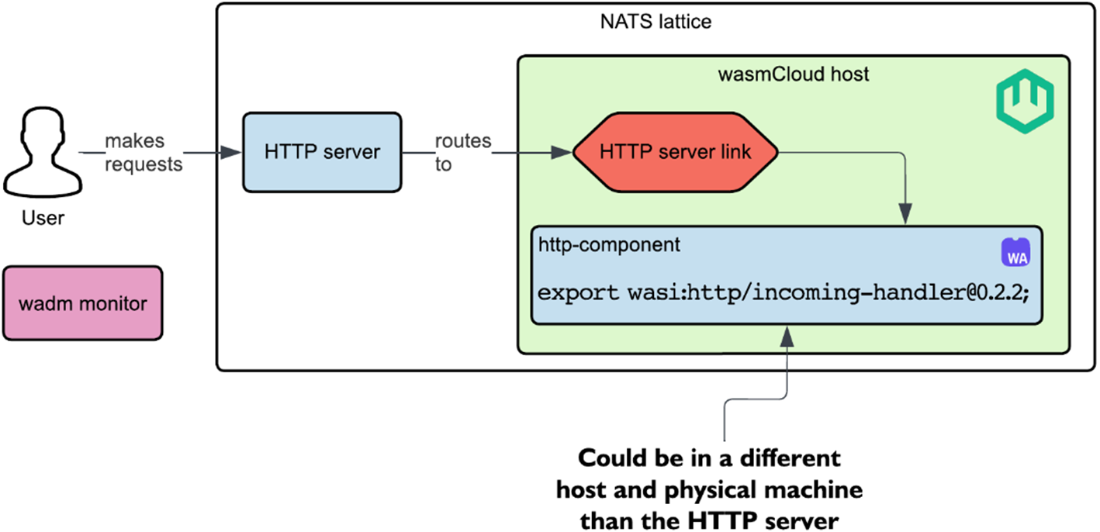
The architecture of our “Hello, World” wasmCloud application
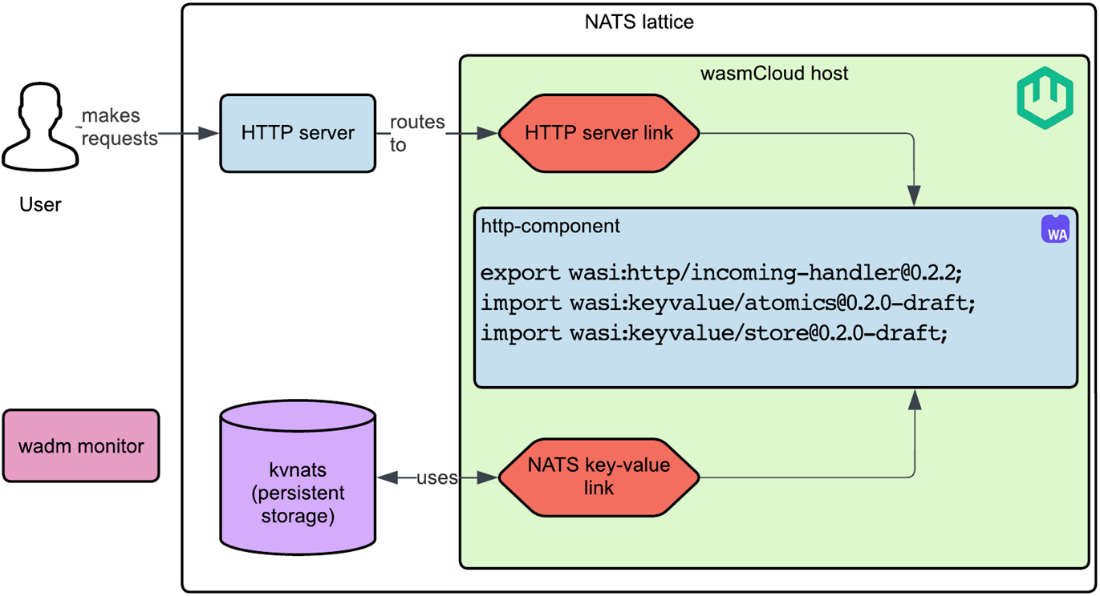
Updated architecture diagram for “Hello, World” wasmCloud app with persistent storage.
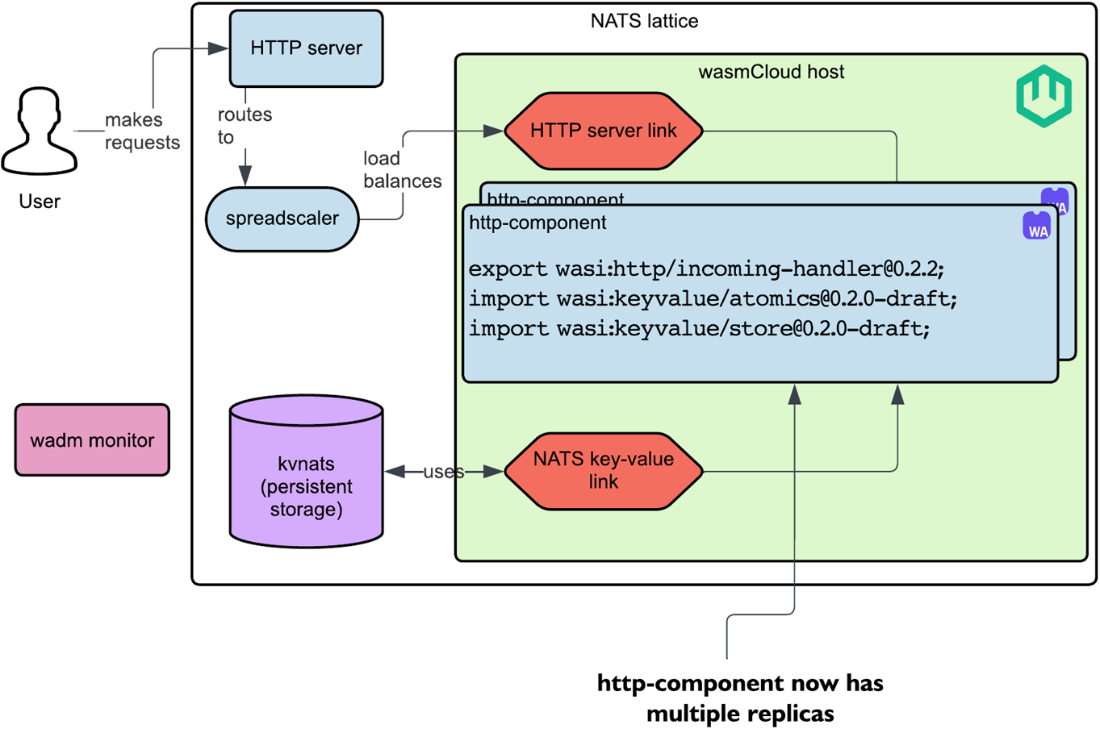
Updated architecture diagram for “Hello, World” wasmCloud app with 10 replicas of the http-component.
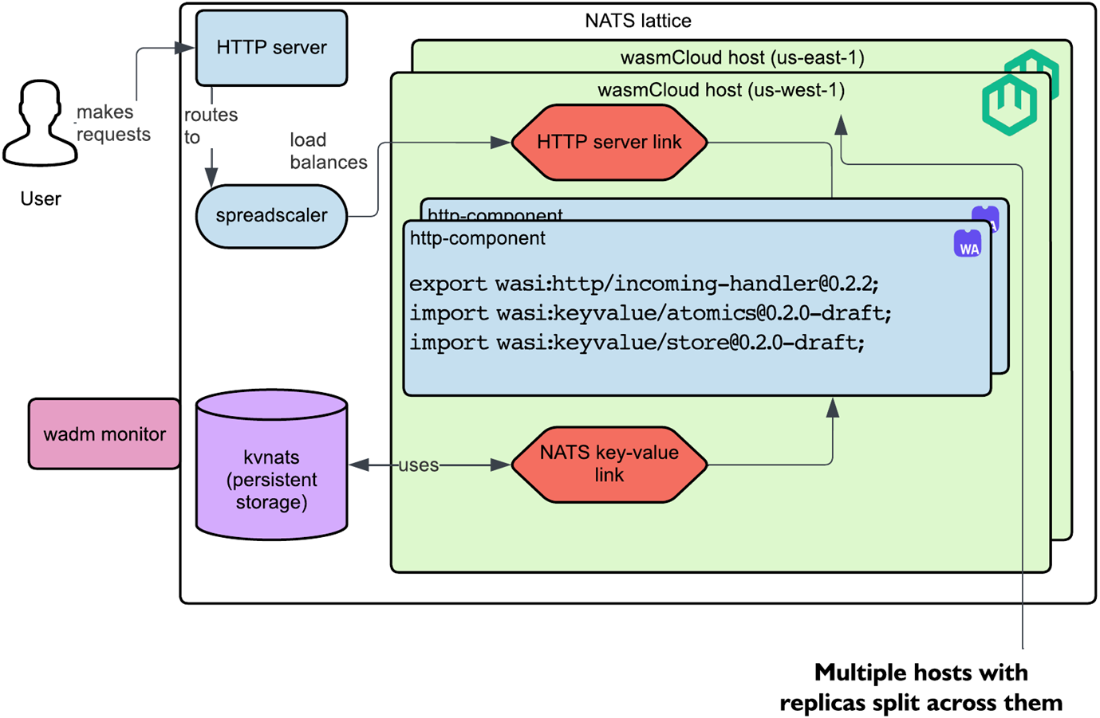
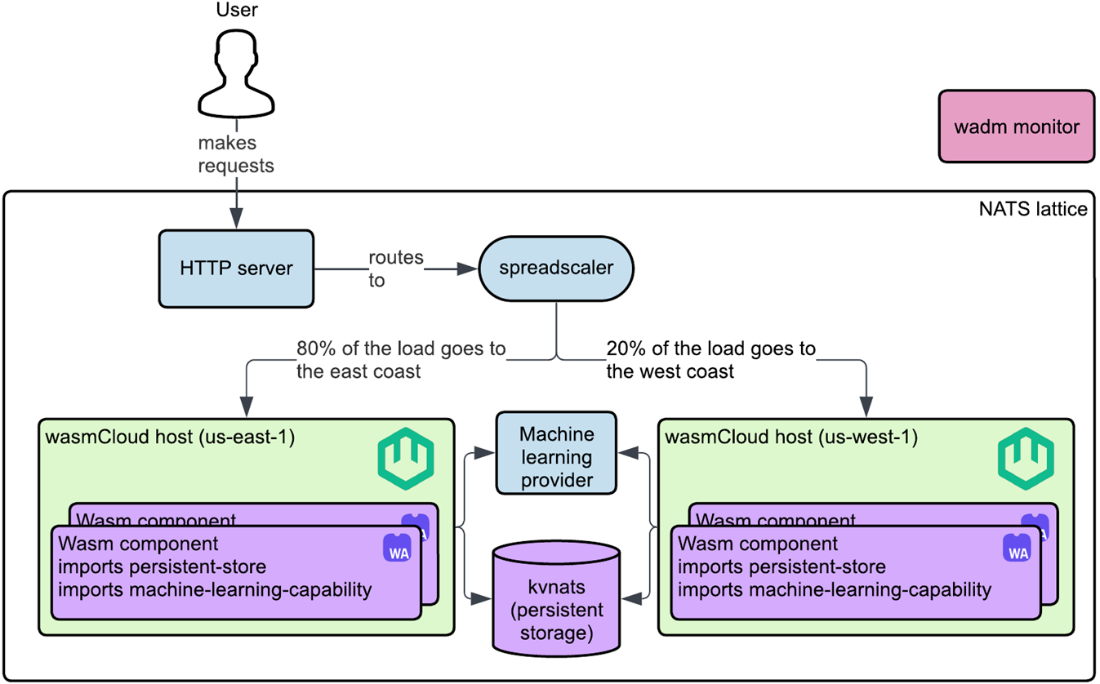
Updated architecture diagram for “Hello, World” wasmCloud app with 10 replicas of the http-component split across different hosts and regions (i.e., us-east-1 and us-west-1).
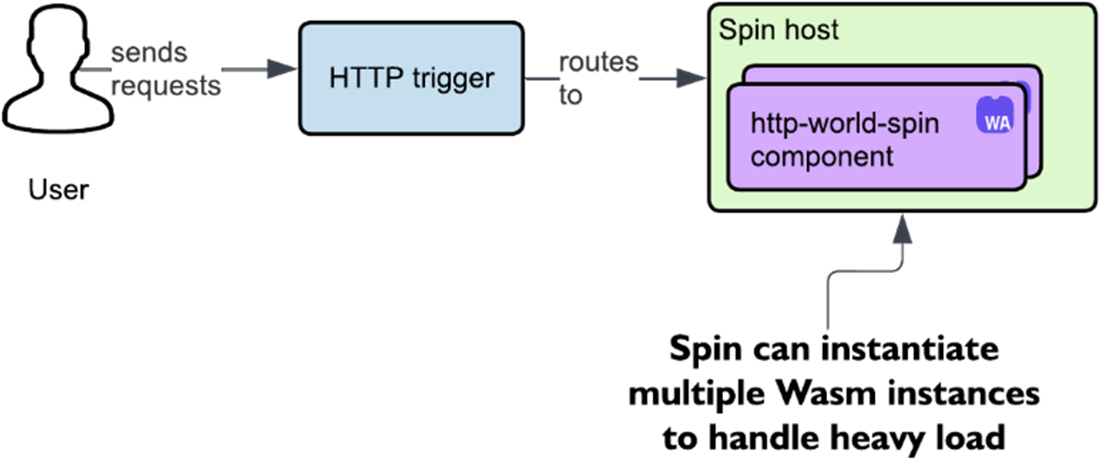
Spin’s event-driven setup for Wasm microservices.
The architecture of our smart CMS application.
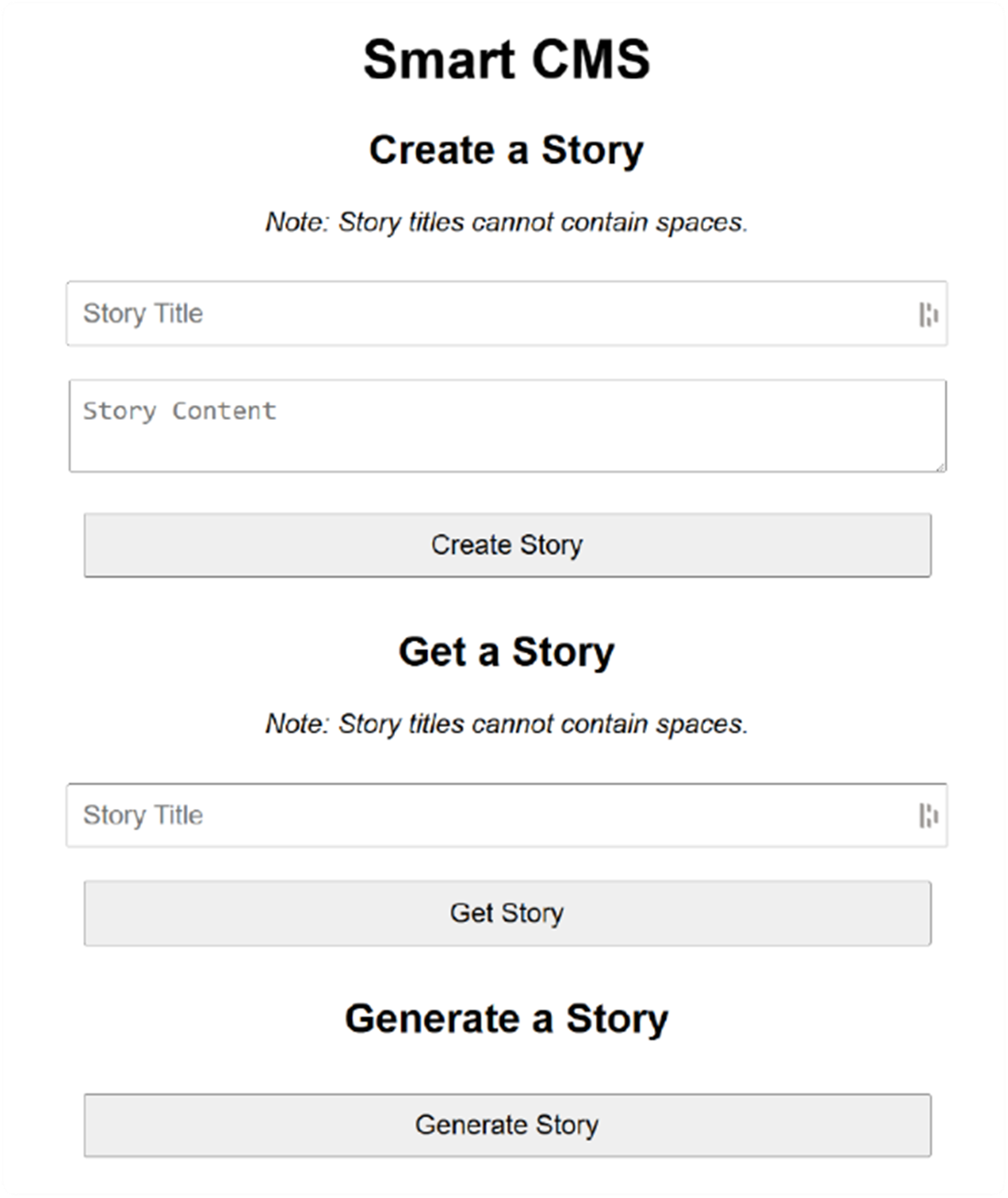
Interface of our smart CMS frontend.
Summary
wasmCloud and Spin provide a robust platforms for running Wasm microservices, significantly reducing the need for custom host development.
Standardized interfaces, like wasi:keyvalue, streamline the process of integrating capabilities such as persistent storage into applications while ensuring interoperability with various providers.
Applications in wasmCloud can be scaled dynamically with the spreadscaler trait, allowing efficient handling of concurrent requests by deploying multiple component instances.
The NATS lattice enables seamless communication between components distributed across multiple hosts, ensuring resilience and fault tolerance.
Machine learning functionalities can be added to wasmCloud applications using custom WIT interfaces and third-party providers, showcasing wasmCloud’s extensibility.
wasmCloud’s architecture eliminates the need for developers to write non-business logic, focusing solely on application features and functionality.
By leveraging off-the-shelf Wasm hosts, developers can achieve faster development cycles while maintaining robust and scalable architectures.
FAQ
What do I need to install to build and run the wasmCloud “Hello, World” app?Install the wash CLI (wash-cli ^0.37) and add the Rust WASI 0.2 target (rustup target add wasm32-wasip2). Then:
- Start the platform: wash up -d
- Scaffold/build the component: wash new component ... and wash build
- Deploy it to the lattice: wash app deploy ./wadm.yaml
Visit the HTTP endpoint configured in wadm.yaml (e.g., http://127.0.0.1:8000).What does “wash up -d” launch, and why are those pieces important?It starts:
- wasmCloud Host: embeds Wasmtime to run components and load capability providers.
- NATS lattice: the message fabric for component-to-component/capability RPC across hosts.
- wadm monitor: reconciles the declared application state (wadm.yaml) with the lattice.
Together, they let you run, link, scale, and observe components locally or across multiple hosts.How are HTTP requests routed to my component in wasmCloud?Define an incoming HTTP handler in WIT (wasi:http/incoming-handler) and implement it in your component. In wadm.yaml, add the HTTP server capability and a link trait that binds the server’s incoming-handler interface to your component. The host wires requests via wRPC over NATS to your component instances.Why does “wash build” produce two artifacts (.wasm and _s.wasm)? What is signing?wasmCloud builds the raw component (.wasm) and a signed component (_s.wasm). Signing adds a cryptographic signature (and claims/metadata), allowing hosts to verify the component’s integrity and provenance. Deployment typically references the signed artifact.How do I add persistent storage with wasi:keyvalue in wasmCloud?Steps:
- Import wasi:keyvalue/store and wasi:keyvalue/atomics in your WIT.
- In wadm.yaml, add a key-value capability provider (e.g., NATS KV: ghcr.io/wasmcloud/keyvalue-nats) and link it to your component’s store and atomics interfaces, configuring a bucket (e.g., default).
- In code, open the bucket (store::open("default")), then use store/atomics operations (e.g., atomics::increment, set, get).Why use the spreadscaler, and how does it improve latency and throughput?Components are single-threaded; one instance handles one request at a time. With long operations, concurrent requests queue up. The spreadscaler trait in wadm.yaml launches multiple component replicas so requests are processed in parallel, dramatically improving average latency and throughput under load.Can I distribute replicas across multiple hosts or “regions” locally?Yes. Start multiple hosts on one machine with labels (e.g., wash up --multi-local --label zone=us-east-1 -d and another with zone=us-west-1). In spreadscaler, set spread weights and requirements by zone to distribute replicas. Verify with wash get inventory to see how instances were placed.How do I verify and troubleshoot my deployment?Useful commands:
- wash app list: shows deployed apps and status
- wash get links: verifies component-to-capability links
- wash get hosts / wash get inventory: inspect hosts, labels, components, and providers
- Check host logs (path printed by wash up) for runtime diagnostics
Stop/clean up with wash app delete ... and wash down (or --all).How does Spin compare to wasmCloud for production-grade apps?Spin uses an event-trigger model (e.g., HTTP triggers), offers broad language/template support, and handles concurrency out of the box on a single host. For multi-host scaling, you typically pair it with an orchestrator (e.g., SpinKube). wasmCloud exposes scaling and placement via spreadscaler, focuses on capability providers (plug-and-play via OCI), and emphasizes runtime linking across a NATS lattice for distributed deployments.How can I add machine learning if wasmCloud doesn’t officially support wasi:nn?Use a custom capability provider and WIT interface, e.g., an Ollama provider:
- Build or include the provider (produces a .par.gz)
- Add a [overrides] entry in wasmcloud.toml to point to the provider’s WIT (e.g., "thomastaylor312:ollama")
- Import the custom interface in your WIT and link it in wadm.yaml (interfaces: [generate]), passing model config (e.g., gurubot/tinystories-656k-q8)
- Generate Rust bindings with wit-bindgen and call the interface (e.g., generate(Request{...}))
Ensure the Ollama service is running (ollama serve) and the model is pulled.
pro $24.99 per month
access to all Manning books, MEAPs, liveVideos, liveProjects, and audiobooks!

 Server-Side WebAssembly ebook for free
