5 From machine learning to databases: applications of Wasm
This chapter pivots from hand-rolled interfaces to standardized ones, framing WASI as a broad suite of “WebAssembly Standard Interfaces” beyond POSIX. It shows how these interfaces enable powerful server-side capabilities while preserving Wasm’s portability and sandboxed security. The narrative focuses on two representative applications: machine learning via the wasi:nn interface and data-proximate computation by running Wasm inside databases, illustrating how common server tasks can be expressed as composable components with consistent host support.
For machine learning, the chapter explains why wasi:nn is the preferred approach in Function-as-a-Service and similar environments: it taps into optimized host ML stacks (SIMD, threads, GPUs/NPUs) for near-native performance, unlike compile-to-Wasm libraries that are constrained by earlier POSIX-style boundaries. Using Wasmtime’s experimental backends (ONNX, OpenVINO, WinML), it walks through an image-classification workflow: loading an ONNX model, preprocessing an image into a tensor, running inference, applying softmax, and reporting top predictions, all within a secure Wasm sandbox. The chapter then extends the pattern to text generation in a SmartCMS example, pairing a guest component that uses wasi:nn and tokenization with a host that links Wasmtime’s wasi:nn support (ONNX enabled), demonstrating end-to-end component composition.
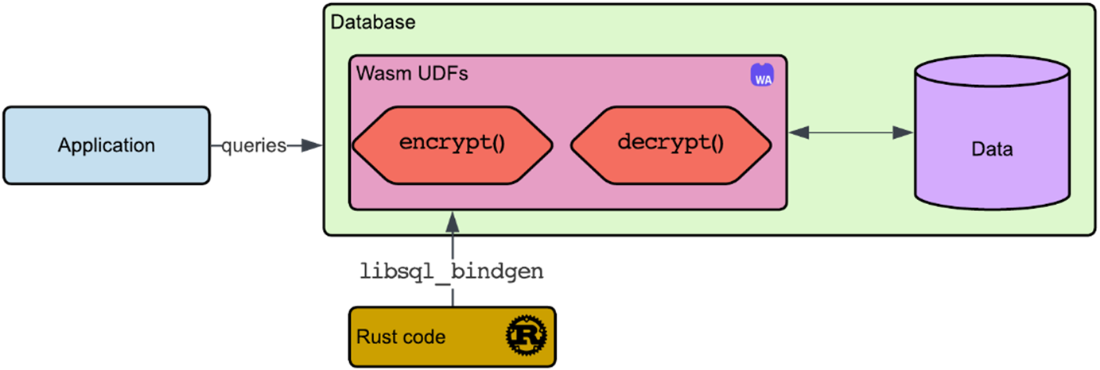
The database section motivates running Wasm “where the data lives” to cut latency and data movement while maintaining isolation. Using libSQL, it builds user-defined functions in Rust (encrypt/decrypt) with libsql_bindgen, compiles them to Wasm, embeds them in SQL as hex blobs or WAT, and executes them in the libSQL shell. It highlights type constraints and sandbox restrictions, plus practical tooling like wasm-opt. The chapter closes by tying these threads together: standardized interfaces like wasi:nn let teams deliver high-performance ML and safe, language-agnostic database extensions with the same component-centric model, broadening the reach of server-side WebAssembly from inference to in-database logic.
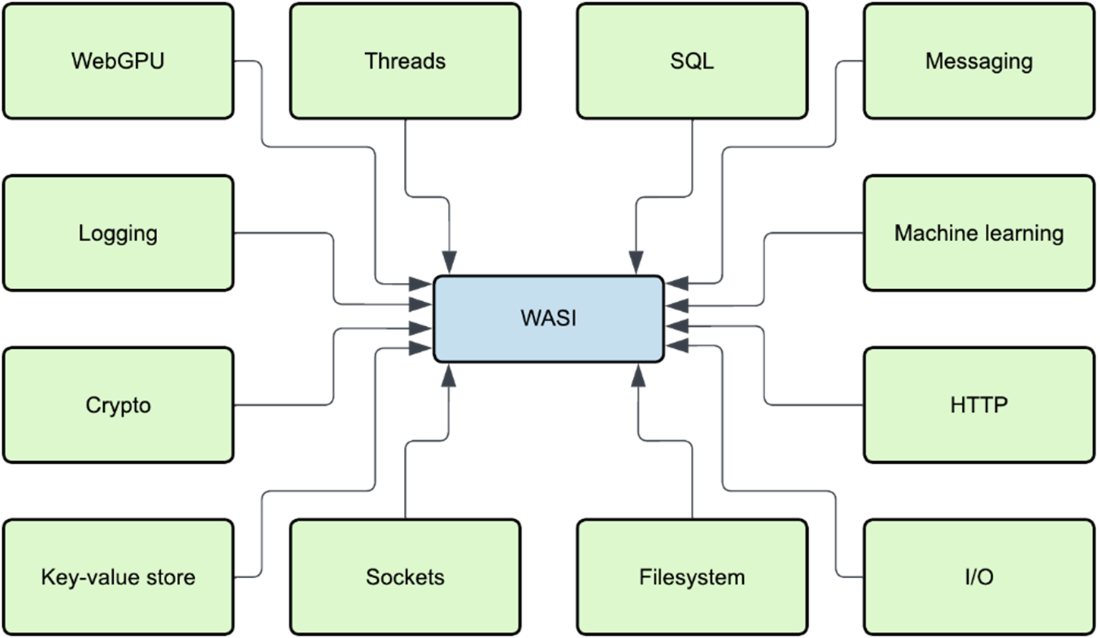
Some of WASI's interfaces.
wasi_nn_example application schematic.
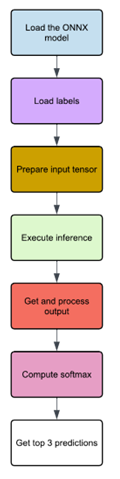
Image of a Persian cat.

Architecture diagram displaying how an application relies on our database with Wasm UDFs.
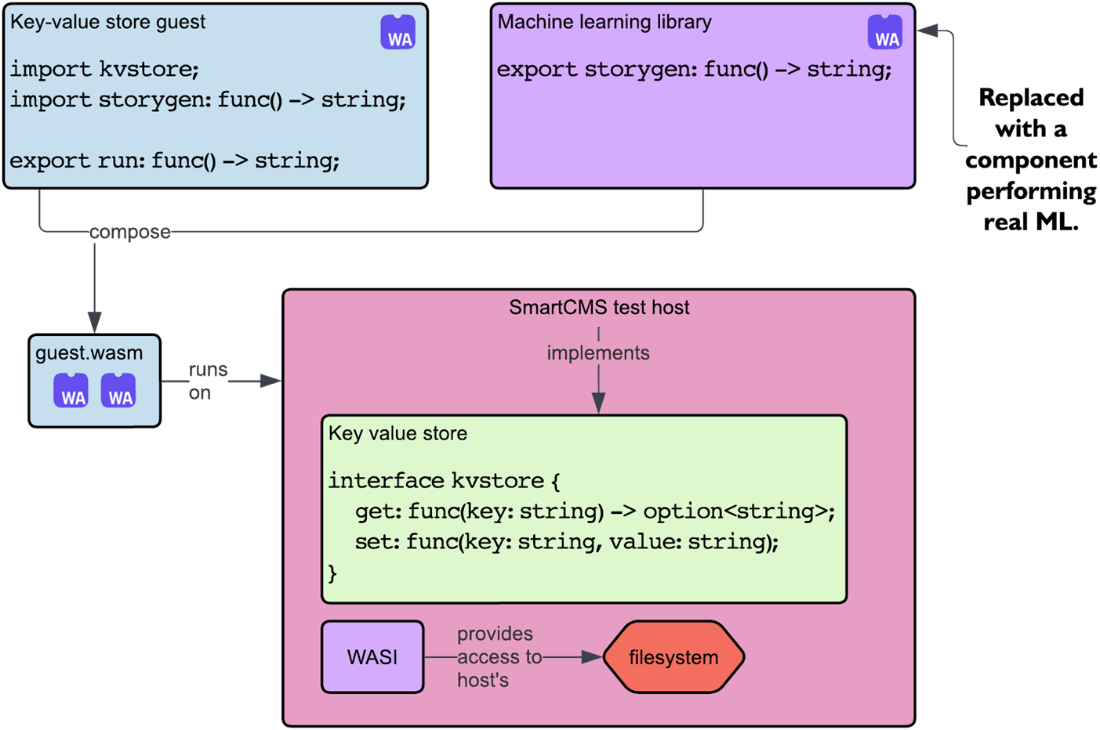
The architecture of our SmartCMS project with the addition of a real machine learning component
Summary
- WASI has expanded beyond POSIX and now serves as a collection of standardized interfaces offering higher-level capabilities, including WebGPU, ML, and SQL interfaces.
- The wasi:nn interface allows native performance for ML workloads within Wasm, leveraging optimizations from existing ML frameworks like GPUs and NPUs. Alternatives like TVM and Tract can run ML within Wasm but often sacrifice performance to conform to WASI 0.1's POSIX subset.
- Running Wasm within databases is achieved by leveraging user-defined functions (UDFs), which allow secure, efficient data processing within a sandboxed environment.
- By integrating Wasm into databases, UDFs can be written in any language that compiles to Wasm, enabling flexible and secure database extensions.
- The libSQL database can embed Wasm UDFs, providing a reliable environment for running secure, sandboxed Wasm functions directly in SQL queries.
- The WebAssembly Text Format (WAT) provides a human-readable representation of Wasm binaries, enabling easier inspection, debugging, and manual adjustments.
- Optimizing Wasm UDFs withs tools like wasm-opt ensures performance and reduces the size of Wasm binaries embedded in SQL databases.
FAQ
How has the meaning of WASI evolved, and which standardized interfaces does it aim to cover?
WASI started as the WebAssembly System Interface (a POSIX-like subset for running Wasm outside the browser). Today it’s better read as “WebAssembly Standard Interfaces,” an umbrella of higher-level interfaces such as HTTP, sockets, filesystem and I/O, crypto, logging, messaging, SQL, key-value store, blob store, runtime config, threads, WebGPU, and machine learning (wasi:nn). Note: most are still proposals and not fully standardized yet—see the current status at https://github.com/WebAssembly/WASI/blob/main/Proposals.md.
What is wasi:nn and why use it for server-side ML with Wasm?
wasi:nn is a standard interface for neural-network inference from Wasm. It lets your Wasm code call into high-performance host ML runtimes (CPU vectorization, threading, GPUs/NPUs) while keeping Wasm’s sandboxed security and portability. Compared to compiling ML libraries directly to Wasm (e.g., TVM/Tract targeting POSIX-like WASI 0.1), wasi:nn typically achieves much better performance by leveraging native backends.
Which wasi:nn backends does Wasmtime support, and how do I enable them?
Wasmtime provides experimental support for multiple backends, including:
- ONNX Runtime
- OpenVINO (Intel)
- WinML (Windows)
For CLI runs, enable wasi:nn with the -Snn switch. ONNX support may require a build or a prebuilt container image that vendors the backend. In a host application, use wasmtime-wasi-nn with the appropriate feature (e.g., features = ["onnx"]) and wire WasiNnCtx into your Store and Linker.
What is ONNX and how is it used in these examples?
ONNX (Open Neural Network Exchange) is an open model format that allows interoperability across ML frameworks and runtimes. The chapter loads ONNX models (e.g., SqueezeNet and a story-generation model) through wasi:nn, so the Wasm guest can perform inference via a host’s ONNX backend.
How do I convert an image into a tensor for inference with wasi:nn?
Typical steps used in the example:
- Open and decode the image; resize to the model’s expected size (e.g., 224×224 RGB).
- Normalize per channel using the model’s mean/std (e.g., ImageNet mean [0.485, 0.456, 0.406], std [0.229, 0.224, 0.225]).
- Reorder to CHW layout if needed and cast to f32.
- Serialize to little-endian f32 bytes and create a Tensor with correct dimensions (e.g., [1, 3, 224, 224]).
How do I run the image-classification example end to end?
High-level flow:
- Build the component (cargo component build --release).
- Place the .wasm and test image in a mounted data/ directory.
- Run Wasmtime inside a prepared Docker image that has the ONNX backend and the model/labels, enabling wasi:nn with -Snn and mapping fixture/data directories with --dir.
- The program loads the model, sets the input tensor, computes, and prints top class probabilities.
How are model outputs turned into human-readable predictions?
The example retrieves the raw output tensor bytes, converts them to f32 values, applies softmax to get probabilities that sum to 1, and then ranks the top classes. It prints the label and its probability for the top few predictions.
What does “running Wasm inside a database” mean, and why is it useful?
It means using Wasm-based user-defined functions (UDFs) inside the database engine (e.g., libSQL). Benefits include:
- Compute near the data (lower latency, less data movement).
- Security via Wasm sandboxing.
- Language flexibility: author UDFs in any language that compiles to Wasm.
- Extensibility for custom logic (encryption, custom transforms, even ML inference) embedded in SQL workflows.
How do I create and register a Wasm UDF in libSQL?
General steps from the chapter:
- Write functions in Rust and annotate with libsql_bindgen to expose them as UDFs.
- Build for wasm32-unknown-unknown.
- Embed the Wasm into SQL either as a literal hex blob (use a tool like wasm_hex_dump) or as WAT (text format).
- Initialize the Wasm function table, CREATE FUNCTION ... LANGUAGE wasm AS X'...'; and then call your UDFs from SQL.
How was wasi:nn integrated into the SmartCMS example?
The ML guest component was upgraded to use wasi:nn for real inference (tokenize prompt, run model, softmax logits, sample next token, stop on EOS/newlines). The host added wasmtime-wasi-nn with the ONNX feature, preloaded backends, created a WasiNnCtx, stored it in host State, and added it to the Linker so the component could call the wasi:nn interface during execution.

 Server-Side WebAssembly ebook for free
