Overview

8 Leveraging your delivery pipeline for security

This chapter argues that security must be woven into the delivery pipeline so it is exercised on every change, just like other quality checks. Rather than performing occasional, heavyweight penetration tests, teams should automate security feedback across build, test, and deploy stages, ensuring consistent execution and preventing steps from being skipped. The result is rapid insight into security posture and earlier discovery of flaws. The chapter then shows how to apply this mindset to day-to-day development practices, from unit-level design to pipeline-wide safeguards.

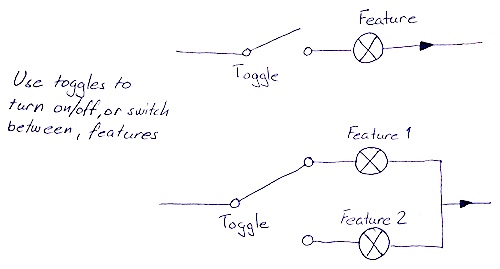
Designing with a security lens begins at the unit test level. Beyond verifying intended behavior, developers should test normal, boundary, invalid, and extreme inputs to catch unintended behavior where vulnerabilities lurk. A worked example of an email address domain primitive demonstrates crafting explicit domain rules, validating length before parsing to avoid performance pitfalls, and rejecting malicious payloads (for example, SQL/XSS-like inputs). The chapter also addresses feature toggles: toggles change system behavior and can accidentally expose unfinished, unauthenticated features in production. The guidance is to write automated tests for every toggle, minimize their number, verify all meaningful combinations, protect and audit runtime controls, and add these tests to the pipeline.

At the pipeline level, “security tests are just tests.” The chapter outlines application-focused and infrastructure-focused checks, integrates security scanners and dependency analyzers, and recommends using infrastructure as code to make environment changes reproducible, reviewable, and testable in preproduction mirrors. It highlights availability as a security concern, advocating headroom estimation, load/DoS simulations, and awareness of “domain DoS” where legitimate rules are abused at scale. Finally, it shows how misconfiguration—unintentional, intentional side effects, or misunderstood defaults—causes security issues, and urges automated verification of configuration hot spots (such as HTTP headers, TLS, parsers, authentication) and of framework defaults, with all such tests running continuously in the delivery pipeline.

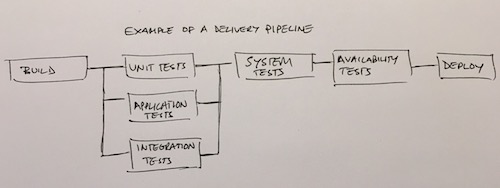
Figure 8.1. Example of a delivery pipeline
ch08 delivery pipeline small
Figure 8.2. Feature toggles let you switch between features or turn them on and off.
ch08 feature toggles small
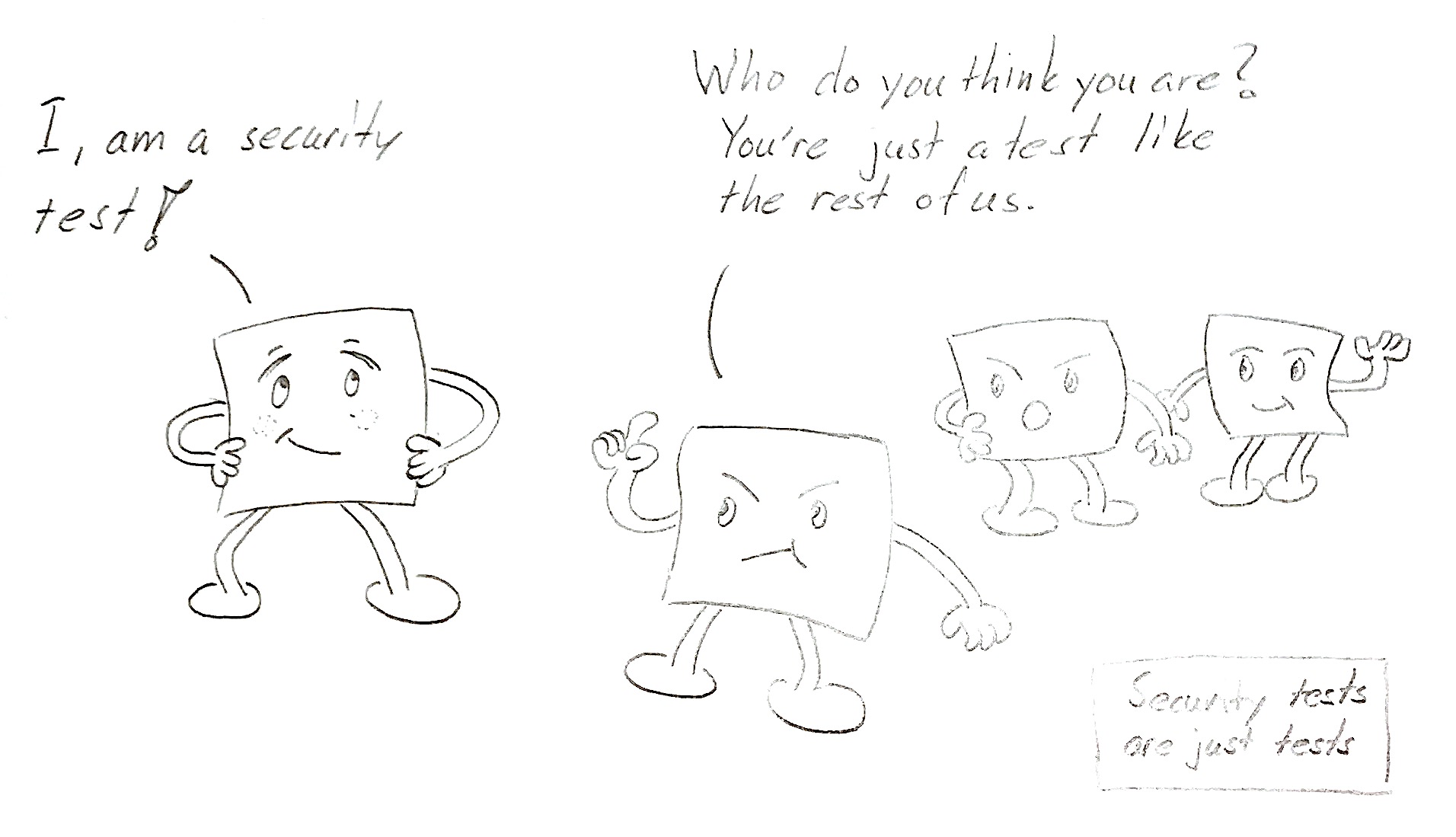
Figure 8.3. Security tests are no different than other tests.
ch08 arguing tests small
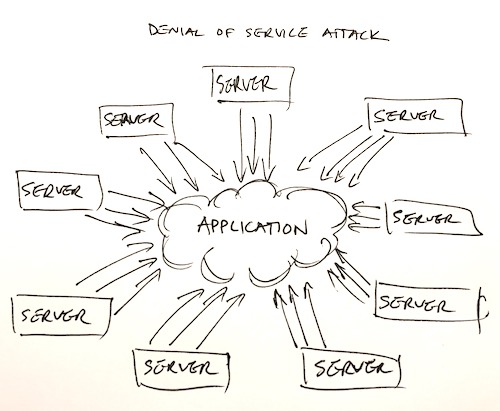
Figure 8.4. Denial of service attack (DDoS, but more commonly referred to as DoS attack)
ch08 denial of service attack small
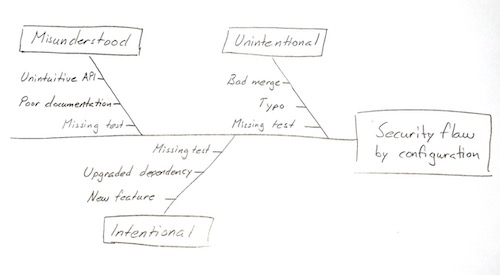
Figure 8.5. Underlying causes for security flaws induced by configuration
ch08 flaw by configuration causes small

 Summary

  • By dividing tests into normal testing, boundary testing, invalid input testing, and extreme input testing, you can include security in your unit test suites.
  • Regular expressions can be sensitive to inefficient backtracking and, therefore, you should check the length of input before sending it to the regular expression engine.
  • Feature toggles can cause security vulnerabilities, but you can mitigate those vulnerabilities by verifying the toggle mechanisms using automated tests.
  • A good rule of thumb is to create a test for every toggle you add, and you should test all possible combinations of them.
  • You should watch out for the combinatory complexity that large numbers of toggles can lead to. The best way to avoid this is by keeping the number of toggles as small as possible.
  • The toggle mechanism itself can be subject to auditing and record keeping.
  • Incorporating automated security tests into your build pipeline can give you the ability to run a mini penetration test as often as you like.
  • Availability is an important security aspect that needs to be considered in every system.
  • Simulating DoS attacks helps in understanding weaknesses in the overall design.
  • A domain DoS attack is extremely difficult to protect against because it’s only the intent that distinguishes it from regular usage.
  • Many security problems are caused by misconfiguration, and the cause for faulty configuration can be either unintentional changes, intentional changes, or misunderstood configuration.
  • Configuration hot spots are good indicators for finding areas in your configuration where testing is most critical.
  • It’s important to know the default behavior of the tools you use and asserting that behavior with tests.

FAQ

What is a delivery pipeline and how does it improve security?A delivery pipeline is an automated manifestation of your build–test–deploy process. By placing security checks and tests inside the pipeline, every change is verified the same way, no steps are skipped, and you get immediate feedback on security posture. This consistency turns security from an afterthought into a continuous practice.
Are security tests different from other tests? How often should they run?No. Security tests are just tests that target security behavior. Treat them like unit, integration, or system tests: automate them and run them on every change. You don’t need a full penetration test per commit, but you should execute automated security checks continuously.
What security-minded unit test types should I use and why?Use four complementary test types to catch both intended and unintended behavior: - Normal input tests: verify vanilla, clearly valid input. - Boundary tests: verify structural limits (lengths, counts, invariants). - Invalid input tests: reject nulls, empties, strange encodings, injection strings. - Extreme input tests: stress behavior/performance with huge or pathological inputs. Together they validate what code should do and ensure it doesn’t do what it shouldn’t.
How should I structure unit tests for secure input validation?Model inputs as domain primitives with explicit rules, then: - Encode structural constraints (for example, min/max length) and check them first. - Apply precise parsing/regex only after cheap guards. - Add invalid-input cases (whitespace, control characters, URL-encoded payloads, multiple delimiters, null). - Include simple injection strings (SQL/XSS) to harden validation. - Add extreme-length cases to detect hangs or memory pressure.
Why does validation order matter (for example, length before regex)?Checking cheap properties (like input length) before regex parsing prevents catastrophic backtracking and crashes in regex engines, improves performance, and reduces attack surface. A quick lexical scan or length check protects parsers against adversarial inputs.
What are best practices for feature toggles from a security perspective?Feature toggles change runtime behavior, so: - Create automated tests for every toggle (on/off and interactions). - Keep toggles minimal and temporary; retire them promptly. - Default to the safest state in production; never expose unfinished features. - Protect runtime toggle controls (authz) and audit who changed what, and when. - Treat toggle verification as part of the pipeline to prevent misconfiguration.
How do I manage the combinatorial complexity of multiple toggles?Prefer fewer toggles. When multiple toggles exist: - Verify all relevant combinations, especially when toggles can interact indirectly. - Use a test matrix and automate it in CI. - Group or encapsulate related toggles and remove obsolete ones quickly. - Don’t rely solely on risk-based sampling; unexpected couplings are common.
Which automated security tests can I add to the pipeline?Add both application- and infrastructure-focused checks: - Application: HTTP security headers, CSRF protection, input validation, authn/z behaviors, enabled HTTP methods. - Infrastructure: open ports, process privileges, TLS/cipher configuration, vulnerable dependencies. Use scanners and dependency-check tools; run slower scans on a schedule; fail the build on unexpected results. With infrastructure as code, spin up a preprod clone and validate changes before production.
How do I test for availability and resilience to DoS?Estimate headroom by load testing and simulating DoS/DDoS: track CPU, memory, latency, and failure modes. Also test domain-level DoS by exercising business rules in ways that can starve capacity (for example, mass reservations then cancellation). Use results to add safeguards like rate limits, quotas, circuit breakers, and anomaly alerts.
How can misconfiguration cause security issues, and how do I guard against it?Three common causes are unintentional changes, intentional changes with side effects, and misunderstood configuration. Guard against these by: - Writing automated tests for behavior controlled by configuration (configuration hot spots like headers, CSRF, TLS, parsers, and auth integration). - Knowing and verifying framework defaults (for example, only required HTTP methods are enabled). - Including these tests in the pipeline so regressions block deployment.

pro $24.99 per month

  • access to all Manning books, MEAPs, liveVideos, liveProjects, and audiobooks!
  • choose one free eBook per month to keep
  • exclusive 50% discount on all purchases
  • renews monthly, pause or cancel renewal anytime

lite $19.99 per month

  • access to all Manning books, including MEAPs!

team

5, 10 or 20 seats+ for your team - learn more


choose your plan

team

monthly
annual
$49.99
$499.99
only $41.67 per month
  • five seats for your team
  • access to all Manning books, MEAPs, liveVideos, liveProjects, and audiobooks!
  • choose another free product every time you renew
  • choose twelve free products per year
  • exclusive 50% discount on all purchases
  • renews monthly, pause or cancel renewal anytime
  • renews annually, pause or cancel renewal anytime
  • Secure by Design ebook for free
choose your plan

team

monthly
annual
$49.99
$499.99
only $41.67 per month
  • five seats for your team
  • access to all Manning books, MEAPs, liveVideos, liveProjects, and audiobooks!
  • choose another free product every time you renew
  • choose twelve free products per year
  • exclusive 50% discount on all purchases
  • renews monthly, pause or cancel renewal anytime
  • renews annually, pause or cancel renewal anytime
  • Secure by Design ebook for free
choose your plan

team

monthly
annual
$49.99
$499.99
only $41.67 per month
  • five seats for your team
  • access to all Manning books, MEAPs, liveVideos, liveProjects, and audiobooks!
  • choose another free product every time you renew
  • choose twelve free products per year
  • exclusive 50% discount on all purchases
  • renews monthly, pause or cancel renewal anytime
  • renews annually, pause or cancel renewal anytime
  • Secure by Design ebook for free
