12 Wrangling regular expressions
Regular expressions are presented as one of JavaScript’s most efficient tools for finding, validating, and transforming text, often replacing pages of manual parsing code with a compact pattern. The chapter begins by stressing both their convenience and their limits: they are excellent for many string-matching tasks, but not a universal solution, and complex parsing problems may call for a dedicated parser instead. It then refreshes the core ideas behind regex syntax, including literals versus constructed expressions, flags, metacharacters, escaping, character classes, anchors, repetition, grouping, alternation, captures, and backreferences, showing how these pieces combine to express surprisingly rich matching rules.
The discussion then shifts to how regular expressions are compiled and used in JavaScript. It explains that regexes are parsed once and then executed against strings, so hoisting a reusable expression is usually preferable to recreating it inside a loop. From there, it compares the main execution methods: using test for simple yes-or-no checks, exec for lower-level control, and match or matchAll for retrieving results. Capture groups are shown as especially useful because they let a match return structured pieces of text, and global matching makes it possible to iterate over many occurrences in a string while still extracting useful subparts.
The final part of the chapter explores substitution and advanced assertions. Using replace with regex and a replacer function enables concise transformations, such as converting kebab-case to camelCase or inserting thousands separators into numbers. The chapter then introduces lookahead and lookbehind, which assert what appears after or before a position without consuming characters, making precise conditional matches possible. It closes with an important warning about performance: greedy repetition and nested optional patterns can trigger backtracking, and in worst cases this can explode into catastrophic backtracking and regex denial-of-service attacks. The overall message is that regular expressions are powerful, but they must be used carefully, with awareness of both correctness and worst-case cost.

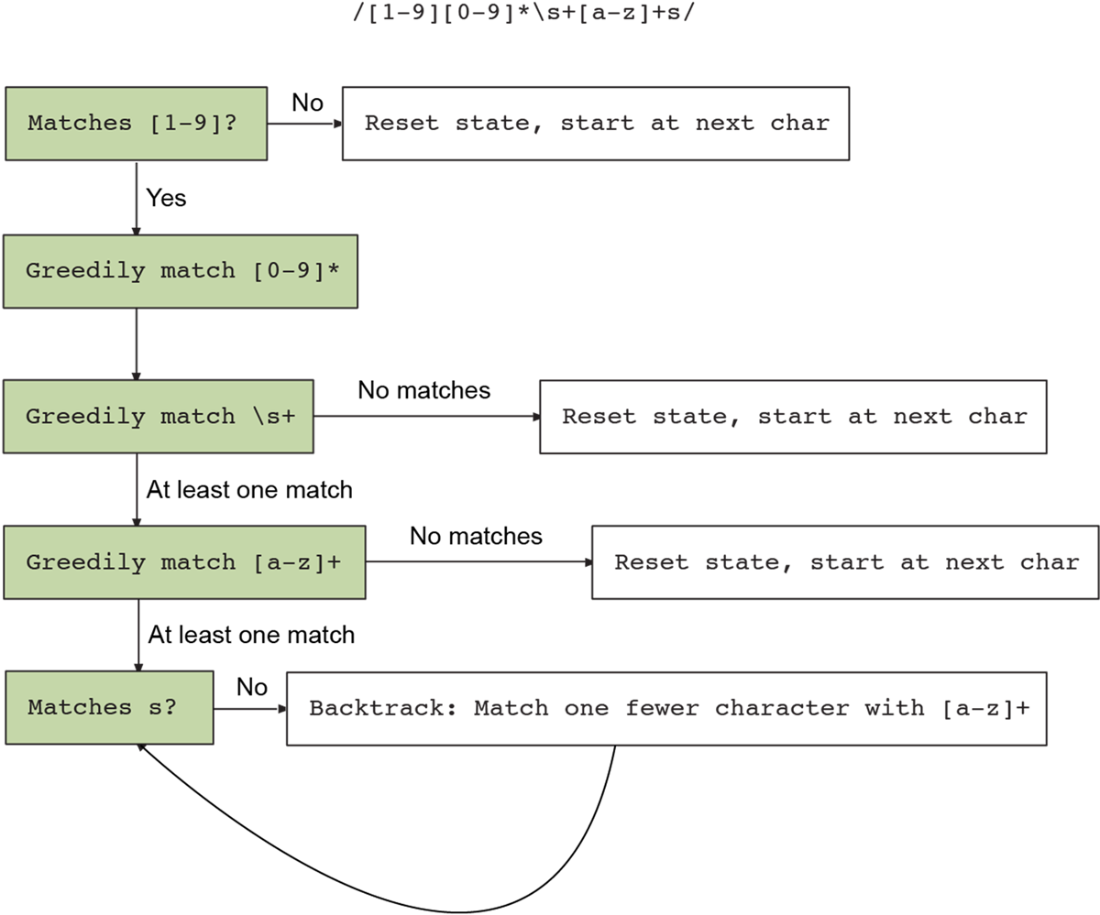
A state diagram representing a regex with backtracking.
Summary
- Regular expressions (“regex”) are a powerful tool for testing strings, extracting information from strings, and transforming strings. They aren’t the right tool for every job, but they can express a wide range of patterns in a succinct syntax.
- You can create regular expressions with the literal syntax (/test/) and with the RegExp constructor (new RegExp("test")).
- Regex patterns are made of terms and operators. A term can be a literal character, a character class, or a group. An operator modifies the preceding term. The main operators are * (zero or more repetitions), + (one or more repetitions), and ? (optional).
- Use parentheses () to group multiple terms together. Groups “capture” their matches by default, returning them as part of the regex’s result. You can make a group non-capturing by adding ?: after the opening parenthesis.
- Captures can be backreferenced later in the regex with a backslash followed by the number of the capture (\1, \2, and so on).
- You can modify regular expressions using several flags, most notably i to make the regex case-insensitive and g to make the regex global. Flags are added at the end of a regex literal: /test/ig, or as a second parameter to the RegExp constructor: new RegExp("test", "ig").
- Local regex (those without the g flag) stop after matching once. Global regexes (those with the g flag) continue matching until the reach the end of the string.
- The most common way to use regexes is with the String prototype’s match and matchAll methods (match for local regexes, matchAll for global). You can also use the replace function to transform a string by replacing each match.
- You can make an assertion about subsequent text with a lookahead, like (?=pattern); or about preceding text with a lookbehind, like (?<=pattern).
- The repetition operators + and * are greedy by default, consuming as many characters as possible. If the subsequent term doesn’t match, the regex engine will backtrack, consuming fewer characters and seeing if that results in a match. If the number of backtracking possibilities is exponential, backtracking becomes catastrophic, blocking the JavaScript thread until all possibilities are exhausted.
FAQ
What problem can regular expressions solve especially well in JavaScript?
They can replace a lot of manual string-parsing code with a compact pattern, making it easy to validate, search, and extract information from strings.When should you avoid using a regular expression and choose a full parser instead?
Use a parser when the string format is too complex for a reasonable regex, especially for nested or delimiter-heavy data like HTML or balanced structures.What are the two main ways to create a regular expression in JavaScript?
You can use a regex literal, such as/test/, or create one dynamically with the RegExp constructor, such as new RegExp("test").Why are regex literals often preferred over the RegExp constructor?
Literals are usually more readable because backslashes do not need double-escaping the way they do inside strings passed to RegExp.What do common regex flags like g, i, m, and s do?
g finds all matches, i ignores case, m makes ^ and $ work per line, and s lets . match newline characters.How do character classes and ranges work in regular expressions?
Square brackets define a character class, such as[abc] for one of several characters, [^abc] for anything except those characters, and [a-m] for a range.What is the difference between greedy and nongreedy repetition?
Greedy repetition consumes as much text as possible, while nongreedy repetition adds? and consumes only as much as needed to satisfy the match.How do capture groups help when matching text?
Parentheses create capture groups, which let you extract parts of a match separately, such as hours and minutes from a time string.What is a backreference in a regular expression?
A backreference like\1 refers to an earlier captured group, allowing the regex to match the same substring again later in the pattern.
 Secrets of the JavaScript Ninja, Third Edition ebook for free
