This chapter explains how chat models work through structured messages rather than one large prompt. The key idea is to separate stable behavior from changing input: system messages set the assistant’s role, instructions, constraints, and output style, while user messages supply the query, context, or data for each request. Assistant messages are model-generated replies that also become part of the conversation history, enabling multiturn interactions and consistent responses across turns.
The chapter then shows how to decompose monolithic prompts into cleaner chat-based architectures. Practical examples demonstrate that tasks like troubleshooting API failures, converting task descriptions into issue reports, and generating daily work summaries are easier to manage when the reusable behavior lives in the system prompt and the variable content lives in the user prompt. This separation improves maintainability, consistency, and scalability, and it also supports prompt caching because static system prompts can be reused more efficiently.
A simple framework is offered for deciding where each piece belongs: ask whether the content configures the system or is provided by the user. Role assignment, task instructions, output format, and static background usually go into the system prompt; variable inputs, documents, and request-specific details go into the user prompt, often wrapped in delimiters. The chapter also warns against common mistakes such as putting instructions in user prompts, repeating system instructions there, omitting delimiters around data, or adding variables to system prompts when they should be user-supplied. It concludes by noting that system/user separation is most valuable in production and repeated-use scenarios, but may be unnecessary for simple one-off prompts.
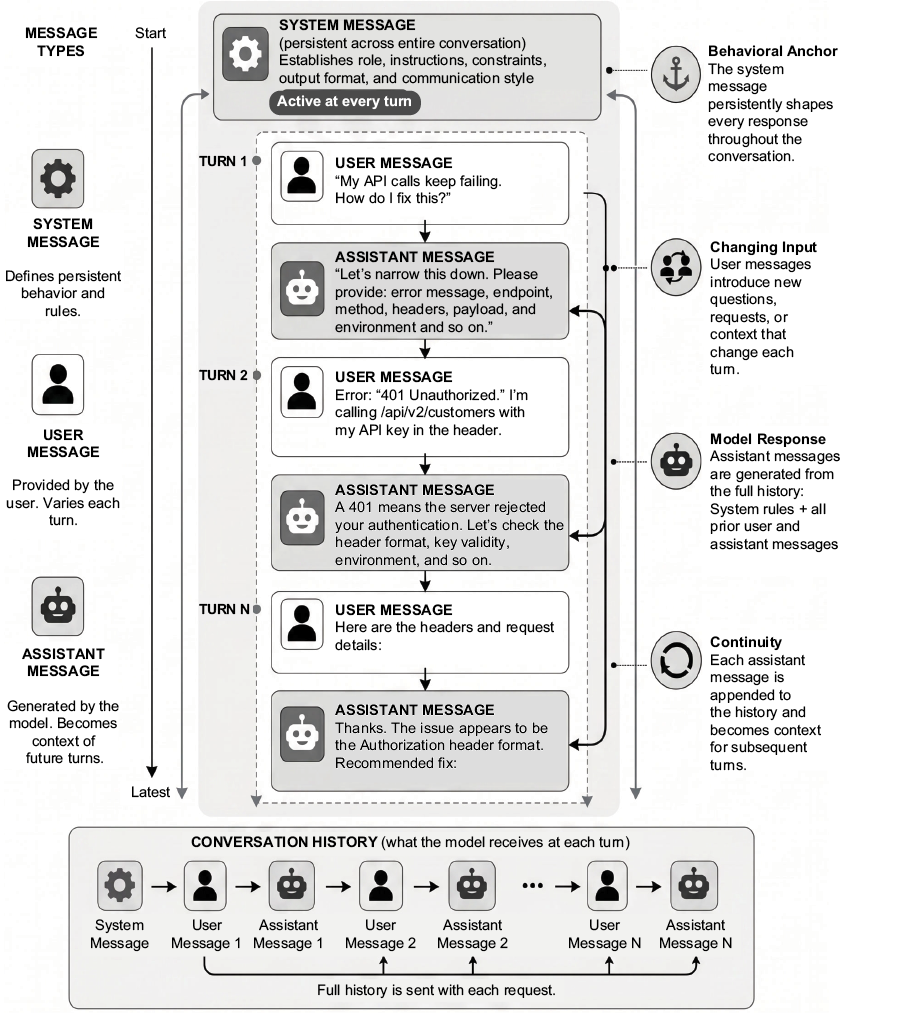
Prompt types in a chat conversation: system and user prompts are designed; assistant messages are generated.
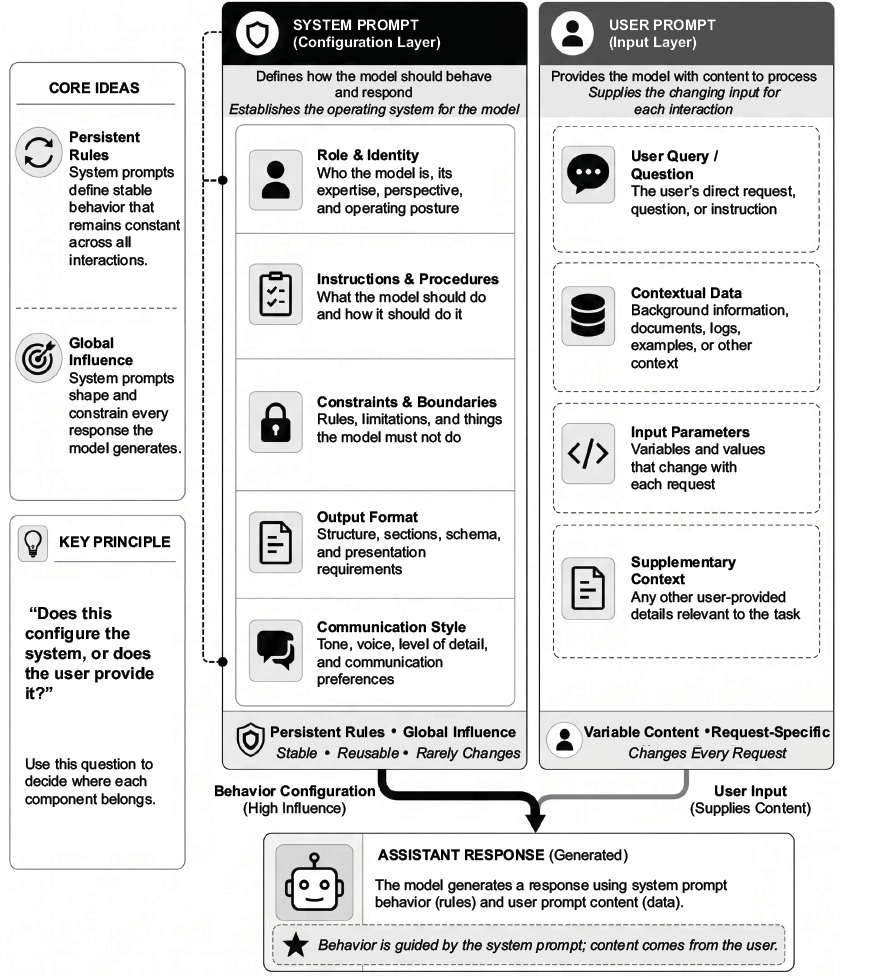
Prompt-type anatomy: system prompts configure behavior; user prompts supply changing input.
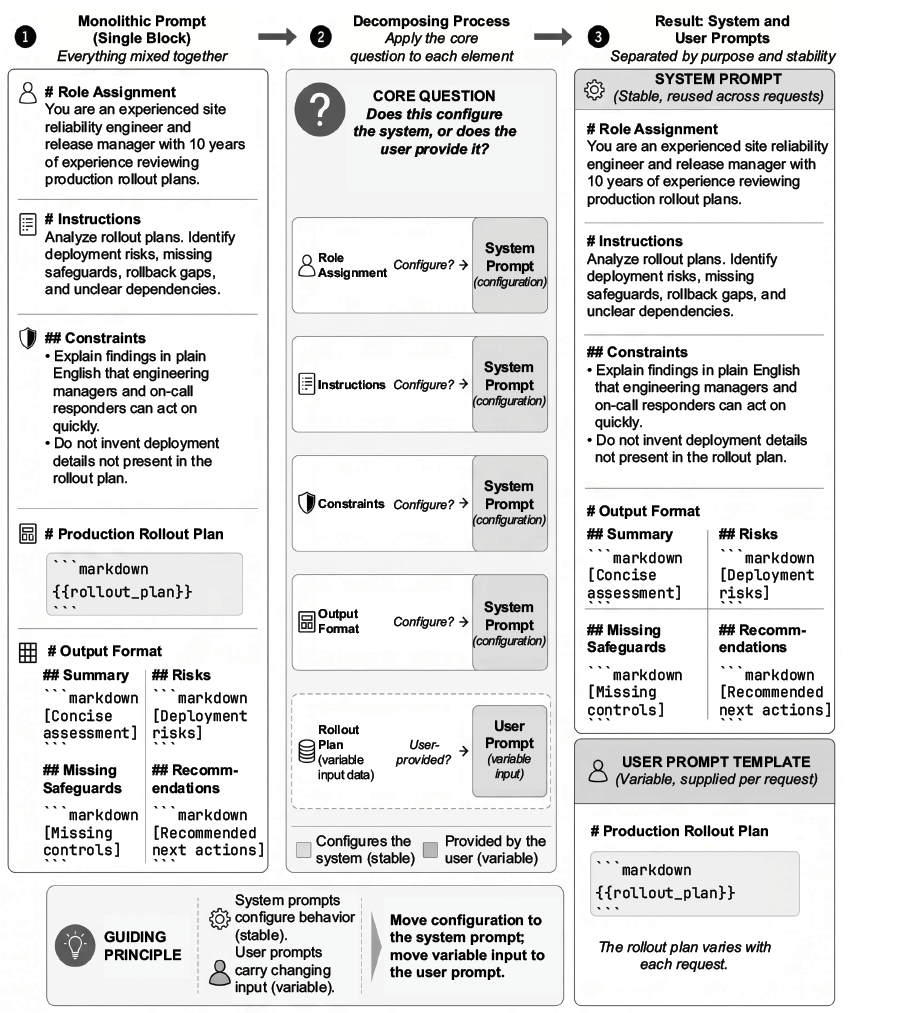
Decomposing a monolithic prompt into system and user prompt components
Summary
Chat models process conversations through three message types. System messages establish behavior, user messages contain queries or context, and assistant messages are generated by the model.
System prompts contain stable behavior. Role, instructions, procedures, constraints, output format, and static context belong in the system prompt.
User prompts contain what users provide. Questions, requests, context changes, and input parameters belong in user prompts, often as templates with delimited variables.
Decomposition follows one core question: “Does this configure the system, or does the user provide it?” Use that question to place each prompt component.
Keep system prompts static when possible. Move variable data into user prompts to preserve clean separation and improve prompt-caching efficiency.
Reserve architectural separation for repeated or production use. Simple one-off tasks can use combined prompts, while scalable systems benefit from system/user separation.
FAQ
What are the three message types used in chat models?Chat models use system, user, and assistant messages. The system message defines behavior, the user message provides input or context, and the assistant message contains the model’s generated response.What is the purpose of a system prompt?A system prompt establishes the model’s stable behavior across interactions. It typically includes the role, instructions, constraints, output format, and communication style that should remain consistent.What should go in a user prompt?A user prompt should contain the changing information for each request, such as a question, task input, or context data to analyze. It is the part of the conversation that varies from one interaction to the next.Why should monolithic prompts be split into system and user messages?Splitting prompts improves maintainability, scalability, and clarity. Stable instructions stay in the system message, while variable input stays in the user message, making updates easier and behavior more consistent.What is the core question to ask when decomposing a prompt?Ask: “Does this configure the system, or does the user provide it?” If it configures behavior, it belongs in the system prompt; if it changes per request, it belongs in the user prompt.When should you use a simple combined prompt instead of system/user separation?Use a simple combined prompt for one-off tasks, small batches, prototypes, or when the prompt will run fewer than about 10 to 20 times. In those cases, the overhead of separation is usually not worth it.When is system/user separation the better choice?Use separation for production applications, multiturn assistants, and workflows that need consistent behavior across many requests. It is especially useful when instructions must be maintained independently of the input data.What belongs in a system prompt versus a user prompt for templates with variables?Static content like role, instructions, constraints, and output format belongs in the system prompt. Variable content like user-supplied data, questions, and documents should go in the user prompt, usually with delimiters.Why are delimiters recommended in user prompts?Delimiters make the boundary around variable input explicit, helping the model distinguish data from instructions. They are good prompt hygiene, but they are not a security control.What are common mistakes when designing chat prompts?Common mistakes include putting instructions in the user prompt, repeating system instructions in the user prompt, leaving context data undelimited, and putting variables in the system prompt when they could belong in the user prompt.
pro $24.99 per month
access to all Manning books, MEAPs, liveVideos, liveProjects, and audiobooks!

 Prompt Engineering in Practice ebook for free
