The chapter explains that effective prompting comes from separating a request into clear structural parts instead of packing everything into one ambiguous block of text. It presents prompts as a structured interface, where each element has a distinct role and can be combined to produce more reliable, reusable, and easier-to-maintain instructions for software engineering tasks.
The main elements are instructions, constraints, context, input parameters, output format, and delimiters. Instructions define the task, constraints set falsifiable limits on what the output may violate, context supplies background for interpretation, input parameters let a single template adapt to changing values, output format makes responses predictable, and delimiters keep embedded content from being mistaken for instructions. The chapter emphasizes that constraints should be specific and testable, and that delimiters are especially useful when working with external text or runtime inputs.
Through examples such as incident summaries, deployment checklists, release notes, and decision briefs, the chapter shows how these elements work together in real operational workflows. The central message is that strong prompts are built deliberately: always include the task and output shape, then add other elements only when they improve clarity or control. This turns prompt design into an engineering practice that is systematic, reusable, and suitable for production use.
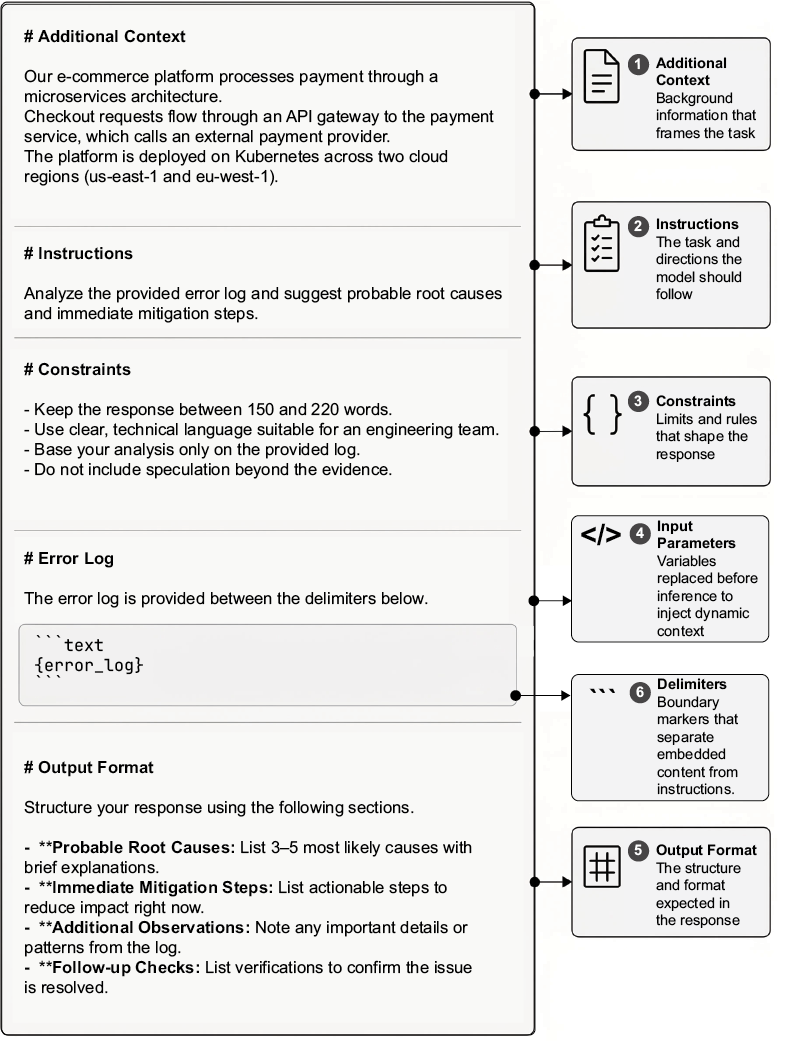
Annotated prompt template with structural elements
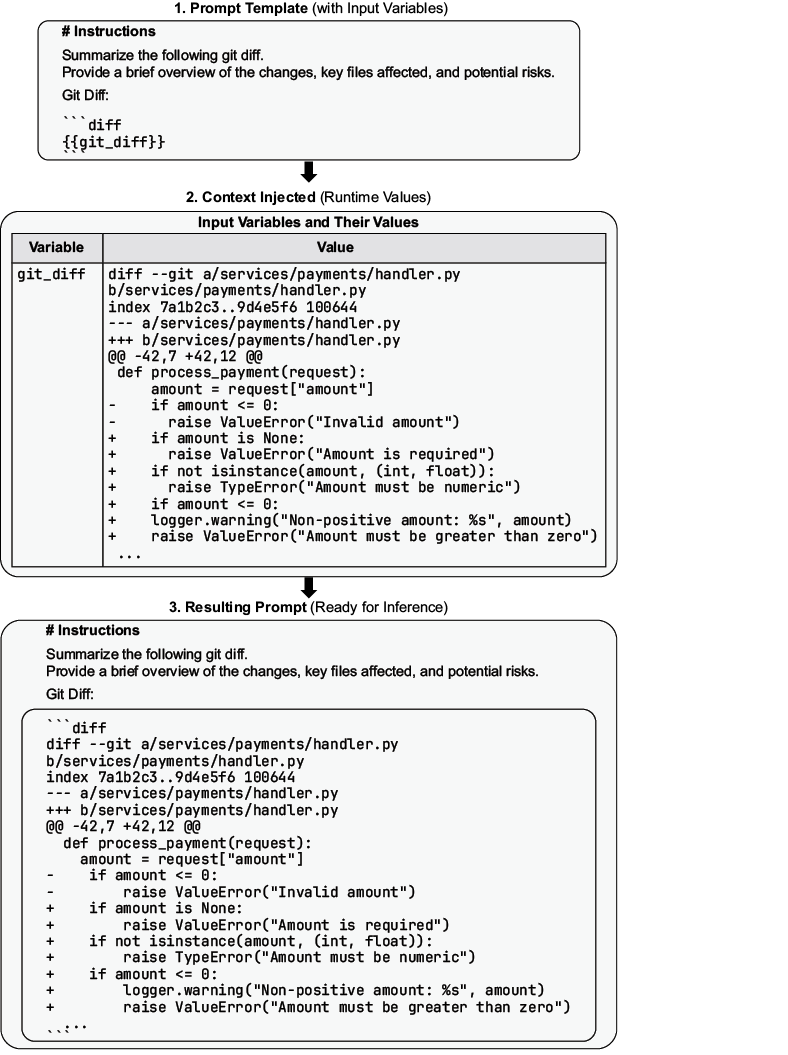
Prompt template demonstrating the use of input variables
Summary
For instructions, define the task clearly and concisely. Clear instructions reduce output variance and improve consistency.
For constraints, add falsifiable conditions that the output must satisfy. Make each constraint specific and verifiable; avoid vague conditions that cannot be tested.
For context, provide static background information directly in the prompt to help the model correctly interpret and follow instructions.
For input parameters, use named placeholders in a prompt template and inject concrete values before inference to make prompts reusable across varied inputs.
For output format, specify the required response structure, sections, fields, or format up front so outputs are consistent and predictable.
For delimiters, use boundary markers such as triple backticks or XML tags to separate contextual content from instructions and reduce interpretation errors.
When combining structural elements, always include instructions and output format; add constraints, context, input parameters, and delimiters only when the problem requires them.
FAQ
What are the main structural elements of a prompt in this chapter?The chapter focuses on six core structural elements: instructions, constraints, context, input parameters, output format, and delimiters. Together, they help separate what the model should do, what it must not violate, what background it needs, what values change at runtime, what the response should look like, and where embedded content begins and ends.Why should instructions be kept separate from context and output format?Instructions define the task, while context provides background and output format defines the response shape. Keeping them separate reduces ambiguity, makes prompts easier to test and maintain, and helps the model follow the task more reliably.What makes a constraint different from an instruction?A constraint is a falsifiable restriction on the output, while an instruction tells the model what to do. Constraints are about what the response must not violate, such as length limits, prohibited content, or required sections, and they should be specific and testable.What are examples of good constraints?Good constraints are measurable and clear, such as “Use 120 to 160 words,” “Use exactly five bullet points,” “Include sections named Impact, Root Cause, Mitigation, and Follow-ups,” or “Do not include code blocks.”How should input parameters be used in prompt design?Input parameters should replace values that change from one run to another, such as service names, environments, logs, or release details. This makes a prompt reusable across different scenarios while keeping the instruction logic stable.What is the difference between context and input parameters?Context is background information written into the prompt to help the model interpret the task. Input parameters are variable placeholders that get filled in before inference. Context tends to be stable, while parameters change per run.Why is output format important in prompts?Output format makes the response predictable and easier to use by humans or systems. It can specify headings, sections, key-value pairs, or ordered lists so the result stays consistent across runs.What role do delimiters play in prompts?Delimiters mark boundaries around embedded content so the model can distinguish instructions from quoted text or other context. This reduces the risk of the model treating the embedded content as instructions, especially when using runtime input.Why are triple backticks recommended as delimiters?Triple backticks are widely recognized, commonly seen in training data, and work well for clearly separating embedded text from instructions. They are recommended unless the input already contains backticks or another delimiter would be safer.How do structural elements work together to create a reliable prompt?Instructions define the task, constraints bound the solution space, context provides background, input parameters add runtime variability, output format ensures consistency, and delimiters protect embedded content. Combined, they form a structured interface that improves clarity, control, and reliability.
pro $24.99 per month
access to all Manning books, MEAPs, liveVideos, liveProjects, and audiobooks!

 Prompt Engineering in Practice ebook for free
