3 Building, testing, and debugging
This chapter offers a pragmatic, language-agnostic tour of how to get productive with Apache Thrift, from acquiring and building the IDL compiler and language libraries to understanding the source tree, running tests, and applying practical debugging techniques for RPC services. It emphasizes that beyond code generation, real-world Thrift development depends on solid habits around testing and visibility, and on knowing how to reason about the I/O stack and network behavior that underpins cross-language communication.
It outlines multiple ways to obtain a working compiler: platform packages across major OSes, prebuilt virtual machines and containers, and building from source. The source build paths cover Autotools and CMake on *nix, and Visual Studio on Windows, with core prerequisites like a C++ compiler, Flex, and Bison. A brief demo shows the compiler transforming simple IDL into substantial language-specific code. The chapter also orients readers to the repository layout (compiler, lib, test, tutorial, and supporting build/docker assets) and explains testing strategy: language-specific tests via make check and comprehensive cross-language verification via make cross and a Python-driven test harness.
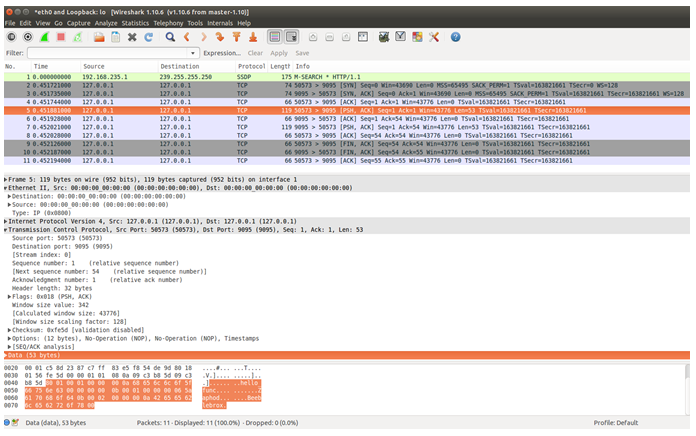
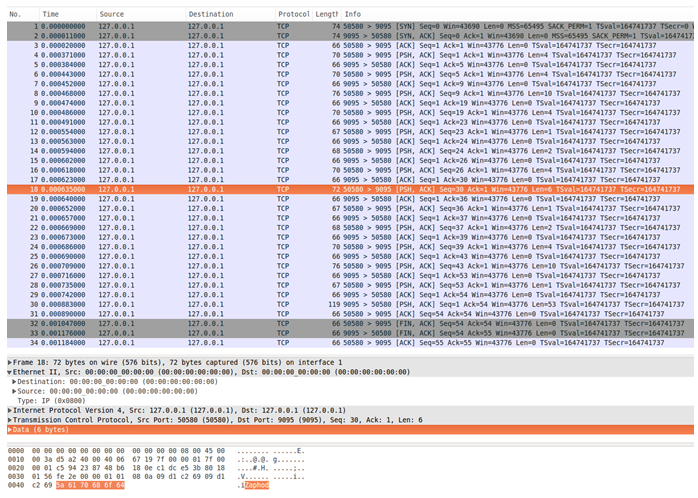
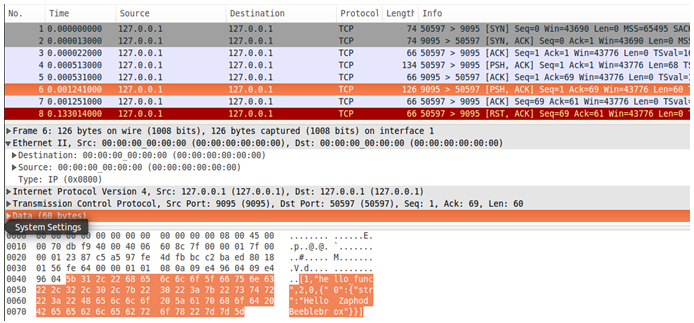
The debugging guidance focuses on the kinds of issues that slip past functional tests: packet-level inspection to baseline healthy traffic and expose pathologies; the performance impact of unbuffered interfaces (and the fix via buffering); diagnosing interface misalignment that leads to connection resets (and the rules for safe evolution, e.g., avoiding return-type changes); and recognizing I/O stack mismatches such as missing framed transports with nonblocking servers. It recommends practical aids like switching to JSON protocol for more readable traces, leveraging server event hooks for application-level logging of connections and calls, and systematically isolating problems by swapping protocols/transports per layer to pinpoint faults and differentiate application bugs from framework issues.
Correct client server interaction.
Problematic client server interaction.
Client RPC connection reset.
Summary
Key chapter takeaways:
- You can download prebuilt Apache Thrift IDL Compilers for Windows from the Apache Thrift website and you can acquire Apache Thrift container images on Docker Hub.
- You can build the Apache Thrift IDL Compiler from source using Autotools or CMake.
- The Apache Thrift source tree offers a wealth of example code in the test and tutorial directories, as well as add-ons in the contrib directory.
- Apache Thrift language library source is found with unit tests beneath the /lib directory.
- Cross-language tests allow you to test the interaction of any language client with any language server.
- Network and RPC introspection tools can help you debug the most common Apache Thrift interoperability problems, including I/O stack misalignment, interface incompatibilities, and lack of message buffering.
FAQ
What is the Apache Thrift IDL compiler and why do I need it?
The Apache Thrift IDL compiler parses your .thrift interface definitions and generates language-specific client/server code. Internally it parses the IDL into an AST and feeds that to language generators. To build apps, you typically need both the generated code and the Thrift runtime library for your target language.What are the main ways to get a working Thrift compiler?
- Platform installers: Ubuntu/Debian (apt), CentOS/RHEL via EPEL (yum), macOS (Homebrew/MacPorts), Windows (NuGet/official binaries).- VMs and containers: Vagrant files in the Thrift repo build a full environment; official Docker images (e.g., apache/thrift) let you run the compiler without installing it locally.
- Build from source: Clone the repo or download a release and build locally.
Tip: Only install binaries from trusted sources; prefer official ASF downloads or your OS package repos.
How do I build the Thrift compiler from source with GNU Autotools?
Prereqs: C++ compiler, Flex (≥2.5), Bison (≥2.5), Autoconf (≥2.6), Automake (≥1.14).Typical steps:
-
git clone https://github.com/apache/thrift and git checkout <release-tag> (or use the release tarball).-
./bootstrap.sh to generate build scripts.-
./configure --disable-libs to build just the compiler.-
make and optionally sudo make install (installs to /usr/local/bin/thrift).How do I build the Thrift compiler with CMake?
Prereqs: C++ toolchain, Flex, Bison, CMake.Typical steps:
- Install dev tools (e.g., on Ubuntu: build-essential, flex, bison, cmake).
-
git clone the repo and git checkout <release-tag> (CMake support begins with 0.9.2).-
cmake . then make (compiler ends up under bin/).- Optional:
sudo make install and use cpack to produce a platform installer (e.g., a .deb).How do I build the Thrift compiler on Windows?
Use the Visual Studio project undercompiler/cpp. Ensure Flex and Bison executables are on your PATH (e.g., win-flex-bison). Open the solution in Visual Studio and build to produce thrift.exe. If your Flex/Bison names/paths differ, update the project settings accordingly.What’s in the Apache Thrift source tree?
Key top-level folders:-
compiler: IDL compiler sources.-
lib: language runtime libraries, their tests and examples.-
test: cross-language test suite (e.g., ThriftTest.thrift).-
tutorial: cross-platform calculator tutorial.-
build: CMake, Docker, CI support; contrib: community extras (e.g., Vagrant).- Packaging and docs:
debian, doc, aclocal.How do I run Thrift’s tests (language-specific and cross-language)?
- Language-specific: From repo root (or per-language dir underlib/<lang>), run make check. This builds and runs that language’s unit/integration tests.- Cross-language: Run
make cross from the root, then use ./test/test.py (e.g., ./test.py --client cpp --server java) to exercise protocol/transport combinations between languages. The central IDL is test/ThriftTest.thrift.How can I inspect and reason about RPC traffic on the wire?
Use a packet sniffer like Wireshark. Filter by your service port to see TCP handshakes, PSH packets, and payload sizes. A single request/response over a short-lived connection typically shows about 10 TCP packets (including SYN/FIN/ACK). Consider using TJSONProtocol in testing to make payloads human-readable during trace analysis.Why is buffering important, and what goes wrong without it?
Without a buffering layer (e.g., TBufferedTransport), each small serialized field may be sent as its own TCP segment with PSH, exploding packet count and CPU load on the server. Symptoms include many tiny packets and degraded throughput. Fix by wrapping your endpoint transport (e.g., TSocket) in TBufferedTransport on both client and server.What common mismatches break Thrift communication, and how do I diagnose them?
- Interface misalignment: Changing return types or field expectations between client/server IDLs can cause the client to reset (RST) after receiving an “unexpected” response. Regenerate code from a consistent IDL; evolve APIs by adding new methods or returning structs, not by changing existing signatures.- I/O stack misalignment: Protocol or transport layers must match. Examples: TBinaryProtocol cannot talk to TCompactProtocol; nonblocking servers often require TFramedTransport. Use traces to spot 4-byte frame prefixes and ensure both sides use compatible stacks.
How can I debug intermittent production issues without client access?
- Instrument servers via Thrift’s server event handlers (boot, connect, per-call, disconnect) to log method names, parameters, latencies, and outcomes at the application level.- Use load balancer metrics for latency/health trends.
- Employ packet capture judiciously (tcpdump, existing SOC tooling) if feasible; filter for anomalies (e.g., RSTs). Balance observability with storage/perf costs.

 Programmer’s Guide to Apache Thrift ebook for free
