Overview

13 Building C# Clients and Servers with .Net and Windows

This chapter introduces how Apache Thrift enables polyglot, cross-platform RPC in the .NET/CLR ecosystem, parallel to the Java/JVM world, with a focus on building C# clients and servers on Windows. It guides you through configuring a Windows development environment, using Visual Studio and NuGet, and shows how Thrift’s language-agnostic IDL and generated code simplify interop between C# and many other languages. Beyond setup and a first working example, the chapter surveys the C# transport, protocol, and server options, and culminates with a practical long‑polling design built on named pipes.

You begin by preparing the essentials: Visual Studio with the .NET Framework SDK, the thrift.exe IDL compiler, and the Thrift C# runtime (built from source or installed via NuGet). A step-by-step “Hello World” solution organizes three projects—client, server, and a shared service library—driven by a simple hello.thrift IDL. Visual Studio is wired to invoke the Thrift compiler via a pre-build event, the generated C# stubs are compiled into the shared library, and both client and server reference that library and Thrift.dll. The server implements a handler and runs over TServerSocket using TSimpleServer, while the client connects with TSocket, layers TBufferedTransport and TBinaryProtocol, and exercises the service end to end.

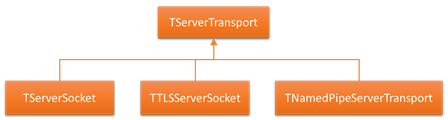
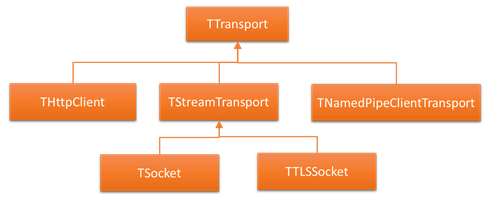
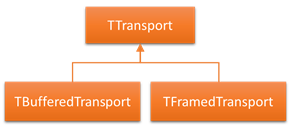
The chapter then details the .NET Thrift stack: base and server transports (TServerSocket, TTLSServerSocket, TNamedPipeServerTransport), endpoint transports (TSocket, TTLSSocket, THttpClient, TNamedPipeClientTransport, TMemoryBuffer), layered transports (TBufferedTransport, TFramedTransport), protocols (TBinaryProtocol, TCompactProtocol, TJSONProtocol), and servers (TSimpleServer, TThreadedServer, TThreadPoolServer) with trade‑offs for concurrency and throughput. An advanced example models long polling for streaming trade reports: a PNWF TradeStream IDL, NuGet-managed Thrift dependency, a multithreaded named‑pipe server (TThreadedServer + TNamedPipeServerTransport + TCompactProtocol) with a TServerEventHandler to subscribe/unsubscribe clients, and a TradeEventGenerator using ThreadLocal events and concurrent collections. A compact client connects via TNamedPipeClientTransport and repeatedly calls GetNextTrade, demonstrating scalable, asynchronous-style delivery within an RPC architecture.

- Building the C# library with Visual Studio
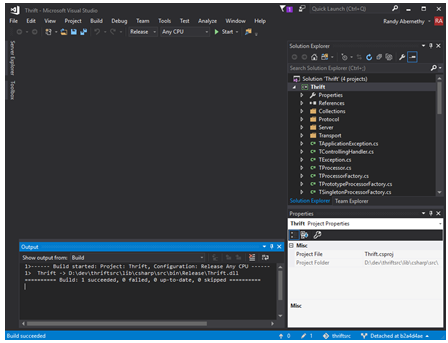
- Creating a new C# solution
- Creating an RPC client project
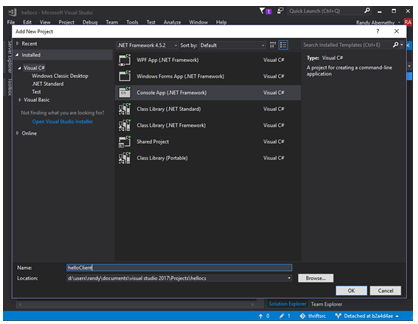
- Client, Server and Service Interface Projects
- Adding Apache Thrift IDL to the Solution
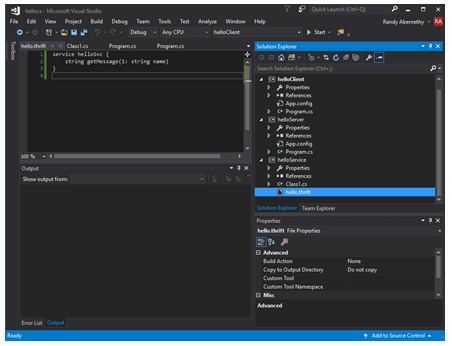
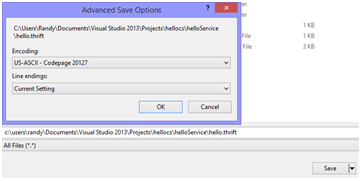
- Saving files in ASCII format
- Adding an IDL Compiler pre-build event
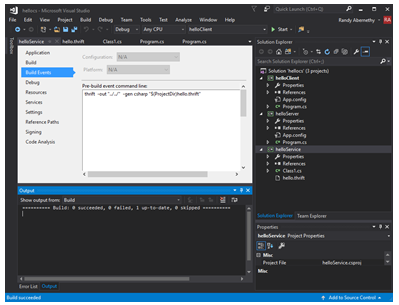
- IDL Compiler C# output
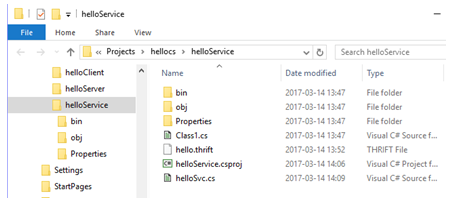
- Successful helloService build
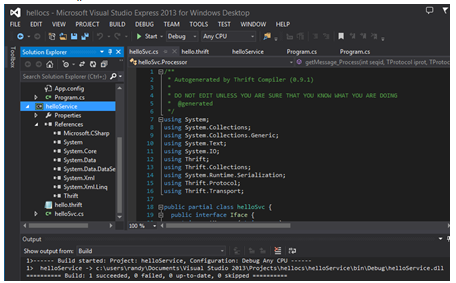
- Successful server build
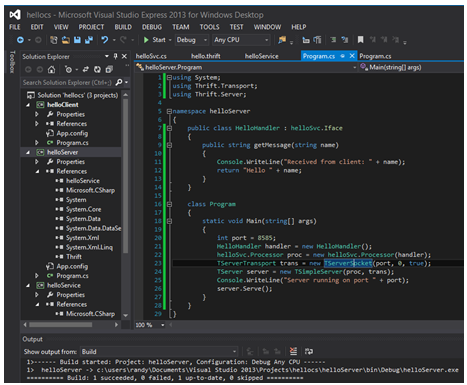
- Testing helloServer.exe
- C# Server Transport Hierarchy
- C# End Point Transport Hierarchy
- C# Layered Transport Hierarchy
- The NuGet Package Manager Console
- The tradeService Project
- Three concurrent clients connected to the named pipe tradeServer

  Summary

This chapter has covered:

  • How to configuring Apache Thrift for use with .Net on Windows.
  • How to create Apache Thrift applications with Visual Studio.
  • How to build C# RPC clients and servers with Apache Thrift.
  • The various End Point Transports available in C#.
  • The Layered Transports available in C#.
  • The C# supported Protocols.
  • How to use C# concurrency features with multithreaded Apache Thrift servers.
  • How to use long polling to supply asynchronous data feeds to clients.

FAQ

What do I need to set up Apache Thrift for C# on Windows?- Visual Studio (Community edition is fine) with the .NET Framework SDK installed (not just .NET Core) - .NET Framework v4.5 or higher - The Apache Thrift IDL compiler (thrift.exe) on your PATH - The Apache Thrift C# library (Thrift.dll), via source build or NuGet - Usual build tools included with Visual Studio
How do I get the Thrift IDL compiler on Windows?- Download the precompiled thrift.exe from http://thrift.apache.org/download - Place thrift.exe on your system PATH (for convenience, many drop it in C:\Windows) - Verify with: dir C:\Windows\thrift.exe (or run thrift --version)
How do I build the Thrift C# library (Thrift.dll) from source?- Get the Thrift sources (zip from the download page or clone from GitHub) - Open lib/csharp/src/Thrift.sln in Visual Studio - Build the “Thrift” project (Debug or set Configuration to Release) - Output appears under lib/csharp/src/bin/(Debug|Release)/Thrift.dll - Linux/Mono option: xbuild /p:Configuration=Release /p:TargetFrameworkVersion="v4.5" Thrift.csproj (ensure mono-complete installed)
How should I structure a Visual Studio solution for a C# Thrift client/server?- Create a Blank Solution (e.g., “hellocs”) - Add three projects: - helloClient: Console App (.NET Framework) - helloServer: Console App (.NET Framework) - helloService: Class Library (.NET Framework) for the shared, generated stubs - Define your service in helloService (add hello.thrift) and generate code into this project
Why does the Thrift compiler complain about my .thrift file from Visual Studio?By default, Visual Studio saves text files as UTF-8 with a byte-order mark (BOM), which the Thrift compiler treats as garbage. Save the file as US-ASCII (File → “Save As…” → “Save with Encoding…” → US-ASCII).
How do I integrate thrift.exe into the VS build so stubs regenerate automatically?- In the helloService project, add a Pre-build event command line like: thrift -out "../../" -gen csharp "$(ProjectDir)hello.thrift" - Ensure thrift.exe is on PATH - Add the generated .cs files to the project (prefer “Add as link” when generating into subfolders)
What references do my projects need?- helloService: reference Thrift.dll (from your build or via NuGet) - helloServer and helloClient: - Reference the helloService project - Reference Thrift.dll - After adding references, IntelliSense errors in generated code (e.g., Thrift.* namespaces) should disappear
How do I run and test the simple client/server in Visual Studio?- Set helloServer as the Startup Project - Debug → “Start Without Debugging” to run the server in its own console (allow firewall if prompted) - Right-click helloClient → Debug → “Start New Instance” to run the client - You should see the server log the received name and the client print the greeting
Which transports, protocols, and servers are available in the C# Thrift library?- Transports: - Endpoint: TSocket, TTLSSocket, THttpClient, TNamedPipeClientTransport, TMemoryBuffer - Server: TServerSocket, TTLSServerSocket, TNamedPipeServerTransport - Layered: TBufferedTransport, TFramedTransport - Protocols: TBinaryProtocol, TCompactProtocol, TJSONProtocol - Servers: TSimpleServer, TThreadedServer, TThreadPoolServer - Note: client and server must use compatible transport/protocol combos
How does the named pipes long‑polling TradeStream example work?- Server: - TNamedPipeServerTransport("TradeStream") + TCompactProtocol - TThreadedServer with a TServerEventHandler to subscribe/unsubscribe clients - TradeEventGenerator (ThreadLocal + ConcurrentDictionary + ConcurrentQueue) feeds per-connection trade queues - Client: - TNamedPipeClientTransport("TradeStream") + TCompactProtocol - Calls GetNextTrade() in a loop; each call may block until new trades are available - Notes: - Named pipes are Windows-native and performant; test Mono environments if planning cross‑platform - Long‑polling reduces new infrastructure but adds repeated request overhead

pro $24.99 per month

  • access to all Manning books, MEAPs, liveVideos, liveProjects, and audiobooks!
  • choose one free eBook per month to keep
  • exclusive 50% discount on all purchases
  • renews monthly, pause or cancel renewal anytime

lite $19.99 per month

  • access to all Manning books, including MEAPs!

team

5, 10 or 20 seats+ for your team - learn more


choose your plan

team

monthly
annual
$49.99
$499.99
only $41.67 per month
  • five seats for your team
  • access to all Manning books, MEAPs, liveVideos, liveProjects, and audiobooks!
  • choose another free product every time you renew
  • choose twelve free products per year
  • exclusive 50% discount on all purchases
  • renews monthly, pause or cancel renewal anytime
  • renews annually, pause or cancel renewal anytime
  • Programmer’s Guide to Apache Thrift ebook for free

choose your plan

team

monthly
annual
$49.99
$499.99
only $41.67 per month
  • five seats for your team
  • access to all Manning books, MEAPs, liveVideos, liveProjects, and audiobooks!
  • choose another free product every time you renew
  • choose twelve free products per year
  • exclusive 50% discount on all purchases
  • renews monthly, pause or cancel renewal anytime
  • renews annually, pause or cancel renewal anytime
  • Programmer’s Guide to Apache Thrift ebook for free
choose your plan

team

monthly
annual
$49.99
$499.99
only $41.67 per month
  • five seats for your team
  • access to all Manning books, MEAPs, liveVideos, liveProjects, and audiobooks!
  • choose another free product every time you renew
  • choose twelve free products per year
  • exclusive 50% discount on all purchases
  • renews monthly, pause or cancel renewal anytime
  • renews annually, pause or cancel renewal anytime
  • Programmer’s Guide to Apache Thrift ebook for free