Overview
11 Building Clients and Servers with C++
This chapter explains how to build high-performance RPC systems in C++ with Apache Thrift. It opens with platform-specific setup and build guidance, moves through a concrete “hello world” client and server to ground the basics, then surveys the C++ transport, protocol, and server ecosystem. The chapter concludes with a deep dive into the TNonblockingServer, discussing its threading model, framing, and tuning strategies for throughput and scalability.
Setup focuses on selecting how to consume the library (shared/static libs or compiling sources into your project), understanding the available components (libthrift core, libthriftnb for non-blocking I/O, libthriftz for compression, Qt libraries), and managing dependencies only when needed (libevent for non-blocking I/O, OpenSSL for TLS, Qt toolkits). It notes the historic Boost requirement for C++98-era releases (≤ 0.10.0) and the transition toward C++11, and shows how to build with autotools or CMake on common Linux distributions, how to regenerate configurations when adding dependencies, and how to handle versioning and linking (debug/release, static/dynamic). Windows users are guided to the Visual Studio solution for producing static libraries, configuring include paths, and optionally building libthriftnb with libevent.
The chapter’s example client uses TSocket + TBufferedTransport + TBinaryProtocol with generated stubs, while the example server pairs a handler implementation with TSimpleServer, TServerSocket, and factories to create compatible I/O stacks. A concise tour covers end-point transports (sockets, SSL sockets, pipes, files, memory buffers), layered transports (buffered, framed, HTTP, zlib), and protocols (binary, compact, JSON), emphasizing that peers must agree on protocol and mutating layers. It then contrasts runtime and compile-time polymorphism, showing how static binding (for example, TBinaryProtocolT with a concrete transport) can trim virtual-call overhead. The TNonblockingServer section explains framing requirements (TFramedTransport on clients), separate I/O and worker thread pools with ThreadManager, connection-scoped handler factories, and practical thread-count tuning based on CPU concurrency and workload behavior, closing with build and linking notes to assemble a production-ready, scalable C++ Thrift service.
Summary
This chapter has covered:
- How to setup an Apache Thrift C++ development environment
- How the Apache Thrift C++ library is organized
- How to build C++ clients and servers
- An overview Apache Thrift C++ library transports, protocols and servers
- How to take advantage of static protocol/transport binding
- How to use handler factories to recover client connection information
- How to build and use non-blocking servers
FAQ
What are my options for using the Apache Thrift C++ library in my projects?
Three common options:
- Shared libraries: link against libthrift.so (and others). Default on *nix; get versioned symlinks.
- Static libraries: link against libthrift.a (and friends). Default on Windows (no shared libs provided).
- Compile from source in your app: add needed Thrift C++ sources to your build. More effort per project, but simplifies debugging and avoids external lib discovery. Most users build and link the libraries.Do I need Boost for Apache Thrift C++? Which version?
For Thrift ≤ 0.10.0, yes—C++98 code relies on Boost (notably boost::shared_ptr; multithreaded servers can use boost::thread). Boost ≥ 1.53 is required for 0.9.2, 0.9.3, and 0.10.0. The IDL compiler (thrift) itself does not require Boost. Newer Thrift (≥ 1.x) targets C++11 where std::shared_ptr/std::thread replace Boost.How do I build Apache Thrift C++ libraries on Ubuntu or CentOS with autotools?
Steps (Ubuntu/CentOS):
- Install build deps (examples): Ubuntu: apt-get install git libtool flex bison pkg-config g++ libssl-dev automake make. CentOS: yum groupinstall "Development Tools" and yum install openssl-devel.
- git clone http://github.com/apache/thrift
- cd thrift && ./bootstrap.sh
- Configure: ./configure CPPFLAGS='-O2' CFLAGS='' CXXFLAGS='' (or '-Og -g' for debug). Choose compilers via CC/CXX if desired (e.g., clang).
- make && sudo make install
Installs headers to /usr/local/include/thrift and libs to /usr/local/lib (e.g., libthrift.{a,so}, plus others when deps are present).Can I build with CMake instead? Any version caveats?
Yes. Install cmake plus dependencies (Boost, OpenSSL, libevent if using nonblocking server). Then:
- cmake .
- make
- sudo make install
On CentOS 7, Thrift requires cmake ≥ 2.8.12; default repos may have 2.8.11—build/upgrade cmake if needed.How do I enable the C++ TNonblockingServer and what must clients use?
- Install libevent development headers (Ubuntu: libevent-dev, CentOS: libevent-devel), then reconfigure/rebuild to produce libthriftnb.
- Link servers with -lthriftnb -levent -pthread in addition to -lthrift.
- TNonblockingServer uses framing; clients must use TSocket + TFramedTransport and a matching protocol (e.g., TCompactProtocol if the server uses it).I’m getting “error while loading shared libraries: libthrift-*.so: cannot open shared object file”. How do I fix it?
Typically update the shared library cache:
- sudo ldconfig
You can inspect which shared libs an executable uses with ldd. Multiple Thrift versions can coexist; the unversioned symlink (libthrift.so) points to the last installed version. Check /usr/local/lib/libthrift.la or symlinks if the wrong version is picked up.How do I build Apache Thrift C++ on Windows with Visual Studio?
- Open thrift/lib/cpp/thrift.sln in Visual Studio.
- Install Boost (≥1.53). For SSL transports, install OpenSSL or remove TSSL* sources if unused.
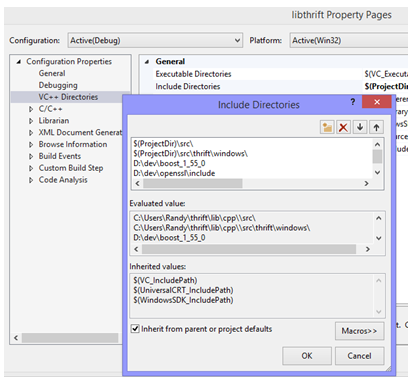
- Configure Boost/OpenSSL include/lib paths in project properties per config/platform.
- Build libthrift.lib; for nonblocking, also build libthriftnb.lib (requires building Libevent). VS solution does not include projects for zlib/Qt libraries.What transport/protocol stack should I use for a simple C++ client/server?
Common baseline:
- Client: TSocket → TBufferedTransport → TBinaryProtocol (or TCompact/TJSON if desired).
- Server: TServerSocket + TBufferedTransportFactory + TBinaryProtocolFactory feeding TSimpleServer (for basic testing) or threaded servers for concurrency.
Match end point and protocol on both sides; non-mutating layers like TBufferedTransport can be added freely.What’s the difference between runtime and compile-time polymorphism for C++ protocols, and why care?
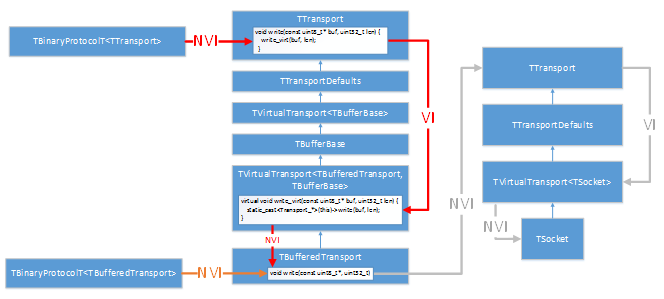
- Runtime (dynamic) binding: using TBinaryProtocol (typedef of TBinaryProtocolT) incurs virtual calls per transport operation.
- Compile-time (static) binding: use TBinaryProtocolT (or TCompactProtocolT<...>) to call concrete transport methods directly (no virtual dispatch), enabling better inlining/optimization.
Potential speedups vary (measured up to ~0–20% in examples). Factory templates (TBinaryProtocolFactoryT, TCompactProtocolFactoryT) enable static binding on servers; ensure the template matches the actual transport being provided.How do I configure and tune a C++ TNonblockingServer?
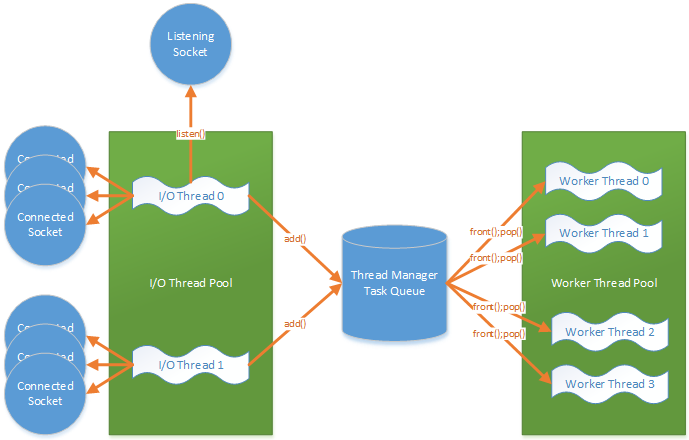
- Threading: Always has an I/O thread pool; optionally add a worker thread pool via a ThreadManager (e.g., newSimpleThreadManager). Set number of I/O threads with setNumIOThreads(...).
- Framing: Requires TFramedTransport on clients; server internally frames and hands complete messages to workers (often via TMemoryBuffer).
- Sizing: Start with I/O threads ≈ CPUs/2+1 and workers ≈ 1.5×CPUs+1, then benchmark. If handlers block on I/O, you may need many more workers.
- Handlers: Use per-connection handler factories when you need connection-local state; use singleton handlers for stateless services (IDL generator provides a singleton factory).
- Linking: Remember -lthriftnb -levent -pthread in addition to -lthrift.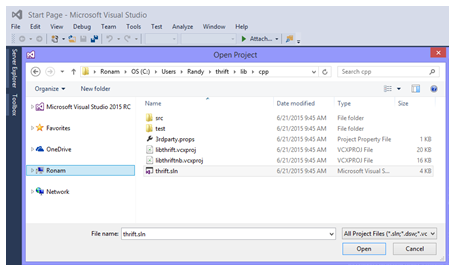


 Programmer’s Guide to Apache Thrift ebook for free
