5 Data Engineering and Data Shaping
This chapter introduces a practical, example-driven mindset for turning messy, multi-table data into analysis-ready forms using R. It emphasizes thinking in terms of the “shape” and “coordinates” of data (tables, rows, columns), planning transformations before coding, and keeping “eyes on the data” through quick checks and summaries. The authors take a polyglot approach—mixing base R, data.table, and dplyr—to build fluency across idioms, highlighting where each shines. Throughout, small but representative datasets are used to illustrate common workflows and to reinforce a mental model of data engineering as a sequence of clear, composable steps.
The core toolkit centers on essential transforms: selecting and reordering rows and columns; creating and renaming columns; handling missing values (complete.cases, na.omit, last-observation-carried-forward via na.locf, and coalescing fallbacks); aggregating and computing per-group summaries; and combining data by rows, by columns, or via joins (left, inner, full). The chapter contrasts philosophies and mechanics: base R is stable and widely available; data.table is fast and memory-efficient with reference semantics, concise by-group operations, and in-place updates (:=, by, setorderv); and dplyr provides readable pipelines and clear verbs (select, filter, arrange, mutate, group_by, summarize) while cautioning about grouping state and API changes. Parametric programming is shown across styles (standard evaluation in base R, data.table’s .. and eval, and dplyr’s quasi-quotation), enabling code that accepts column names as variables.
Reshaping data—moving between wide and tall forms—is treated as a first-class operation, demonstrated with tidyr (gather/spread), data.table (melt/dcast), and cdata (pivot_to_rowrecs/unpivot_to_blocks) to support plotting, reporting, and modeling needs. More advanced joins appear where time and ranges matter: data.table’s range joins match values within intervals, and rolling joins retrieve the most recent record as of a timestamp—patterns crucial for irregular time series such as quotes and trades. The chapter closes by reframing all these tasks as coordinate changes over tables, rows, and columns: once you can articulate where each datum should live, the chosen tool—base R, data.table, or dplyr—becomes a means to reliably apply that plan.
Figure 5.1. Chapter 5 Mental Model

Figure 5.2. Example iris plot
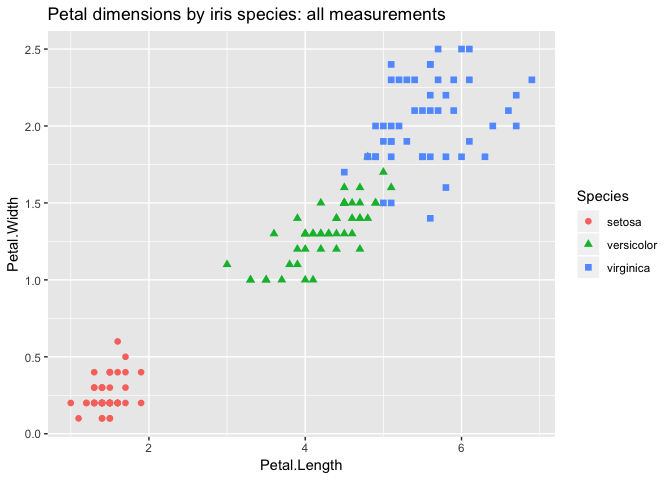
Figure 5.3. Selecting columns and rows.
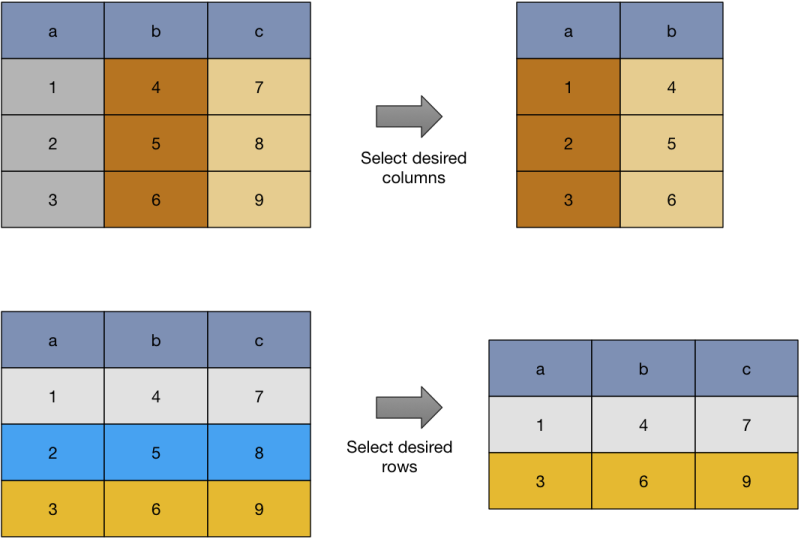
Figure 5.4. Removing rows with missing values.
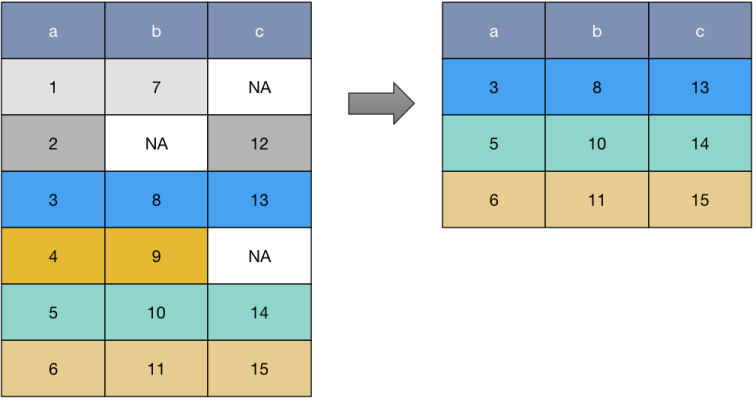
Figure 5.5. Ordering rows
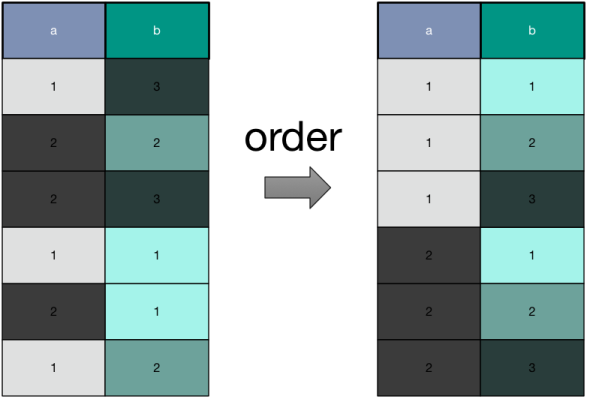
Figure 5.6. Adding or altering columns

Figure 5.7. Ozone plot example
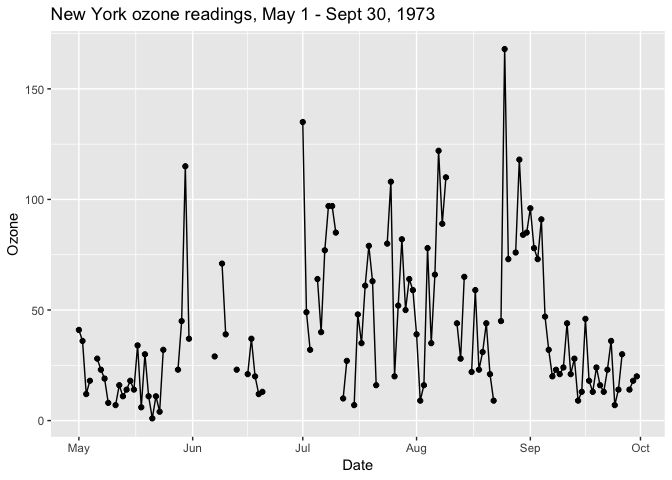
Figure 5.8. Filling in missing values
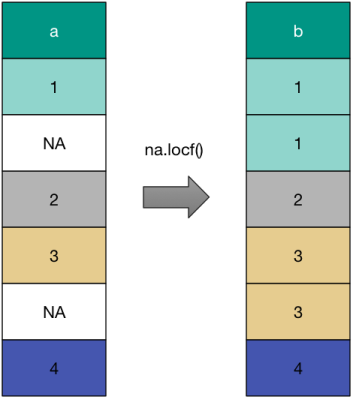
Figure 5.9. Ozone plot again
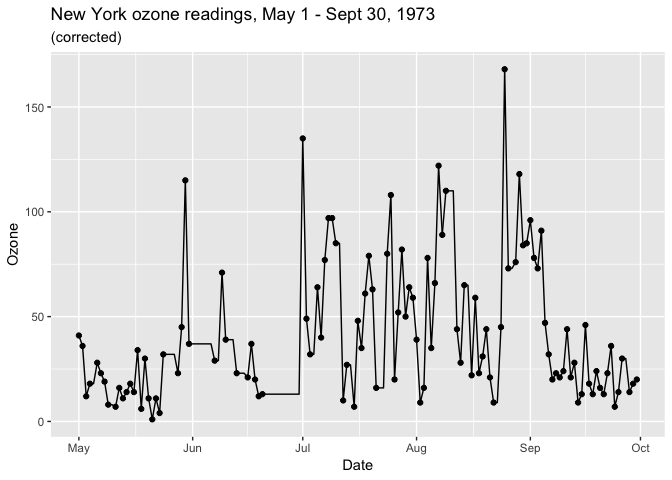
Figure 5.10. Coalescing missing values
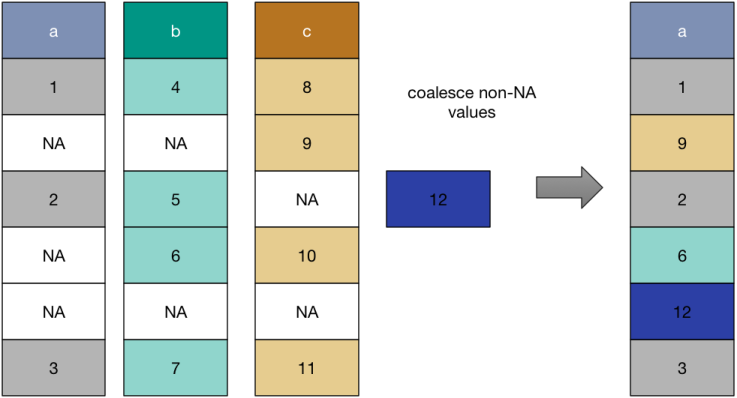
Figure 5.11. Aggregating rows
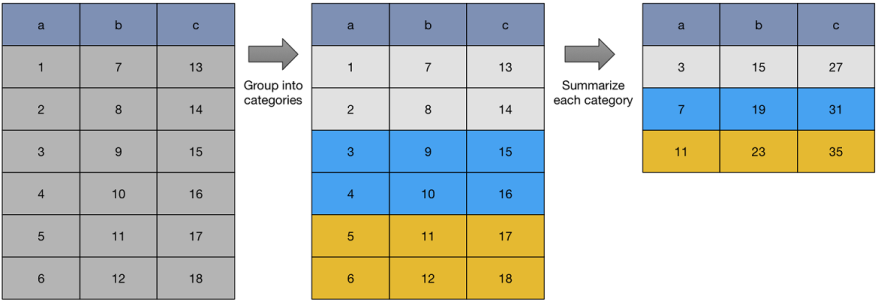
Figure 5.12. Iris plot
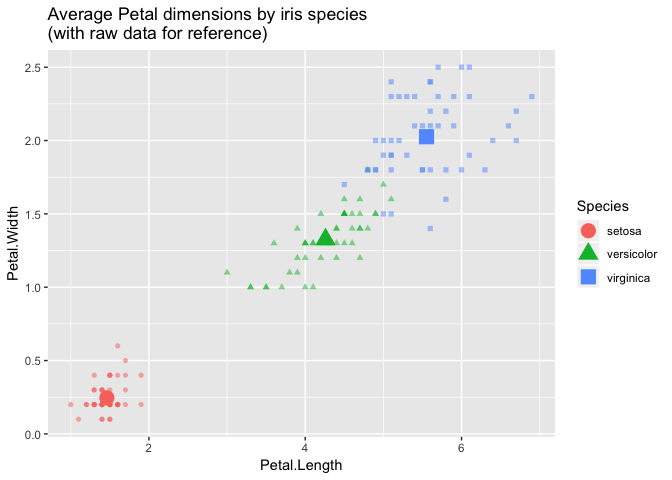
Figure 5.13. Unioning rows
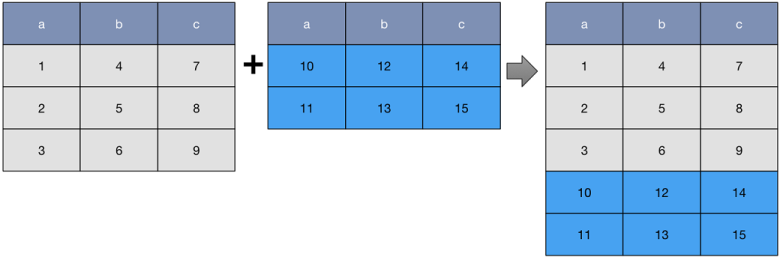
Figure 5.14. Unioning columns

Figure 5.15. Left Join
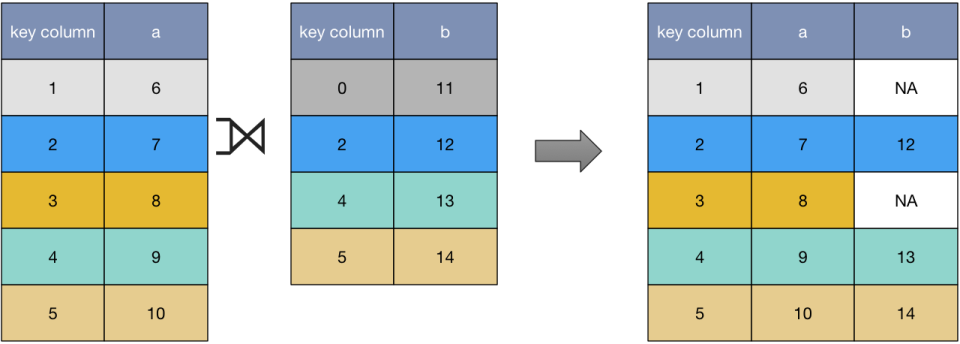
Figure 5.16. Inner Join
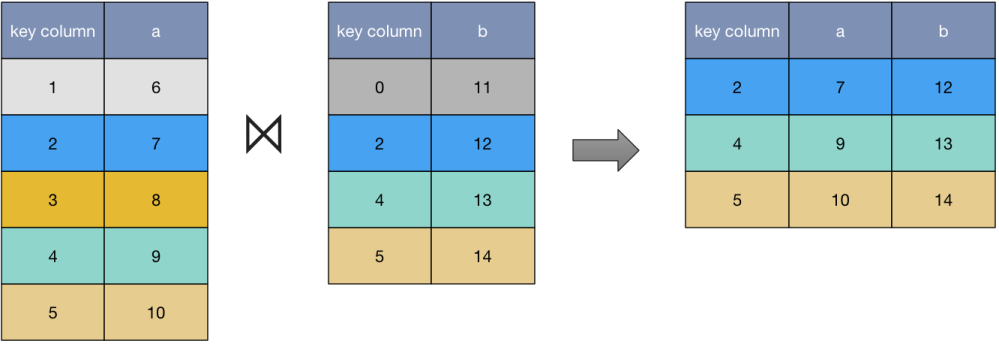
Figure 5.17. Full Join
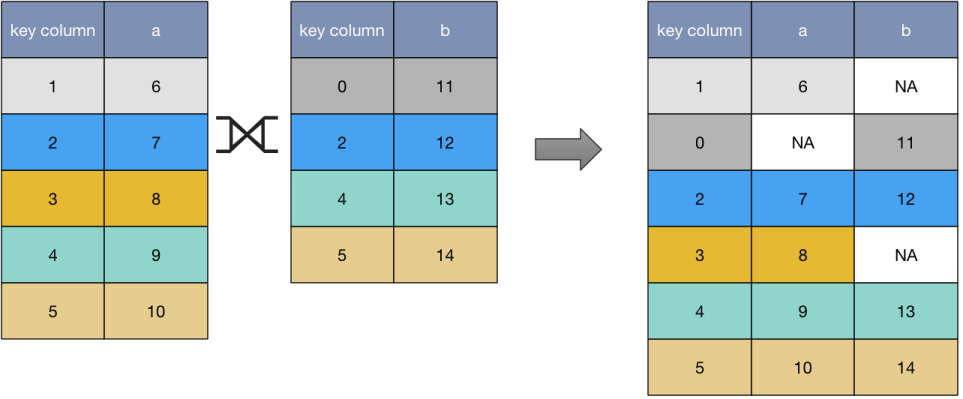
Figure 5.18. Passenger Deaths plot
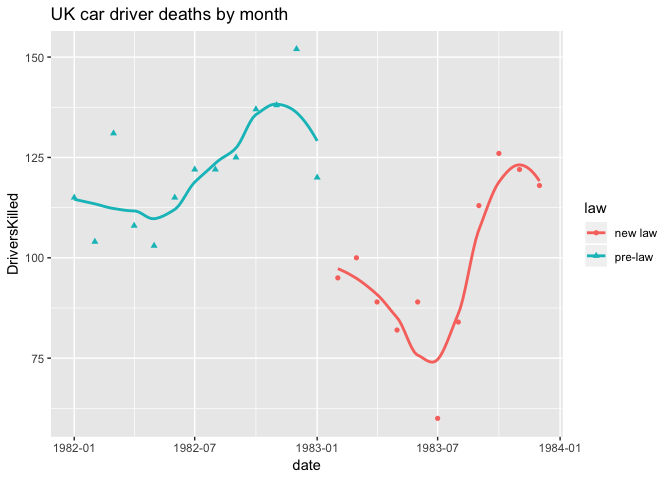
Figure 5.19. Wide to tall conversion
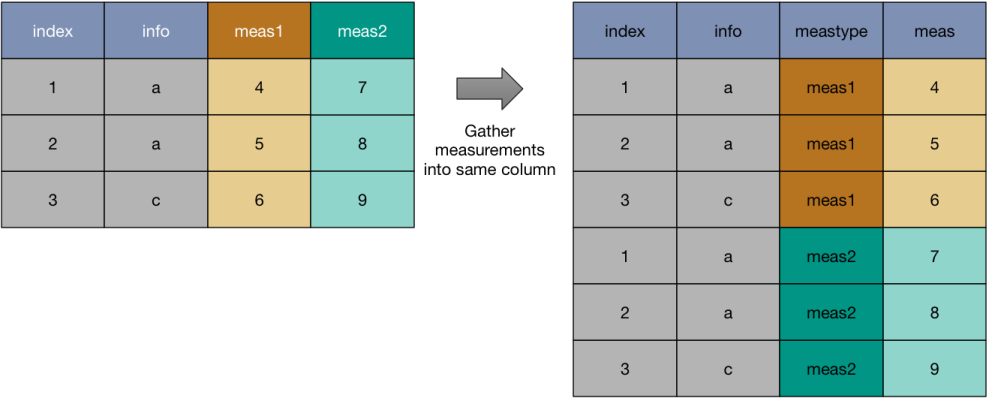
Figure 5.20. Faceted passenger death plot
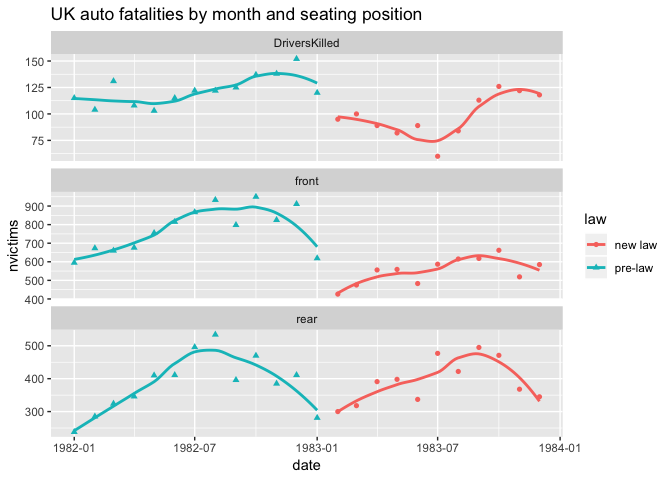
Figure 5.21. Chick count and weight over time
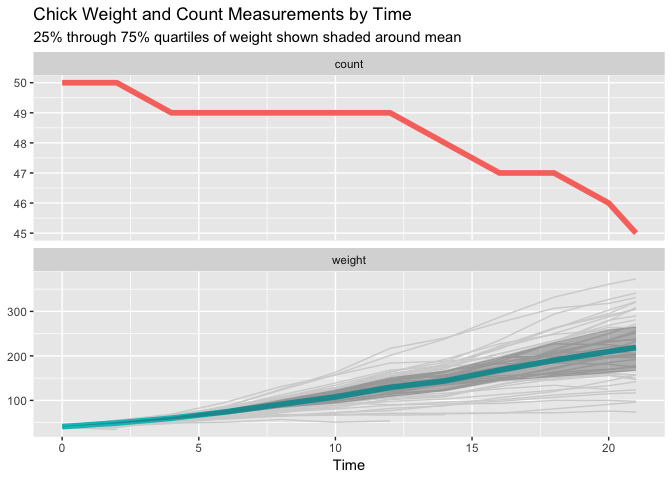
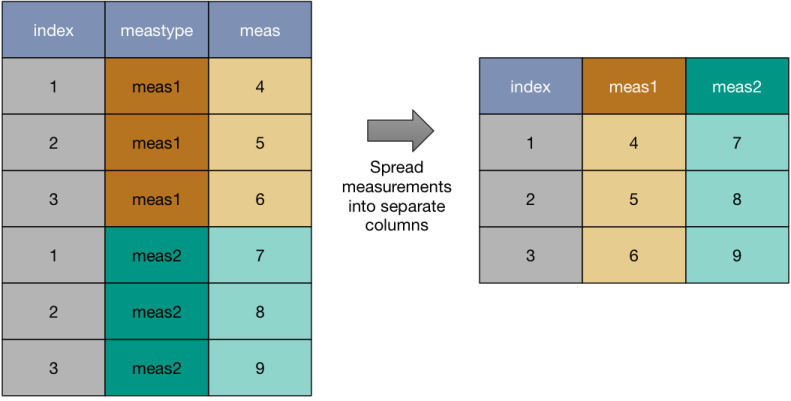
Figure 5.22. Moving from tall to wide form
Summary
In this chapter, we’ve worked through the basic examples of transform data for analysis and presentation.
At this point we have worked through a great number of data transforms. A natural question is: are these enough transforms, can one quickly decompose any task into a small sequence of these transforms?
The answer is "no and yes." There are more specialized transforms such as "rolling window functions" and other time-series operations that are hard to express in terms of the above transforms, but do in fact have their own efficient implementations in R and data.table. However towards the "yes" answer: there are good reasons to consider the set of transforms we have learned as substantial. The basic manipulation transforms pretty much cover all of Edgar F. Codd's relational algebra: a set of transforms that has been driving data engineering since 1970.
In this chapter you have learned:
- How to use a catalogue of powerful data re-shaping transforms.
- How to apply these transforms to solve data organization issues.
FAQ
What does “data shaping” (or wrangling) mean and why is it necessary?
Data shaping is the process of reorganizing raw data into a structure that’s convenient for analysis. When data isn’t already in a single, analysis-ready table, you visualize the target “shape” (columns, rows, keys) and then apply transforms to reach it. This chapter shows practical patterns across base R, data.table, and dplyr.How do I subset rows and columns in base R, data.table, and dplyr?
- base R: df[rows, cols, drop = FALSE]- data.table: DT[rows, ..cols] (the “..” tells data.table to use a character vector of column names)
- dplyr: df %>% select(cols) %>% filter(condition)
Why should I use drop = FALSE when subsetting in base R?
By default, selecting a single column (df[, "x"]) returns a vector, not a data.frame. Adding drop = FALSE ensures a data.frame is returned, preventing downstream surprises.What are data.table’s “reference semantics,” and how do := and [] behave?
data.table modifies in place (“by reference”). Using DT[, newcol := expr] alters DT without making a copy. Such in-place operations suppress printing; adding [] (a no-op) forces printing. Use := for in-place column create/modify; use = inside j with .() when constructing a new table.What are common ways to deal with missing values (NA)?
- Remove incomplete rows: base R complete.cases()/na.omit(); data.table/filter with complete.cases(); dplyr filter(complete.cases(.))- Fill down within a column: zoo::na.locf(x, na.rm = FALSE)
- Coalesce across columns: wrapr::coalesce (infix %?%) or dplyr::coalesce with matching types (e.g., use NA_real_ for numeric)
How do I order rows and compute running totals, including per-group?
- base R: order_index <- with(df, order(col1, col2)); df[order_index, ]; df$run := cumsum(val). For per-group, split/lapply/recombine.- data.table: setorderv(DT, c("col1","col2")); DT[, run := cumsum(val)]; per-group with by = groupcol.
- dplyr: arrange(col1, col2) %>% mutate(run = cumsum(val)); for per-group, add group_by(groupcol) and remember to ungroup().
How can I write “parametric” code that uses column names stored in variables?
- base R: df[[colname]]; many functions accept character vectors (e.g., df[, cols]).- data.table: DT[, ..cols] for selecting; use eval()/as.name() inside j to compute with variable column names.
- dplyr: use rlang “bang-bang” (!!) or wrapr::let() to substitute names; example: select(!!colname) or mutate(!!new := !!x + !!y).
What are the main ways to combine tables: by rows, by columns, and by keys (joins)?
- Append rows: base rbind(); data.table rbindlist(list(...)); dplyr bind_rows(). Note: factor handling differs; dplyr often coerces to character.- Append columns (same row order): base cbind(); dplyr bind_cols(). If order may differ, use a join instead.
- Joins (by keys): base merge(); data.table’s join via DT2[DT1, on="key"]; dplyr left_join/inner_join/full_join. For adding a single lookup column, match() can be a fast base R alternative.
What’s the difference between equi-joins, range joins, and rolling joins?
- Equi-join: match rows on equality of keys (standard left/inner/full joins).- Range join (data.table): match using inequalities in on= (e.g., bid <= price, ask >= price) to find interval overlaps.
- Rolling join (data.table): for ordered keys (e.g., time), return the most recent matching row (“last observation carried forward”), ideal for aligning trades with latest quotes.
How do I reshape data between wide and tall forms?
- Wide → Tall (long): tidyr::gather(), data.table::melt(), or cdata::unpivot_to_blocks(); ggplot2 typically prefers tall data.- Tall → Wide: tidyr::spread(), data.table::dcast(), or cdata::pivot_to_rowrecs().
Key idea: treat column names, row keys, and table names as “data coordinates” you can rearrange to suit the task.

 Practical Data Science with R, Second Edition ebook for free
