3 Exploring data
This chapter emphasizes why exploratory data analysis should precede modeling and shows how to do it effectively in R. It combines quick, quantitative scans with visual inspection to understand what the data can support, where it is broken, and how it should be prepared. Using a practical customer-insurance example, it frames exploration around building intuition about populations and variables, so you can identify promising predictors, anticipate data-cleaning needs, and avoid the costly trap of fitting models on flawed inputs.
The first pillar is summary statistics. Simple commands reveal distributions and counts that surface missing values, invalid entries, outliers, and suspicious ranges. You are encouraged to ask whether gaps are informative, whether unusual values are true extremes or sentinel codes, and whether to drop, transform, or recode them. The text highlights the importance of adequate variation (too wide can require transformations like logs; too narrow limits predictive power) and warns about unit mistakes and data types (e.g., ensuring categorical variables are factors). These checks guide decisions such as treating NAs as their own category, trimming or capping extremes, and confirming consistent measurement units.
The second pillar is visualization guided by clear principles: maximize information with minimal cognitive load, and iterate to answer questions. The chapter demonstrates histograms and density plots (with log scales when distributions are highly skewed) to see shape, range, modes, and anomalies; bar and dot plots (often sorted or faceted) to compare categorical frequencies; and scatter plots with smoothing curves or hexbins to expose relationships between continuous variables at varying data volumes. It shows how to visualize binary outcomes against continuous inputs to estimate probabilities, and introduces faceting and “shadow” comparisons to preserve both ratios and totals across groups. Together, these techniques make data issues obvious, sharpen feature choices, and set up effective cleaning and transformation before modeling.
Figure 3.1. Chapter 3 Mental Model

Figure 3.2. Some information is easier to read from a graph, and some from a summary.
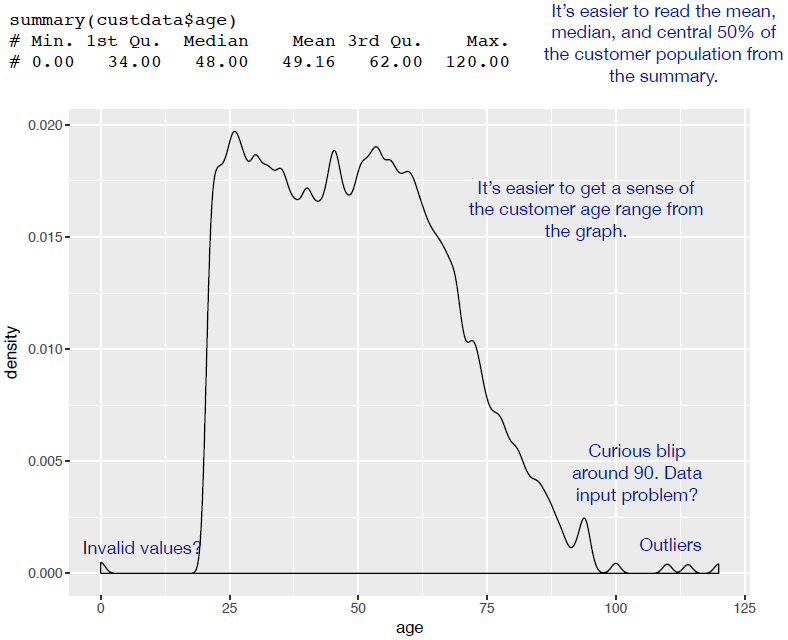
Figure 3.3. The density plot of age
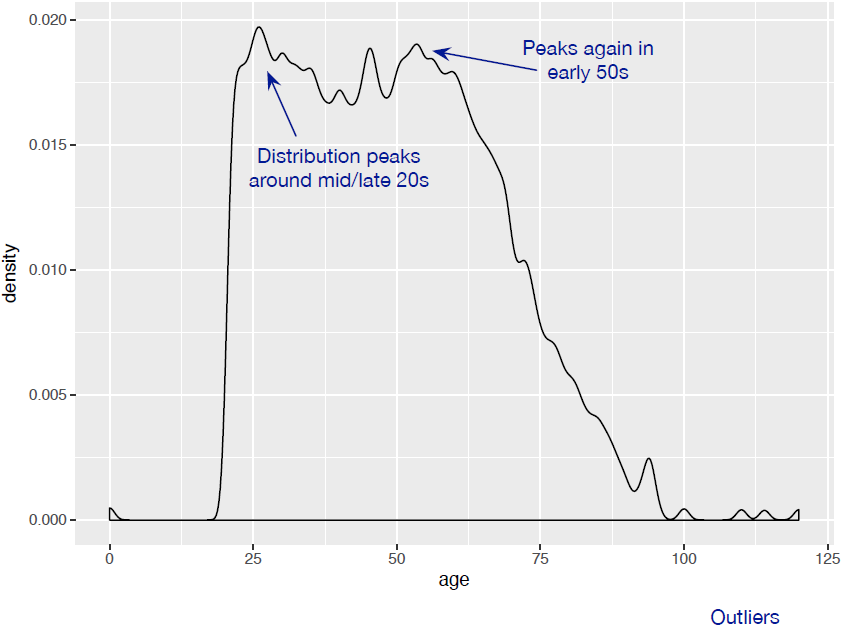
Figure 3.4. A unimodal distribution (solid curve) can usually be modeled as coming from a single population of users. With a bimodal distribution (dashed curve), your data often comes from two populations of users.
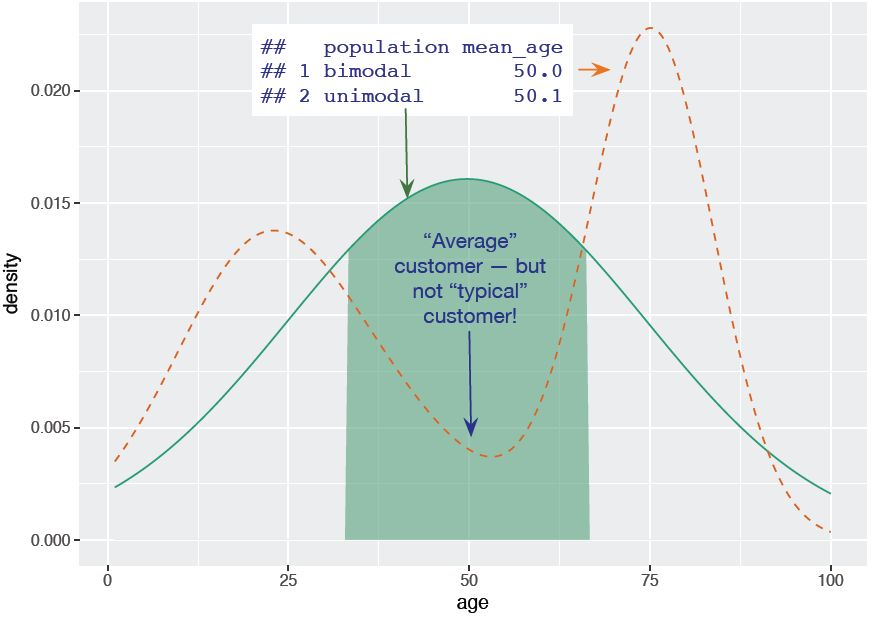
Figure 3.5. A histogram tells you where your data is concentrated. It also visually highlights outliers and anomalies.
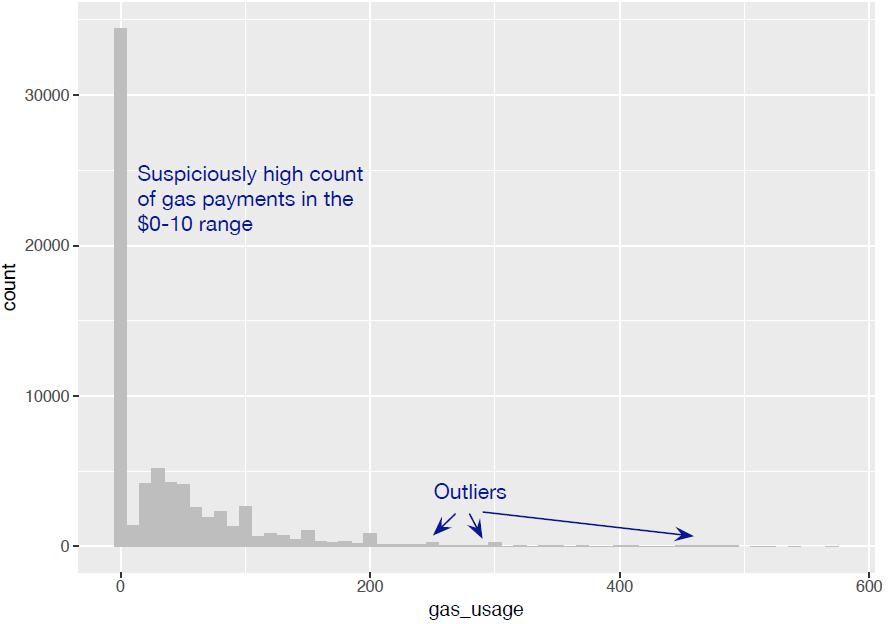
Figure 3.6. Density plots show where data is concentrated.
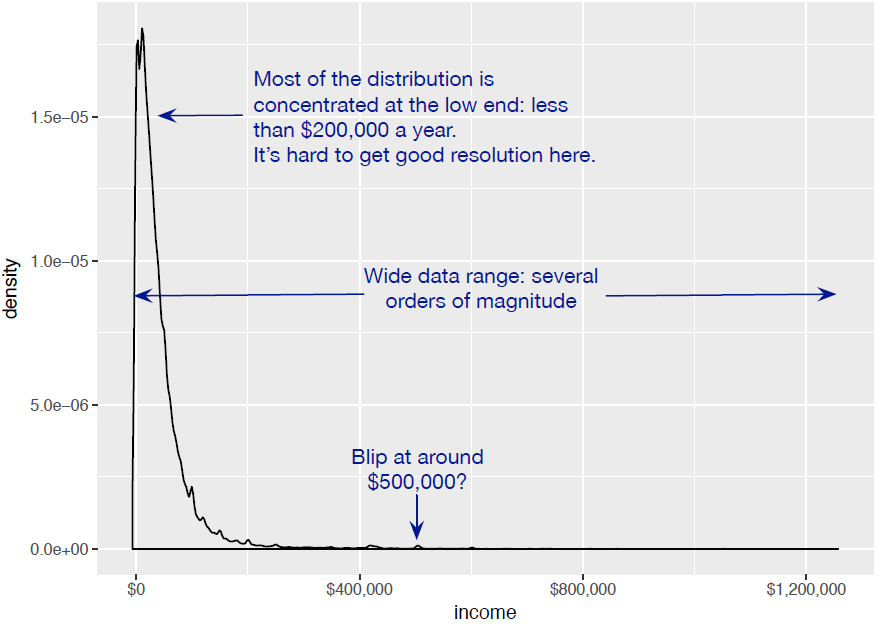
Figure 3.7. The density plot of income on a log10 scale highlights details of the income distribution that are harder to see in a regular density plot.
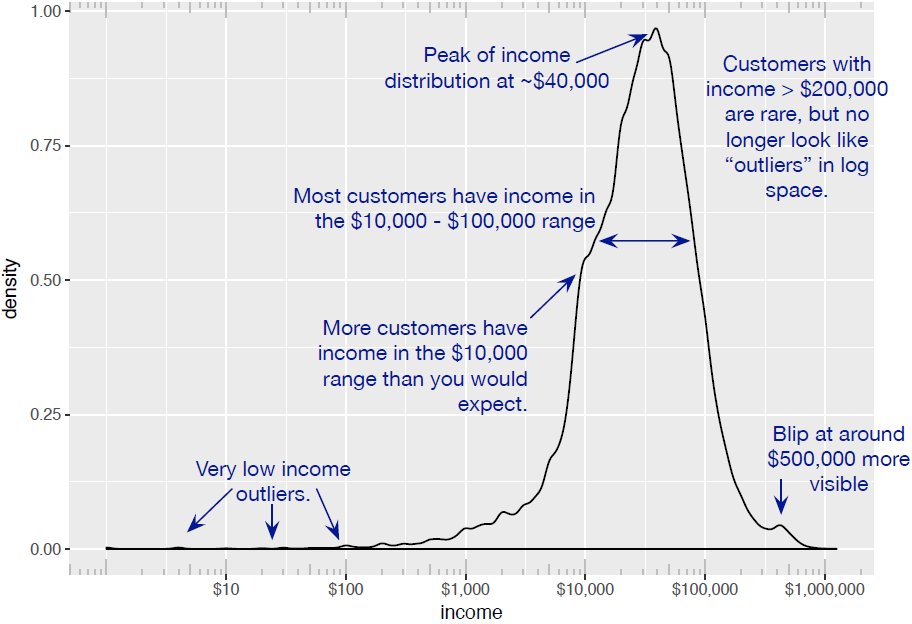
Figure 3.8. Bar charts show the distribution of categorical variables.
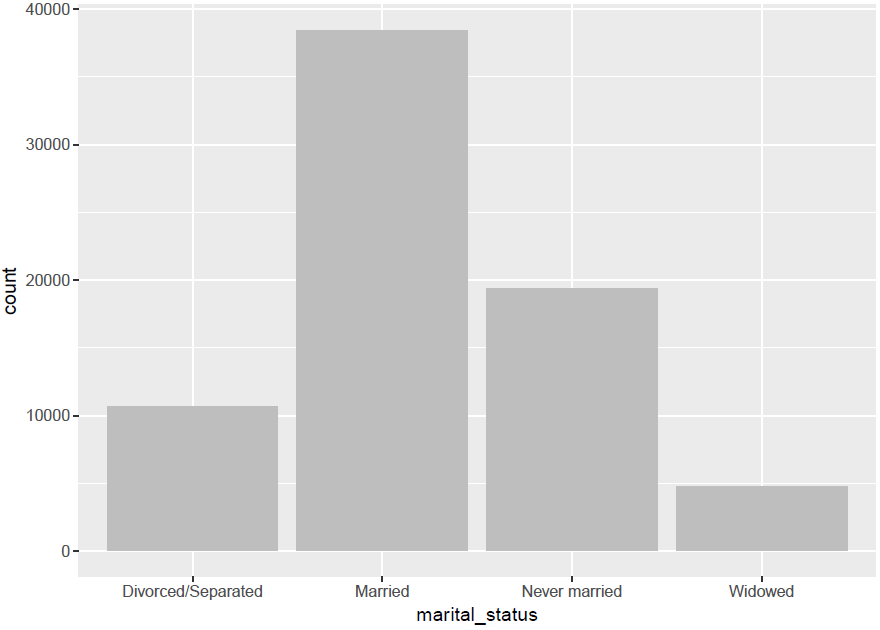
Figure 3.9. A horizontal bar chart can be easier to read when there are several categories with long names.
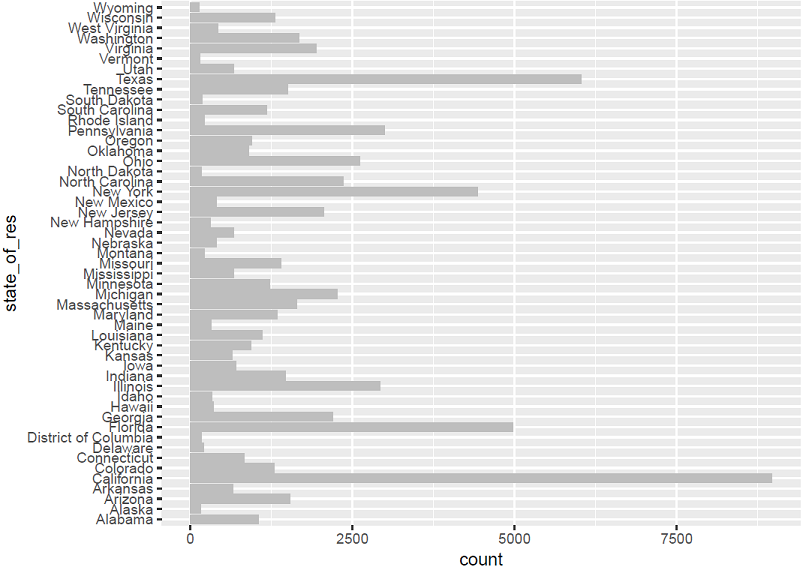
Figure 3.10. Using a dot plot and sorting by count makes the data even easier to read.
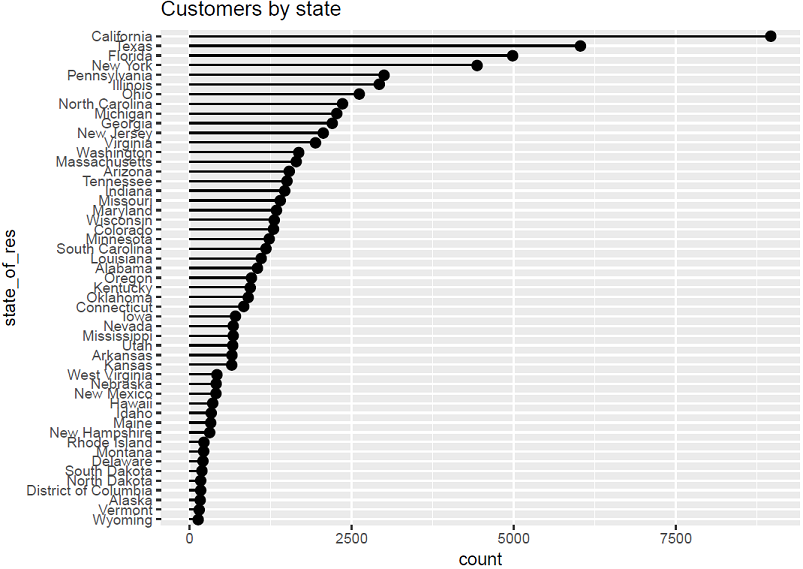
Figure 3.11. Example of a line plot
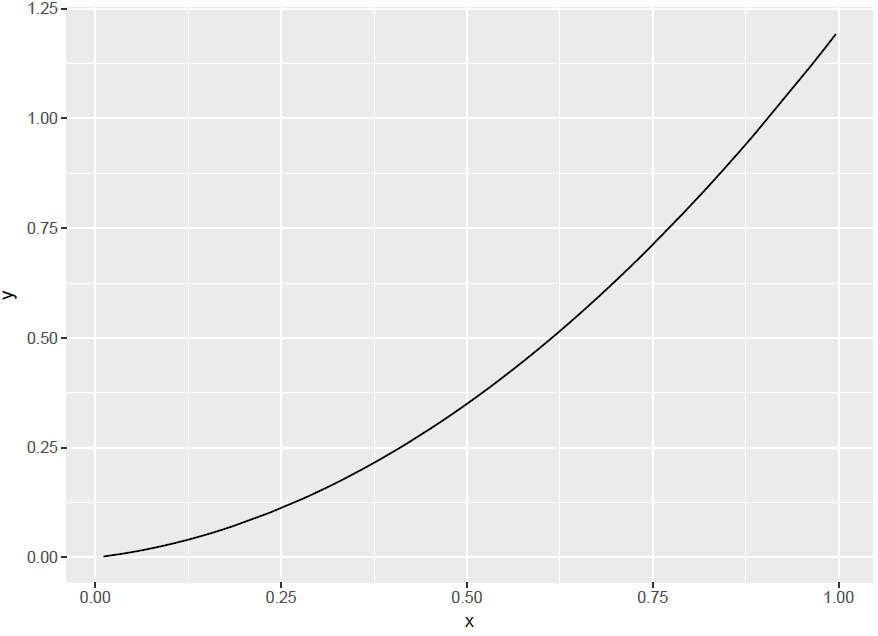
Figure 3.12. A scatter plot of income versus age
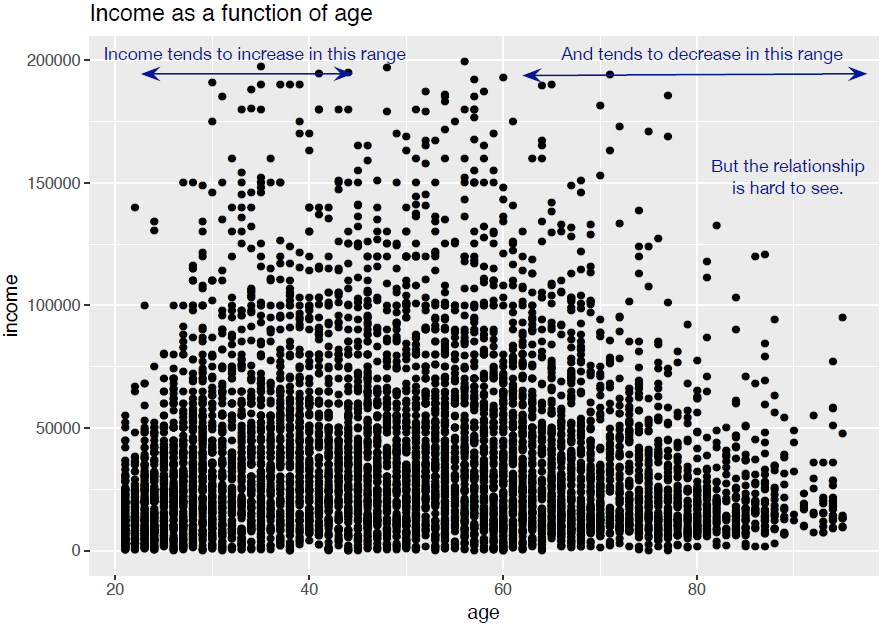
Figure 3.13. A scatter plot of income versus age, with a smoothing curve
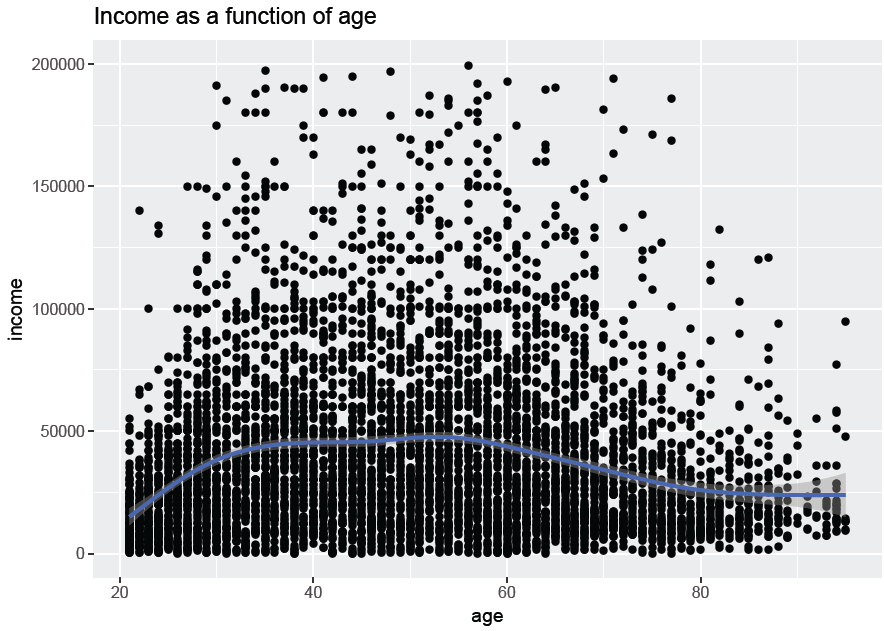
Figure 3.14. Fraction of customers with health insurance, as a function of age
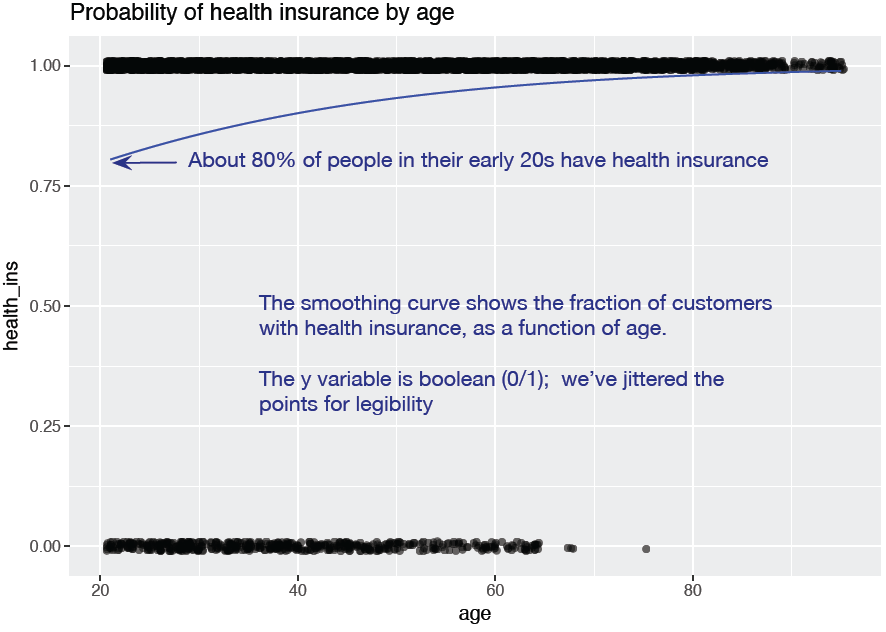
Figure 3.15. Hexbin plot of income versus age, with a smoothing curve superimposed
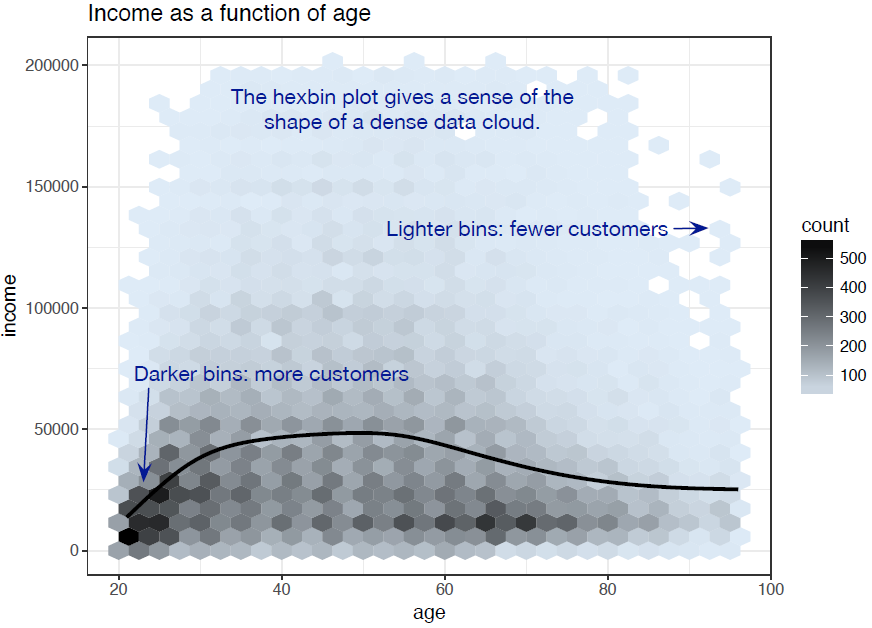
Figure 3.16. Health insurance versus marital status: stacked bar chart
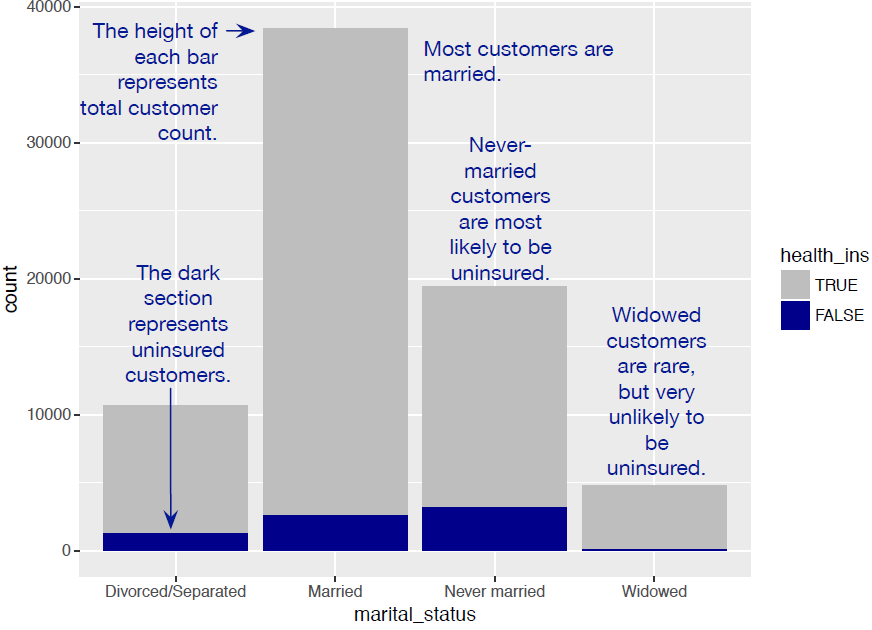
Figure 3.17. Health insurance versus marital status: side-by-side bar chart
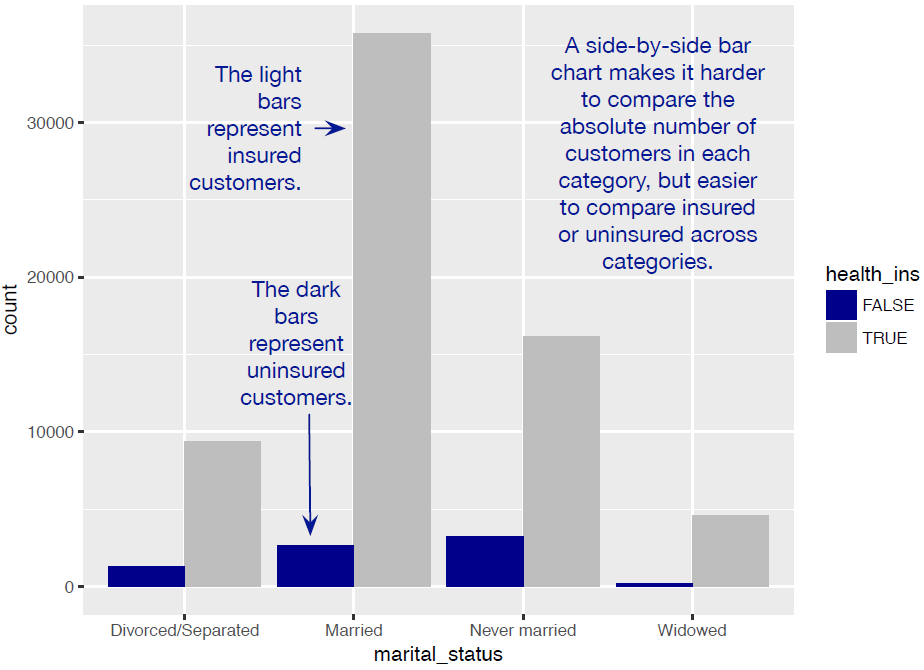
Figure 3.18. Health insurance versus marital status: shadow plot
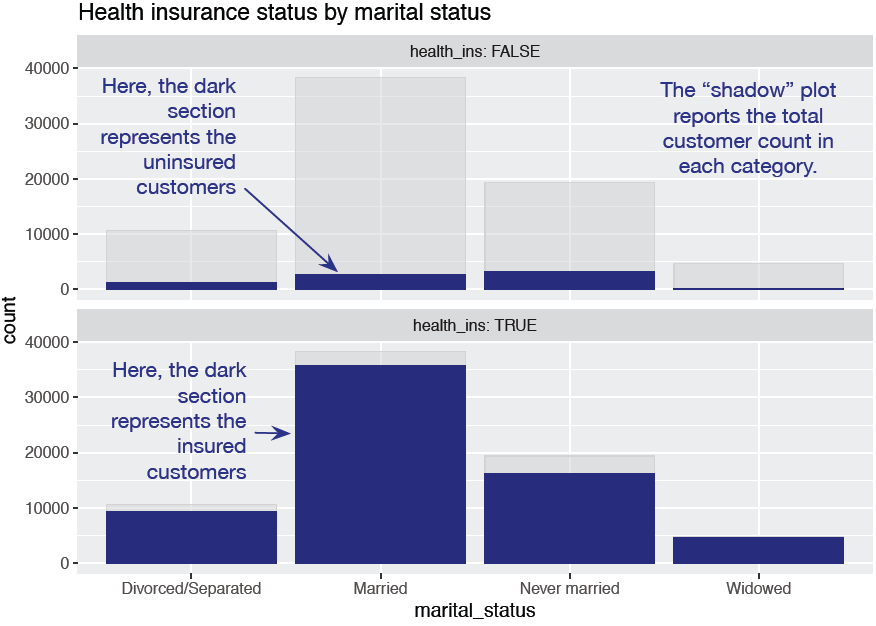
Figure 3.19. Health insurance versus marital status: filled bar chart
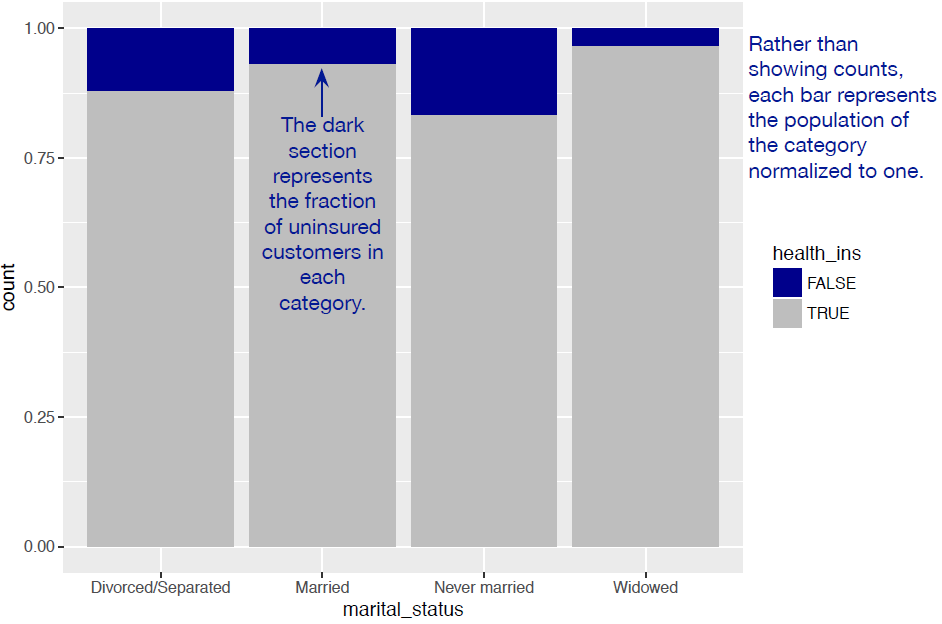
Figure 3.20. Distribution of marital status by housing type: side-by-side bar chart
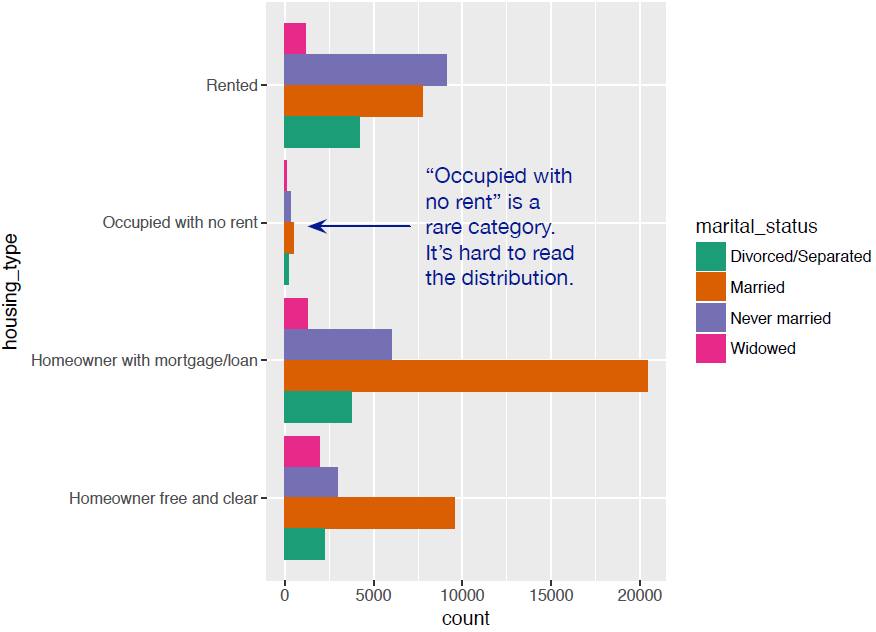
Figure 3.21. Distribution of marital status by housing type: faceted side-by-side bar chart
Figure 3.22. Comparing the distribution of marital status for Widowed and Never Married populations
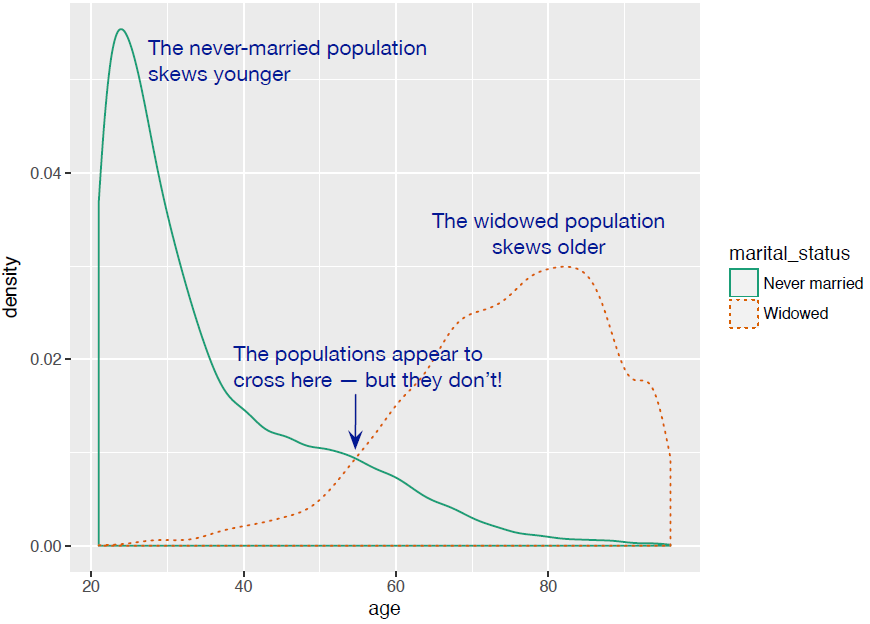
Figure 3.23. Shadowhist comparison of the age distributions of widowed and never married populations
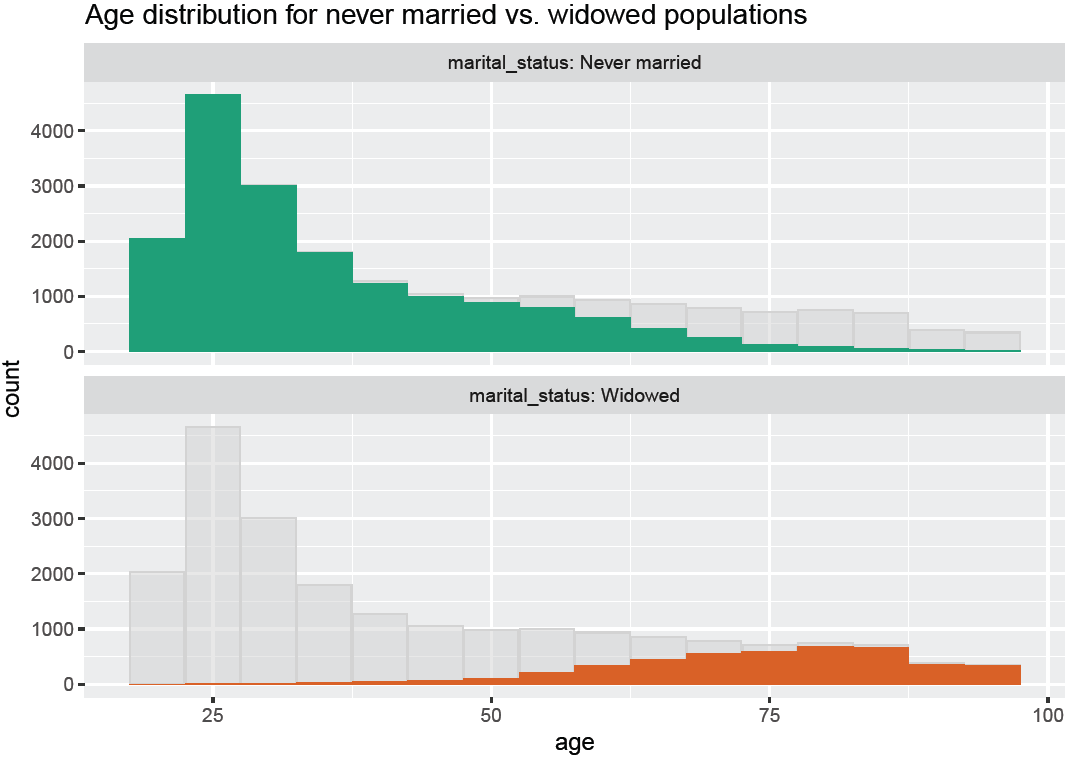
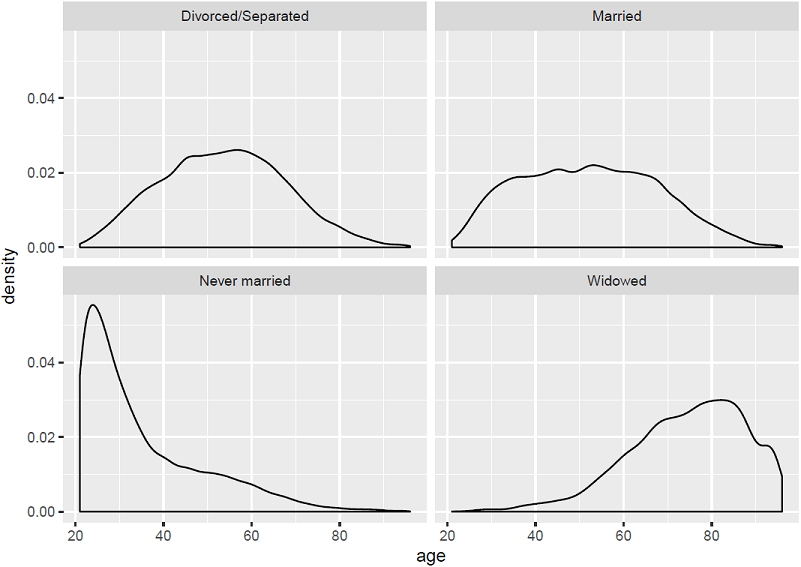
Figure 3.24. Faceted plot of the age distributions of different marital statuses
Summary
At this point, you’ve gotten a feel for your data. You’ve explored it through summaries and visualizations; you now have a sense of the quality of your data, and of the relationships among your variables. You’ve caught and are ready to correct several kinds of data issues—although you’ll likely run into more issues as you progress.
Maybe some of the things you’ve discovered have led you to reevaluate the question you’re trying to answer, or to modify your goals. Maybe you’ve decided that you need more or different types of data to achieve your goals. This is all good. As we mentioned in the previous chapter, the data science process is made of loops within loops. The data exploration and data cleaning stages (we’ll discuss cleaning in the next chapter) are two of the more time-consuming—and also the most important—stages of the process. Without good data, you can’t build good models. Time you spend here is time you don’t waste elsewhere.
In the next chapter, we’ll talk about fixing the issues that you’ve discovered in the data.
In this chapter you have learned:
- To take the time to examine and understand your data before diving into the modeling.
- How the
summarycommand helps you spot issues with data range, units, data type, and missing or invalid values.
- The benefits and applications of different visualization techniques.
- That visualization is an iterative process and helps answer questions about the data. Information you learn from one visualization may lead to more questions-that you might try to answer with another visualization. If one visualization doesn't work, try another. Time spent here is time not wasted during the modeling process.

 Practical Data Science with R, Second Edition ebook for free
