7 Administration bad practices
Putting PostgreSQL into production demands disciplined administration as much as good schema design or query tuning. This chapter highlights the “unexciting” but decisive practices that protect reliability: staying ahead of disk pressure, treating logs as a real-time health feed, instrumenting the database with meaningful monitoring, retaining statistics to understand long-term trends, and keeping both Postgres and the underlying system up to date. Neglect in any of these areas can cascade into outages, data loss risks, or opaque performance problems that are far harder to fix under fire.
One of the most common pitfalls is letting disk usage run wild. Running out of space on data or, worse, on the WAL volume can stall commits and even force a shutdown, and knee‑jerk fixes like deleting data or files inside pg_wal/pg_xact can be catastrophic. Growth drivers include table and index bloat, orphaned temp files after crashes, excessive WAL due to replication lag/slots, or failed archiving. Keep data and WAL on separate volumes, use tablespaces to redistribute pressure, and monitor with early alerts. Likewise, avoid logging to the PGDATA filesystem; error storms can fill disks fast. Move logs to a separate volume, enable log rotation, and enforce size/age limits to blunt both accidents and potential DoS vectors.
Equally risky is flying blind. Logs surface configuration errors (replication senders, connection exhaustion), memory mis-sizing (temp files), slow queries, checkpoint thrash, deadlocks, early signs of corruption, and security events; use them proactively and augment with analyzers when volume is high. Monitor essentials like disk, temp space, table/index stats, WAL volume, connections and blocking, replication health, transaction age, backups, and deeper views (pg_stat_statements, buffer/checkpointer/writer, locks, I/O). Track statistics over time for capacity planning—lightweight tools such as pg_statviz help you spot trends without heavy infrastructure. Finally, treat upgrades as routine risk management: apply minor releases for security and bug fixes, plan major upgrades to gain features and performance, read all intervening release notes, verify extension compatibility, and use pg_upgrade or logical replication to reduce downtime. Don’t forget the OS and libraries—stale system components can silently undermine performance just as surely as an outdated database.
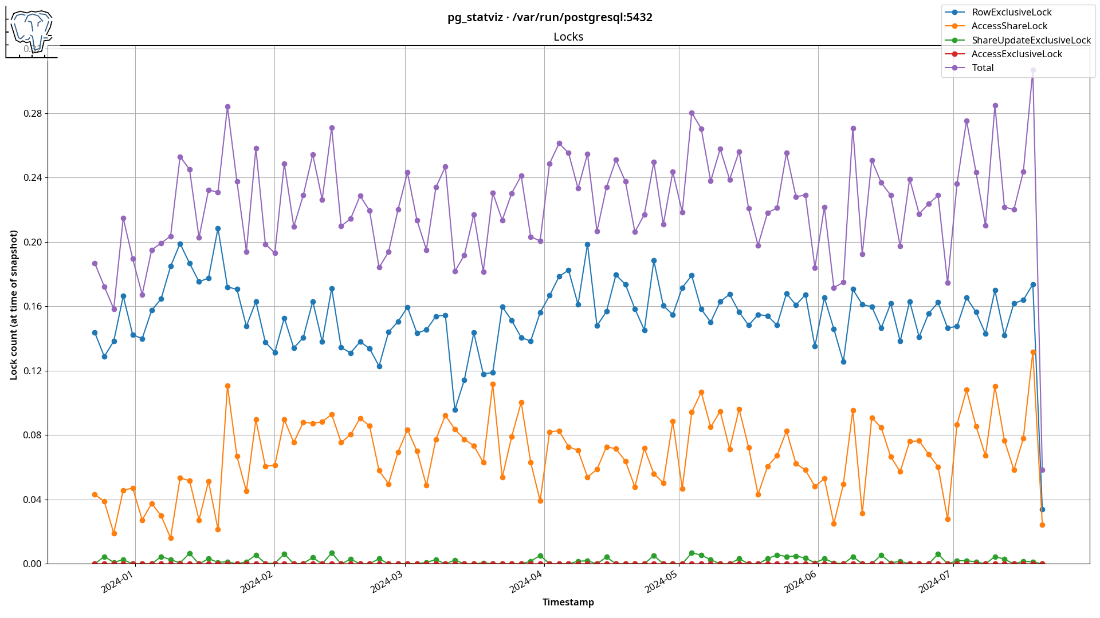
pg_statviz locks analysis output: This visualization displays the mean number and type of locks in the database, with snapshots taken every minute over a period of several months in 2024.
Summary
- Running out of disk space can cause serious problems, so monitor your usage closely. Rash decisions like deleting what looks like logs or unnecessary files or resizing volumes can make the situation worse. Identify what’s consuming your space, and mitigate by employing multiple volumes.
- Storing PostgreSQL logs on a separate filesystem from the database helps you reduce the risk of excessive logging filling up your disk. You should also implement log rotation and enforce log size limits.
- Regularly checking PostgreSQL logs is crucial for identifying and addressing configuration issues, performance bottlenecks, data integrity concerns, and security incidents in near real-time. This can allow you to deal with problems before they escalate, and you can use pgBadger to help with the task.
- Not monitoring your PostgreSQL database can lead to undetected performance issues, security threats, and resource exhaustion that could impact its operation. By using the appropriate tools and metrics to look out for slowdowns, resource spikes, and maintenance needs, you can ensure optimal performance and mitigate risk.
- Long-term tracking of PostgreSQL statistics is important for understanding performance trends and making informed capacity planning decisions. You can use the usual monitoring tools, or the lightweight
pg_statvizextension to capture and visualize these statistics over time without the need for heavy tooling or storage overhead. - If you don’t upgrade Postgres regularly with minor releases, you can incur security risks or run into bugs that have been fixed. By not upgrading to the next major release you can and miss out on new features and enhancements. Upgrading is made safe and reliable by well-tested tools and thorough documentation. Don’t fear the upgrade — fear the alternative.
- Failing to upgrade the operating system and dependency libraries as well, can lead to obscure PostgreSQL performance issues, bugs and vulnerabilities, negating the perceived stability in pursuit of which you avoided to upgrade.
FAQ
What happens when PostgreSQL runs out of disk space?
It depends on which volume fills. If the data volume fills, many operations fail and the app may error. If the WAL volume fills, transactions can’t be committed; PostgreSQL may panic and shut down to protect data integrity. Separate data and WAL volumes to reduce blast radius and monitor both closely.Can I quickly free space by deleting data or running VACUUM FULL during an incident?
Usually no. DELETE/TRUNCATE still generate WAL, so you need free space to run them. Regular VACUUM only marks space free inside the relation (not returned to the OS). VACUUM FULL can return space to the OS but takes an ACCESS EXCLUSIVE lock and rewrites the table—risky during an outage. Prefer adding space, moving objects to another tablespace/volume, or restoring to a larger node.Is it safe to delete files from pg_wal or pg_xact to reclaim space?
Absolutely not. Removing files frompg_wal or pg_xact can instantly corrupt or destroy the cluster. These were renamed from older names to discourage accidental deletion, but the rule remains: never touch them. Fix the root cause (e.g., replication lag, failed archiving) and free space safely.What commonly causes unexpected disk growth in PostgreSQL?
- Table/index bloat from unremoved dead tuples- Temporary files left after crash or huge sorts/joins
- Excessive WAL due to suboptimal
max_wal_size/wal_keep_size, replication lag/slots, or failed archive_commandMitigate with healthy autovacuum, periodic temp cleanup after improper shutdowns, appropriate WAL settings, and replication/archiving monitoring.
How can I prevent disk exhaustion in production?
- Put data and WAL on separate volumes- Use tablespaces to spread large objects and add emergency capacity
- Monitor usage with alerts well before critical thresholds (filesystems can slow down when nearly full)
- Plan capacity; investigate anomalies early.
Why is logging to PGDATA risky, and what should I do instead?
Logs stored in the data filesystem can quickly fill it (even via app bugs or DoS by spamming errors), causing outages. Move logs to a separate filesystem/partition and enable rotation/limits (e.g.,log_rotation_size, log_rotation_age, log_truncate_on_rotation) or use your OS log manager.Why should I continuously review PostgreSQL logs, and what should I look for?
Logs provide early warnings for:- Configuration issues (e.g.,
max_wal_senders, connection limits)- Memory pressure (many temp files → tune
work_mem)- Slow queries (
log_min_duration_statement)- Frequent checkpoints (consider raising
max_wal_size)- Deadlocks (fix app lock ordering)
- Corruption/hardware I/O errors
- Security signals (failed logins, odd access)
Automate with tools like pgBadger or simple grep pipelines.
What should a minimal but effective PostgreSQL monitoring setup track?
- Disk and temp file usage- Table/index stats:
pg_stat_user_tables, pg_stat_user_indexes- WAL count/size:
pg_stat_wal, pg_ls_waldir()- Connections/queries/blocks:
pg_stat_activity- Replication status:
pg_stat_replication and WAL functions- Transaction age:
pg_stat_database- Backup status
Advanced:
pg_stat_statements, bgwriter/checkpointer stats, locks/waits, pg_stat_io.How do I track statistics over time without heavy external tooling?
Capture historical trends for capacity planning and anomaly detection. A lightweight option is thepg_statviz extension: schedule periodic snapshots (e.g., via cron or pg_cron) into in-DB tables, then use its visualizer to graph metrics. It’s low-overhead, doesn’t require shared_preload, and supports resampling to analyze long periods efficiently.Why keep PostgreSQL and the OS up to date, and how can I upgrade safely?
- PostgreSQL: Minor releases carry security and bug fixes; majors add features/perf. Read release notes for all intervening versions, verify extension compatibility, and usepg_upgrade (with dry-run) or logical replication for near-zero downtime.- Operating system: Outdated kernels/libs (e.g.,
glibc) can cause hidden perf/behavior issues. Apply updates regularly; postponing increases risk and makes later updates harder.
 PostgreSQL Mistakes and How to Avoid Them ebook for free
