6 Performance bad Practices
PostgreSQL can deliver excellent performance, but only when you avoid a handful of common anti-patterns. This chapter surveys the pitfalls that most often hurt throughput and stability: shipping to production with stock settings, mismanaging connections and transaction lifecycles, neglecting essential maintenance, misunderstanding query plans, and mishandling indexes. The unifying themes are that defaults are intentionally conservative, workload shapes every tuning decision, and seemingly harmless choices—like letting sessions idle or piling on connections—can cascade into slowdowns, stalls, or even crashes.
Configuration and concurrency mistakes top the list. Relying on default memory settings wastes hardware; overcorrecting by inflating shared buffers or work mem can be worse, as per-node memory is multiplied by query complexity and concurrent sessions, risking out-of-memory kills and downtime. High connection counts add OS overhead and lock contention; real throughput usually improves by limiting active backends, queuing via a pooler, and matching concurrency to CPU cores. Idle sessions and especially idle-in-transaction sessions amplify snapshot and lock costs, block DDL and autovacuum, and promote table bloat. Long-running queries hold snapshots, starve autovacuum, and can cause replication conflicts and lag. Sustained high transaction rates burn through XIDs, pushing the system toward anti-wraparound autovacuum; batching commits, tuning autovacuum more aggressively, and curating data ingest help keep pace. Above all, do not disable autovacuum—tune it; its cost is the price of MVCC health.
On the query side, skipping EXPLAIN (ANALYZE) hides the real causes of slowness and blinds you to planner choices and statistics gaps. Indexes are essential when predicates filter meaningfully: add what you need (for example, on referencing columns in foreign key joins), but avoid blanket or redundant indexing that bloats storage and drags down writes. Identify unused indexes thoughtfully—usage is instance-specific, so confirm a standby isn’t depending on them before dropping. Finally, avoid explicit heavyweight locks that serialize work and induce head-of-line blocking; prefer retry-friendly logic or SERIALIZABLE with retries to preserve correctness without pervasive blocking. The practical recipe is to test with production-like data, measure TPS and latency under realistic client counts, watch MVCC and lock indicators, and iterate configurations to match your workload rather than dogma.
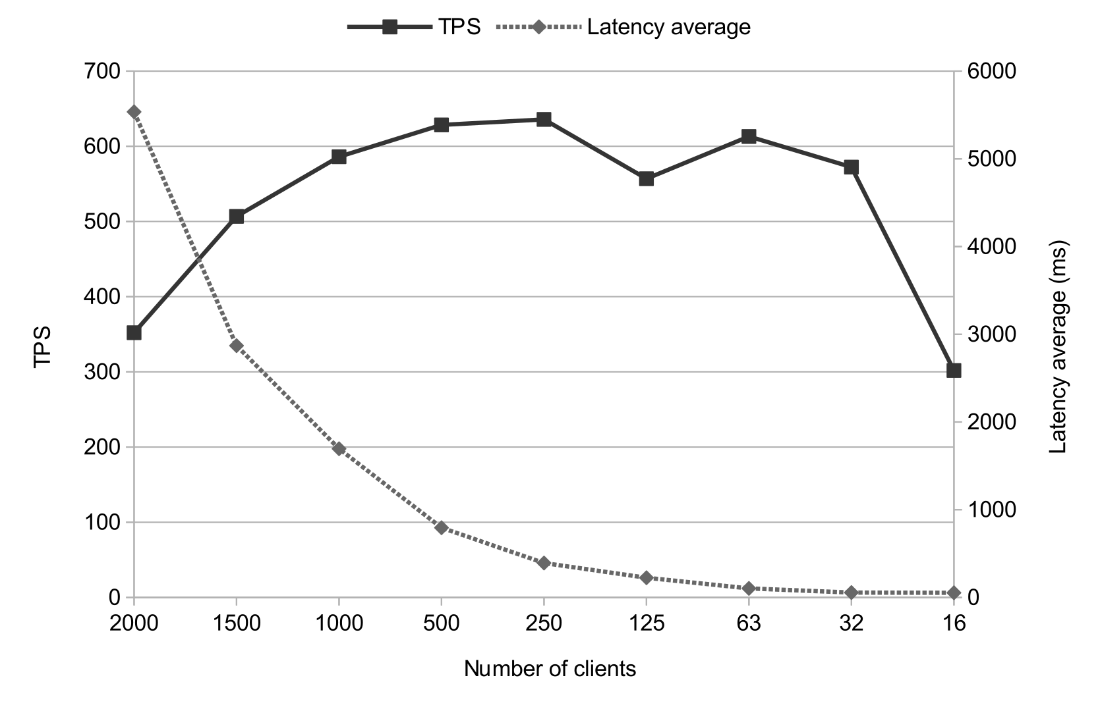
TPS & latency test result plot with various numbers of clients
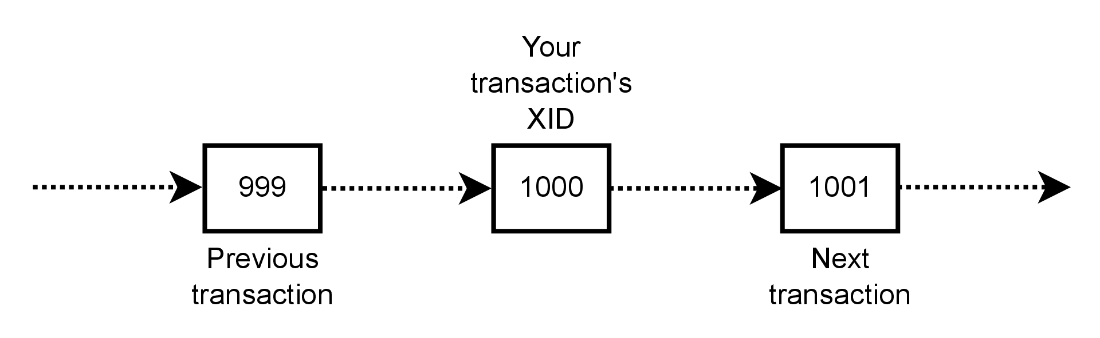
PostgreSQL transaction timeline showing linear sequence of XIDs
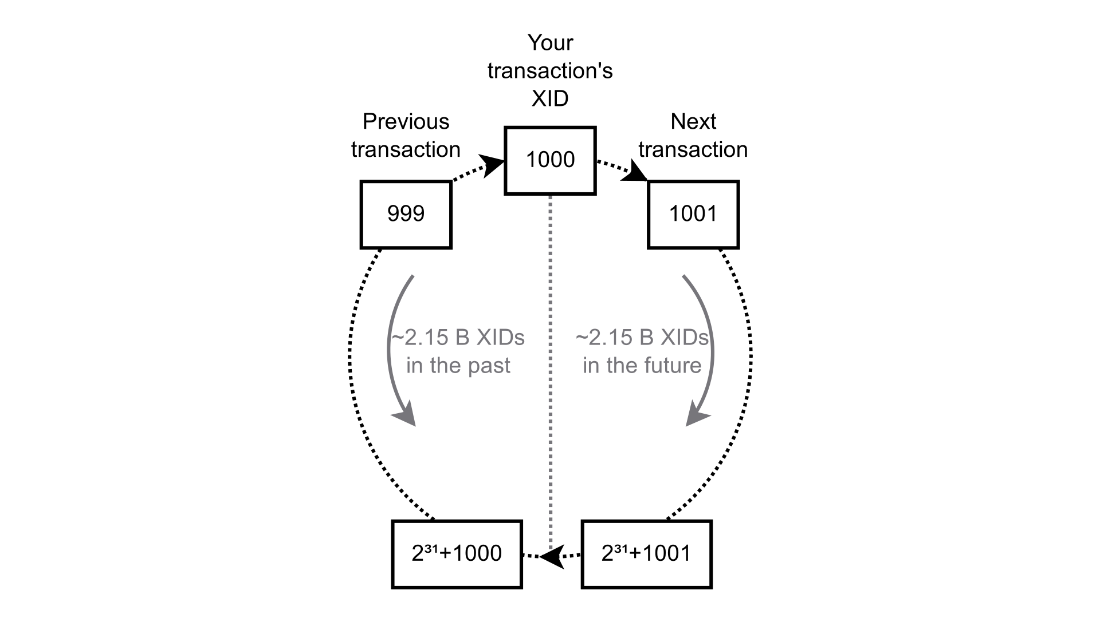
Depiction of PostgreSQL’s transaction IDs as a circular space
Summary
- PostgreSQL’s default configuration is very conservative and in most cases will not be optimal for a real-world workload. This can mean that you are leaving your system resources underutilized and leaving potential performance gains on the table.
- You can shoot yourself in the foot by calculating memory allocation settings incorrectly. You need to take your workload into account, including what types of queries you are running and how memory-hungry they are along with what level of client concurrency you are expecting.
- Excessive concurrency can kill your performance rather than allow more work to be performed in parallel because of the way Multi-Version Concurrency Control (MVCC) works. You need to be aware of the risks associated with opening too many sessions inside PostgreSQL, and also the nature of your workload and the limitations of your particular database host.
- Connections that are mostly or entirely idle don’t come for free; they are associated with computational overhead that may affect PostgreSQL’s, and your operating system’s, performance in general. You should try to avoid having connections around that don’t do much actual work. If you can’t, you should use a connection pooler that’s aware of these connection semantics, such as PgBouncer in Transaction Mode.
- Idle in transaction sessions and sessions with long-running queries can cause unexpected blocking of other queries, leading to application delays or errors. They can also postpone or altogether block autovacuum, and this can lead to performance degradation beacuse of bloat, or more serious errors.
- If you let your transaction rate get out of control, it can outrun the efforts of autovacuum to prevent XID wraparound failure and bring down your database. You can mitigate this by batching, reorganizing, and summarizing data — or even skipping the ingestion of data you aren’t likely to use again.
- Autovacuum is essential for the correct operation of your database. Lowering its effectiveness or disabling it altogether to save system resources is a fallacy, because any performance gains will be undone in time by bloat accumulation, inaccurate optimizer statistics, and forced anti-wraparound prevention.
- Where there’s evidence that a query is running slowly, checking its
EXPLAINis a quick and accurate way to identify the reasons why and help troubleshoot it. - Locking objects explicitly can lead to read/write blocking that can make your application feel sluggish or broken. Where synchronization is needed, try to use the
SERIALIZABLEisolation level and make your application able to retry actions. - Indexes can make or break your queries' performance, and PostgreSQL has lots of index types. Examine your query plans and take advantage of indexing to boost performance for your
WHEREs. Sequential scans are bad because they become linearly slower as the table grows. - Having indexes that you don’t need can slow down your table for writing and consume valuable disk space. Identify those that aren’t in use from
pg_stat_all_indexesand remove them. - Be careful when dropping indexes that appear unused as this statistic is for the local node only, and those indexes may be in use on another node you are physically replicating to.

 PostgreSQL Mistakes and How to Avoid Them ebook for free
