10 Upgrade/migration bad practices
Upgrading PostgreSQL and migrating from other databases are routine tasks that can hide costly pitfalls if treated lightly. While PostgreSQL tends to preserve backward compatibility and offers smooth upgrade tooling, subtle behavior changes, configuration shifts, and cross-database differences can trigger performance regressions, logic bugs, and even data integrity issues. This chapter highlights common bad practices—skipping release notes, inadequate testing, and underestimating differences in encodings and data types—and offers practical guidance to avoid them.
For in-place upgrades, skipping major versions is often technically supported, but skipping the intervening release notes is not. Small changes can have big effects, such as interval parsing semantics that altered date math across versions, or planner behavior changes like CTE inlining from v12 and JIT defaults that can reshape execution plans and slow previously fast queries. The remedy is disciplined preparation: read all intervening release notes, test with realistic data in a staging environment, compare query plans and timings against a baseline, and include load/stress testing to catch plan shifts, threshold effects, and configuration-related surprises before production.
Migrations demand even more vigilance around data representation. Encoding mismatches (e.g., MySQL latin1 or “utf8” vs true UTF-8) and illegal characters like NUL can break imports or silently corrupt data unless you detect the source encoding, convert to UTF-8, and cleanse the dump before loading. Seemingly compatible types also diverge: MySQL/MariaDB BOOLEANs are actually tinyints; some systems’ DATETIME lacks time zone awareness or accepts invalid values; Oracle’s DATE includes time but only to the second; and numeric families differ in precision and semantics. Successful migrations map types deliberately to PostgreSQL equivalents (e.g., real booleans, timestamptz, precise numerics), set appropriate encodings/collations, use conversion tools where helpful, and validate the results with thorough, realistic testing.
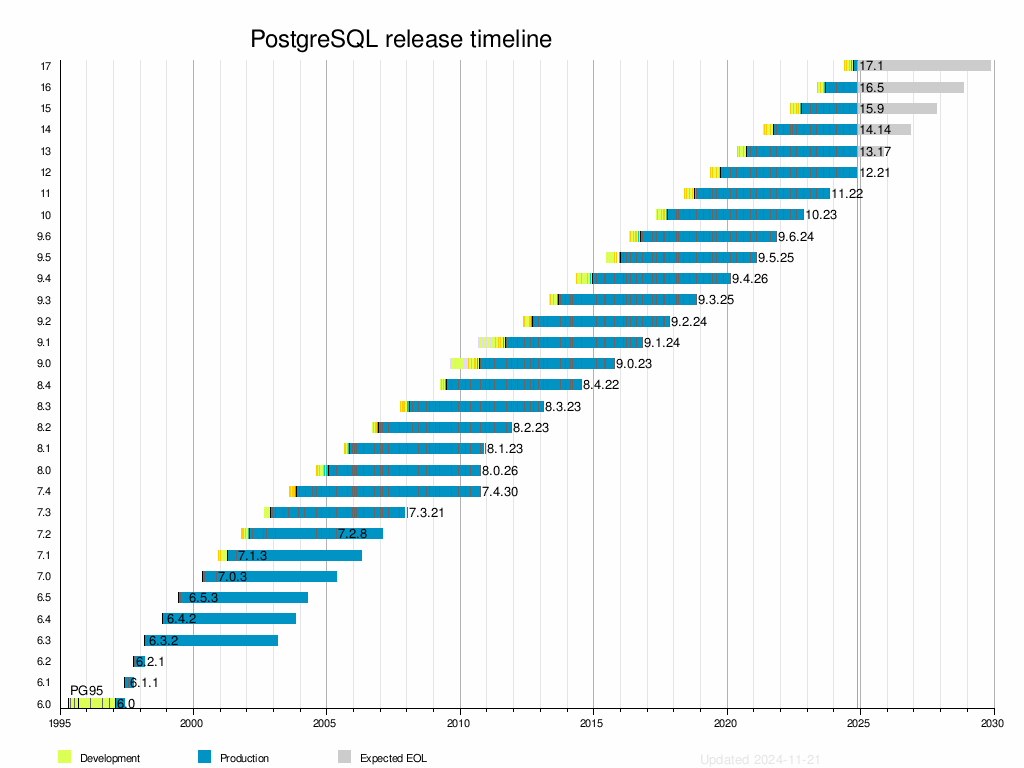
A graphical representation of the PostgreSQL release timeline. Generated from data available under the Creative Commons Attribution-ShareAlike 4.0 License using https://en.wikipedia.org/wiki/Template:Timeline_PostgreSQL.
Summary
- Always read the release notes for all versions between your current and target PostgreSQL versions before upgrading. Neglecting to do this can lead to unexpected behavior because of new optimizations or breaking changes that are time-consuming to diagnose and fix.
- PostgreSQL upgrades can introduce subtle changes in behavior or performance that may add up to become a problem in the end. Thoroughly test your application and queries in a staging environment before upgrading, and use realistic data and workloads to uncover potential issues early.
- Neglecting to address character encoding differences and disallowed characters during a database migration can lead to import errors or even data loss. When migrating between different RDBMSs, make sure to properly specify character encodings and the corresponding conversion between them, and clean the data from things such as ASCII nulls. Migration tools can help with this task.
- When migrating boolean data to PostgreSQL, ensure it uses the proper
booleantype. Convert non-standard representations (e.g., integers or characters) totrueandfalseto maintain consistency and avoid type mismatch errors. - Inconsistencies in data type naming, functionality, and precision across DBMSs can lead to migration errors. Always verify and understand data type definitions and behavior and use PostgreSQL’s conversion tools and migration utilities to ensure compatibility.
FAQ
Is it safe to skip PostgreSQL major versions during an upgrade?
Yes, PostgreSQL generally allows skipping versions (for example, 13 → 16). However, you must read all intervening major release notes (13→14, 14→15, 15→16). Skipping the notes can hide subtle behavior changes that may affect correctness, performance, or defaults.What changed with interval parsing around PostgreSQL 15 and why did my date math shift by a month?
From PostgreSQL 15, fractional parts for units greater than months are rounded to the nearest month (previously truncated). For example, adding '0.333 years' to a timestamp may yield a different month boundary after upgrading. To avoid ambiguity, add whole months (for example, '4 months'), or compute integer months explicitly.How can I catch upgrade-related behavior changes before going live?
- Read every intervening major release’s notes (feature changes, defaults, deprecations, syntax).- Test in a staging environment with realistic data and traffic patterns.
- Compare query plans and timings across versions using EXPLAIN ANALYZE.
- Use pg_upgrade for dry runs and include stress/load tests.
Why did my query plans change after upgrading to PostgreSQL 12?
PostgreSQL 12 started inlining certain CTEs (referenced once, non-recursive, no side effects). This can change join orders, push filters later/earlier, and alter parallelism, which can help or hurt performance. If needed, use WITH MATERIALIZED to force the old barrier behavior, or WITH NOT MATERIALIZED to encourage inlining deliberately.Could JIT compilation make my queries slower after upgrading?
Yes. JIT was enabled by default starting in PostgreSQL 12. For already fast/cheap queries, JIT overhead can outweigh benefits. Compare performance with jit = off or by tuning jit_* settings and the jit_above_cost threshold.Why am I getting “invalid byte sequence for encoding ‘UTF8’: 0xe9” or “0x00” when importing a dump?
0xe9 typically indicates source data in a non‑UTF‑8 encoding (for example, latin1). Convert the dump to UTF‑8 before import. 0x00 indicates NUL bytes, which PostgreSQL text types reject—clean them out before loading.How do I safely migrate text from MySQL/MariaDB to PostgreSQL UTF8?
1) Identify the source encoding (latin1, utf8, or utf8mb4).2) Export using that encoding.
3) Convert to UTF‑8, for example:
iconv -f latin1 -t utf8 prod_dump_latin1.sql -o prod_dump_utf8.sql4) Remove NUL bytes if present, for example:
tr -d '\000' < prod_dump_utf8.sql > prod_dump_clean.sql5) Ensure the target DB uses ENCODING 'UTF8' and correct collations.
6) Import and test. Tools like pgloader and ora2pg can automate much of this.
Why do MySQL/MariaDB BOOLEAN columns fail to load as booleans in PostgreSQL?
In MySQL/MariaDB, BOOLEAN is an alias for TINYINT(1), so dumps often contain 0/1 integers. PostgreSQL booleans are strict true/false. Convert after load or during migration. Example post‑load conversion:ALTER TABLE ... ALTER voted DROP DEFAULT;
ALTER TABLE ... ALTER voted SET DATA TYPE boolean USING CASE WHEN voted = 1 THEN true ELSE false END;
ALTER TABLE ... ALTER voted SET DEFAULT false;What cross‑database data type mismatches should I watch for?
- DATETIME (many DBMSs) lacks time zone semantics; map carefully to PostgreSQL TIMESTAMPTZ and verify precision/validity rules.- Oracle DATE stores date+time to whole seconds; TIMESTAMP adds fractional seconds.
- Oracle NUMBER vs PostgreSQL numeric/integer/float: choose types to preserve precision/scale. Never assume same‑named types are equivalent—check docs and test conversions.
What’s a practical pre‑upgrade/migration checklist to avoid outages and data issues?
- Read all intervening release notes and note behavior/default changes.- Build a realistic staging environment; rehearse with pg_upgrade and production‑like data.
- Benchmark critical queries; compare plans; test under load and with edge cases.
- Audit encodings, collations, and illegal characters; plan conversions/cleanses.
- Map data types explicitly (booleans, datetime/timestamps, numbers).
- Have rollback plans and monitoring ready for cutover.

 PostgreSQL Mistakes and How to Avoid Them ebook for free
