Overview

9 Strings

This chapter introduces pandas string handling as a practical extension of data analysis beyond numbers. It explains that while pandas is often associated with numeric work, real-world datasets frequently contain text such as names, labels, regions, and descriptions, and pandas provides strong support for processing those values. The chapter emphasizes that text columns can be analyzed just as flexibly as numeric ones, especially through the str accessor, which applies string operations across an entire series and returns a new series for further use.

A major theme is how pandas stores and manages text data. The chapter contrasts the older object dtype approach, which was flexible but error-prone because it could hold any Python object, with the newer pandas string dtype designed specifically for text. It also explains how missing text values should be handled with pd.NA rather than NaN, and notes that although the newer string dtype offers advantages, its implementation is still described as experimental. Along the way, the chapter surveys commonly used string-related methods such as searching, replacing, splitting, stripping punctuation, checking membership, and finding intersections.

The exercises show how to use these tools in realistic text-analysis tasks. One exercise studies Alice in Wonderland, using methods like lowercasing, splitting into words, stripping punctuation, filtering by capitalization, and counting vowels to answer questions about word frequency and character patterns. Another analyzes wine-review descriptions to compare language across countries, wine types, and varieties by building a reusable function that cleans text, removes common filler words, and computes the most frequent meaningful terms. The final exercise applies similar string techniques to a Stack Overflow survey, where semicolon-separated language lists are split, exploded, counted, intersected, and converted into dummy variables so that language use can be connected to salary and country-level patterns.

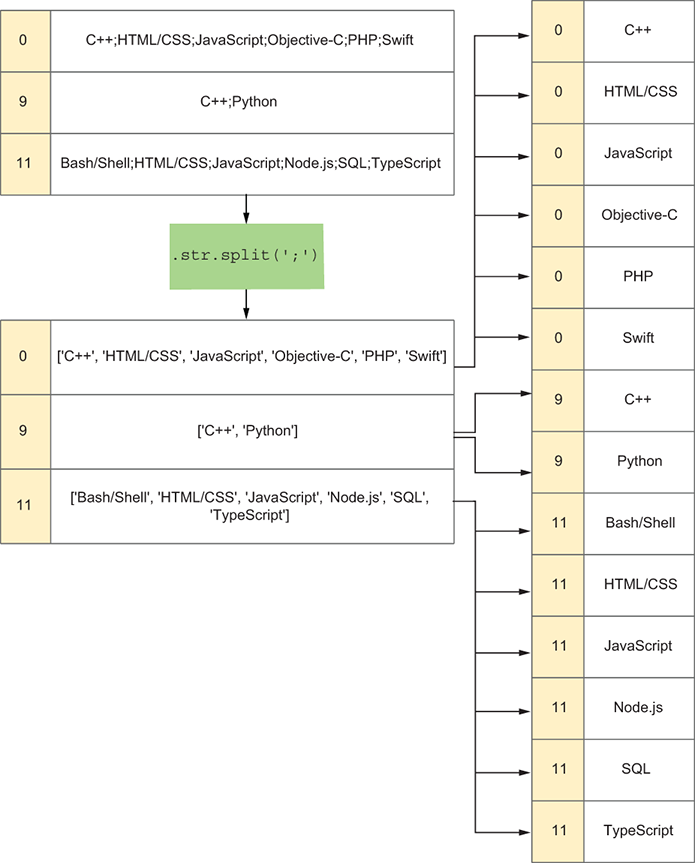
We can use split and explode to turn a series of text into a series of individual words.
Summary

In this chapter, we looked at various ways pandas lets us work with textual data, especially via the str accessor. The combination of Python’s rich string methods along with the various ways pandas lets us manipulate series and data frames gives us a great deal of flexibility and lets us ask a wide variety of sophisticated questions that aren’t directly numerical. Many data sets, such as the ones we looked at in this chapter, contain a mix of numeric and textual data, and being able to work with the text alongside the numbers is especially useful.

FAQ

What is the purpose of the chapter on strings in pandas?The chapter explains how pandas handles textual data and shows how to use the str accessor to apply string methods across an entire series.
How does pandas store string data in older versions versus newer versions?Older pandas versions typically store strings with dtype=object, while newer versions introduce pd.StringDtype, which is designed specifically for text data and avoids mixing strings with other Python object types.
Why is pd.StringDtype considered useful, and what caution does the chapter mention?It helps prevent ambiguity by restricting a series to textual data and using pd.NA for missing values, but the chapter notes that the pandas documentation still describes it as experimental.
What does the str accessor do in pandas?It lets you apply string methods to every element in a pandas series and returns a new series with the same length and index.
How can you find the length of each string in a pandas series?Use s.str.len(), which returns a series of integers representing the length of each string.
How can you check whether each element in a series contains only digits?Use s.str.isdigit(), which returns a boolean series indicating which values are made up only of digits.
How do you search for strings matching a pattern in pandas?Use s.str.contains(...). It supports regular expressions, so you can search for patterns like words containing specific letters or matching a capitalized-word format.
How can you remove punctuation from the start and end of each string in a series?Use s.str.strip(string.punctuation) to remove leading and trailing punctuation characters from every element.
When should you use apply instead of str?Use apply when you need to run a custom function on each element of a series, such as counting vowels in each word.
What is the main idea of the Alice in Wonderland exercise in this chapter?It shows how to read text into a series of words and then use pandas string methods to find common words, count capitalized words, and compute statistics like the average number of vowels per word.

pro $24.99 per month

  • access to all Manning books, MEAPs, liveVideos, liveProjects, and audiobooks!
  • choose one free eBook per month to keep
  • exclusive 50% discount on all purchases
  • renews monthly, pause or cancel renewal anytime

lite $19.99 per month

  • access to all Manning books, including MEAPs!

team

5, 10 or 20 seats+ for your team - learn more


Close
choose your plan

team

monthly
annual
$49.99
$499.99
only $41.67 per month
  • five seats for your team
  • access to all Manning books, MEAPs, liveVideos, liveProjects, and audiobooks!
  • choose another free product every time you renew
  • choose twelve free products per year
  • exclusive 50% discount on all purchases
  • renews monthly, pause or cancel renewal anytime
  • renews annually, pause or cancel renewal anytime
  • Pandas Workout Pandas Workout ebook for free
