Overview

5 Cleaning data

Cleaning data is presented as one of the central realities of data analysis: real-world datasets are often incomplete, inconsistent, or inaccurate, even when they come from official-looking sources. The chapter emphasizes that missing values can arise from human error, system failures, or simply the fact that nothing was recorded, and that handling those gaps well is essential if analysis is going to be trustworthy. It frames cleaning as a broad set of tasks, from renaming and restructuring columns to removing bad rows, standardizing text, correcting types, and dealing with outliers.

The chapter then focuses on core pandas tools for inspecting and cleaning data efficiently. It shows how to measure dataset size with len(df.index), identify missing values with isnull() and notnull(), count nulls with .sum(), and use info(show_counts=True) for a quick overview. It also compares ways to remove or replace bad data, such as dropna(), fillna(), replace(), mode(), and pd.to_numeric(errors='coerce'), while stressing that different kinds of data require different decisions. The text repeatedly notes that the “right” fix depends on context, because preserving data, eliminating noise, and avoiding misleading results can all matter at once.

Through exercises, the chapter illustrates these ideas in practical settings. In the parking-ticket example, it measures how much revenue might be lost if rows with missing fields are dropped under different rules, showing how a small percentage of missing data can represent a large financial impact. In the celebrity-deaths example, it extracts month information from dates, cleans an age column that mixes text and numbers, removes implausible ages, and then computes an average over a selected date range. In the Titanic exercise, it demonstrates different choices for handling nulls: dropping some sparse columns, filling ages with the mean, and filling destination data with the mode. A final parking-ticket exercise shows how inconsistent labels, especially vehicle colors, can be normalized with a translation dictionary and replace(), reinforcing the broader lesson that data cleaning is often messy, iterative, and indispensable.

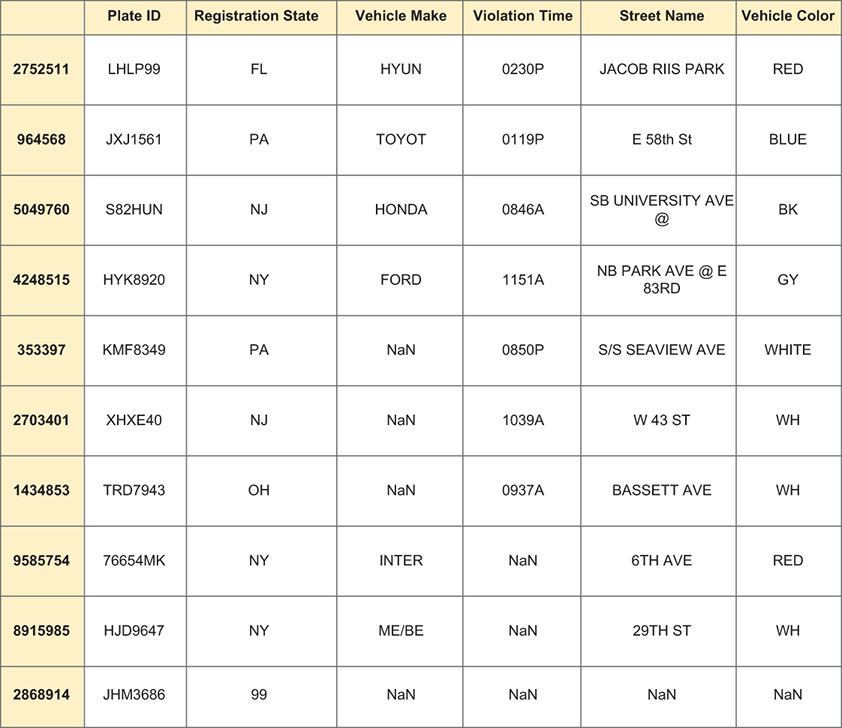
Sample of df, including NaN values
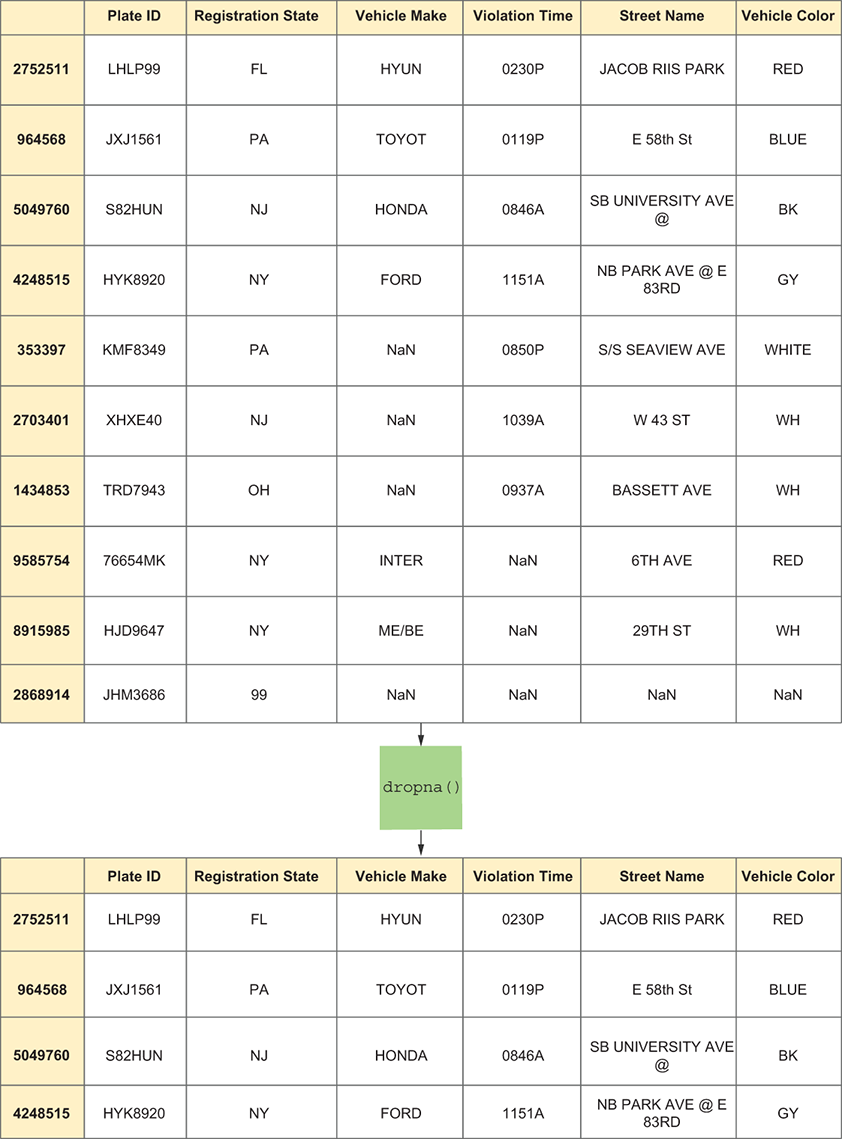
Running dropna on a data frame removes all NaN values and the rows containing them.
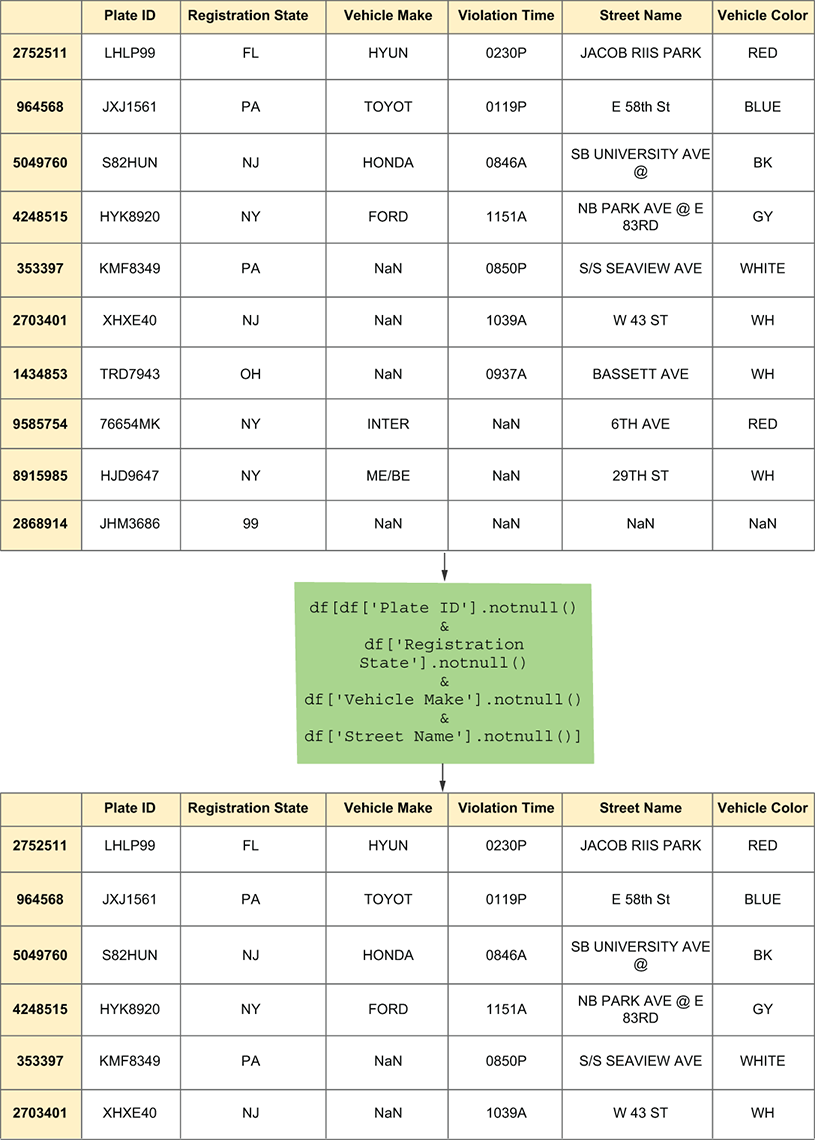
Running dropna on a data frame, looking at only a subset of columns
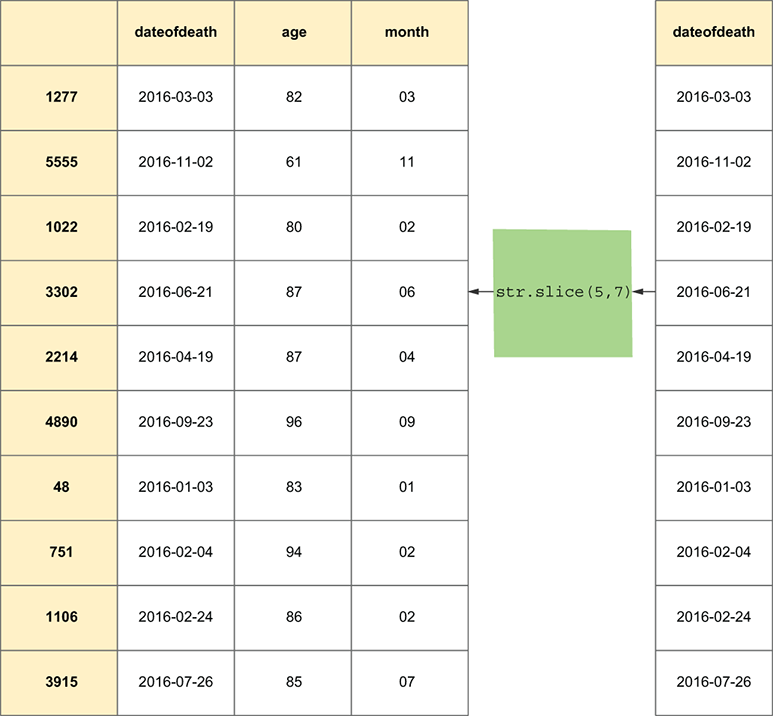
Adding a new month column to our data frame based on the month in dateofdeath
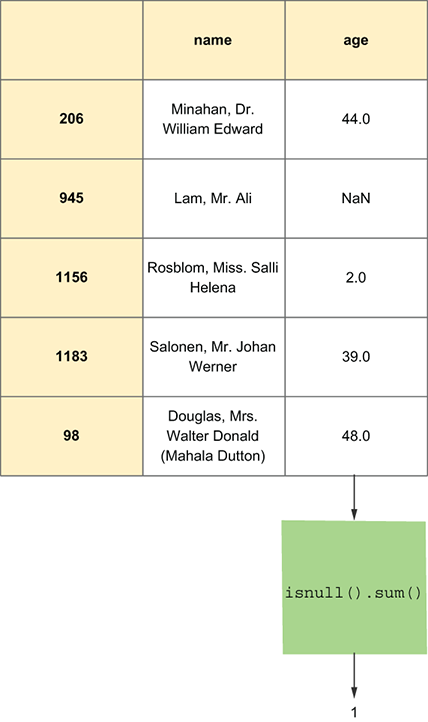
Finding the number of NaN values in a column by summing the result of isnull()
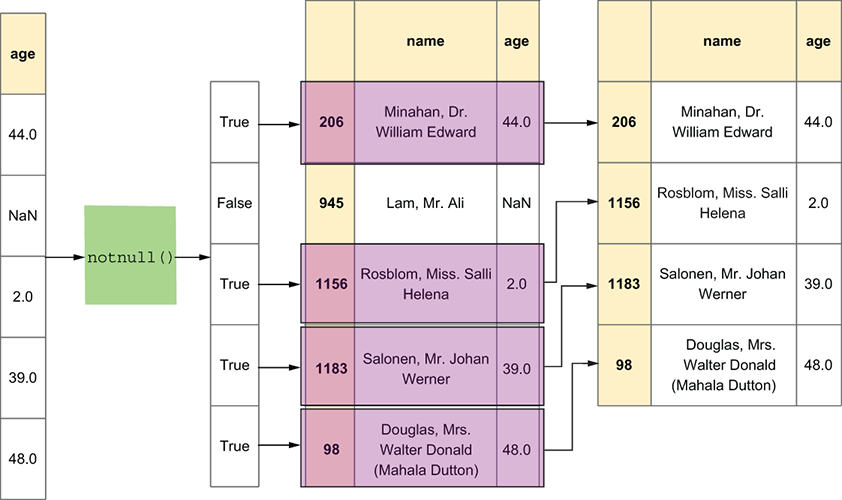
Removing rows in which a column contains NaN
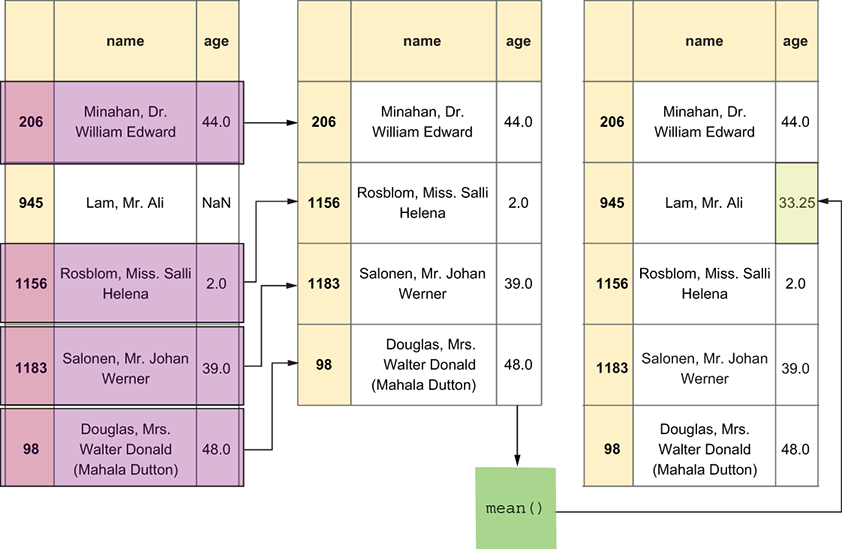
Replacing NaN in the age column with the mean of age
Summary

Cleaning data is one of the most important parts of data analysis, although it’s not glamorous. In this chapter, we saw that effective data cleaning requires not just knowing the techniques, but also applying judgment—knowing when you can allow null or duplicate values and what you should do with them. pandas comes with a wide variety of tools we can use to clean our data, from removing NaN values to replacing them, replacing existing values, and running custom functions on each row in a series or data frame. The techniques we explored in this chapter, along with the interpolate method we saw in exercise 13, are important tools in your data-cleaning toolbox and will likely come up in many of the projects you work on.

FAQ

What is data cleaning in pandas, and why is it so important?Data cleaning is the process of preparing messy data for analysis by fixing or removing problems such as missing values, inconsistent strings, bad types, duplicate rows, irrelevant columns, and outliers. It matters because even small data issues can lead to inaccurate conclusions.
How do you count missing values in a pandas Series or DataFrame?Use isnull() and then sum(). For a Series, s.isnull().sum() gives the number of missing values. For a DataFrame, df.isnull().sum() returns the number of missing values in each column.
What is the difference between isnull and isna in pandas?There is no difference. In pandas, isnull and isna are identical methods with different names. Both return boolean results showing where values are null.
How can you count the total number of rows in a DataFrame efficiently?The book recommends len(df.index), which returns the number of rows and is faster than df.shape[0] or len(df) in the examples shown.
How do you remove rows with missing data in a DataFrame?Use df.dropna() to remove rows containing any missing values. If you want to remove rows based only on certain columns, use df.dropna(subset=[...]).
How can you remove rows only when selected columns contain missing values?Pass a list of columns to subset in dropna. For example, df.dropna(subset=['Plate ID', 'Registration State', 'Vehicle Make', 'Street Name']) removes rows missing data in any of those columns.
What does the thresh parameter do in dropna?thresh lets you keep rows that have at least a certain number of non-null values in the specified subset. For example, thresh=3 means at least three of the listed columns must be non-null.
How do you replace missing values with a single chosen value?Use fillna. For example, df['age'] = df['age'].fillna(df['age'].mean()) replaces missing ages with the mean age.
How can you convert string data to numeric values safely in pandas?Use pd.to_numeric(). If some values are not valid numbers, use errors='coerce' to convert invalid entries into NaN, which you can then clean up with other methods.
How do you standardize inconsistent string values, such as vehicle colors?Create a dictionary that maps inconsistent values to a standard form, then apply replace. For example, df['Vehicle Color'] = df['Vehicle Color'].replace(colormap) can normalize many variations into a smaller set of consistent values.

pro $24.99 per month

  • access to all Manning books, MEAPs, liveVideos, liveProjects, and audiobooks!
  • choose one free eBook per month to keep
  • exclusive 50% discount on all purchases
  • renews monthly, pause or cancel renewal anytime

lite $19.99 per month

  • access to all Manning books, including MEAPs!

team

5, 10 or 20 seats+ for your team - learn more


Close
choose your plan

team

monthly
annual
$49.99
$499.99
only $41.67 per month
  • five seats for your team
  • access to all Manning books, MEAPs, liveVideos, liveProjects, and audiobooks!
  • choose another free product every time you renew
  • choose twelve free products per year
  • exclusive 50% discount on all purchases
  • renews monthly, pause or cancel renewal anytime
  • renews annually, pause or cancel renewal anytime
  • Pandas Workout Pandas Workout ebook for free
