The chapter introduces dates and times as essential but often tricky data types for analysis, highlighting why pandas provides specialized support for them. It distinguishes between timestamps, which represent specific moments, and timedeltas, which represent spans of time between moments. The discussion emphasizes that pandas can flexibly read, convert, compare, and calculate with both kinds of values, making it well suited for data sets that include calendar or clock information.
A major focus is on creating and parsing datetime data. The text shows how to turn strings into Timestamp values with pd.to_datetime, including handling multiple date formats, ambiguous day/month ordering, and date-time strings that include hours, minutes, and seconds. It also explains how to load datetime columns directly from CSV files with parse_dates, how to inspect datetime parts with the dt accessor, and how to write custom datetime output formats with to_csv and date_format. Timedelta creation and inspection are also covered, including subtraction between timestamps and the use of timedelta components and attributes.
The exercises apply these tools to real data analysis tasks, especially taxi trips and oil prices. In the taxi examples, timestamps are used to compute trip durations, count unusually short or long rides, categorize trips by length, and compare passenger counts across time-based groups. In the oil-price example, a datetime index enables concise date-based lookup, month and year filtering, quarter-end selection, and resampling to compute averages over regular time periods. A later exercise extends the same ideas to tipping behavior, using datetime-based grouping and resampling to compare tip percentages by day, hour, month, and specific date ranges. Overall, the chapter shows how time-aware pandas features simplify both data cleaning and time-based exploration.
My schedule, illustrated with timestamps and timedeltas
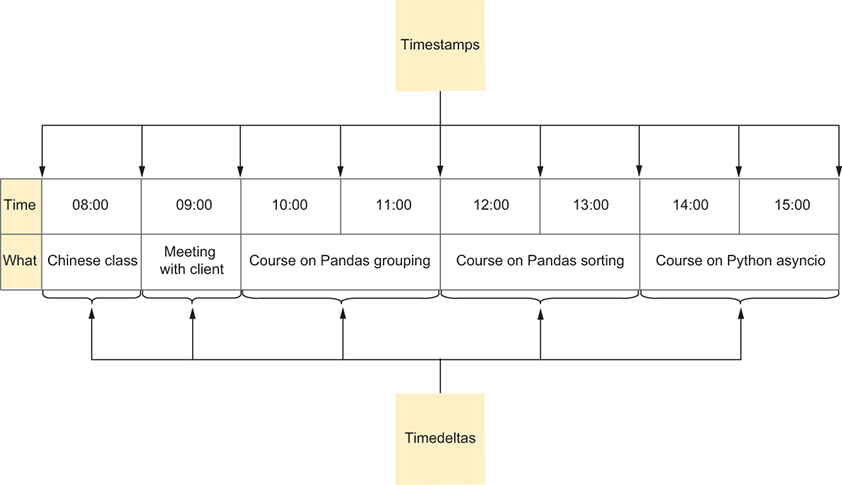
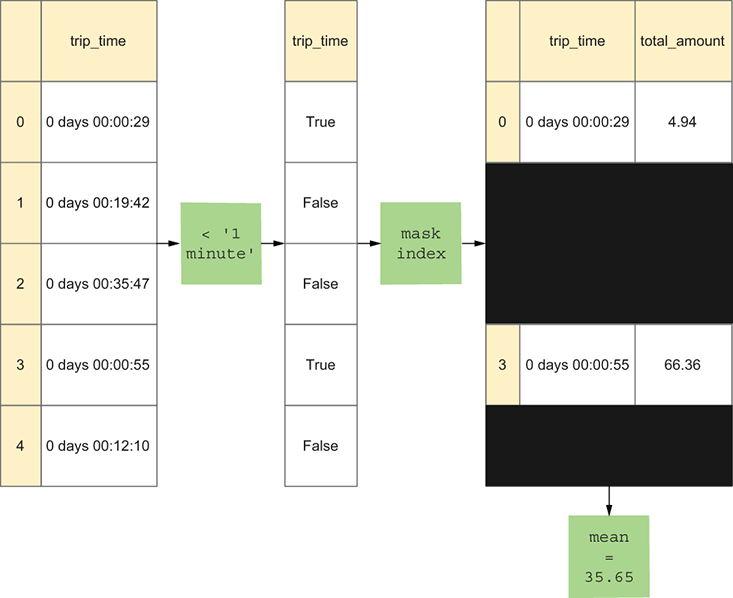
Illustration of how we got the mean of rides less than one minute long
Summary
In this chapter, we explored various ways pandas lets us examine data that includes a date-and-time component. We saw how to read datetime information into a data frame, extract datetime information from an existing column, break such a column apart, and interpret odd datetime formats. We also learned to create and work with a time series—a data frame in which a datetime column serves as our index—and how to query it in various ways, including resampling, letting us run aggregation methods over particular time periods.
FAQ
```htmlWhat is the difference between a timestamp and a timedelta in pandas?
A timestamp represents one specific point in time, such as a date and time of day. A timedelta represents a span of time, or the distance between two timestamps.How do you convert a Series of date strings into pandas Timestamp objects?
Usepd.to_datetime() on the Series. It returns a Series of Timestamp values, even though the dtype may display as datetime64[ns].How do you tell pandas to parse date columns when reading a CSV file?
Use theparse_dates parameter in pd.read_csv() and pass the date column names or column indexes. This makes pandas read those columns as datetime values instead of plain strings.What does the dayfirst parameter do in pd.to_datetime()?
It tells pandas how to interpret ambiguous dates like 01/03/1972. If dayfirst=True, pandas reads that as 1 March 1972; if dayfirst=False, it reads it as 3 January 1972.How do you create a timedelta column from two datetime columns?
Subtract one datetime column from the other. For example,df['end'] - df['start'] produces a timedelta Series showing the elapsed time.How can you test whether a timedelta is shorter than one minute?
Compare it to a string such as'1 minute'. Pandas can convert the string behind the scenes, so an expression like df['trip_time'] < '1 minute' returns a boolean Series.How do you group values into short, medium, and long time ranges?
Usepd.cut() with timedelta bin edges and labels. In the chapter, the bins were created with pd.to_timedelta() and labeled short, medium, and long.How can you access parts of a datetime value after converting a column to timestamps?
Use thedt accessor. For example, s.dt.month, s.dt.hour, s.dt.day_of_week, and s.dt.is_leap_year return useful datetime components.What is resampling in pandas time series analysis?
Resampling is like a time-basedgroupby. It groups data into time periods such as days, months, quarters, or years, and then applies an aggregation like mean() or count().How do you create a time series and use partial date indexing?
Set a datetime column as the index withdf.set_index('Date'). Then you can retrieve data by partial dates such as df.loc['1970-07'] for a month or df.loc['1971'] for a whole year.
 Pandas Workout ebook for free