Appendix A. Search and Optimization Libraries in Python
This appendix provides a practical tour of the Python ecosystem for search and optimization, beginning with how to prepare a working environment and ending with rich libraries for exact optimization, heuristics, geospatial analysis, and machine learning. It outlines installing Python 3 with pip or conda, creating virtual environments, and setting up Jupyter Notebook or JupyterLab, with an option to use cloud-based notebooks. It also introduces the book’s code repository and a helper package, offering utilities to streamline common tasks so readers can focus on modeling rather than boilerplate.
The text then surveys mathematical programming tools and demonstrates them through a linear production planning example, showing how to model and solve with SciPy’s linprog and PuLP, and highlighting a broad solver ecosystem spanning linear, integer, nonlinear, and convex optimization (e.g., OR-Tools, Gurobi, Pyomo, CVXPY, and others). It next moves to graph and mapping libraries for building and analyzing networks and geospatial data: networkx for graph algorithms and approximations such as TSP heuristics, OSMnx for retrieving real street networks, GeoPandas for reading and manipulating spatial datasets, contextily for adding basemaps, and folium for interactive web maps, along with a number of complementary tools in the geospatial stack.
For metaheuristics, the appendix presents practical recipes using PySwarms (PSO), scikit-opt (e.g., simulated annealing, GA, PSO), networkx heuristics, DEAP for genetic algorithms, and OR-Tools’ local search metaheuristics (such as tabu search and simulated annealing), plus a wider catalogue of specialized packages. The machine learning section covers graph representation learning and GNNs—including node2vec, DeepWalk via KarateClub, and PyTorch Geometric—and introduces reinforcement learning environments and frameworks such as Gym or Gymnasium and Flow, followed by additional ML and RL toolkits. Throughout, the emphasis is on concise installation steps and minimal working examples that help readers select and apply the right tools to real design, planning, and control problems.
Figure A.1 Solving TSP using Christofides algorithm implemented in networkx. The found route is: [0, 10, 7, 2, 6, 1, 15, 14, 5, 17, 4, 9, 12, 18, 3, 19, 16, 8, 11, 13, 0]
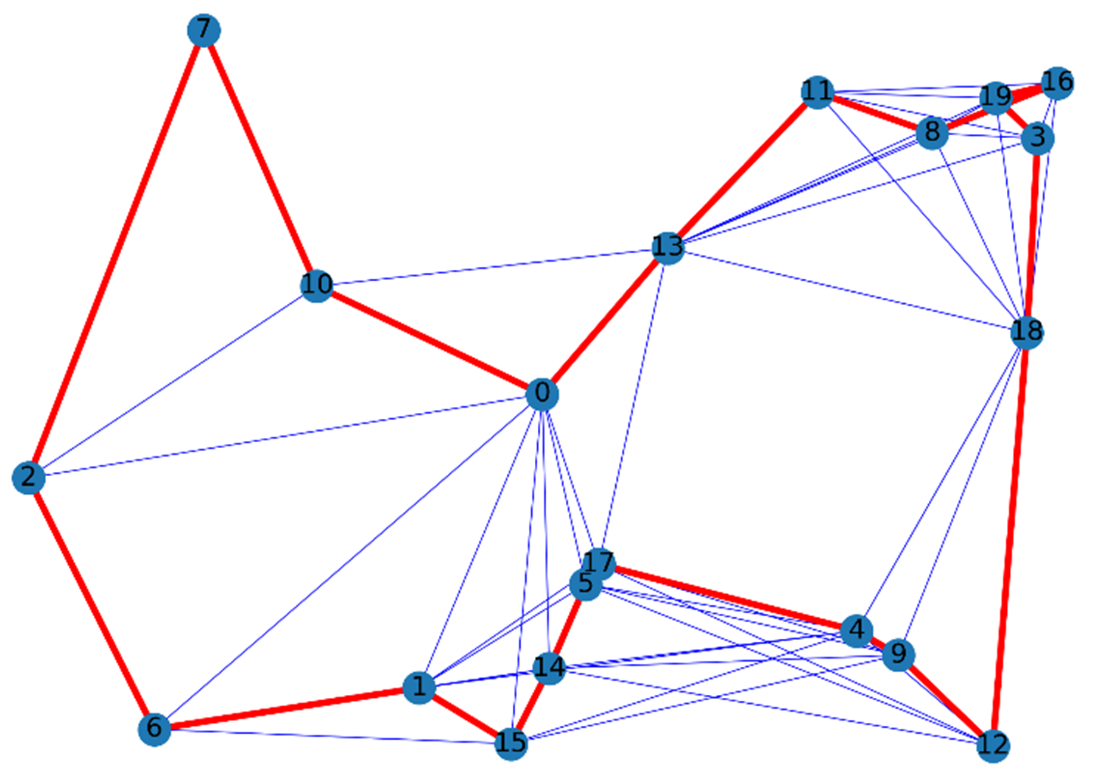
Figure A.2 Times Square Graph wit drivable streets
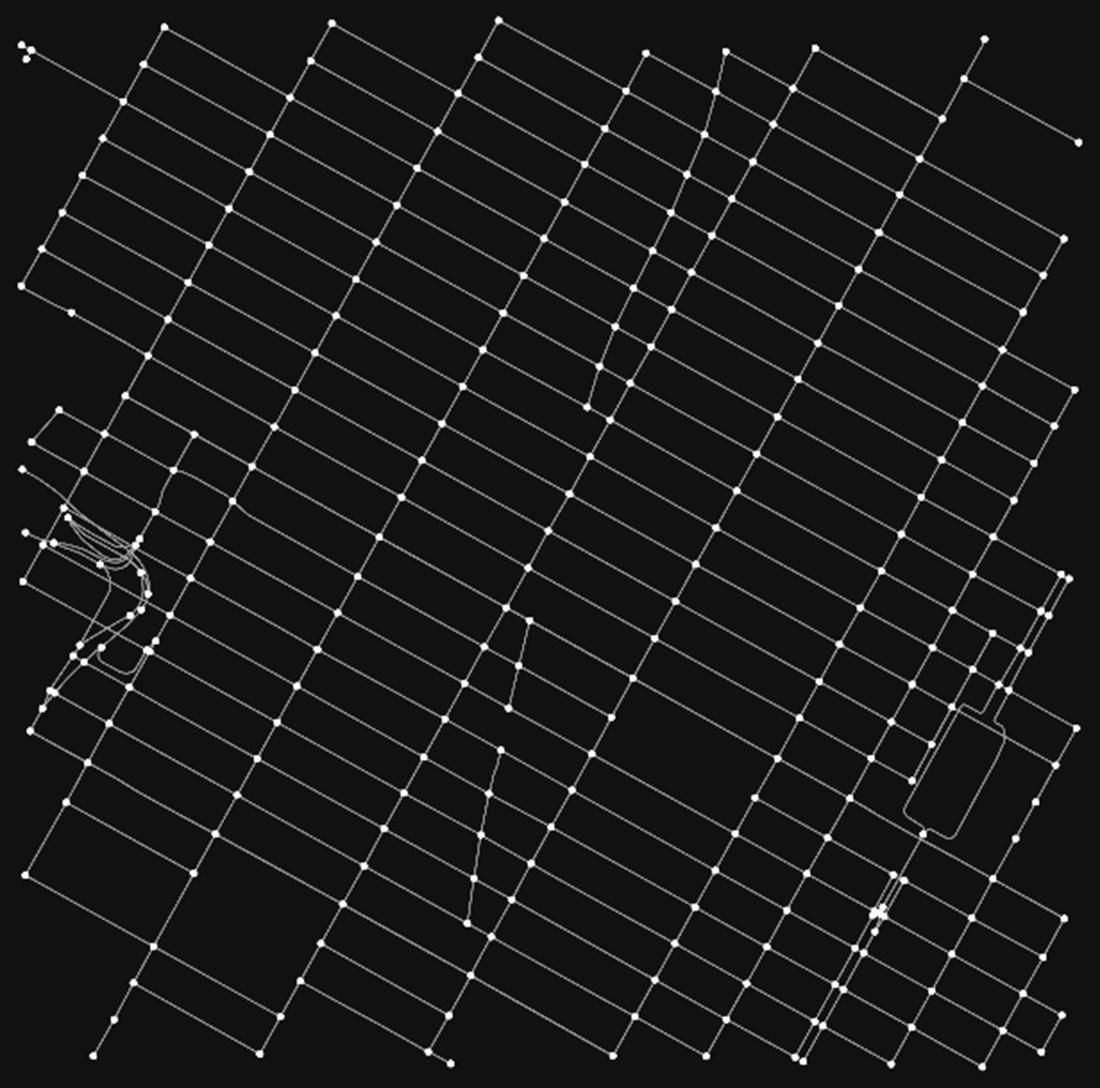
Figure A.3 Travelling Salesman Problem (TSP) for 20 largest US cities.
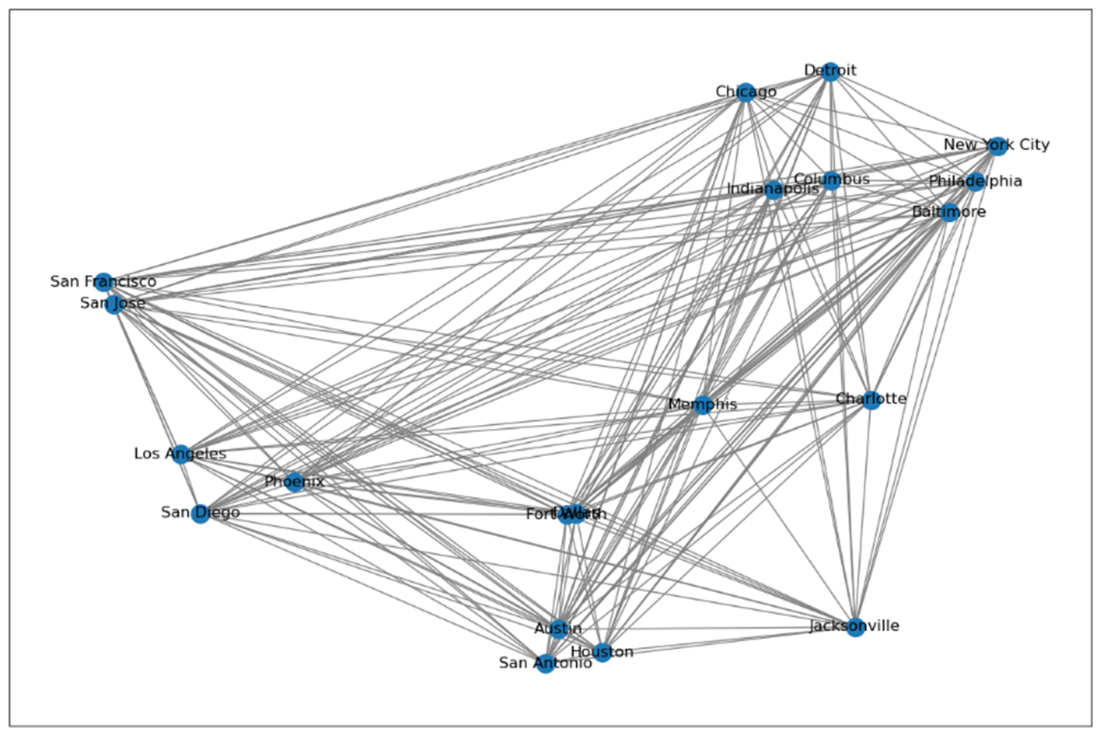
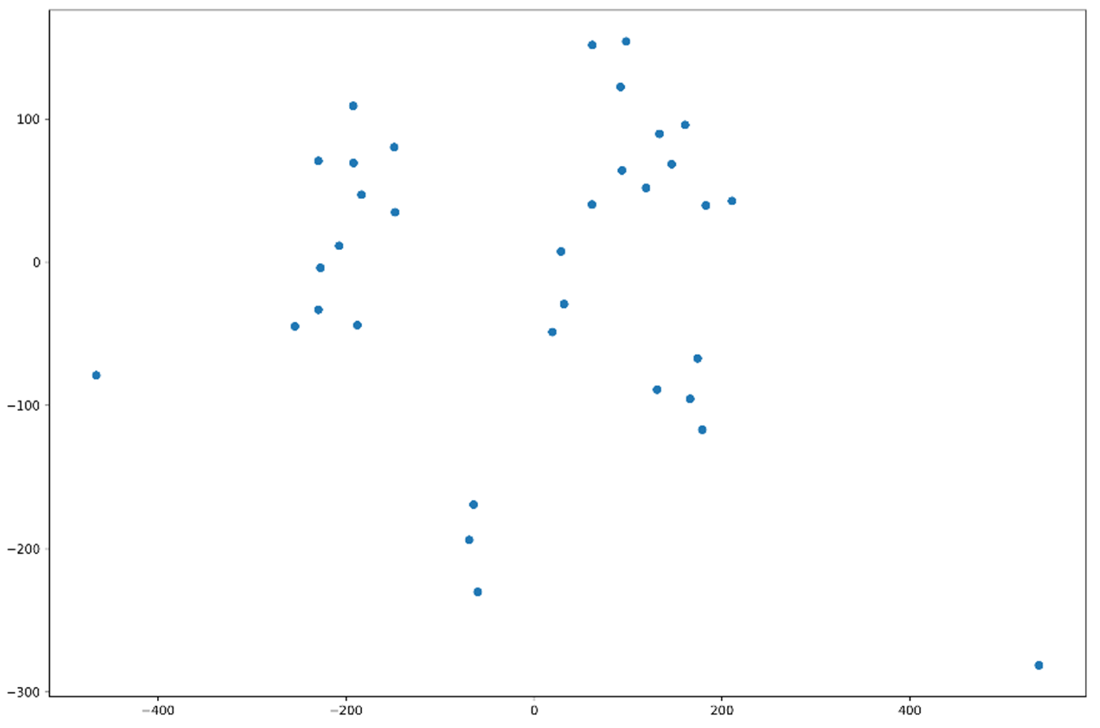
Figure A.4 t-SNE-based visualization for the low-dimensional representations generated by node2vec.
A.6 Projects
The course "ECE1724H: Bio-inspired Algorithms for Smart Mobility," designed and taught by the book's author at the University of Toronto, features a collection of exemplary projects available in “AI for Smart Mobility (AI4SM)” publication hub (https://medium.com/ai4sm) with Python code implementations. These projects encompass a broad spectrum of optimization algorithms covered in this book and their practical applications in smart mobility domain. Among the topics tackled are: employing large language models for reinforcement learning in intelligent driving, forecasting traffic flow, strategizing the placement of EV charging stations, optimizing food delivery services, predicting estimated times of arrival, improving the deployment of traffic sensors, customizing cycling routes, reorganizing urban fire districts, pricing strategies for ride-sharing, refining school bus routes, availability predictions for bikes, districting for efficient waste collection, enhancing bus stop layouts, implementing dynamic pricing for public transportation, optimizing student transportation and boarding, integrating hotel recommendations with route planning, determining ideal locations for public parcel lockers, predictive responses and accessibility scoring for healthcare facilities.
FAQ
How do I set up the Python environment for this book on Windows, Linux, or macOS?
- Prerequisite: Python 3.6+.
- Windows: Download and run the installer from https://www.python.org/downloads/ (check “Install launcher for all users” and “Add Python to PATH”), then verify with
python -Vandpip -V. Optionally install virtualenv withpip install virtualenv. - Linux (Debian/Ubuntu):
sudo apt update,sudo apt install python3-pip, thensudo apt install python3.x-venv, create and activate:python -m venv <venv_path>,source <venv_path>/bin/activate. - macOS: Upgrade pip with
python -m ensurepip --upgrade, create and activate a venv withpython -m venv <venv_path>,source <venv_path>/bin/activate. - Alternative (recommended): Use a Python distribution (Anaconda/Miniconda). Create and activate an env:
conda create --name <env> python=<version>,conda activate <env>.
How do I install Jupyter Notebook/Lab and enable ipywidgets?
- Using pip:
pip install jupyterlab notebook - Using conda (conda-forge):
conda install -c conda-forge jupyterlab notebook - ipywidgets:
pip install ipywidgetsorconda install -c conda-forge ipywidgets - Old classic Notebook only: enable extension with
jupyter nbextension install --user --py widgetsnbextensionandjupyter nbextension enable --user --py widgetsnbextension. - Cloud option: Google Colab at https://colab.research.google.com/ (GPU/TPU available).
How do I clone the book’s repository and use the optalgotools package (locally or in Colab)?
- Clone code listings:
git clone https://github.com/Optimization-Algorithms-Book/Code-Listings.git - Use optalgotools without install: place the
optalgotoolsfolder beside your notebook and add to path:import sys; sys.path.insert(0, '../') - In Colab:
from google.colab import drive; drive.mount('/content/drive'), copyoptalgotoolsto Drive and add its path tosys.path. - From PyPI:
pip install optalgotools. Example imports:from optalgotools.problems import TSP;from optalgotools.algorithms import SimulatedAnnealing.
When should I use SciPy’s linprog vs. PuLP for linear optimization?
- SciPy linprog: great for LPs; expects minimization and ≤-type constraints (convert max to min by negating objective; convert ≥ to ≤). Example method:
method='highs-ds'. No direct integer variables. - PuLP: modeling layer supporting maximization/minimization, named constraints, and integer/binary variables. Can connect to many solvers (CBC, HiGHS, GLPK, Gurobi, CPLEX, etc.). Recommended for MILP and cleaner model building.
What other mathematical programming libraries are useful and how do they differ?
- OR-Tools: LP/MIP, CP-SAT, flows, routing; high-quality free suite (C++ core, Python API).
- Commercial solvers: Gurobi, CPLEX, MOSEK, XPRESS—state-of-the-art performance; Python APIs.
- Modeling languages: Pyomo, CVXPY (convex), DOcplex—express models and plug various solvers.
- NLP/DAE/AD: CasADi, GEKKO, IPOPT via optlang/PICOS.
- Other: PYTHON-MIP (CBC/Gurobi), CyLP (COIN-OR interfaces), CVXOPT, PICOS, PySCIPOpt, etc.
How can I build and analyze real street networks with OSMnx and NetworkX?
- Create a drivable graph from a place string:
graph = ox.graph_from_address("Times Square, NY", network_type='drive') - Highlight one-way edges: derive
edge_colorfrom the'oneway'attribute and plot. - Convert to GeoDataFrames:
nodes, edges = ox.graph_to_gdfs(graph); inspect attributes, counts (e.g.,edges['highway'].value_counts()). - Save in multiple formats: PNG/SVG, .osm XML, GeoPackage, GraphML, Shapefile via
ox.save_*functions. - Use NetworkX algorithms (e.g., Christofides TSP approximation) directly on weighted graphs.
How do I read and visualize geospatial data with GeoPandas, add basemaps with contextily, and build interactive maps with folium?
- Read shapefiles:
gpd.read_file("Ontario_Health_Regions.shp")(ensure accompanying .shx/.dbf/.prj files). - CRS handling: reproject to WGS84 for web maps:
gdf = gdf.to_crs(epsg=4326). - Basemap with contextily: plot GeoPandas Axes, then
ctx.add_basemap(ax, source=ctx.providers.OpenStreetMap.Mapnik, crs=gdf.crs). - Interactive folium:
m = folium.Map(location=[lat, lon], zoom_start=7, tiles='cartodbpositron'); add regions viafolium.GeoJsonandfolium.Popup.
Which metaheuristics libraries are covered and when should I choose each?
- PySwarms: particle swarm optimization (and tools/visuals) for continuous search spaces.
- scikit-opt: broad set (GA, PSO, SA, ACO, etc.) for both continuous and discrete problems.
- DEAP: flexible evolutionary computation toolbox (selection/crossover/mutation, GA/ES/GP); great for custom operators and experimentation.
- OR-Tools: includes SA/Tabu/Guided Local Search inside powerful routing/assignment solvers.
- NetworkX: provides heuristic/approximation routines (e.g., TSP via simulated annealing, Christofides).
How can I generate and visualize node embeddings (node2vec/DeepWalk) and GNN embeddings (PyG)?
- node2vec: random-walk-based embeddings. Fit on a NetworkX graph and retrieve vectors via
model.wv. - DeepWalk (KarateClub): similar workflow;
model.fit(G)thenmodel.get_embedding(). - Visualization: reduce to 2D using t-SNE or PCA and plot with Matplotlib.
- PyG (GCN/GAT): build a GNN (e.g., GCNConv layers), train on graph data (KarateClub dataset available), and use intermediate hidden representation as embeddings.
How do I use NetworkX, OSMnx, and folium for TSP-like demos and mapping routes?
- TSP approximation with NetworkX: construct a weighted complete graph (Euclidean distances), then run
nx.algorithms.approximation.christofidesorapprox.simulated_annealing_tspto get a tour. - Map context: extract real road networks with OSMnx and plot edges/nodes.
- Interactive route display: convert a route to GeoJSON and add to a folium map for interactive inspection.
How can I experiment with reinforcement learning environments related to optimization (Gym/Gymnasium, Flow)?
- Gym/Gymnasium: install with
pip install gym[all](or Gymnasium), create envs likeenv = gym.make('MountainCar-v0')for quick RL experiments. - Flow: deep RL for mixed-autonomy traffic; clone repo, create conda env, and install in editable mode. Useful for optimizing system-level metrics on realistic road networks.
- Ecosystem: SB3, RLlib, TF-Agents, Keras-RL provide reliable RL algorithm implementations you can plug into Gym-like environments.

 Optimization Algorithms ebook for free
