7 Indexing for query performance
This chapter explains how MongoDB uses indexes to accelerate queries and how to reason about their impact on performance. Indexes provide ordered, B-tree structures that enable efficient equality, range, and sort operations; without them, MongoDB falls back to full collection scans. Because each write must also update relevant indexes, the right balance is essential—especially in write-heavy workloads. You learn how the query planner explores candidate plans in a trial phase, selects a winning plan, and caches it per query shape (Missing, Inactive, Active states), as well as how and when plan caches are purged. The chapter shows how to inspect execution strategies with explain() at different verbosity levels, highlights common execution stages (e.g., COLLSCAN, IXSCAN, FETCH) and new EXPRESS stages in MongoDB 8.0, and notes the classic vs. slot-based engines that MongoDB chooses automatically.
You then survey the major index types and design rules. Single-field and compound indexes form the core, with compound prefixes and the ESR rule (Equality, Sort, Range) guiding key order to satisfy predicates and non-blocking sorts. Multikey indexes power queries over arrays and embedded fields; text indexes support basic text search (distinct from Atlas Search); wildcard and compound wildcard indexes help when field names vary; geospatial indexes (2dsphere, 2d) enable location queries; and hashed indexes distribute data for sharding with important limitations (no arrays, uniqueness, or large floats). The chapter demonstrates using indexes for sorting, crafting covered queries, converting an existing index to unique with collMod, and recognizing when an index cannot support a query (e.g., violating compound prefix rules), which often results in COLLSCAN.
Operationally, you learn how to create, view, drop, and safely test removal by first hiding an index. Index attributes fine-tune behavior: partial indexes reduce size and write overhead with a filter; sparse indexes include only documents that have the field; TTL indexes expire time-bound data and can be adjusted with collMod; and hidden indexes remain maintained but excluded from planning. Index builds run concurrently across replica set members with improved resilience and disk-space safeguards, and you can monitor, size, and manage indexes with explain(), $planCacheStats, $indexStats, and totalIndexSize(). Guidance covers modifying indexes (drop/recreate, except TTL), forcing use with hint(), requirements for $or clauses (every branch indexed), caveats for $ne/$nin/$not, keeping hot portions in RAM, index limits, and—crucially—when not to use an index if a query returns a large fraction of the collection.
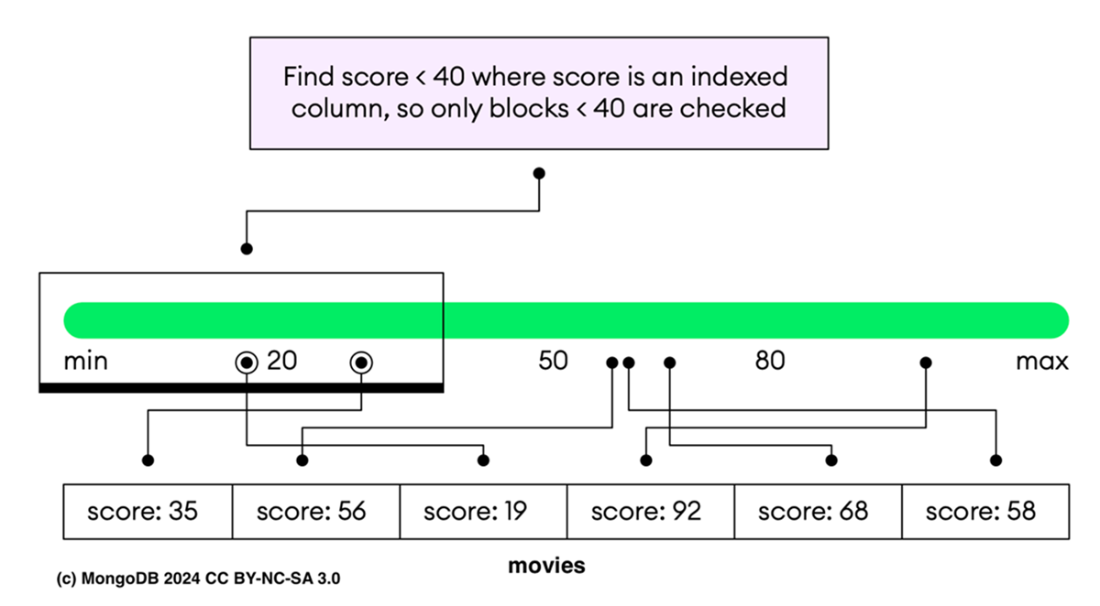
The index guides the search, allowing the system to skip entire blocks of data that don't meet the search criteria, and only examining blocks potentially containing relevant data. This optimization significantly reduces the number of operations needed, highlighting the efficiency of using indexed searches in managing and querying large datasets.
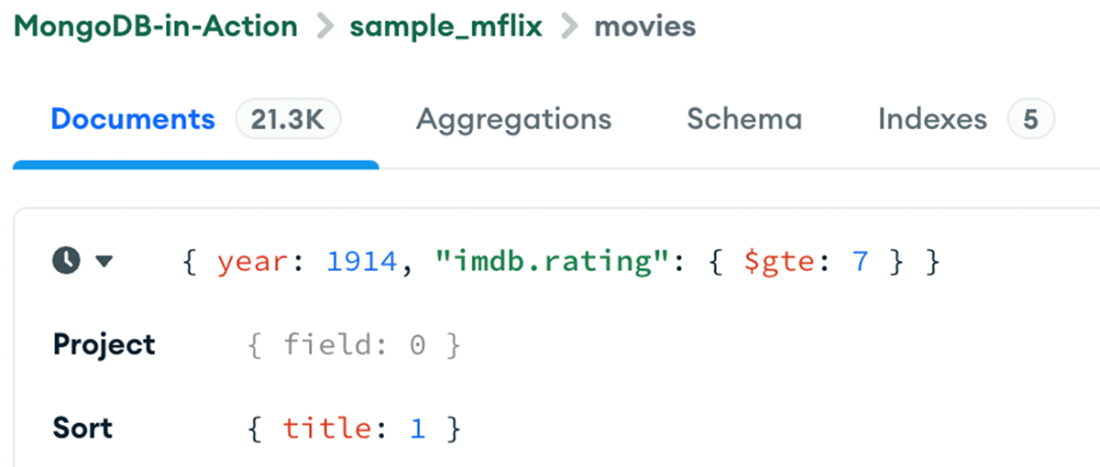
The MongoDB Compass GUI executes the query { year: 1914, "imdb.rating": { $gte: 7 } } on the movies collection. The results are sorted by { title: 1 }.
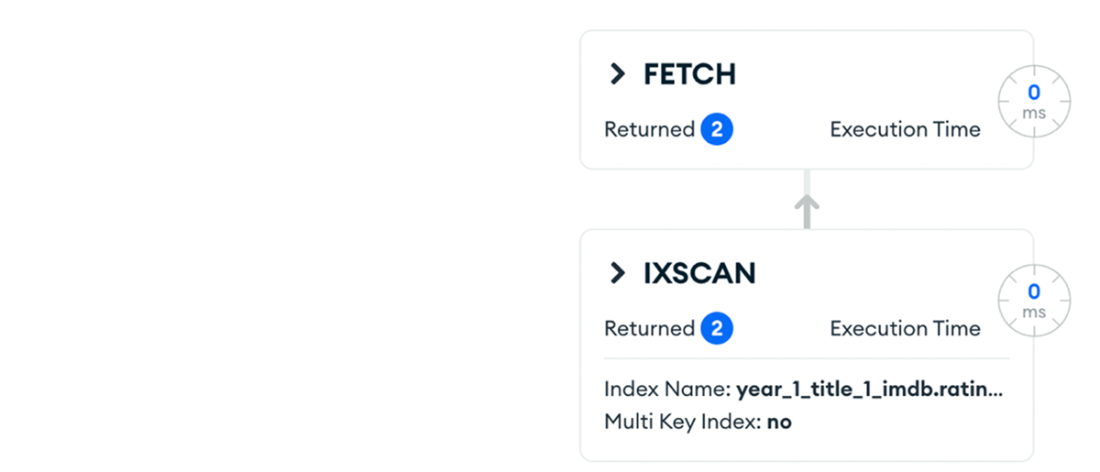
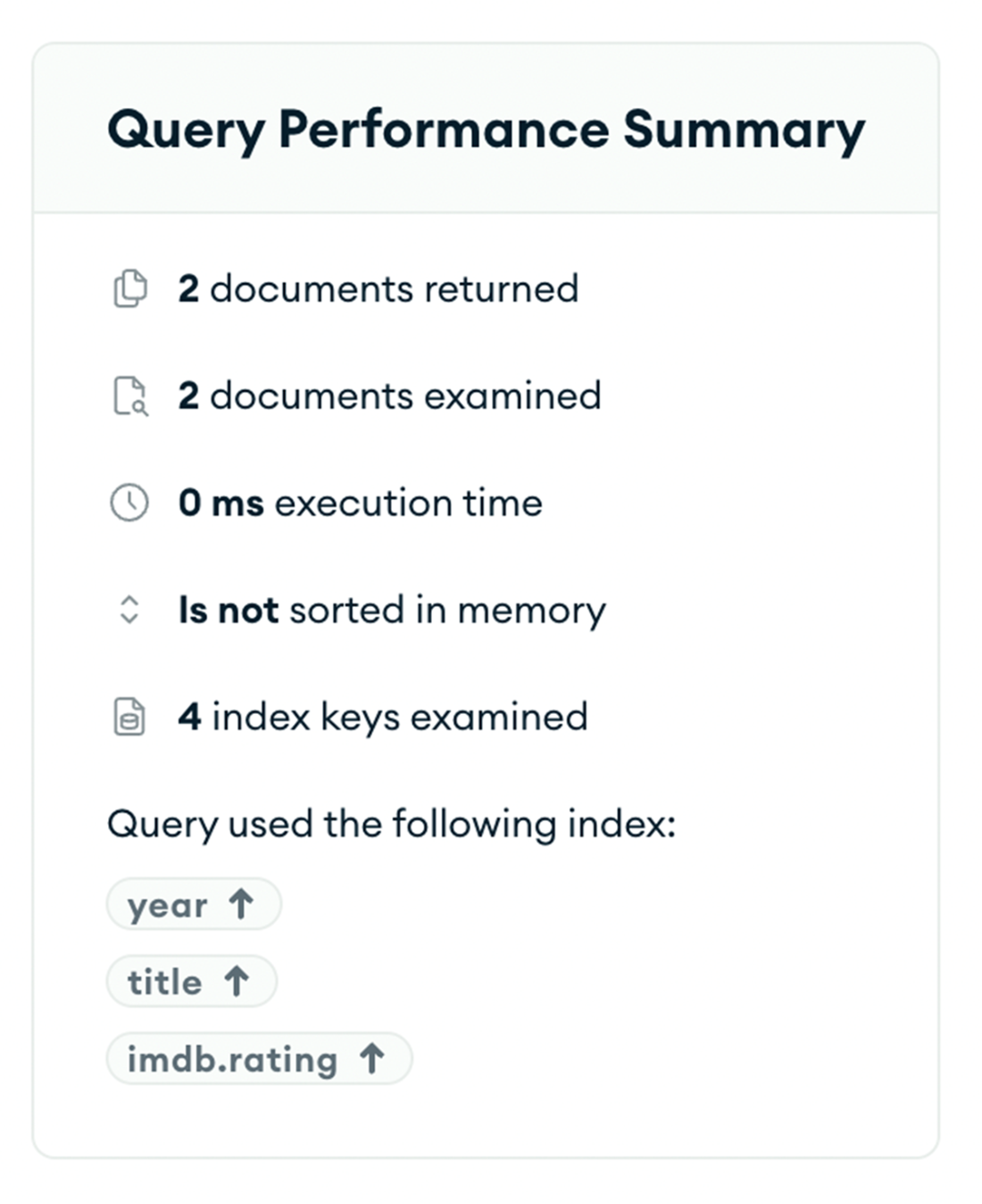
shows the explain plan for a query optimized with an index using the ESR rule in Compass. The plan consists of an IXSCAN stage, which uses the year_1_title_1_imdb.rating_1 index to scan and fetch documents. This stage returned 2 documents and examined 4 index keys with an execution time of 0 milliseconds. The FETCH stage then retrieves the documents, with an execution time of 0 milliseconds.
The MongoDB Atlas User Interface, which allows you to add and remove indexes.

The indexes statistics helps make decisions about index maintenance and optimization. For the sample_mflix.movies collection, the title_text_fullplot_text index is a text index that has been accessed 0 times since December 17, 2024, while the year_1_title_1_imdb.rating_1 compound index has been accessed 16 times since December 17, 2024.

Summary
- The MongoDB query planner analyzes multiple execution plans to select the most efficient one, using indexes to minimize response times and resource usage. If no suitable index is available, it performs a full collection scan, which is less efficient and can significantly burden the database, especially with large datasets.
- MongoDB uses two query engines to find and return results, and the engine is chosen automatically by MongoDB, so you can't select it manually: the classic query engine and the slot-based query engine. The slot-based engine usually offers better performance and lower CPU and memory usage.
- To access query plan details in MongoDB, use db.collection.explain() or cursor.explain() with verbosity levels like "queryPlanner", "executionStats", and "allPlansExecution" for varying detail. These tools help understand performance characteristics and diagnose query efficiency issues.
- MongoDB supports various index types to enhance query performance, including single-field, compound, multikey, text, wildcard, geospatial, and hashed indexes. Each index type caters to different query requirements, optimizing data retrieval based on the fields and operations involved.
- You can create an index using the db.collection.createIndex() mongosh helper method, database createIndexes command or through the Compass or Atlas UI.
- MongoDB index attributes affect how the query planner uses indexes and stores documents. Partial indexes reduce storage and performance costs by indexing only documents that meet a filter expression. Sparse indexes include only documents with the indexed field, while TTL indexes automatically delete documents after a set time. Hidden indexes let you test their absence without removal, remaining invisible to the planner but still enforcing constraints and TTL deletions.
- Index builds in MongoDB secure exclusive locks on collections at the beginning and end, allowing interleaved read and write operations during the process. Monitoring and terminating in-progress index builds can be done using commands like db.currentOp() and dropIndexes.
- To optimize sort operations, you can use compound indexes, ensuring that the sort keys match the order of the index fields. For instance, you can create an index on { field1: 1, field2: 1 } and then sort documents by field1 and field2 in ascending order using db.collection.find().sort({ field1: 1, field2: 1 }).
- Managing indexes involves using tools like the $indexStats aggregation stage to monitor index usage and hint() to control which indexes are used for specific queries.
- Indexes that fit in RAM optimizes performance, and covered queries improve efficiency by retrieving results directly from indexes without scanning documents.
- MongoDB uses indexes to evaluate a $or expression only if all clauses are supported by indexes. Otherwise, it performs a collection scan.

 MongoDB 8.0 in Action, Third Edition ebook for free
