6 Building aggregation pipelines
This chapter introduces MongoDB’s aggregation framework as the core tool for in-database data processing and analytics. It explains the pipeline model—each stage transforms a stream of documents and passes results to the next—enabling efficient filtering, reshaping, grouping, calculations, and report generation at scale. It outlines common use cases such as business reporting and dashboards, real-time analytics, data wrangling and ELT, joins across collections, masking sensitive data, and graph-style analyses, and notes that Atlas extends pipelines with full-text and vector search stages.
Readers learn how to author pipelines with db.collection.aggregate and compose stages like $match, $group, $sort, $limit, $skip, $set, $unset, $project, $unwind, and $lookup into expressive workflows. Practical guidance emphasizes performance and maintainability: place $match early, index fields used by $sort, apply $limit to curb work and memory, filter arrays before $unwind, and prefer $set/$unset (including $$REMOVE) for targeted field changes while reserving $project for major reshaping. It also bridges SQL concepts to MongoDB operators (for example, WHERE → $match, GROUP BY → $group, JOIN → $lookup). For persisting results, it contrasts $out—which atomically replaces the target collection and must be last—with $merge, a flexible final stage that can insert, merge, replace, or retain documents, operate across databases or back into the source, and support sharded collections.
The material then delves into joins and array processing: $lookup enriches documents and can power read-only views; $mergeObjects with $replaceRoot flattens joined data; and guidance cautions against overusing joins, suggesting denormalization or $unionWith when appropriate, and noting Atlas Search stages can be embedded within $lookup pipelines. Array handling with $unwind enables per-element analysis and downstream grouping/sorting, illustrated with examples that count occurrences and compute statistics using accumulators such as $sum, $avg, $max, and $sortByCount. Finally, it highlights the Atlas aggregation pipeline builder as a convenient way to prototype pipelines visually and export them to application code.
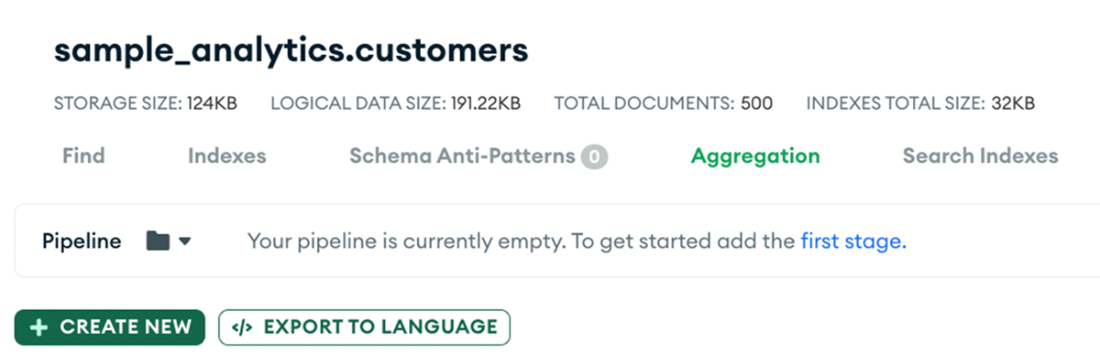
The MongoDB Atlas interface within the Aggregation tab of the sample_analytics.customers collection, where users can manage data by building and modifying aggregation pipelines.
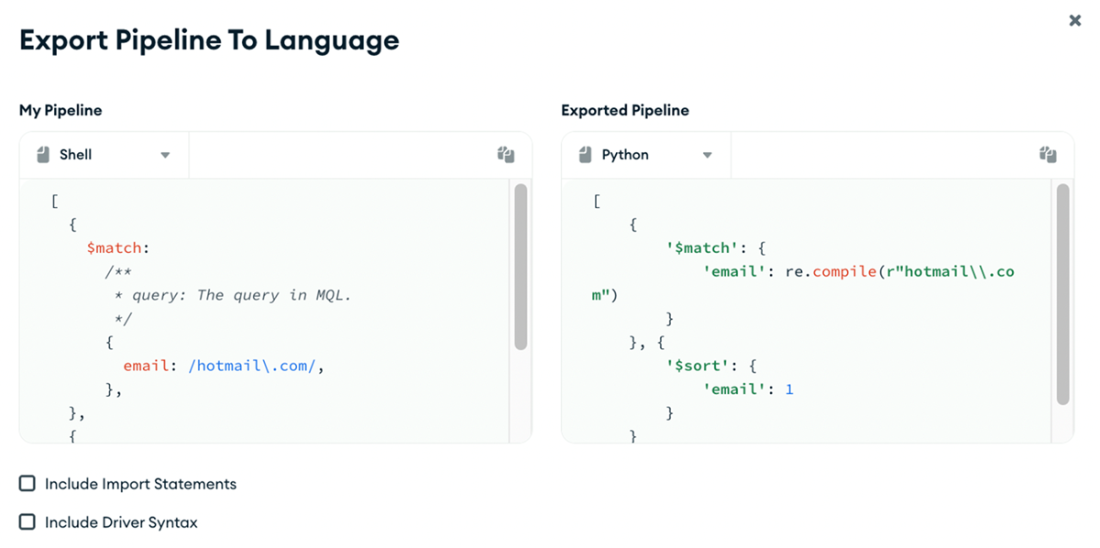
The interface shows the Export Pipeline to Language feature where a user-defined pipeline involving a match stage that filters documents by email addresses is set up. On the left, the pipeline configuration is displayed in MongoDB's Shell syntax. On the right, the same pipeline is exported in Node.js syntax.
Summary
- MongoDB Aggregation Framework allows creating complex data transformation and aggregation pipelines for efficient operations like filtering, grouping, and transforming data.
- Operators like $match filter data based on conditions, selecting relevant documents for further processing.
- The $group operator aggregates documents by criteria, enabling calculations like sums, averages, and other aggregate functions across grouped data.
- The $limit operator restricts dataset size, limiting the number of documents passed to subsequent pipeline stages or returned to the client, enhancing processing efficiency.
- The $sort operator arranges documents in order within a pipeline based on specified fields, facilitating data organization for analysis or presentation.
- Use $set (or $addFields) instead of $project for field inclusion. Use $project when needing a significantly different document structure and retaining just a few original fields.
- $lookup enables integrating data from multiple collections through left outer joins, combining related information for enhanced data analysis.
- The framework provides accumulators like $sum, $avg, $max, and $min for performing aggregation operations such as summing, averaging, and finding extremes.
- The $unwind operator deconstructs arrays within documents, producing a separate document for each array element, facilitating further processing.
- MongoDB aggregation pipelines also support full-text search, fuzzy search, and vector search, enabling advanced data retrieval and analysis based on intricate search parameters.
- MongoDB Atlas provider aggregation pipelines builder, which is primarily designed for building pipelines, rather than executing them. The pipeline builder offers a straightforward method to export your pipeline for execution in a driver.
FAQ
What is the MongoDB aggregation framework and why use pipelines?
The aggregation framework lets you process and analyze documents through a multi-stage pipeline, where each stage transforms the data and passes it to the next. It’s ideal for filtering, grouping, reshaping, and computing metrics at scale, enabling use cases like reporting, dashboards, joins via $lookup, array transformations, full‑text search, vector search (Atlas), and real-time analytics.How do I run an aggregation pipeline, and does it modify data?
Use db.collection.aggregate([...]). By default, pipelines are read-only. Data changes happen only if you include $merge or $out as the final stage, which write results to a collection (same or different).What are the most common aggregation stages and what do they do?
- $match: Filter documents by criteria- $group: Group by a key and compute aggregates (sum, avg, min, max, count)
- $set / $unset / $project: Add, remove, or reshape fields
- $sort: Order results
- $limit / $skip: Page/trim result sets
- $unwind: Flatten array fields into one document per element
- $lookup: Join related data from another collection (left outer join)
What are best practices for building fast, maintainable pipelines?
- Place $match early to reduce data quickly- Prefer $set and $unset over $project unless you’re drastically reshaping the document
- Ensure sort fields are indexed for $sort
- Use $limit to cut memory and time on large datasets
- Filter arrays before $unwind to avoid exploding data needlessly
- Index the foreign field for $lookup to speed joins
- Use $addFields sparingly and avoid overly complex expressions
- Streamline pipelines by removing/merging unnecessary stages
- Monitor with explain() and performance tools to find bottlenecks
When should I use $set and $unset instead of $project (and vice versa)?
Use $set/$unset when you keep most fields and only add/update/remove a few. They’re concise and clearer. You can also drop a field inside $set using $$REMOVE. Use $project when the output structure is significantly different and you want to explicitly control the final shape (often near the end of the pipeline).What’s the difference between $out and $merge for saving results?
- $out: Final stage only; writes the pipeline output to a collection, atomically replacing it if it exists.- $merge: Final stage only; writes into a target collection with flexible behaviors (insert, merge, replace, keep existing, fail, or custom update pipeline). Can write to same/different DB and to sharded collections. Pipelines with $merge can read from secondaries but write on the primary.

 MongoDB 8.0 in Action, Third Edition ebook for free
