3 Communicating with MongoDB
This chapter surveys how applications and tools communicate with MongoDB, starting from the foundation: the MongoDB Wire Protocol and its OP_MSG message format, which streamlines client–server exchanges over TCP/IP. Building on that, it presents the main ways developers interact with MongoDB—via the interactive mongosh shell, the visual MongoDB Compass GUI, and official drivers for popular languages (Node.js, Python, and Ruby). A recurring theme is stable, reliable connectivity across Atlas and self‑hosted deployments, aided by SRV connection strings and the MongoDB Stable API to reduce breakage across upgrades.
For hands-on work, mongosh provides a JavaScript/Node.js REPL with syntax highlighting, smart autocomplete, contextual help, and scripting support. The chapter shows how to connect to Atlas and self‑hosted clusters, navigate databases and collections, review NDJSON session logs, and run scripts with load() and Node’s require(), including noninteractive execution with --file. It also covers persistent customization through the config API and .mongoshrc.js—for example, tailoring the prompt and automating common setup steps. Complementing the shell, MongoDB Compass offers a visual workflow for CRUD, query building, schema exploration, index management, performance profiling, aggregation pipeline design, real-time stats, and an embedded shell, plus AI-assisted query and pipeline generation.
For programmatic access, the chapter demonstrates connecting and querying with the Node.js driver (also noting TypeScript support), contrasts Python’s synchronous PyMongo with the asynchronous Motor driver and when to use each, and introduces the Ruby driver with TLS and multiple authentication options. It closes with Mongoid, the Ruby ODM that adds higher-level modeling—validations, associations, transactions, and caching—while preserving idiomatic access patterns. Across languages, examples emphasize best practices such as managing client lifecycles, using SRV URIs and the Stable API, and choosing synchronous vs. asynchronous approaches to meet performance and concurrency needs.
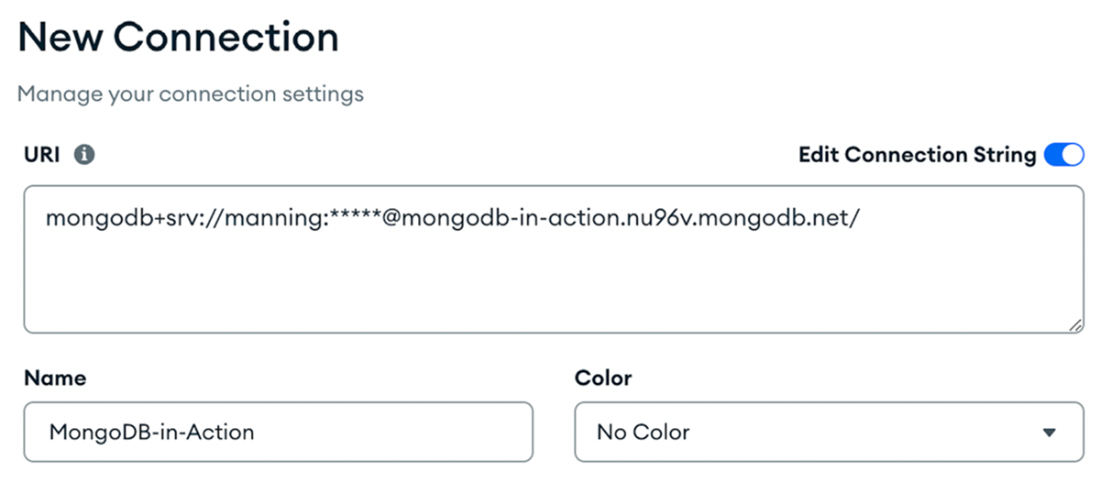
You can connect to a MongoDB deployment with the MongoDB Compass application. Enter a MongoDB connection string in the New Connection window.
The Aggregations tab is where you can add various stages of data processing.

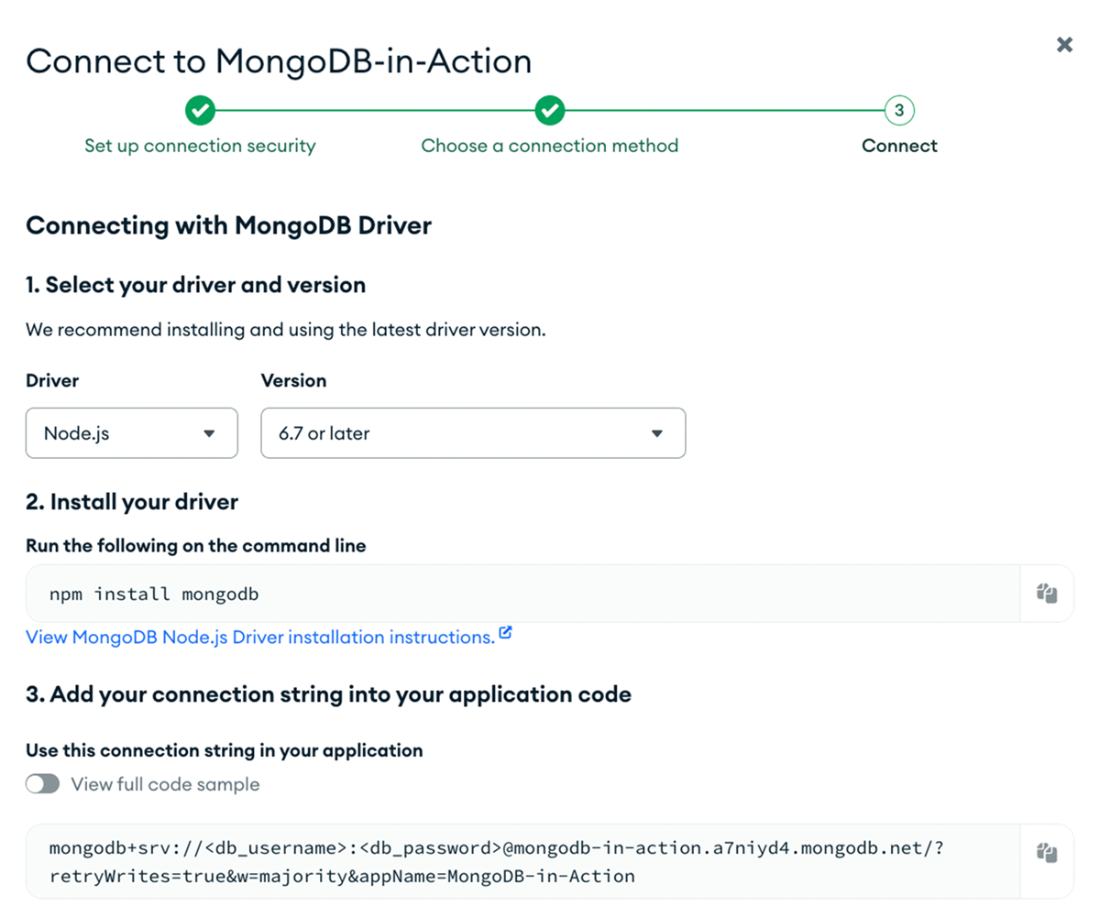
Use the MongoDB Atlas interface to connect a MongoDB database to an application using a MongoDB driver. Select your driver and version and click the clipboard icon next to the connection string to copy the string.
Summary
- The MongoDB Wire Protocol is essential for client-server data exchange, offering efficient communication through a request-response mechanism over sockets, typically on port 27017.
- The MongoDB Shell (mongosh) is a versatile client for direct MongoDB interactions, supporting features like syntax highlighting, intelligent autocomplete, contextual help, and scripting capabilities.
- MongoDB Compass is a GUI tool offering schema visualizations, query building, index management, and performance profiling for an enhanced database management experience.
- The Node.js MongoDB driver simplifies the integration of Node.js applications with MongoDB databases, offering techniques and configurations to optimize interaction.
- You use the MongoDB Node.js Driver for developing TypeScript applications that interact with MongoDB.
- PyMongo, tailored for synchronous operations in Python, facilitates direct connections and interactions with MongoDB, and you can use it to execute database queries.
- Motor, the asynchronous Python driver, permits non-blocking database operations, boosting the efficiency of Python applications with concurrent database interactions.
- The Ruby driver for MongoDB establishes connections and executing queries.
- Mongoid, recognized as the officially supported object-document mapper (ODM) for MongoDB in Ruby, improves Ruby's interaction with MongoDB.
FAQ
What is the MongoDB Wire Protocol and why does OP_MSG matter?
The MongoDB Wire Protocol is the request–response format used by clients and servers over TCP/IP (little-endian byte order, default port 27017). OP_MSG is the modern, extensible opcode for messages. It lets a single message contain multiple sections plus flags and an optional CRC-32C checksum, reducing overhead and improving throughput under load.How do I connect to MongoDB Atlas from mongosh and what does mongodb+srv do?
Use an SRV URI (mongodb+srv://) in mongosh to auto-discover replica set or sharded cluster nodes, so you don’t list hosts manually. Example: mongosh "mongodb+srv://How do I connect to a self-hosted MongoDB that requires authentication?
Run mongosh with a standard URI and credentials, e.g., mongosh "mongodb://mongodb1.example.com:27017" --usernameWhat productivity features does mongosh provide, and how do I find help?
mongosh offers syntax highlighting, clear error messages, intelligent autocomplete, contextual help, scripting, and reusable snippets. Use help, db.help(), and db.collection.help() for guidance; tab-complete with db.[Tab][Tab] and db.Where are mongosh logs and command history stored, and how long are they kept?
mongosh writes NDJSON logs per session to ~/.mongodb/mongosh/How do I run scripts in mongosh and what’s the difference between load() and require()?
Use load("/path/script.js") inside mongosh to execute a JavaScript file. Use require() to import Node.js built-ins or npm modules (resolved via Node’s module algorithm), e.g., require("dayjs"). You can also run non-interactively with mongosh ... --file script.js for automation and batch tasks.How can I customize mongosh using config and .mongoshrc.js?
View and persist settings via config (e.g., config.set("editor", "vi"), config.set("historyLength", 3000); verify with config.get("...")). For advanced customization, add JavaScript to ~/.mongoshrc.js, such as a custom prompt that shows version and collection count or an auto-switch to a preferred database. Start mongosh with --norc to skip loading .mongoshrc.js.What is MongoDB Compass and what are its key features?
Compass is a free GUI for MongoDB that supports CRUD operations, visual query building, schema visualization, performance profiling with explain plans, index management, real-time server stats dashboards, an Aggregation Pipeline Builder, integrated mongosh, and GenAI-assisted query and aggregation generation. Connect using your MongoDB URI and manage data visually.How do I connect from application code using official drivers (Node.js, Python, Ruby)?
- Node.js: npm install mongodb, then create a MongoClient with your URI and run queries (supports promises; TypeScript types available).- Python: Use PyMongo for sync or Motor for asyncio; specify ServerApi('1') to use the Stable API; query collections normally.
- Ruby: Use the mongo gem (TLS/SCRAM supported). For Atlas, 2.6.1+ is recommended for better TLS performance.

 MongoDB 8.0 in Action, Third Edition ebook for free
