Overview

21 Operational excellence with MongoDB Atlas

MongoDB Atlas centralizes operational excellence with managed resilience, security, and efficiency features. The chapter explains Atlas Cloud Backups across tiers, from manual dumps for free clusters to automated snapshots on Flex and full-featured schedules, on‑demand snapshots, retention policies, and customer‑managed encryption on dedicated clusters. It details restorations—from snapshot and point‑in‑time recovery using continuous backups (oplog capture) to restoring in place or to an alternate cluster—highlighting that Atlas wipes target data to ensure consistency, briefly takes clusters offline during restore, and urges regular restore testing for reliability and compliance.

For performance and cost control, Atlas provides end‑to‑end observability and optimization: Performance Advisor suggests indexes and flags inefficient query patterns; the Query Profiler, Real‑Time Performance Panel, and Namespace Insights surface live and historical hotspots, latency, and resource bottlenecks (many tools available on M10+). Schema suggestions guide data model refinements to match access patterns. Native diagnostic commands—serverStatus, currentOp/killOp, top, dbStats/collStats, and replication info—offer granular, node‑level insight into load, queuing, locking, and lag, enabling targeted tuning, right‑sizing, and capacity planning.

Robust alerting and logging round out operational safeguards. Teams define alert conditions and thresholds (for example, CPU steal, queues, query targeting, and connection saturation) and route notifications through preferred channels for rapid response. Atlas surfaces database, audit, and trigger logs (with tier‑based retention and download constraints) and supports secure forwarding to external observability platforms or long‑term storage. Finally, the chapter underscores disciplined upgrades: automatic, rolling minor updates within maintenance windows; planned major version upgrades performed one step at a time on healthy clusters with driver compatibility checks. Together, these practices sustain reliability, performance, security, and predictable growth on Atlas.

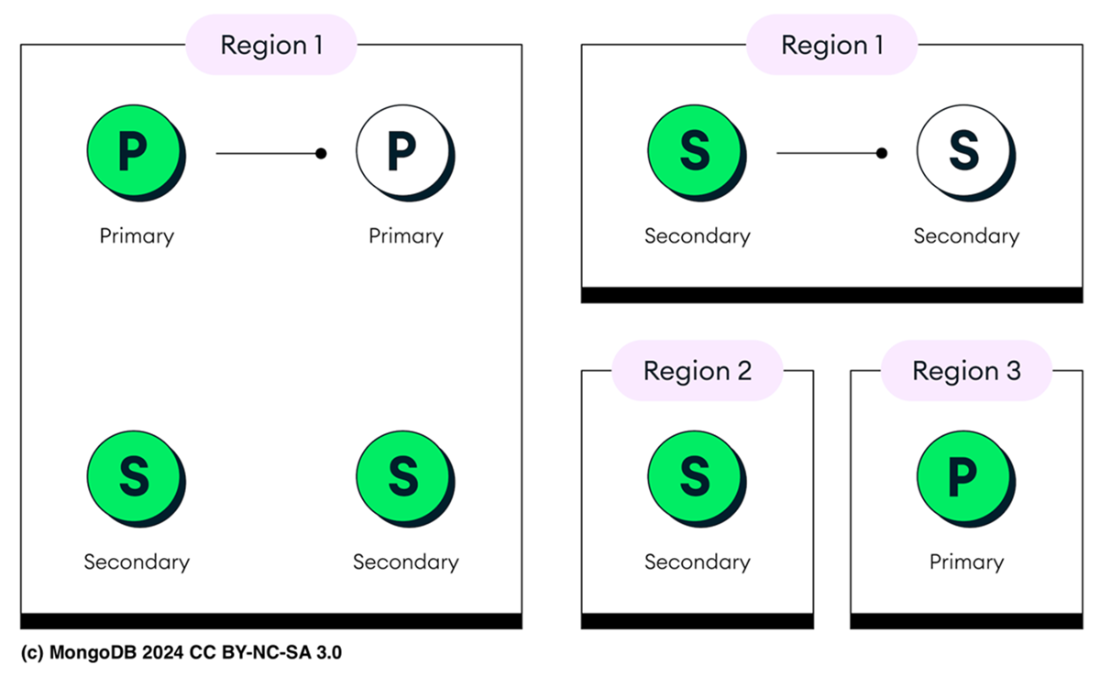
The primary node (P) and secondary nodes (S) are all located within the same region (Region 1). Backups are created by taking snapshots of these nodes, prioritizing secondary nodes where possible to reduce impact on the primary node. If a new snapshot storage volume is required, it is created within the same region. This setup ensures that all backups remain in the same geographic area as the original data, following Atlas's single-region backup policy.
Summary

  • Database backups are crucial for data integrity and resilience. They allow quick recovery if data is accidentally deleted or in cases of corruption, maintaining business continuity. In cybersecurity, backups are key for recovery, especially during ransomware attacks, as secure backups can restore data without paying a ransom.
  • MongoDB Atlas provides Cloud Backup, a managed service that automatically stores point-in-time snapshots of clusters using AWS, Azure, or Google Cloud. It supports scheduled and on-demand snapshots, offering options like continuous backups with point-in-time recovery to ensure data protection and policy compliance.
  • Atlas cloud backups are unavailable for M0 Free clusters. Instead, you can use tools like mongodump to create backups and mongorestore for data restoration. mongodump generates a logical backup by extracting database content and saving it as BSON files, rather than copying the physical data layer.
  • Atlas cloud backup for Flex clusters is limited to automatic daily snapshots, starting 24 hours post-setup. On-demand snapshots aren’t supported, but cloud provider snapshots enable quick restoration.
  • Dedicated clusters (M10 and above) offer advanced cloud backup options, leveraging cloud providers' native snapshot capabilities to create full-copy snapshots stored in the same region. Snapshots can be scheduled regularly, with configurable retention policies, and on-demand snapshots are available for backups anytime.
  • Continuous Cloud Backups offer robust data protection with point-in-time recovery, continuously capturing database changes for restoration at any moment within a set retention window. Available for M10 and higher clusters, this feature may increase costs due to additional storage and processing. The backup window duration can be configured to meet specific recovery needs.
  • In Atlas, mongorestore doesn’t support --restoreDbUsersAndRoles, --oplogReplay, or --preserveUUID, so users and roles must be recreated manually, restored collections will receive new UUIDs, and there is no point-in-time restore option.
  • When restoring from a Cloud Backup, the target cluster is prepared to match the exact state of the selected snapshot or backup point. To achieve this, Atlas first clears all existing data on the target cluster, avoiding any potential conflicts or inconsistencies. This clean start ensures that the cluster can be accurately restored to reflect the data as it was at the backup time.
  • MongoDB Atlas offers real-time monitoring and alerting for database performance, health, and resource usage. You can track metrics like CPU, memory, disk I/O, and active connections to spot issues early. Custom alerts can be set for specific thresholds, with notifications sent automatically via email, SMS, or integrations like PagerDuty and Slack.
  • The Performance Advisor monitors slow queries and suggests indexes to boost performance, adjusting thresholds based on your cluster’s average operation time. Each index recommendation includes sample queries that would benefit from it, grouped by query structure.
  • MongoDB Atlas offers the Query Profiler, a tool for diagnosing and monitoring database cluster performance. The Query Profiler identifies slow queries and provides key metrics like execution time and server processing time, allowing for in-depth analysis across clusters or individual nodes.
  • The Real-Time Performance Panel (RTPP) is a live monitoring tool that tracks key metrics like CPU, memory, disk, and network usage, helping identify bottlenecks and manage database performance proactively.
  • Namespace Insights in MongoDB Atlas offers detailed collection-level metrics on query latency, helping teams monitor response times and pinpoint collections with high latency or inefficient queries for targeted optimizations.
  • Atlas offers schema suggestions to optimize database performance by analyzing high-traffic collections and slow queries. It recommends changes like field restructuring, index optimization, and data type adjustments to reduce bottlenecks.
  • Apart from Atlas's built-in monitoring tools, you can use native MongoDB diagnostic commands, which provide direct insights into server performance, resource usage, and potential bottlenecks. Many of Atlas's tools use these commands under the hood. Key commands include: serverStatus, dbStats, collStats, currentOp, top, and replSetGetStatus.
  • Logging records system activities for troubleshooting and security, while alerting notifies admins of critical issues instantly. Together, they ensure performance, security, and reliability by tracking and responding to issues proactively.
  • You can set alerts in Atlas for specific conditions, including CPU Steal, Queues, Query Targeting, and Connection Limits. Each condition monitors essential performance metrics to help maintain cluster health.
  • Enable an alert with atlas alerts settings enable <alertConfigId>, delete it with atlas alerts settings delete <alertConfigId>. List all alerts using atlas alerts list, and view details with atlas alerts describe <alertId>.
  • MongoDB Atlas provides logging for effective database monitoring, including database logs for instance activities (kept for 30 days), audit logs for tracking database actions, and trigger logs for application events (kept for 10 days). Logs are accessible via the Atlas UI or CLI.
  • Regular MongoDB Atlas upgrades ensure security, performance, and new features. Minor upgrades, like from 8.0.3 to 8.0.5, are automatic during maintenance, focusing on patches and stability. Major upgrades, such as from 7.0 to 8.0, require manual initiation and introduce significant changes, needing a healthy cluster and completed snapshots.

FAQ

What backup options does MongoDB Atlas provide, and how do they differ by cluster tier?Atlas Cloud Backup supports: - M0 Free: No Cloud Backup. Use mongodump/mongorestore (with limitations: no --dumpDbUsersAndRoles/--oplog/--restoreDbUsersAndRoles/--oplogReplay/--preserveUUID in Atlas). - Flex: Automatic daily snapshots (retains the 8 most recent). No on-demand snapshots, no CLI support, no point-in-time restore. - Dedicated (M10+): Full Cloud Backup features—scheduled and on-demand snapshots, configurable retention, Continuous Cloud Backups (PITR), and snapshot encryption. Snapshots are stored in the same region as the cluster (preferred region for multi-region).
How do I create and monitor on-demand snapshots for an M10+ cluster using the Atlas CLI?Use: - Show schedule: atlas backups schedule describe <CLUSTER_NAME> - Create on-demand snapshot: atlas backups snapshots create <CLUSTER_NAME> --desc "on-demand" - List/monitor snapshots: atlas backups snapshots list <CLUSTER_NAME> Example: atlas backups snapshots create "MongoDB-in-Action-M10" --desc "Atlas on-demand", then atlas backups snapshots list "MongoDB-in-Action-M10" and wait for status "completed".
What is Continuous Cloud Backup and how does Point-in-Time Recovery (PITR) work?Continuous Cloud Backup captures and stores the oplog to enable precise restores to any minute within a retention window (stored in S3/Azure Blob/GCS depending on provider). PITR applies a snapshot baseline then replays oplog entries up to your chosen moment. CLI example: atlas backups restores start pointInTime --clusterName <SRC> --pointInTimeUTCSeconds <EPOCH_SEC> --targetClusterName <TARGET> --targetProjectId <PID>. You can use --oplogTs and --oplogInc for sub-second precision. Available on M10+.
How do I restore data for M0, Flex, and M10+ clusters, and what limitations apply? - M0: Restore with mongorestore from mongodump; Atlas-specific limitations (e.g., no --restoreDbUsersAndRoles, --oplogReplay, --preserveUUID). - Flex: Restore via Atlas UI only; choose snapshot and target cluster. Flex snapshots restore to replica sets only (not sharded). - M10+: Use CLI: - Automated snapshot restore: atlas backups restores start automated --clusterName <SRC> --targetClusterName <TARGET> --snapshotId <SNAP_ID> --targetProjectId <PID> - Download snapshot: atlas backups restores start download --clusterName <SRC> --snapshotId <SNAP_ID> During restore, Atlas wipes target data, applies snapshot/oplog, takes cluster offline, then brings it back online. After completion, Atlas creates a new snapshot retained for the continuous backup window. Watch progress with atlas backups restores watch <JOB_ID> --clusterName <CLUSTER>.
How are Atlas upgrades handled (minor vs major), and what should I prepare for? - Minor upgrades (e.g., 8.0.3 → 8.0.5): Automatically applied during maintenance windows via rolling upgrades (little/no downtime). Manage windows via CLI (atlas maintenanceWindows create|update|delete) or UI. - Major upgrades (e.g., 7.0 → 8.0): Not auto-applied (except when current version reaches EoL). No version skipping; cluster must be healthy; complete on-demand snapshots first. Verify driver compatibility and review release notes; test in staging. Shared tiers (M0/Flex) auto-upgrade shortly after a few patch releases of the new major version.
Which Atlas tools help me find and fix slow queries? - Performance Advisor: Identifies slow query shapes and recommends indexes; dynamic slow-op threshold by default (fixed 100 ms if disabled). CLI: list processes, then - Namespaces with slow ops: atlas performanceAdvisor namespaces list --processName <HOST:PORT> - Suggested indexes: atlas performanceAdvisor suggestedIndexes list --processName <HOST:PORT> - Slow query logs: atlas performanceAdvisor slowQueryLogs list --processName <HOST:PORT> Note: Atlas-managed threshold not supported on M0/Flex. - Query Profiler (M10+): Surfaces slow operations and execution stats in UI. - Namespace Insights (M10+): Collection-level latency monitoring. Remember: More indexes speed reads but can slow writes.
What real-time monitoring does Atlas provide for cluster health?The Real-Time Performance Panel (M10+) shows live CPU, memory, disk, network, query execution times, and replication lag. Charts auto-refresh and support custom ranges, helping pinpoint bottlenecks quickly. Pair with deployment metrics and alerts for proactive capacity planning. Tip: Always identify the true bottleneck (CPU vs I/O vs network) before tuning.
Which native MongoDB diagnostic commands are useful for troubleshooting? - db.serverStatus(): Instance, memory, connections, network, op counters, and WiredTiger concurrent tickets. Check queues via db.serverStatus().globalLock.currentQueue. - db.currentOp(): View active operations; filter (e.g., db.currentOp({secs_running: {$gt: 60}})); terminate with caution via db.killOp(opid). - db.runCommand({ top: 1 }): Time spent per collection (reads/writes). - db.runCommand({ dbStats: 1 }), db.runCommand({ collStats: "name" }): Database/collection stats. - rs.printReplicationInfo(), rs.printSecondaryReplicationInfo(): Oplog window and replication lag.
How do I configure alerts in Atlas, and which conditions are important?Set alerts in UI or CLI to notify via email/SMS/webhooks/PagerDuty/Slack, etc. Useful conditions include: - CPU steal (burstable instances) - Queue depth (e.g., >100) - Query targeting (e.g., high scanned objects per returned) - Connection limits (e.g., >80–90%) CLI example (query targeting): atlas alerts settings create --event OUTSIDE_METRIC_THRESHOLD --enabled --metricName QUERY_TARGETING_SCANNED_OBJECTS_PER_RETURNED --metricOperator GREATER_THAN --metricThreshold 1000 --metricUnits RAW --notificationType EMAIL --notificationEmailEnabled --notificationEmailAddress you@example.com --notificationIntervalMin 15. Manage with atlas alerts settings describe|list|update|delete.
What logging options does Atlas offer, and how can I access or forward logs? - Logs: Database logs (mongod/mongos, 30-day retention), audit logs (if auditing enabled), and trigger/function/change stream logs (10-day retention). - Access: UI Logs tab (filter by type/status/time/user/request ID) or CLI download: atlas logs download <HOSTNAME> <log-type> (e.g., mongodb.gz, mongodb-audit-log.gz). Not available for M0 and Flex. - Forwarding/integrations: CloudWatch, Datadog, Amazon S3 (long-term storage), and Elasticsearch (visualize with Grafana).
Where are snapshots stored and how are snapshot nodes selected?Atlas stores snapshots in the same cloud region as the cluster (preferred region for multi-region). For single-region clusters, Atlas prefers snapshotting a secondary; otherwise chooses the lowest-priority node, tries incremental snapshots on the same disk where possible, and tie-breaks by lexicographically smallest hostname. For multi-region, it prioritizes the highest-priority region first, then similar tie-breakers. If a snapshot volume becomes invalid, Atlas creates a new one in-region and takes a full-copy snapshot to resume incrementals.

pro $24.99 per month

  • access to all Manning books, MEAPs, liveVideos, liveProjects, and audiobooks!
  • choose one free eBook per month to keep
  • exclusive 50% discount on all purchases
  • renews monthly, pause or cancel renewal anytime

lite $19.99 per month

  • access to all Manning books, including MEAPs!

team

5, 10 or 20 seats+ for your team - learn more


choose your plan

team

monthly
annual
$49.99
$499.99
only $41.67 per month
  • five seats for your team
  • access to all Manning books, MEAPs, liveVideos, liveProjects, and audiobooks!
  • choose another free product every time you renew
  • choose twelve free products per year
  • exclusive 50% discount on all purchases
  • renews monthly, pause or cancel renewal anytime
  • renews annually, pause or cancel renewal anytime
  • MongoDB 8.0 in Action, Third Edition ebook for free

choose your plan

team

monthly
annual
$49.99
$499.99
only $41.67 per month
  • five seats for your team
  • access to all Manning books, MEAPs, liveVideos, liveProjects, and audiobooks!
  • choose another free product every time you renew
  • choose twelve free products per year
  • exclusive 50% discount on all purchases
  • renews monthly, pause or cancel renewal anytime
  • renews annually, pause or cancel renewal anytime
  • MongoDB 8.0 in Action, Third Edition ebook for free
choose your plan

team

monthly
annual
$49.99
$499.99
only $41.67 per month
  • five seats for your team
  • access to all Manning books, MEAPs, liveVideos, liveProjects, and audiobooks!
  • choose another free product every time you renew
  • choose twelve free products per year
  • exclusive 50% discount on all purchases
  • renews monthly, pause or cancel renewal anytime
  • renews annually, pause or cancel renewal anytime
  • MongoDB 8.0 in Action, Third Edition ebook for free